Today I Learned

Short TIL posts

178 posts latest post 2026-09-01
Publishing rhythm
Aug 2026 | 1 posts

I’m playing with omarchy on an old laptop and decided I want to share it with my kids without sharing what I also set up as my sudo password.

Lsblk -f

Look for the one labeled crypto_LUKS

Sudo cryptsetup luksChangeKey /dev/nvme0n1p2

Then you will be asked for your sudo password, previous full disk encryption password, then the new one twice.

Now my laptop can be shared without sharing my private sudo password.

First Find your usb disk. You should be able to identify it by size and name using lsblk.

lsblk -o NAME,SIZE,MODEL,TRAN,RM,MOUNTPOINTS

Here I see my good ol Trans-It Drive. It’s not fancy, it wasnt even at the time it was new, but I have it and it works. next we run the disk destroyer dd to copy raw bytes right on to the drive.

Warning

This is a full reformat of the drive, nothing on the drive will be recoverable afterwards. I keep this drive around as a boot disk and it just changes distro occasionally.

sudo dd if=~/Downloads/omarchy-4.0.1.iso of=/dev/sdb bs=4M status=progress conv=fsync

Note

Don’t forget the bs, the default block size is so slow it will take an eternity to copy a linux iso on to a boot drive.

Installing omarchy #

I wanted to give omarchy quatro a try, here is the session to get it.

~  NO PYTHON VENV SET  USING SYSTEM NVIM
❯ lsblk -o NAME,SIZE,MODEL,TRAN,RM,MOUNTPOINTS
NAME          SIZE MODEL                      TRAN   RM MOUNTPOINTS
sda         119.2G SAMSUNG MZNLN128HAHQ-000H1 sata    0 
├─sda1          1G                                    0 
└─sda2      118.2G                                    0 
sdb           7.6G Trans-It Drive             usb     1 
├─sdb1        5.8G                                    1 
└─sdb2         23M                                    1 
zram0        93.9G                                    0 [SWAP]
nvme0n1     931.5G Samsung SSD 980 1TB        nvme    0 
├─nvme0n1p1     1G                            nvme    0 /boot
└─nvme0n1p2 930.5G                            nvme    0 /var/log
                                                        /var/cache/pacman/pkg
                                                        /home
                                                        /

~  NO PYTHON VENV SET  USING SYSTEM NVIM
❯ sudo dd if=~/Downloads/omarchy-4.0.1.iso of=/dev/sdb bs=4M status=progress conv=fsync

Helix has got to have one of the easiest configurations. It is this easy to get the markata-go lsp in helix.

markata-go lsp setup --editor helix
# Helix languages.toml (usually ~/.config/helix/languages.toml)
[language-server.markata-go]
command = "markata-go"
args = ["lsp"]

[[language]]
name = "markdown"
language-servers = ["markata-go"]

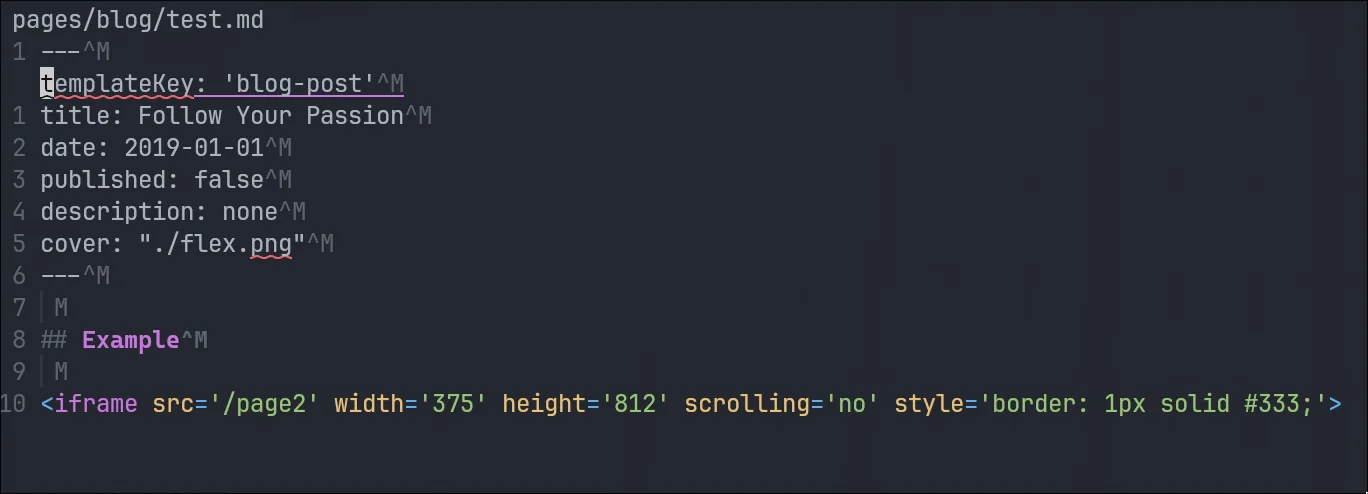
I don’t run into windows file endings very often, so when I see little ^M’s all over your file, I think “shit I know what these are and cant remember” They represent the windows carriage return.

Linux vs Unix Line Endings #

The difference here is that Unix uses \n and Linux uses \r\n, going all the way back to the typewriter it represents the two keys that a typist would have to press to get a new line and return the carriage back to the beginning.

Vim/Neovim #

When I open up a file and see this garbage all over, its not cozy, I want them gone, I dont want them all over my editor. I’m not sure what this would look like on windows, I haven’t been able to afford a windows machine in years, but its gross on my machine.

131d6463-bcbb-4ee8-80aa-bb7355915eb9.webp

Remove them with a substitution command from normal mode.

:%s/\r//g

removing carriage returns with a substitution command

I ran into an issue where my pinentry was unable to connect, blocking me from doing commits. You can use this to continue signing commits.

export GPG_TTY=$(tty)
gpg-connect-agent updatestartuptty /bye

printf test | gpg \
  --local-user 9A47900E81415D65C32C630066E2BF2B4190EFE4 \
  --pinentry-mode loopback \
  --sign >/dev/nul

I’ve been running fedora coreos on my home servers for awhile. I really liked the stability I got from bazzite, and have since enjoyed the stability of fedora coreos. Since it’s an immutable system I’ve never quite known if I need to reboot or not, and was unsure how to check for updates. Today I learned you can use rpm-ostree status to see if your fedora coreos system is up to date.

rpm-ostree status

For me it listed security advisories with a count of each severity unknown, low, moderate, and important.

This morning I had a machine crash on me and came back to an error.

Error

zsh: corrupt history file /home/u_walkews/.zsh_history

Dammit I don’t want to redo my shell history, I checked with a clanker and they came up with this solution using strings that only prints printable characters.

cp ~/.zsh_history ~/.zsh_history.bak
mv ~/.zsh_history ~/.zsh_history.corrupt
touch ~/.zsh_history
chmod 600 ~/.zsh_history
strings ~/.zsh_history.corrupt > ~/.zsh_history
chmod 600 ~/.zsh_history

Just give em the ol one eyed fighting Kirby

This is a vim substitution technique to capture the rest of the line as a capture group.

:'<,'>s/longhorn\(.*\)/longhorn\1-rwx

This one captures pesky optional " and places it back at the end if it found one.

:'<,'>s/longhorn\("\?\)\(.*\)/longhorn\2-rwx\1

!!! see-also

<a href="/thought-200/" class="wikilink" data-title="The One Eyed Fighting Kirby" data-description="!https://www.youtube.com/watch?v=9_Ekt1PZBzQ&amp;t=351s" data-date="2024-01-26">The One Eyed Fighting Kirby</a>

I’ve been deploying my site old school for most of this year, rsync to a volume mounted to nginx. I ran into an issue today where I updated my site and all of the pages updated first, followed by upload. The issue this created was that the new cache busted css files were not up yet and the site had no styles for a brief period during upload.

I found that delaying updates and delaying deletes until the new content exists first solves this problem pretty well. Theres still possiblility of jank while uploading to a live directory and not doing some sort of hot swap, but I’m good with this low budget option for now.

sync:
	rsync -rlt --delete --omit-dir-times \
	--info=progress2 \
	--delay-updates \
	--delete-delay \
	./output/ \
	server:/mnt/mysite

To ignore commands that start with a space character, use the HIST_IGNORE_SPACE option in bash or zsh.

setopt HIST_IGNORE_SPACE

I just learned that forgejo has a push to create repo feature and it is a gamechanger. Upon first try it didn’t work, with just a couple of environment variables I was up and running with push to create.

notify.wayl.one on  main is 📦 v0.1.62  v3.14.4  NO PYTHON VENV SET  USING SYSTEM NVIM
❯ git remote add origin https://git.waylonwalker.com/waylon/notify.wayl.one
notify.wayl.one on  main is 📦 v0.1.62  v3.14.4  NO PYTHON VENV SET  USING SYSTEM NVIM
❯ git push
remote: Push to create is not enabled for users.
fatal: unable to access 'https://git.waylonwalker.com/waylon/notify.wayl.one/': The requested URL returned error: 403

So I added the following environment variables.

Author: Waylon S. Walker <[email protected]>
Date:   Wed May 6 21:56:53 2026 -0500

    enable push to create

diff --git a/k8s/forgejo/deployment.yaml b/k8s/forgejo/deployment.yaml
index d77daab..9346763 100644
--- a/k8s/forgejo/deployment.yaml
+++ b/k8s/forgejo/deployment.yaml
@@ -91,6 +91,10 @@ spec:
               value: "0.0.0.0"
             - name: FORGEJO__server__HTTP_PORT
               value: "3000"
+            - name: FORGEJO__repository__ENABLE_PUSH_CREATE_USER
+              value: "true"
+            - name: FORGEJO__repository__ENABLE_PUSH_CREATE_ORG
+              value: "true"
             - name: FORGEJO__database__DB_TYPE
               value: postgres
             - name: FORGEJO__database__HOST

https://github.com/WaylonWalker/homelab-argo/commit/b2e953bc12

Tried again, and it just worked!

notify.wayl.one on  main is 📦 v0.1.62  v3.14.4  NO PYTHON VENV SET  USING SYSTEM NVIM
❯ git push
Enumerating objects: 171, done.
Counting objects: 100% (171/171), done.
Delta compression using up to 12 threads
Compressing objects: 100% (169/169), done.
Writing objects: 100% (171/171), 176.22 KiB | 16.02 MiB/s, done.
Total 171 (delta 99), reused 0 (delta 0), pack-reused 0 (from 0)
remote: Resolving deltas: 100% (99/99), done.
To https://git.waylonwalker.com/waylon/notify.wayl.one
 * [new branch]      main -> main

nless is a seriously sick tui for exploring streaming data. It makes it seriously simple to pivot (U), drill in (Enter), sort (s). It leave breadcrumbs as you go and you can press q to back out.

Play with your kubernetes events. Ya, my homelab is far from perfect, dont judge.

kubectl get events -A -w | uvx --from nothing-less nless

markata-go now has web awesome integration for image compare. It renders a nice web component with a slider to compare two images.

d628ffba-de18-4fff-91a8-700f037df119.webpimage

It’s done with a class wrapper around the image components.

::: wa-comparison
![d628ffba-de18-4fff-91a8-700f037df119.webp](https://dropper.waylonwalker.com/file/d628ffba-de18-4fff-91a8-700f037df119.webp)
![image](https://dropper.waylonwalker.com/file/ca30665f-1a15-453e-aab8-221901c7df99.webp)
:::

Without markata-go’s web awesome integration, the above would look like:

<script type="module">
  import 'https://ka-f.webawesome.com/[email protected]/components/comparison/comparison.js';
</script>

<wa-comparison>
  <img
    slot="before"
    src="https://dropper.waylonwalker.com/file/d628ffba-de18-4fff-91a8-700f037df119.webp"
    alt="Grayscale version of kittens in a basket looking around."
  />
  <img
    slot="after"
    src="https://dropper.waylonwalker.com/file/ca30665f-1a15-453e-aab8-221901c7df99.webp"
    alt="Color version of kittens in a basket looking around."
  />
</wa-comparison>

Today I found a way to test model syntax, cause the clankers always get the exact model name that copilot wants wrong.

copilot --model claude-sonnet-4.5 -p "Reply with OK" --allow-all --no-ask-user -s
copilot --model gpt-5.4 -p "Reply with OK" --allow-all --no-ask-user -s

Stow comes with a local and global ignore list that you can use to ignore certain files or directories.

If you put Perl regular expressions, one per line, in a .stow-local-ignore file within any top level package directory, in which case any file or directory within that package matching any of these regular expressions will be ignored. In the absence of this package-specific ignore list, Stow will instead use the contents of ~/.stow-global-ignore, if it exists. If neither the package-local or global ignore list exist, Stow will use its own built-in default ignore list, which serves as a useful example of the format of these ignore list files:

Example given from the docs

RCS
.+,v

CVS
\.\#.+       # CVS conflict files / emacs lock files
\.cvsignore

\.svn
_darcs
\.hg

\.git
\.gitignore
\.gitmodules

.+~          # emacs backup files
\#.*\#       # emacs autosave files

^/README.*
^/LICENSE.*
^/COPYING

Reference #

https://www.gnu.org/software/stow/manual/html_node/Types-And-Syntax-Of-Ignore-Lists.html

I’ve been having issue with my keyboard disconnecting to my main desktop for awhile. Today I got a cheap bluetooh dongle in and am giving it a run this week to see how things go. The first step was to move it to the new adapter. I’ve never had multiple adapters installed so this was a new to me process.

I was able to do it all with the same keyboard, It did require some juggling between usb and bluetooth modes pluging and unplugging, two keyboards would be simpler to reason about.

I can’t be bothered to change my brain to think about this machine on a different zmk profile it is of absolute importance for it to remain on the same profile, otherwise this would be a simple bind to another empty profile.

Why not use a cable on desktop?

I dont mind cable, and have used one on this setup for years, but I have actually been picking up and moving this keyboard and using it with different devices.

I’ve got a big battery and performace cranked up, unless my machine is under load I do not notice any key lag.

I did it with bluetoothctl, I’m sure it could have been done with a gui like blueberry or blueman.

bluetoothctl
# list adapters
list
select <old-adapter>
devices
# fin the MAC address of the device 42BLOCK
remove <42BLOCK_MAC>

Now I plugged into usb. And importantly cleared out the zmk profile. If you do not clear the profile your board does not go into pairing mode.

bluetoothctl
# switch adapters
select <new-adapter>
power on
agent on
default-agent
scan on
Put 42Block in pairing mode, then:
pair <42BLOCK_MAC>
trust <42BLOCK_MAC>

At this pint I saw this show up in the logs, I think there was some masking issues or something in zmk, output kept going out usb no matter what so I disconnected the keyboard and typed the passkey in, and it worked.

[agent] Passkey: 540044

Boom, it just started working right away.

bluetoothctl
connect <42BLOCK_MAC>
info <42BLOCK_MAC>
scan off
exit
Today I learned that docker creates an empty /.dockerenv file to indicate that you are running in a docker container. Other runtimes like podman commonly use /run/.containerenv. kubernetes uses neither of these, the most common way to detect if you are running in kubernetes is to check for the presence of the KUBERNETES_SERVICE_HOST environment variable. There will also be a directory at /var/run/secrets/kubernetes.io/serviceaccount that contains the service account credentials if you are running in kubernetes.

In the age of agents sometimes work gets done on so many different worktrees and branches its hard to tell if there is already a PR or any of them or not, the great gh cli has us covered.

gh pr list --head fix/markata-go-connections-graph

I keep forgetting about the double gutter problem with nested containers. When you put padding on a parent and the child also has padding, you get twice the spacing you wanted.

The Problem #

.container {
  padding: 2rem;
}

.child {
  padding: 2rem;
}

Now your content is 4rem from the edge. Not what I meant at all.

The Fix #

Either remove padding from the parent or use box-sizing: border-box and plan for it. I usually just drop the parent padding when I realize what I have done.