---
title: "Building Rich a Dev Server"
description: "**"
date: 2021-03-27
published: true
tags:
- dev
- markata
- python
- webdev
template: blog-post
---
**Draft Post**
I've really been digging [@willmcgugan's](https://twitter.com/willmcgugan)
[rich](https://github.com/willmcgugan/rich) library for creating TUI like
interfaces in python. I've only recently started to take full advantage of it.
## Dev Server
I am working on a project in which I want to have a dev
server running continuously in the background. I really
like dev servers theat automatically chooose an unused
port and list out the running pid so that I can kill it if
I need to.
- automatic port number
- auto-restart
- display _( port, pid, uptime )_
## finding the port
I am very novice at best when it comes to sockets, the following function came
from searching StackOverflow for how to tell if a port is in use. I
recursively check if a port is being used, if it is I increment by one until I
find an unused port to return.
```python
def find_port(port=8000):
"""Find a port not in ues starting at given port"""
import socket
with socket.socket(socket.AF_INET, socket.SOCK_STREAM) as s:
if s.connect_ex(("localhost", port)) == 0:
return find_port(port=port + 1)
else:
return port
```
## The Dev Server
I am going super basic here and just running `python -m http.server `.
It works for what I need it for, it hosts my files for the browser to display,
and if I try a route without an index.html it gives me a decent file list.
```python
import subprocess
proc = subprocess.Popen(["python", "-m", "http.server", str(find_port)],)
```
> Optionally if you wanted a live-reload you could opt into `live-reload` from
> pypi.
The above snippet will start my dev server on the first open port starting at
`8000` and give me a `subprocess.Popen` object. From there I can see a bit of
information about the process.
```python
# returns the process id
proc.pid
# returns none if proc is still running
proc.poll()
```
## Rich
_a quick aside_
[rich](https://github.com/willmcgugan/rich) will assist in creating a beautiful
terminal interface with minimal effort. Here we are going to build a reuable
component to later use inside of a rich layout. When using `rich.print` or the
live display rich will execute a `__rich__` method on our objects.
```python
class Min:
def __rich__(self) -> Panel:
return Panel("hello world")
def make_min_layout():
layout = Layout()
layout.split(Layout(name="upper"), Layout(name="lower"))
layout["upper"].update(Min())
layout["lower"].update(Min())
return layout
```
- `__repr__` - custom method
- `Panel` - box around a renderable
- `Layout` - split and nest renderables
There are many components to rich, but the basics I am using so far here are
making my own components with a `__repr__` method, `Panel`, and `Layout`.
Panel is an object that will by default take up as much space as it can and
draw a rounded border around itself. Layout is an object that accepts other
rich renderables, can be split and nested.
## Final Result
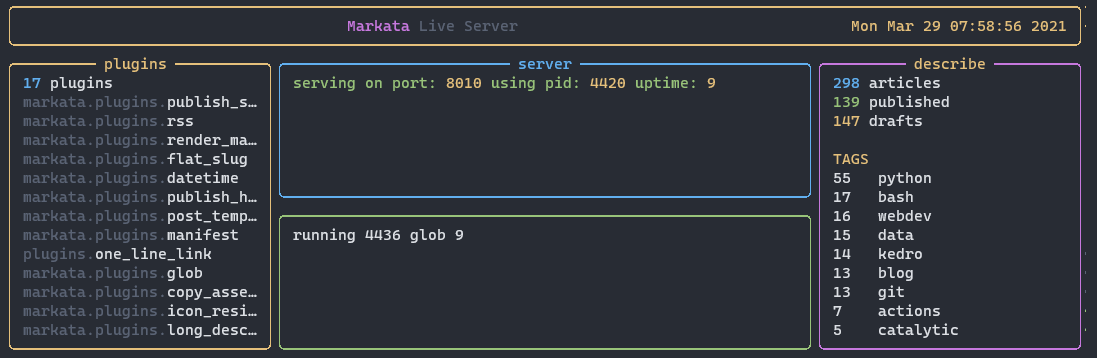
Here is a image of the final result running. Here I have
the server running on the top split and kill the running
server several times. You will see a quick flash of server died followed by the
sever back up and running on a new pid.
```python
class Server:
def __init__(self, auto_restart=True):
self.port = find_port()
self.start_server()
self.auto_restart = auto_restart
def start_server(self):
import subprocess
self.proc = subprocess.Popen(
["python", "-m", "http.server", str(self.port)],
stdout=subprocess.PIPE,
stderr=subprocess.PIPE,
)
def __rich__(self) -> Panel:
if not self.proc.poll():
return Panel(
f"[green]serving on port: [gold1]{self.port} [green]using pid: [gold1]{self.proc.pid}[/]"
)
else:
if self.auto_restart:
self.start_server()
return Panel(f"[red]server died")
```
## Future State
Future state this is going to be integrated into the main layout for my
personal website SSG markata.