---
title: "Reclaim memory usage in Jupyter"
description: "Today I ran into an issue where we had a one-off script that just needed to work, but it was just chewing threw memory like nothing."
date: 2020-10-01
published: true
tags:
- python
template: blog-post
---
Today I ran into an issue where we had a one-off script that just needed to
work, but it was just chewing threw memory like nothing.
It started with a colleague asking me How do I clear the memory in a Jupyter
notebook, these are the steps we took to debug the issue and free up some
memory in their notebook.
> How do I clear the memory in a Jupyter notebook?
## Pre check the status of memory
There are a number of ways that you can check the amount of memory on your
system. The easiest is not necessarily my first go to is free... literally
`free`.
_check for free space_
``` bash
$ free -h
total used free shared buffers cached
Mem: 15G 15G 150M 0B 59M 8.7G
```
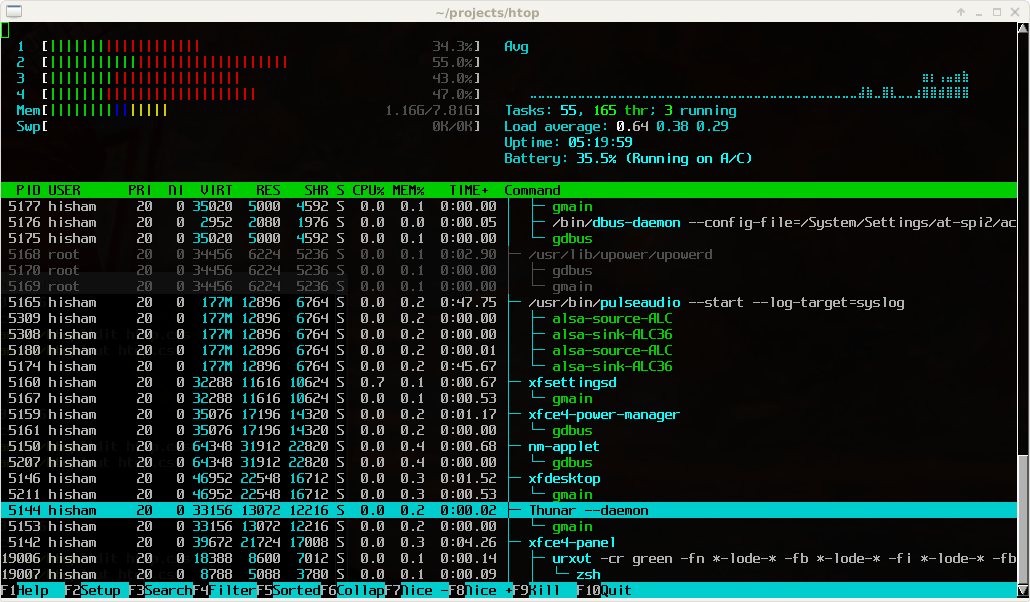
Generally my first go to is a bit more graphical, and not available on a stock
stystem, but far more useful.... `htop`. [`htop`](https://htop.dev) is a
terminal process explorer that shows cpu usage, mem usage, and running
processes.
_htop_
``` bash
sudo apt-get install htop # install it from your package repo
htop
```
## First step throw more swap at it
Often before going through the process of getting a larger instance underneath
the notebook you can hobble home with a bit more swap file. It may not be
pretty or fast, but gets the job done in a pinch.
_Check for free disk_
``` bash
$ du
Filesystem Size Used Avail Use% Mounted on
/dev/asdasd 200G 50G 150G 25% /
```
> Make sure you check your free disk space first, filling both memory and disk
> can be bad news
_make a swap file and activate it_
```bash
SWAPFILE=~/swaps/swap1-50G
mkdir ~/swaps
sudo fallocate -l 50G $SWAPFILE
sudo chmod 600 $SWAPFILE
sudo mkswap $SWAPFILE
sudo swapon $SWAPFILE
```
You can see the results with either swapon or free.
``` bash
sudo swapon --show
free -h
```
[linuxize how to add swap space on ubuntu 20.04](https://linuxize.com/post/how-to-add-swap-space-on-ubuntu-20-04/)
More details on creating swapfiles checkout
[linuxize](https://linuxize.com/post/how-to-add-swap-space-on-ubuntu-20-04/).
It is my favorite linux tutorial site!
## Refactor - functions
_keep big datasets inside functions returning aggregations_
Sometimes there is a clear quick and simple way to just let the python garbage
collector. Often we pull in large datasets to create features then aggregate
them down into smaller datasets that can be then joined into other datasets.
This pattern of pulling in `big_data`, processing then aggregating can be a
simple one.
_let the garbage collector take care of big data_
``` python
def process():
big_data = get_big_data()
smaller_data =
return smaller_data
data = process()
```
If your notebook is following this type of pattern a simple `del` won't work
because ipython adds extra references to your `big_data` that you didnt add.
These are things that enable features like `_`, `__`, `___`, umong others.
## %reset
_check out more on reset from the [ipython docs](https://ipython.readthedocs.io/en/stable/interactive/magics.html#magic-reset)_
The last resort I would lean on here is an `ipython` specific feature `%reset`
and `%reset_selective`. These will flush out all user define variables or
selecive ones based on a regex respectively.
Following two example are directly from the [ipython docs](https://ipython.readthedocs.io/en/stable/interactive/magics.html#magic-reset)
_%reset_
``` python
In [6]: a = 1
In [7]: a
Out[7]: 1
In [8]: 'a' in get_ipython().user_ns
Out[8]: True
In [9]: %reset -f
In [1]: 'a' in get_ipython().user_ns
Out[1]: False
In [2]: %reset -f in
Flushing input history
In [3]: %reset -f dhist in
Flushing directory history
Flushing input history
```
_%reset_selective_
```
In [2]: a=1; b=2; c=3; b1m=4; b2m=5; b3m=6; b4m=7; b2s=8
In [3]: who_ls
Out[3]: ['a', 'b', 'b1m', 'b2m', 'b2s', 'b3m', 'b4m', 'c']
In [4]: %reset_selective -f b[2-3]m
In [5]: who_ls
Out[5]: ['a', 'b', 'b1m', 'b2s', 'b4m', 'c']
In [6]: %reset_selective -f d
In [7]: who_ls
Out[7]: ['a', 'b', 'b1m', 'b2s', 'b4m', 'c']
In [8]: %reset_selective -f c
In [9]: who_ls
Out[9]: ['a', 'b', 'b1m', 'b2s', 'b4m']
In [10]: %reset_selective -f b
In [11]: who_ls
Out[11]: ['a']
```
## Develop faster utilizing autoreload in ipython
The above tips will help you reclaim used memory in ipython, but the following
tip is one that single handedly is the reason I use Ipython for faster
development over anything else.

[autoreload-ipython](https://waylonwalker.com/autoreload-ipython/) one of my biggest productivity boosts.
## Want automatic imports??
Smoother Python with automatic imports | pyflyby
> This article covers how I setup automatic imports in ipython