---
title: "💭 Change Autocomplete Styles in WebKit Browsers | CSS-Tricks - C..."
description: "!https://css-tricks.com/snippets/css/change-autocomplete-styles-webkit-browsers/"
date: 2023-10-10
published: true
tags:
  - webdev
  - css
  - thought
template: link
---


<div class="embed-card embed-card-external">
  <a href="https://css-tricks.com/snippets/css/change-autocomplete-styles-webkit-browsers/" class="embed-card-link" target="_blank" rel="noopener noreferrer">
    <div class="embed-card-image">
      <img src="//css-tricks.com/wp-content/uploads/2016/04/form-autocomplete.gif" alt="Change Autocomplete Styles in WebKit Browsers | CSS-Tricks — We got a nice tip from Lydia Dugger via email with a method for changing the styles that WebKit browsers apply to form fields that have been autocompleted." loading="lazy">
    </div>
    <div class="embed-card-content">
      <div class="embed-card-title">Change Autocomplete Styles in WebKit Browsers | CSS-Tricks</div>
      <div class="embed-card-description">We got a nice tip from Lydia Dugger via email with a method for changing the styles that WebKit browsers apply to form fields that have been autocompleted.</div>
      <div class="embed-card-meta">CSS-Tricks &middot; css-tricks.com</div>
    </div>
  </a>
</div>


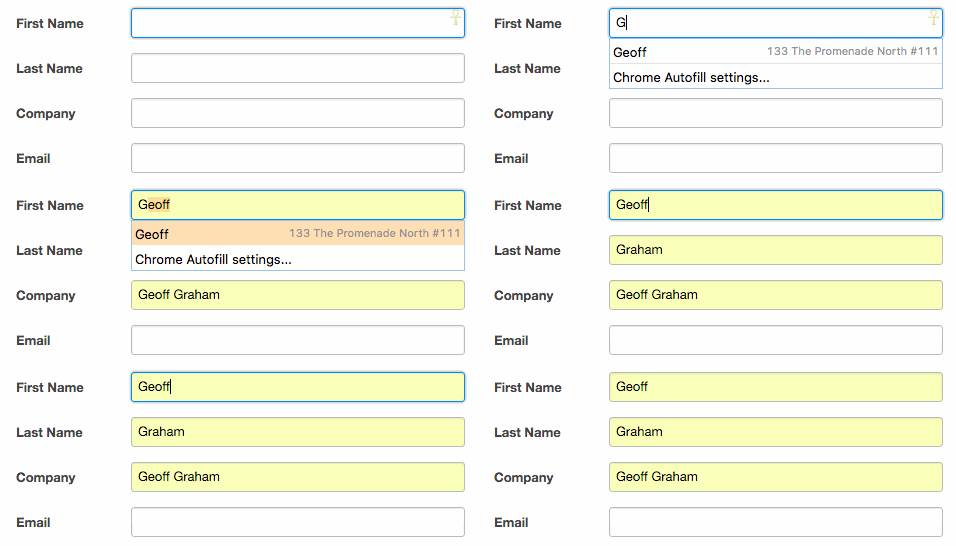
All the hover, select, autofil, focus combinations have left me confused on how to consistently get my form elements styled in dark mode

This snippet from CSS tricks has fixed all the different states for me to give me full control.
```
/* Change Autocomplete styles in Chrome*/
input:-webkit-autofill,
input:-webkit-autofill:hover, 
input:-webkit-autofill:focus,
textarea:-webkit-autofill,
textarea:-webkit-autofill:hover,
textarea:-webkit-autofill:focus,
select:-webkit-autofill,
select:-webkit-autofill:hover,
select:-webkit-autofill:focus {
  border: 1px solid green;
  -webkit-text-fill-color: green;
  -webkit-box-shadow: 0 0 0px 1000px #000 inset;
  transition: background-color 5000s ease-in-out 0s;
}
```

!!! note

    This post is a <a href="/thoughts/" class="wikilink" data-title="Thoughts" data-description="These are generally my thoughts on a web page or some sort of url, except a rare few don&#39;t have a link. These are dual published off of my..." data-date="2024-04-01">thought</a>. It's a short note that I make
    about someone else's content online <a href="/tags/thoughts/" class="hashtag-tag" data-tag="thoughts" data-count=2 data-reading-time=3 data-reading-time-text="3 minutes">#thoughts</a>
