---
title: "thoughts 0.0.4"
description: "This is such an improvement to the backend of my website it warrants a blog post of celebration. For far too long I've been dealing with a tiny ass edit form..."
date: 2024-12-18
published: true
tags:
  - python
  - webdev
template: blog-post
---


This is such an improvement to the backend of my website it warrants a blog
post of celebration.  For far too long I've been dealing with a tiny ass edit
form on thoughts.  I tend to not edit them, and try to get them right in one
go.  This is kinda the point of a thought, its a quick post meant to be the
size of a tweet, but sometimes I'm leaving thoughts on a video or long post and
want to make sure I have a good save point, but I just keep the thing in draft
and hope I don't loose if for far too long.

## Results

Let's see this change in action!!

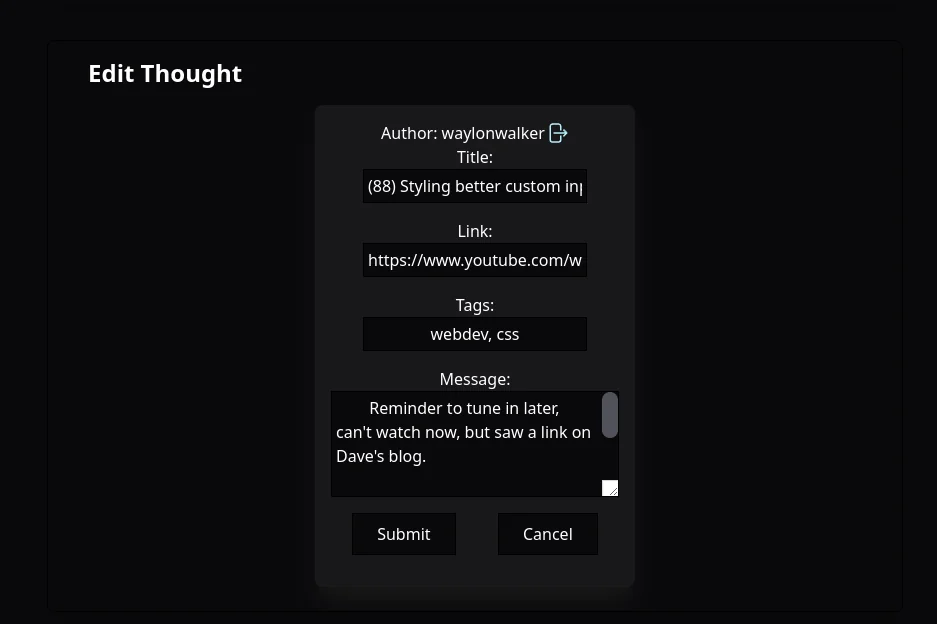
### before

This is the tiny ass form nested deeply in the flow of the feed.  When I made
it I naively just swapped out the post itself with the edit form, and swapped
the post back in after edit.
![screenshot-2024-12-19T00-58-43-976Z.png](https://dropper.waylonwalker.com/api/file/fe60b579-18d3-450e-87e2-2f5664f32210.webp)

> thoughts is built with HTMX btw so all html is rendered in the backend and swapped by htmx client side.

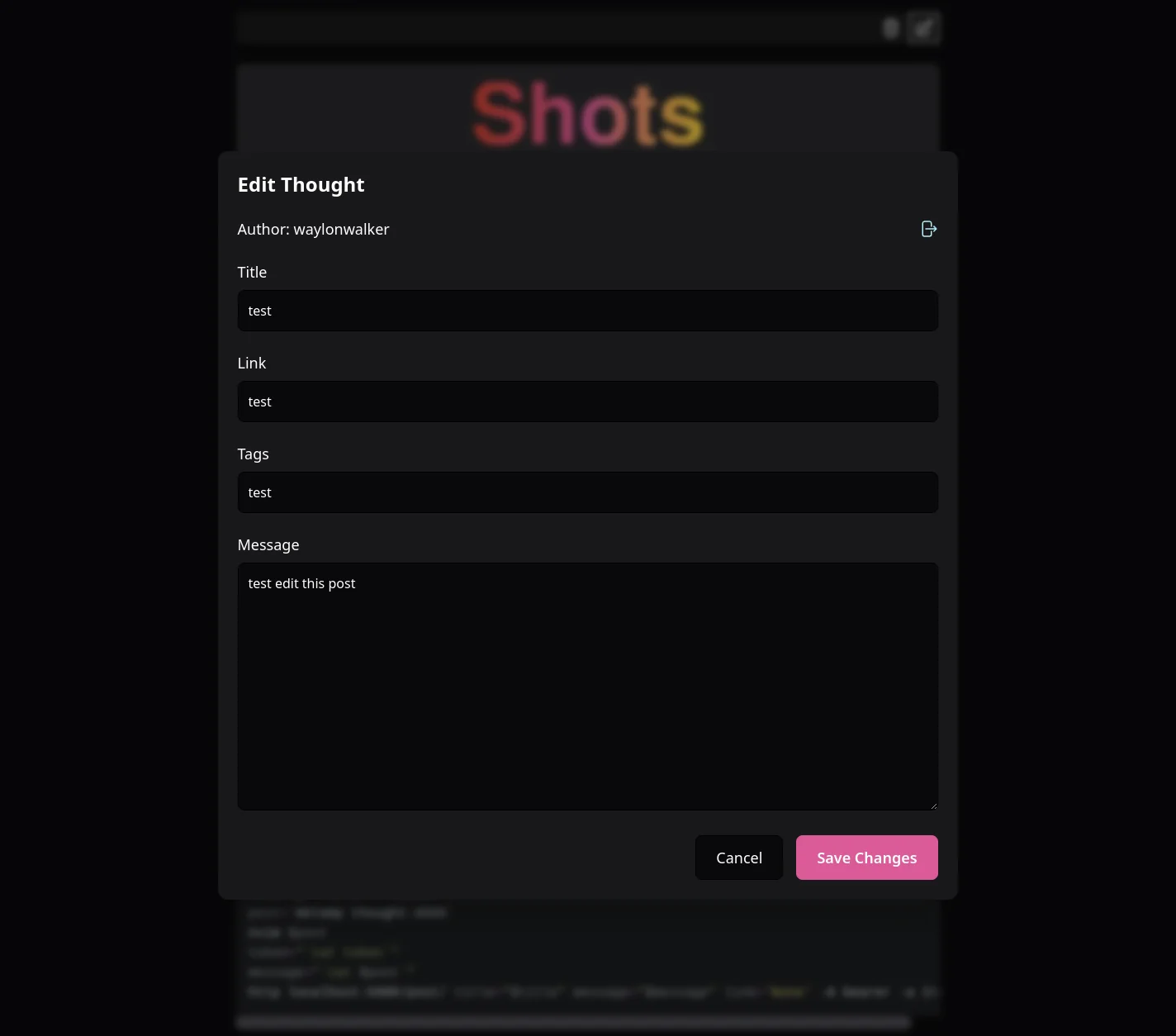
### after

Now the edit is a full page modal with a nice blurry backdrop effect to the
rest of the content.  This feels pretty similar to making a `new post` on
twitter.
![screenshot-2024-12-19T00-59-21-503Z.png](https://dropper.waylonwalker.com/api/file/c560e113-66c1-4532-9eb7-c75eb6d3aaf3.webp)

### How

How did I do this with htmx?  I had to break out of the mindset my brain was in
with swapping in place and letting the edit form take over the entire screen.

First the empty `#modal-container` was added to the top of every page.

``` html
<div id="modal-container"></div>
```

Then each post that gets added to the page already had an edit button, but now
the target is set to `#modal-container`, and the swap is set to `innerHTML` so
that we keep the `#modal-container` in place.

``` html
<button class="h-8 w-8 p-1 text-center" hx-get="{{ config.root }}/edit-thought/{{ post.id }}"
        hx-target="#modal-container" hx-swap="innerHTML" title="Edit">
    {% include 'edit.svg' %}
</button>
```

Now the edit post that is returned from the server is turned into a full height
and width modal with a nice backgrop blur over the content.

``` html

<div id="modal-container">
    <div class="fixed inset-0 z-50 overflow-y-auto" aria-labelledby="modal-title" role="dialog" aria-modal="true">
        <!-- Background backdrop -->
        <div class="fixed inset-0 bg-black/30 backdrop-blur-sm"></div>

        <!-- Modal panel -->
        <div class="flex min-h-screen items-center justify-center p-4">
            <div class="relative w-full max-w-4xl transform rounded-xl bg-zinc-900 p-6 shadow-2xl transition-all">
... similar to the original edit form in here
            </div>
        </div>
    </div>
</div>
```

## Clearing the modal

One notable change to the original edit form is clearing the modal container
on submit.  It is done with an `hx-on::after-request` event and one line of js.

``` html
<form id="websiteForm"
      hx-patch="{{ config.root }}/post/html/"
      method="POST"
      name="newPost"
      hx-target="#post-{{ post.id }}"
      hx-swap="outerHTML"
      hx-on::after-request="document.getElementById('modal-container').innerHTML = ''">
    ```

Similarly on the Cancel button.

``` html
<button class="rounded-lg border border-black bg-zinc-950 px-6 py-3 text-lg hover:bg-zinc-900"
        type="button"
        onclick="document.getElementById('modal-container').innerHTML = ''">
    Cancel
</button>
```

## Hotkeys

Now I struggled to get this right with htmx, and it seemed like things were
getting more complicated by trying to get the buttons to trigger using htmx
triggered keyboard events, I ended up just using javascript.  Its still in the
same file, so locality of behavior is barely an issue on this one anyways, and
the js was just working.

``` html
<script>
document.addEventListener('keydown', function(e) {
    if (e.key === 'Escape') {
        document.getElementById('modal-container').innerHTML = '';
    }
    if (e.key === 'Enter' && e.ctrlKey) {
        e.preventDefault();
        htmx.trigger('#websiteForm', 'submit');
    }
});
</script>
```

## Other small change

When the server is returns an empty list of posts the post container would
change size and cause a layout shift.  Now the empty posts element, while not
great does not cause layout shift.

``` html
<ul id="posts" class="min-h-screen"><li>No posts</li></ul>
```
