External Link stackoverflow.com Today I learned how to configure the baseurl for htmx using the tag. This is pretty handy to be able to configure different baseurls.
Posts tagged: dev
All posts with the tag "dev"
321 posts
latest post 2026-10-16
Publishing rhythm
Addy Osmani (@addyosmani.bsky.social) Tip: Chrome DevTools can override the content of Fetch/XHR requests! Useful for mocking APIs without waiting on backend changes. Bluesky Social · bsky.app WTF, you can just change a server response from devtools and update a vuejs app? Just tried with htmx, and my GET requests are not showing up in the sources tab. I’ll keep this in my back pocket for next time I’m supporting a vuejs app though.
Great list of 4 tips for running fastapi applications. Keep routes small Fat routers with all of the logic built in makes them hard to test, hard to refactor, causes lots of duplication, and makes it hard to reuse the business logic code later in something like a cli application. Deploy Early I really like this advice! He reccommends deploying as early as you can get a healthcheck live in your application. I’ve found too many times developers build something that is really hard, or impossible to deploy, when if they had tried to deploy early they would have spotted some easy to fix issues. This is less important if you are building out of a template that your team commonly deploys from, but very important with new patterns. https://youtu.be/XlnmN4BfCxw?si=ks1wvmgDyoQLgrv2&t=1093
This was an eye opening video into agentic editing workflows. setting rules Dfferent ai tools use different rules files, windsurf uses.windsurfrules. testing out rules Test out your rules file by having it say something at the beginning of the output to verify that the rules are being applied correctly. First line He suggests to use this key rule for debugging purposes, otherwise you are guessing to what rules if any it is following.
This is a pretty great episode talking shop with typecraft. They talk setups, cameras, content creation. I found them talking about their linux setups particularly interesting. Dax talked about his flow from building his own machines to using reliablesite.com. tmux default leader Dax hates on c-a, both typecraft and dax use c-s, which normally freezes a terminal, we can all agree that is useless. I use the default c-b, it seems fine for me. type crafts setup Ubuntu Ghosty Tmux Nvim Ruby Selling coffee without a web front end Dax talks about terminal.shop and how they originally planned to have a web front end, but after they had so much success they stuck with it. now they are leaning harder into it and are building out integrations with a bunch of languages and an api, but no front end.
thoughts 0.0.4
This is such an improvement to the backend of my website it warrants a blog post of celebration. For far too long I’ve been dealing with a tiny ass edit form on thoughts. I tend to not edit them, and try to get them right in one go. This is kinda the point of a thought, its a quick post meant to be the size of a tweet, but sometimes I’m leaving thoughts on a video or long post and want to make sure I have a good save point, but I just keep the thing in draft and hope I don’t loose if for far too long. Results Let’s see this change in action!! before This is the tiny ass form nested deeply in the flow of the feed. When I made it I naively just swapped out the post itself with the edit form, and swapped the post back in after edit. after Now the edit is a full page modal with a nice blurry backdrop effect to the rest of the content. This feels pretty similar to making a on twitter. How How did I do this with htmx? I had to break out of the mindset my brain was in with swapping in place a…
Reminder to tune in later, can’t watch now, but saw a link on Dave’s blog.
Today i got hit by this accessibility issue on my site. Low contrast links are not distiniquishable. I had not seen this error title before it was new to me, maybe I have bad memory or maybe it’s new to me.
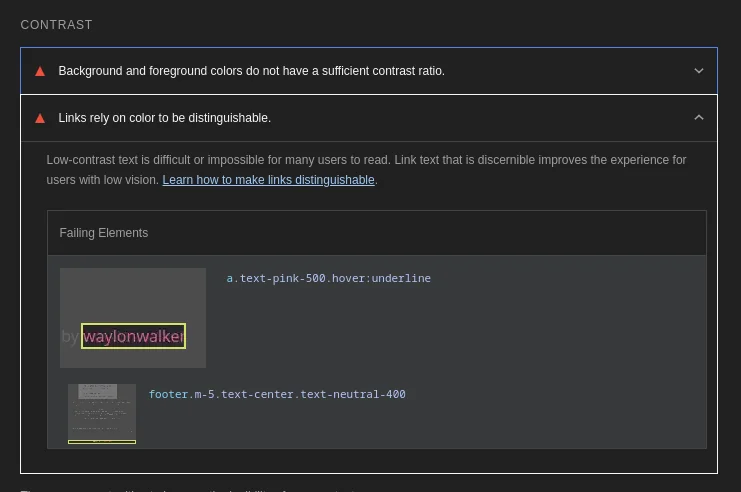
I ended up dropping the background color of the site down a notch as I didn’t
really care for the semi-dark brown anyways. I’m liking the near black
bg-zinc-950 much better now.

Now I got that 100 A11y score in lighthouse.

Add a healthcheck to your FastAPI app | Nic Payne I'm building a few FastAPI apps to throw in docker and run on my homelab... I wanted to add healthchecks and here's a simple way to do it Make sure to pype.dev Nice example of adding a healthcheck to fastapi, and integrating it with docker. Don’t forget to include curl in the install, nice touch.
Hurl - Run and Test HTTP Requests Hurl, run and test HTTP requests with plain text and curl. Hurl can run fast automated integration tests. hurl.dev Hurl was mentioned by @gerhard on the latest changelog and Friends. Looks like a feature rich easy to use testing tool that is tested via what looks like a config file. Hurl is a command line tool that runs HTTP requests defined in a simple plain text format. It can chain requests, capture values and evaluate queries on headers and body response. Hurl is very versatile: it can be used for both fetching data and testing HTTP sessions. Hurl makes it easy to work with HTML content, REST / SOAP / GraphQL APIs, or any other XML / JSON based APIs.
Wes Bos (@wesbos) on X CSS Anchors: flip a tooltip to the bottom when it goes offscreen X (formerly Twitter) · x.com These css anchors are crazy that you can do this with html and not a bunch of js, probably requiring a library or framework.
External Link uxplanet.org A nice set of blacks to use in web design. Subtle variants off of black or white like this can really make your design look nice and modern.
Wes Bos (@wesbos) on X Are you using position: absolute; to overlap elements? It's almost always better to Use CSS Grid instead! X (formerly Twitter) · x.com This is a pretty incredible use of css grid to overlay items overtop of each other without needing to resort to and the side effects that it brings.
A slug is the part of the url that comes after the domain. Commonly matches the file name of a markdown file many blogging systems. These are typically human readable, unique identifiers for pages within the site.
Wikilinks are a core concept within obsidian to link to documents by Slug wrapped in double square brackets. These are commonly used within wiki site generators.
[[slug]]
Obsidian gives you a keybinding alt+enter to go to that file, but if it does not exist it will create the file for you in the root of the project. It’s a nice way to quickly make new documents.
Hotkey to open link under at the text cursor position while typing in edit mode I find myself not wanting to leave the keyboard for navigation and think a keyboard-only shortcut that could open a link at the text cursor position is at would be really handy for this case. Obsidian Forum · forum.obsidian.md Obsidian has a go to definition like feature, the keybind is alt+enter, I would have never guessed this one.
It was not obvious to me, but if you have a wikilink such as Trying Obsidian, you can jump to the file in obsidian, just like you can with lsp go to definition, the keybinding is alt + enter.
I’ve long used copier to create all of my posts for my blog, and it works really well for my workflow. I think of a title, call a template, and give it a title. out of the box obsidian did not seem to work this way. It seems like it wants me to right click a file tree and make a new file using the tree, this is not my jam.
Here is what I came up with to replace my til template.
---
date: <% tp.file.creation_date() %>
templateKey: til
title: <%*
  const originalFileName = await tp.system.prompt("Enter file name");
  const toTitleCase = str => str.replace(
    /\w\S*/g,
    txt => txt.charAt(0).toUpperCase() + txt.substr(1).toLowerCase()
  );
  const title = toTitleCase(originalFileName);
  tR += title + '\n'; // Add the title to the template result
-%>
published: true
tags:
  -
---
<%*
const fileName = originalFileName.toLowerCase().replace(/\s+/g, '-');
const newFilePath = `pages/til/${fileName}`;
await tp.file.move(newFilePath);
-%>

<% tp.file.cursor() %>
tRis a return value, and it gets placed directly into the place it is in the fileto.file.cursor()creates a tab-index point so I can tab into the content
I’m giving obsidian a go as an editor for my blog and one of the main things I want to fix in my workflow is the ability to quickly drop in images. on first look through the community plugins I found Image Converter. I set it up to convert to webp and drop them in a git submodule. I may make it something other than a git repo in the future, but I’ve learned that adding images to my blog repo quickly makes it heavy and hard to clone on other machines.
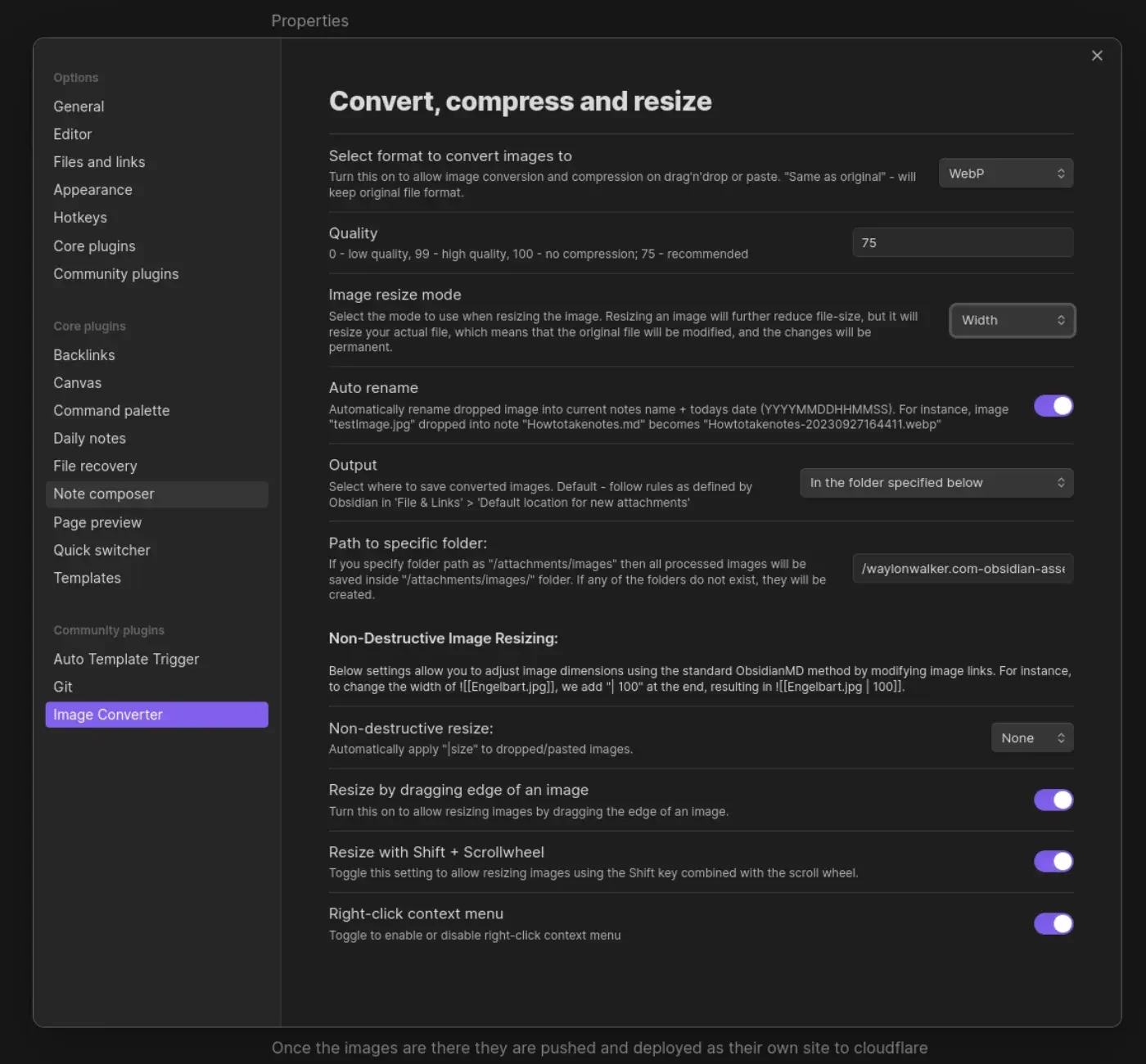
Once the images are there they are pushed and deployed as their own site to
cloudflare pages. I made a quick edit to my sick wikilink hover plugin for
my blog. if it sees a wikilink ending in webp, convert the domain over to
obsidian-assets.waylonwalker.com, and clean up the remaining "! " that the
python md-it library leaves behind.
Note
after first try I needed to increase the width from 600 to 1400, the image in this post was unreadable.
This is part of me getting set up and Trying Obsidian

Calendar data could not load. Try again.