Stop Making TUIs Thomas Ptacek advocates for building real native user interfaces for even the smallest of personal tools, because coding agents have reduced the cost of getting a usable-enough GUI up and … Simon Willison’s Weblog · simonwillison.net Hard to argue this so hard here. For me it’s convenience. I work from a terminal. Most things that are real work get done there, so this provides a convenient proximity to real work. If it’s a developer tool for me to use alongside development work I prefer a tui if it can be done in a text interface. CLIs are different. CLIs provide a great interface into automation, scripting, agent use, interop from two things no one else uses together. Alternatively to the argument for agents making real user interfaces easy I’m going to argue if that’s the case you should have your backend logic hooked into all the interfaces a user could want, CLI, TUI, HTML, and REST/HTTP API. I honestly feel like the training data for a good tui just isn’t there and agents default to making bad TUIs.
Posts tagged: cli
All posts with the tag "cli"
102 posts
latest post 2026-08-21
Publishing rhythm
Hard agree with Theo, terminals suck to use on a phone. Unless you have an attached keyboard they are unusable IMHO. t3 code ad https://youtu.be/dLhcLqoff6k?t=1354&is=xDCw0PpqH2zkZDou This part of the pitch is fantastic. I think most of the people I talk to can relate to being unsure about when to start work because you want to keep your agents working. My morning process generally includes walking around tmux greeting all of my agents that were working hard last night and unblocking them to get them going for the day. Before even opening team chat, but after checking status pages that’s #1. My going home routine now has to start about an hour before I leave questioning whether I should start a session or not.
This morning I had a machine crash on me and came back to an error.
Error
zsh: corrupt history file /home/u_walkews/.zsh_history
Dammit I don’t want to redo my shell history, I checked with a clanker and they
came up with this solution using strings that only prints printable
characters.
cp ~/.zsh_history ~/.zsh_history.bak
mv ~/.zsh_history ~/.zsh_history.corrupt
touch ~/.zsh_history
chmod 600 ~/.zsh_history
strings ~/.zsh_history.corrupt > ~/.zsh_history
chmod 600 ~/.zsh_history
I’ve been deploying my site old school for most of this year, rsync to a volume mounted to nginx. I ran into an issue today where I updated my site and all of the pages updated first, followed by upload. The issue this created was that the new cache busted css files were not up yet and the site had no styles for a brief period during upload.
I found that delaying updates and delaying deletes until the new content exists first solves this problem pretty well. Theres still possiblility of jank while uploading to a live directory and not doing some sort of hot swap, but I’m good with this low budget option for now.
sync:
	rsync -rlt --delete --omit-dir-times \
	--info=progress2 \
	--delay-updates \
	--delete-delay \
	./output/ \
	server:/mnt/mysite
To ignore commands that start with a space character, use the
HIST_IGNORE_SPACE option in bash or zsh.
setopt HIST_IGNORE_SPACE
Today I found a way to test model syntax, cause the clankers always get the exact model name that copilot wants wrong.
copilot --model claude-sonnet-4.5 -p "Reply with OK" --allow-all --no-ask-user -s
copilot --model gpt-5.4 -p "Reply with OK" --allow-all --no-ask-user -s
Ses_3444b09b1ffexter3elfg5qqtg
Session ID: ses_3444b09b1ffeXTEr3ELFg5qqtg Created: 3/4/2026, 7:55:24 PM Updated: 3/4/2026, 8:52:32 PM User I want to spec out a cli for tmux session switching in go. responsive to terminal size works in tmux popup shows list of tmux sessions with favorites pinned at the top keymap j/k arrow navigation tab to switch sections asdfqwertzxcvb to pick a session (letter listed next to the session) space to select a session, then arrows j/k move that session up in priority and hotkey letter Assistant (Build · gpt-5.3-codex · 2.4s) Thinking: Initiating brainstorming skill load Tool: skill Input: Output: Assistant (Build · gpt-5.3-codex · 8.8s) Thinking: Planning cautious context inspection Tool: glob Input: Output: Assistant (Build · gpt-5.3-codex · 27.0s) Thinking: Outlining comprehensive spec approach Great idea. Here’s a practical spec you can build straight into Go. Product Shape Build (tmux session switcher) as a full-screen TUI that also runs cleanly inside. Primary goal: fast switching…
I Built A Tmux Session Switcher
I’ve been thinking about this for awhile now. For years now, fuzzy pickers and last session have been my go to. They have served me well. I can typically only keep so much in my head anyways. I’m often doing a hub and spoke pattern between main project, notes, and infra repo, maybe two projects. Don’t get me wrong, I regularly run with a dozen or more sessions running at a time, but only two to three are in my immediate context at any point anyways. The Design harpoon for tmux press a hotkey followed by one more keystroke, currently any left hand letter SIMPLE, FAST, thats of utmost importance, what I want are sessions that I can can be assigned in order of importance from middle row, top row, bottom row. I added this binding to my tmux config. Now I can press to go to the first session, to go to the second session. and pause to think j/k to navigate, space to pick up a session and move it, x to kill it. Enter the agents Now with agents doing more and more work, and cooking for longer…
In the age of agents sometimes work gets done on so many different worktrees
and branches its hard to tell if there is already a PR or any of them or not,
the great gh cli has us covered.
gh pr list --head fix/markata-go-connections-graph
Vaulted Secrets Without Git Churn
Ansible Vault keeps secrets out of sight, but the ciphertext changes on every encrypt. That turns Git diffs into noise and makes it hard to tell if anything actually changed. Decrypting, editing, and re-encrypting often leaves uncertainty about whether any plaintext changed. This is amplified when secret repos are tightly coupled to dependent repositories. A typical cycle includes decrypting, adding a key, updating a value, applying changes, and returning later with little clarity about what changed while secrets were in plaintext. Today a new workflow was created with @gpt-5.2-codex to keep diffs clean and avoid re-encrypting when the plaintext is identical. Waylon Walker This repo has ansible vaulted secrets and an encrypt/decrypt process, but no way to compare. Please research compare options. The goal is to avoid changing files on encrypt/decrypt when plaintext is unchanged, ideally by comparing decrypted content and reusing the remote encrypted file. @gpt-5.2-codex The repo workfl…
Yeah there’s some basics, you know things you might expect like using standard error and standard out correctly. One thing I’ll say on that because I think this is commonly misunderstood, standard error is not for errors, it’s for any information that isn’t part of the normal output. So you know often times that’s warnings and errors, but it might just be progress information. You know anytime that you just need to have something go to the user that’s what it’s there for." (6:15 - 6:42) I’ve definitely done this sin in my own tooling before, and it does make things harder to use. I think I still take err/out at face value. I really like the translation Jeff gave here, one is for normal output, i.e. what the user asked for and the other is extra information. So if I wanted to list something and pipe it into something else, stdout only captures the list, thats it. if you have a bunch of information about config warnings, showing environment, are you sure questions, none of that is captured.
When using two GitHub accounts the gh cli gives very easy gh auth switch workflow from the cli.
from the docs
gh auth switch –help Switch the active account for a GitHub host.
This command changes the authentication configuration that will be used when running commands targeting the specified GitHub host.
If the specified host has two accounts, the active account will be switched
automatically. If there are more than two accounts, disambiguation will be
required either through the --user flag or an interactive prompt.
# list accounts
gh auth status
# switch accounds (interactive if more than 2, i've never seen this personally)
gh auth switch
setting COLUMNS env var to a number greater than 0 will make the terminal resize to that number of columns.
COLUMNS=80 uvx --from rich-cli rich myscript.py
Note
Not all programs respct the COLUMNS env var, but rich does, and a lot of
stuff I’m building uses rich.
I discovered this when I was trying to make a low effort readme generated from the code, but did not depend on the size of terminal it was ran on.
# justfile
readme:
    echo "# Workspaces" > README.md
    echo "" >> README.md
    echo '``` bash' >> README.md
    COLUMNS=80 ./workspaces.py --help >> README.md
    echo '```' >> README.md
The tea command for gitea (used by forgejo) has a flag for login. With gitea
you can have multiple accounts logged in. When you try to run a command such
as repo create it will prompt you which login to use, but I learned that you
can bake it in to all of them with --login <login-name>
❯ tea repo create --name deleteme --description 'for example'
┃ NOTE: no gitea login detected, whether falling back to login 'git.waylonwalker.com'?
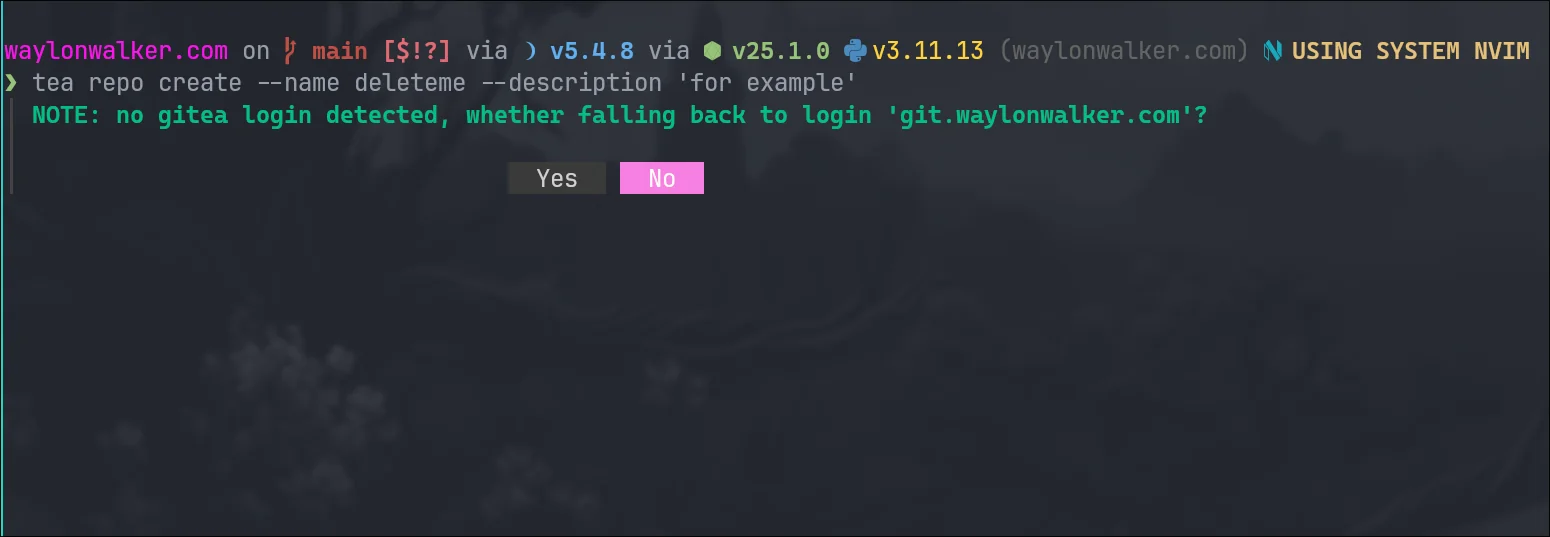
tea repo create --name deleteme --description 'for example' --login git.wayl.one
Atuin desktop sounds dope AF, tried to install it off the AUR and it was broken for me. Seems early and the dev team is all in on mac. They have an official.deb and.rpm. I’ll have to try again later, maybe the binary will work. The idea of building out runbooks from my Atuin data sounds dope AF. It sounds like a mix of markdown and executable cells like a jupyter notebook, but not. Really pitching hard to those of us in the system administration, dev ops, SRE space. Having something that you walk through when a system goes down and you are feeling panicked in DR mode sounds relieving.
Today I learned how to use tar over ssh to save hours in file transfers. I keep all of my projects in ~/git (very creative I know, I’ve done it for years and haven’t changed). I just swapped out my main desktop from bazzite to hyprland, and wanted to get all of my projects back. Before killing my bazzite install I moved everything over (16GB of many small files), it took over 14 hours, maybe longer. I had started in the morning and just let it churn.
This was not going to happen for re-seeding all of my projects on my new system, I knew there had to be a better way, I looked at rsync, but for seeding I ran into this tar over ssh technique and it only took me 6m51s to pull all of my projects off of my remote server.
ssh [email protected] 'tar -C /tank/git -cpf - .' \
  | tar -C "$HOME/git" -xpf -
2025-07-09 Notes from yesterday I have temporal stuff kind of going with postiz in a windsurf session working on [[thoughts-to-nostr]] Been cleaning up my z" loading="lazy"> 2025-07-10 Notes | Nic Payne 2025-07-09 Notes from yesterday I have temporal stuff kind of going with postiz in a windsurf session working on [[thoughts-to-nostr]] Been cleaning up my z pype.dev big fan of eza and dust, I like these aliases to have some common commands at my fingertips. I often use the tree command and yes it sometimes goes too deep to actually be useful.
I am a linux user through and through. Desktop, server, vms, containers,
everything except my phone is linux. With this I spend a lot of time in the
terminal, and have been a long time user of !! to rerun the last command, but
with the ability to tack something on at the beginning or end.
TIL about fc, which opens the last command in your shell history in your
$EDITOR or pass in your editor -e nvim.
Rcap of how !! works #
!! pronounces bang bang and will run the last command in your history.
ls -l

!! | wc -l
# ls -l | wc -l

sudo !!
# sudo ls -l | wc -l

!!:s/-l/-l \/tmp
# sudo ls -l /tmp | wc -l
fc enters the chat #
Now making complex edits in your shell can be a bit of a chore, so fc moves
this work to your $EDITOR.
fc
This pops open your $EDITOR with the last command in your history.
sudo ls -l | wc -l

Shell History #
fc shows up in shell history, but !! does not, !! gets replaced by the
command that it becomes.
Up Arrow #
yaya yaya, I know you can also up-arrow c-e, but what fun is that, it’s barely a
flex. fc just looks big brained and like you really know what you are doing.
You can unset multiple environment variables at once. I did not know this was a
thing, its something that ended up happening organically on a call and asking
someone to run unset. They had never done it before and did not know how it
works, but did exactly as I said instead of what I meant. I like this handy
shortcut doing it in one line rather than each one individually, I will be
using this in the future. You might need this for something like
running aws cli commands with localstack.
unset AWS_ACCESS_KEY_ID AWS_SECRET_ACCESS_KEY AWS_DEFAULT_REGION
Calendar data could not load. Try again.