Archive

All published posts

2605 posts latest post 2026-10-24
Publishing rhythm
Sep 2026 | 28 posts

May 6 – May 12, 20242 years ago

Featured this weekWriting

just has been by go to tool for saving commands in a way that I can replay them and have team members replay them without relying on the shell history of any given machine. This is my go to default step, it lets you pick a just command to run with a fuzzy picker.

default:
  @just --list

Link

Note

Note

Apr 29 – May 5, 20242 years ago

Note

Hatch v1.10.0 - Hatch hatch.pypa.io Hatch be flyin. This new release of hatch includes support for the new package installer which is just mind blowing fast compared to anything else we have in python right now. The other features are cool too, check them out. I’ll probably be using the test runner, but I’ve been waiti…

Note

Note

Note

Note

Note

Note

Note

#pydantic.networks.EmailStr" class="embed-card-link" target="_blank" rel="noopener noreferrer"> Network Types Pydantic Docs · docs.pydantic.dev pydantic has a nice built in email validator It requires an optional pydantic dependency Then you can validate email addresses.

Note

Note

Handling Errors - FastAPI FastAPI framework, high performance, easy to learn, fast to code, ready for production fastapi.tiangolo.com This page shows how to customize your fastapi errors. I found this very useful to setup common templates so that I can return the same 404’s both programatically and by default, so it al…

Note

Note

Note

</> htmx ~ The htmx Response Targets Extension Extension htmx gives you access to AJAX, CSS Transitions, WebSockets and Server Sent Events directly in HTML, using attributes, so you can build modern user interfaces with the simplicity and power of hypert... htmx.org The htmx response-targets extension allows me to resp…

Apr 22 – Apr 28, 20242 years ago

Featured this weekWriting

TIL how to display the list of nfs mounts on your network.

showmount -e

You can even look for mounts of other machines on your network.

showmount -e <hostname>

Writing

To allow access only to the , you can pass add the Resource field to the User Policy when you create a new token.

{
  "Version": "2012-10-17",
  "Statement": [
    {
      "Effect": "Allow",
      "Action": [
        "admin:*"
      ]
    },
    {
      "Effect": "Allow",
      "Action": [
        "kms:*"
      ]
    },
    {
      "Effect": "Allow",
      "Action": [
        "s3:*"
      ],
      "Resource": [
        "arn:aws:s3:::<bucket>",
        "arn:aws:s3:::<bucket>/*"
      ]
    }
  ]
}

Writing

You can inspect sqlite tables with the sqlite shell.

note that you get into the shell with sqlite3 database.db

.tables

I also learned that .tables, .index and .schema are helper functions that query the sqlite_master table on the main database.

Here is an output from my redka database. The sqlite_master table contains all the sqlite objects type, name, tbl_name, rootpage, and sql to create them.

❯ sqlite3 database.db "SELECT * from sqlite_master;"
table|rkey|rkey|2|CREATE TABLE rkey (
    id       integer primary key,
    key      text not null,
    type     integer not null,
        version  integer not null,
    etime    integer,
        mtime    integer not null
)
index|rkey_key_idx|rkey|3|CREATE UNIQUE INDEX rkey_key_idx on rkey (key)
index|rkey_etime_idx|rkey|4|CREATE INDEX rkey_etime_idx on rkey (etime)
where etime is not null
trigger|rkey_on_type_update|rkey|0|CREATE TRIGGER rkey_on_type_update
before update of type on rkey
for each row
when old.type is not new.type
begin
    select raise(abort, 'key type mismatch');
end
table|rstring|rstring|5|CREATE TABLE rstring (
    key_id integer not null,
    value  blob not null,

    foreign key (key_id) references rkey (id)
          on delete cascade
)
index|rstring_pk_idx|rstring|6|CREATE UNIQUE INDEX rstring_pk_idx on rstring (key_id)
view|vstring|vstring|0|CREATE VIEW vstring as
  select
    rkey.id as key_id, rkey.key, rstring.value,
        datetime(etime/1000, 'unixepoch') as etime,
        datetime(mtime/1000, 'unixepoch') as mtime
  from rkey join rstring on rkey.id = rstring.key_id
  where rkey.type = 1
    and (rkey.etime is null or rkey.etime > unixepoch('subsec'))
table|rhash|rhash|7|CREATE TABLE rhash (
    key_id integer not null,
    field text not null,
    value blob not null,

    foreign key (key_id) references rkey (id)
      on delete cascade
)
index|rhash_pk_idx|rhash|8|CREATE UNIQUE INDEX rhash_pk_idx on rhash (key_id, field)
index|rhash_key_id_idx|rhash|9|CREATE INDEX rhash_key_id_idx on rhash (key_id)
view|vhash|vhash|0|CREATE VIEW vhash as
  select
    rkey.id as key_id, rkey.key, rhash.field, rhash.value,
        datetime(etime/1000, 'unixepoch') as etime,
        datetime(mtime/1000, 'unixepoch') as mtime
  from rkey join rhash on rkey.id = rhash.key_id
  where rkey.type = 4
    and (rkey.etime is null or rkey.etime > unixepoch('subsec'))

Writing

With the liscense changes to redis there are several new forks out there. One that I am particularly interested in is redka.

curl https://i.jpillora.com/nalgeon/redka | bash
chmod +x redka
./redka database.db

We now have redis running on port 6379 that we can connect to with a redis client. And we have a sqlite database that we can inspect.

❯ sqlite3 database.db "SELECT name FROM sqlite_master;"
rkey
rkey_key_idx
rkey_etime_idx
rkey_on_type_update
rstring
rstring_pk_idx
vstring
rhash
rhash_pk_idx
rhash_key_id_idx
vhash

We can look at the values in the vstring table.

sqlite3 database.db "SELECT * from vstring;"
1|hi|hello there you||2024-04-17 01:46:26

Note

Apr 15 – Apr 21, 20242 years ago

Featured this weekWriting

The main system that I am concerned about is my arch BTW machine. I found a great article from the official archlinux site covering it.

For my machine I am concerned with this line.

The xz packages prior to version 5.6.1-2 (specifically 5.6.0-1 and 5.6.1-1) contain this backdoor.

I checked my xz package with paru, and I am good.

paru -Qii zx

Writing

paru has some nice features that I rarely use, and hav to look up when I need them. Here are two commands to help with dependency management.

❯ paru -Qii nodejs
Name            : nodejs
Version         : 21.7.2-1
Description     : Evented I/O for V8 javascript
Architecture    : x86_64
URL             : https://nodejs.org/
Licenses        : MIT
Groups          : None
Provides        : None
Depends On      : icu  libuv  libnghttp2  libnghttp3  libngtcp2  openssl  zlib  brotli  c-ares
Optional Deps   : npm: nodejs package manager [installed]
Required By     : node-gyp  nodejs-nopt  npm  semver
Optional For    : None
Conflicts With  : None
Replaces        : None
Installed Size  : 46.86 MiB
Packager        : Felix Yan <[email protected]>
Build Date      : Thu 04 Apr 2024 05:11:09 AM CDT
Install Date    : Mon 15 Apr 2024 07:27:02 AM CDT
Install Reason  : Installed as a dependency for another package
Install Script  : No
Validated By    : Signature
Backup Files    : None
Extended Data   : pkgtype=pkg

You can check all the packages depended on by nodejs by running the following. This is everything from all of the repos you have configured, not what you have installed.

❯ pactree --reverse --sync --depth 1 nodejs

nodejs
├─acorn
├─ansible-language-server
├─asar
├─babel-cli
├─babel-core
├─bash-language-server
├─blinksocks
├─bower
├─browserify
├─coffeescript
├─dot-language-server
├─emscripten
├─eslint
├─eslint-language-server
├─eslint_d
├─gitlab
├─gnomon
├─grunt-cli
├─gtop
├─gulp
├─hedgedoc
├─jake
├─markdownlint-cli2
├─marked
├─marked-man
├─matrix-appservice-irc
├─modclean
├─node-gyp
├─nodejs-emojione
├─nodejs-material-design-icons
├─nodejs-nopt
├─nodejs-source-map
├─nodejs-yaml
├─npm
├─openui5
├─pm2
├─prettier
├─pyright
├─rapydscript-ng
├─s3rver
├─semver
├─serverless
├─stylelint
├─stylus
├─svelte-language-server
├─tailwindcss-language-server
├─ts-node
├─typescript
├─typescript-svelte-plugin
├─uglify-js
├─vscode-css-languageserver
├─vscode-html-languageserver
├─vscode-json-languageserver
├─vue-language-server
├─vue-typescript-plugin
├─wasm-bindgen
├─web-ext
├─wrangler
├─yaml-language-server
├─yarn

Writing

I recently had to update my copier-gallery command to trust my own templates because some of them have shell scripts that run afterwards. Be warned that this could be a dangerous feature to run on random templates you get off the internet, but these are all mine, so if I wreck it its my own fault.

copier copy --trust <template> <destination>

All the the copier copy api can be found with help.

❯ copier copy --help
copier copy 8.3.0

Copy from a template source to a destination.

Usage:
    copier copy [SWITCHES] template_src destination_path

Hidden-switches:
    -h, --help                         Prints this help message and quits
    --help-all                         Prints help messages of all sub-commands and quits
    -v, --version                      Prints the program's version and quits

Switches:
    -C, --no-cleanup                   On error, do not delete destination if it was
                                       created by Copier.
    --UNSAFE, --trust                  Allow templates with unsafe features (Jinja
                                       extensions, migrations, tasks)
    -a, --answers-file VALUE:str       Update using this path (relative to
                                       `destination_path`) to find the answers file
    -d, --data VARIABLE=VALUE:str      Make VARIABLE available as VALUE when rendering the
                                       template; may be given multiple times
    -f, --force                        Same as `--defaults --overwrite`.
    -g, --prereleases                  Use prereleases to compare template VCS tags.
    -l, --defaults                     Use default answers to questions, which might be
                                       null if not specified.
    -n, --pretend                      Run but do not make any changes
    -q, --quiet                        Suppress status output
    -r, --vcs-ref VALUE:str            Git reference to checkout in `template_src`. If you
                                       do not specify it, it will try to checkout the
                                       latest git tag, as sorted using the PEP 440
                                       algorithm. If you want to checkout always the
                                       latest version, use `--vcs-ref=HEAD`.
    -s, --skip VALUE:str               Skip specified files if they exist already; may be
                                       given multiple times
    -w, --overwrite                    Overwrite files that already exist, without asking.
    -x, --exclude VALUE:str            A name or shell-style pattern matching files or
                                       folders that must not be copied; may be given
                                       multiple times

Writing

Today I accidentally ran f2 in ipython to discover that it opens your $EDITOR! I use this feature quite often in zsh, it is bound to <c-e> for me, and since I have my environment variable EDITOR set to nvim it opens nvim when I hit <c-e>. Today I discovered that Ipython has this bound to F2. If you know how to set it to <c-e> let me know I’ve tried, a lot.

export EDITOR=nvim
ipython
<F2>

better yet add export EDITOR=nvim to your .zshrc

# ~/.zshrc
export EDITOR=nvim

Writing

I’ve really been enjoying using sqlmodel for my projects that need a database. One thing that I definitely lacked on for too long was indexing my database. I hit a point with one database where it was taking 7s for pretty simple paginated queries to return 10 records.

For every field that you will be querying on, you can create an index, by setting it equal to Field(index=True)

class Hero(SQLModel, table=True):
    id: int | None = Field(default=None, primary_key=True)
    name: str = Field(index=True)
    secret_name: str
    age: int | None = Field(default=None, index=True)

example courtesy of the docs

Note

primary keys are indexed by default.

The docs cover this pretty well, and in quite depth - Optimizing Queries

Writing

inline-snapshot is a new tool that I am trying out for python testing. It takes snapshots of your outputs and places them inline with the test.

Here is the most basic starter.

import inline_snapshot

def test_one():
    assert 1 == snapshot()

Now when I run pytest my tests will fail because my assert has no value, but if I run pytest --inline-snapshot=create it will fill out my snapshot values and the file will then look like this.

import inline_snapshot

def test_one():
    assert 1 == snapshot(1)

It also works with pydantic models.

class MyModel(BaseModel):
    name: str
    age: int
    nickname: str | None = None


def test_my_model_instance():
    assert MyModel(name="Waylon", age=1) == snapshot(MyModel(name="Waylon", age=1))


def test_my_model_fields():
    me = MyModel(name="Waylon", age=1, nickname='Waylon')
    assert me.name == snapshot("Waylon")
    assert me.age == snapshot(1)
    assert me.nickname == snapshot("Waylon")

Writing

Today I learned how to VACUUM a sqlite database and cut its size in about half. It’s a database that I have had running for quite awhile and has some decent traffic on it.

Why is it important to do a VACUUM? In short its becuase the file system gets fragmented with as data is updated. On delete the files are removed from the database and marked as available for reuse in the filesystem, but the space is not reclaimed.

To VACUUM a database, run the following sql command. You can do it right form the sqlite shell by running sqlite3.

You will need about double the current size of the database as free space to do the VACUUM, you need space for a full copy, journaling or write ahead logs, and the existing database.

VACUUM;

The docs are fantastic for vacuum.

Writing

I learned that tailwind animations are pretty easy to add only needing a few classes. For some reason though my brain broke, thinking that I could dynamically change the number and you can’t cause there are only so many pre compiled classes without using an arbitrary value with brackets.

Here are the classes that I used to transition my colors very slowly.

<div id="square"
      class="transition-colors ease-in-out duration-700">
</div>

And the entire square element.

<div id="square"
      class="w-16 h-16 bg-rose-500 rounded border border-4 border-rose-800 hover:bg-indigo-600 hover:border-yellow-500 transition-colors ease-in-out duration-700">
</div>

Link

nalgeon has done a fantastic job with redka. Highly recommend taking a look. Redis re-implemented with SQLite

Note

Changelog Master Feed Your one-stop shop for all Changelog podcasts. Changelog · changelog.com Jerod (It’s ya boi) and Adam are my favorite tech news nerds, and have the sickest podcasts in tech. Yes plural podcasts they run seven podcasts maybe more. If you want it short and sweet they got the best 15 minutes of tech…

Note

MarkdownDown Convert any webpage to a clean markdown w/ images downloaded. MarkdownDown · markdowndown.vercel.app Small web app to convert html into markdown. Pretty cool idea. I actually want to look into this for reader and see how well it would work. Right now I am just pulling descriptions, but maybe I can pull ful…

Note

Note

Rug pull, not cool! (Changelog & Friends #40) If Changelog News had an extended edition, this might be it! Jerod & Adam discuss Hashicorp's Cease and Desist letter, Redis getting forked, Boston Dymanics' scary cool new robot, Justin Searls' ex... Changelog · changelog.com Five star episode with Jarod and Adam shootin t…

Note

Note

Manual Upgrades | K3s You can upgrade K3s by using the installation script, or by manually installing the binary of the desired version. docs.k3s.io You can give k3s an install channel to install,, or specific versions like. This is handy to make sure that you install the same version on all of your workers.

Note

Note

Note

Redirecting 15r10nk.github.io This is a cool snapshot testing tool that automatically creates, and updates test values for you. Starting with some test code. now if I run my tests will fail because my assert will fail, but if I run it will fill out my snapshot values and the file will then look like this.

Note

GitHub - nalgeon/redka: Redis re-implemented with SQL Redis re-implemented with SQL. Contribute to nalgeon/redka development by creating an account on GitHub. GitHub · github.com Redka a sick new redis compatable api, that uses sqlite as its backend datastore. It feels lightweight to use as it is a single small binary.…

Note

Note

Apr 8 – Apr 14, 20242 years ago

Featured this weekWriting

I recently updated ollama, and it now installs a systemd service that I was not expecting. Seems like a great option, but I hadn’t expeted this and I was able to kill it previously. It was using up gpu, and I do other things on my machine with a gpu. I tried pkill, kill, and everything, it was still coming back.

No matter what it comes back

# stop it
systemctl stop ollama.service

# disable it if you want
systemctl disable ollama.service

# confirm its status
systemctl status ollama.service

You can confirm this with the following command.

# checking running processes
ps aux | grep ollama
pgrep ollama

# checking gpu processes
gpustat --show-cmd --show-pid

Next time you want to start you can do it as before with ollama serve.

Writing

Typer makes it easy to compose your cli applications, like you might with a web router if you are more familiar with that. This allows you to build smaller applications that compose into a larger application.

You will see similar patterns in the wild, namely the aws cli which always has the aws <command> <subcommand> pattern.

Lets setup the cli app itself first. You can put it in project/cli/cli.py.

import typer

from project.cli.api import api_app
from project.cli.config import config_app
from project.cli.user import user_app
from project.cli.run import run_app

app = typer.Typer()

app.add_typer(api_app, name="api")
app.add_typer(config_app, name="config")
app.add_typer(user_app, name="user")
app.add_typer(run_app, name="run")

Creating an app that will become a command is the same as creating a regular app in Typer. We need to create a callback that will become our command, and a command that will become our subcommand in the parent app.

import typer
from rich.console import Console

from project.config import get_config

config_app = typer.Typer()

@config_app.callback()
def config():
    "model cli"


@config_app.command()
def show(
):
    project_config = get_config(env)
    Console().print(fokais_config)

Setting up the entrypoint in pyproject.toml.

[project.scripts] # <- this project is part of the config DO NOT change it
project = "project.cli.cli:app" # <- This project is the project name, DO change it

Now you can see each cli application as a sub command.

❯ project --help

 Usage: project [OPTIONS] COMMAND [ARGS]...

╭─ Options ─────────────────────────────────────────────────────────────────────────────────────────╮
│ --install-completion  [bash|zsh|fish|powershell|pwsh]  Install completion for the specified shell.│
│                                                        [default: None]                            │
│ --show-completion     [bash|zsh|fish|powershell|pwsh]  Show completion for the specified shell,   │
│                                                        to copy it or customize the installation.  │
│                                                        [default: None]                            │
│ --help                                                 Show this message and exit.                │
╰───────────────────────────────────────────────────────────────────────────────────────────────────╯
╭─ Commands ────────────────────────────────────────────────────────────────────────────────────────╮
│ api                        model cli                                                              │
│ config                     config cli                                                             │
│ user                       user cli                                                               │
│ run                        run cli                                                                │
╰───────────────────────────────────────────────────────────────────────────────────────────────────╯

In the example above we can run the command project config show to see the current configuration of our project.
Writing

I learned not to fear the arbitrary size feature of tailwind. While building out reader.waylonwalker.com I kept getting content flowing off the screen, and struggling to keep it on the screen. I really felt that I should be able to do this with vanilla tailwind, but after some encouragement from Twitter I decided to lean on arbitrary values and it worked.

Don’t fear the arbitrary values.

<li class="max-w-[100vw]">
</li>

Learn more about using-arbitrary-values from their docs docs

Writing

Each time I go to set up npm I am frustrated by the errors saying that I don’t have permission to npm i -g <package>, and it’s frustrating. And I forget what I need to do to tell npm to install packages in a directory I own, and my shell to look there so that I can use the executables.

mkdir ~/.npm-global
export NPM_CONFIG_PREFIX=~/.npm-global
export PATH=$PATH:~/.npm-global/bin

For the fix to remain persistent you need to put these two lines in your shell profile like ~/.bashrc or ~/.zshrc.

export NPM_CONFIG_PREFIX=~/.npm-global
export PATH=$PATH:~/.npm-global/bin

Writing

If you are designing a website in dark mode the scrollbars can be finicky to match the theme. Here is a pretty sane default that looks nice without being obnoxiously contrast to the rest of the site.

    <style>
        ::-webkit-scrollbar {
            height: 1rem;
            width: 1rem;
        }

        ::-webkit-scrollbar-track {
            background-color: rgb(24 24 27);
        }

        body::-webkit-scrollbar-track {
            background-color: rgb(39 39 42);
        }

        ::-webkit-scrollbar-thumb {
            background-color: rgb(82 82 91);
        }

        ::-webkit-scrollbar-thumb:hover {
            background-color: rgb(113 113 122);
        }

        body::-webkit-scrollbar-thumb {
            background-color: rgb(82 82 91);
        }

        body::-webkit-scrollbar-thumb:hover {
            background-color: rgb(113 113 122);
        }

        ::-webkit-scrollbar-corner {
            background-color: rgb(39 39 42);
        }
    </style>

Want a rounded scrollbar thumb? add these styles.

::-webkit-scrollbar-thumb {
    border-radius: 0.25rem;
    border-radius: 9999px;
}

body::-webkit-scrollbar-thumb {
    border-radius: 0.25rem;
    border-radius: 9999px;
}

This makes a very nice looking default darkmode scrollbar.

Writing

One Day Build - Play Outside

Inspired by Adam Savage and his One Day builds on youtube. I often build things, and want to make them generally useful for others and over configure out of the gate. This project is purely for me inspired by a need I have. play-outside!How-To This post will not directly show how to make a weather app, but document the…
6 min read

Writing

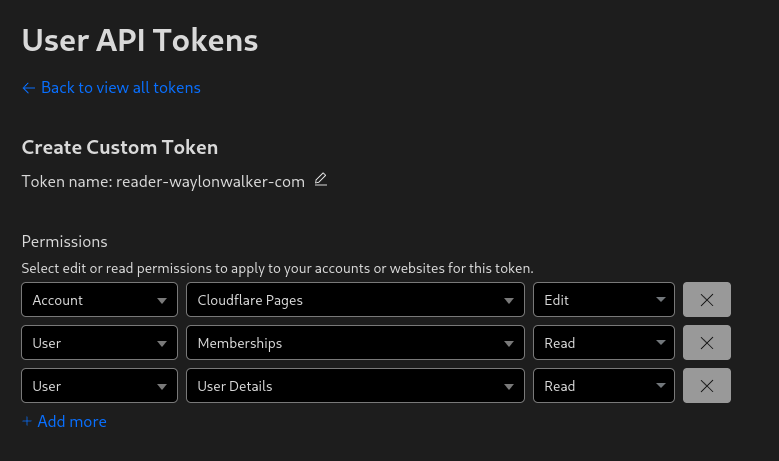
Before deploying to cloudflare pages with wrangler you need a cloudflare api token. You can get one at dash.cloudflare.com/profile/api-tokens.

cloudflare-pages-api-token.png

Install Wrangler #

Next install wrangler using npm.

npm i -g wrangler

Create a Project #

Before you deploy to cloudflare pages you need to create a project. You might already have one, or you might want to create one in the webui, but you have the option to create it at the command line with wrangler.

npx wrangler pages deploy markout --project-name reader-waylonwalker-com --branch markout

Deploy #

Now you can deploy your static application using wrangler to cloudflare pages.

In this example I have my application built into the markout directory, and since the production branch is named markout I need to pass that in here as well.

wrangler pages deploy markout --project-name reader-waylonwalker-com --branch markout

Writing

For my reader app I am using cronjobs to schedule my a new build and upload to cloudflare pages every hour. In this example I have built a docker image docker.io/waylonwalker/reader-waylonwalker-com and pushed it to dockerhub. It uses a CLOUDFLARE_API_TOKEN secret to access cloudflare, and the entrypoint itself does the build and upload.

apiVersion: v1
kind: Namespace
metadata:
  creationTimestamp: null
  name: reader
  namespace: reader

---
apiVersion: batch/v1
kind: CronJob
metadata:
  name: reader-cronjob
  namespace: reader
spec:
  schedule: "0 * * * *"
  successfulJobsHistoryLimit: 6
  failedJobsHistoryLimit: 6
  jobTemplate:
    spec:
      template:
        spec:
          containers:
            - name: reader-container
              image: docker.io/waylonwalker/reader-waylonwalker-com:latest
              env:
                - name: CLOUDFLARE_API_TOKEN
                  valueFrom:
                    secretKeyRef:
                      name: cloudflare-secret
                      key: cloudflare-secret
          restartPolicy: OnFailure

Note

I found this statement quite intriguing. multi-cursors are just macros. This is quite a philisophical video and mostly prime talking about the things that make vim vim, and what prime needs in and editor vs what he can live without.

Note

Note

Note

Note

Note