With the liscense changes to redis there are several new forks out there. One
that I am particularly interested in is
redka [1].
curl https://i.jpillora.com/nalgeon/redka | bash
chmod +x redka
./redka database.db
We now have redis running on port 6379 that we can connect to with a redis
client. And we have a sqlite database that we can inspect.
❯ sqlite3 database.db "SELECT name FROM sqlite_master;"
rkey
rkey_key_idx
rkey_etime_idx
rkey_on_type_update
rstring
rstring_pk_idx
vstring
rhash
rhash_pk_idx
rhash_key_id_idx
vhash
We can look at the values in the vstring table.
sqlite3 database.db "SELECT * from vstring;"
1|hi|hello there you||2024-04-17 01:46:26
References:
[1]: https://github.com/nalgeon/redka
Posts tagged: infrastructure
All posts with the tag "infrastructure"
2 posts
latest post 2024-04-22
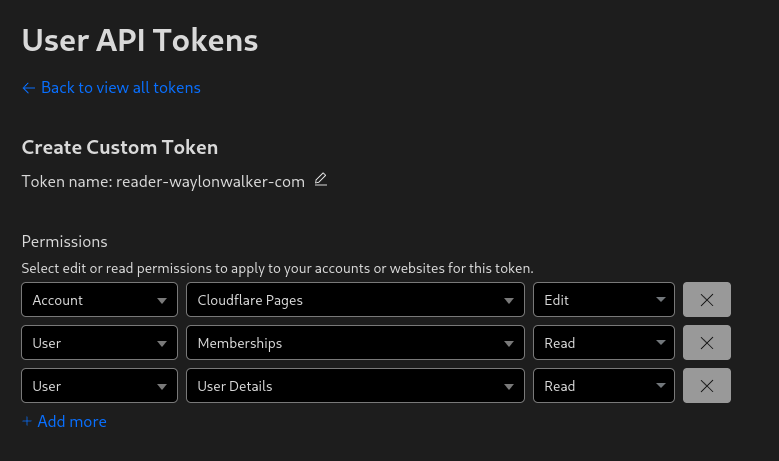
Before deploying to cloudflare pages with wrangler you need a cloudflare api
token. You can get one at
dash.cloudflare.com/profile/api-tokens [1].
[2]
Install Wrangler # [3]
Next install wrangler using npm.
npm i -g wrangler
Create a Project # [4]
Before you deploy to cloudflare pages you need to create a project. You might
already have one, or you might want to create one in the webui, but you have
the option to create it at the command line with wrangler.
npx wrangler pages deploy markout --project-name reader-waylonwalker-com --branch markout
Deploy # [5]
Now you can deploy your static application using wrangler to cloudflare pages.
In this example I have my application built into the markout directory, and
since the production branch is named markout I need to pass that in here as
well.
wrangler pages deploy markout --project-name reader-waylonwalker-com --branch markout
References:
[1]: https://dash.cloudflare.com/profile/api-tokens
[2]: https://dropper.waylonwalker.com/api/file/7b566e55-98ff-4d96-b0bc-3c4e5b619d68.png
[3]: #install-wrangler
[4]: #create-a-project
[5]: #deploy