Will models become more stubborn as we use them more and feed us using them as long running agents where we simply ask for what seems to be an impossible task to be spit out by the all mighty clanker with all of the time in the world to try every way possible, add obnoxious amounts of telemetry, and somehow digest the flood of data it brings back?
Publishing rhythm
second brain slop is dumb
The second brain hype train of people looking at fancy graphs in obsidian of the content their clanker wrote for them is top tier cringe. If you actually want to get better at anything you need to actually put some effort in with your first brain.
Hard to argue this so hard here. For me it’s convenience. I work from a terminal most things that are real work get done there so this provide a convenient proximity to real work. If it’s a developer tool for me to use alongside development work I prefer a tui if it can be done in a text interface.
Clis are different. Clis provide a great interface into automation, scripting, agent use, interop from two things no one else uses together.
Alternatively to the argument for agents making real user interfaces easy I’m going to argue if that’s the case you should have your backend logic hooked into all the interfaces a user could want, CLI, tui, html [1], rest/http api.
I honestly feel like the training data for a good tui just isn’t there and agents default to making bad this.
References:
[1]: /html/

agentic engineering takes discipline
Agents allow so much scope creep it is harder to say no than it is to say yes, and let the model just pop in a new feature for you alongside you current pr with almost no effort on your befalf, staking up so much validation work for you to do that it becomes very difficult to merge. We are all learning this discipline right now.
Hard agree with Theo, terminals suck to use on a phone. Unless you have an attached keyboard they are unusable IMHO.
t3 code ad # [1]
https://youtu.be/dLhcLqoff6k?t=1354&is=xDCw0PpqH2zkZDou [2]
This part of the pitch is fantastic. I think most of the people I talk to can relate to being unsure about when to start work because you want to keep your agents working.
My morning process generally includes walking around tmux greeting all of my agents that were working hard last night and unblocking them to get them going for the day. Before even opening team chat, but after checking status pages that #1.
My going home routine now has to start about an hour before I leave questioning whether I should start a session or not.
References:
[1]: #t3-code-ad
[2]: https://youtu.be/dLhcLqoff6k?t=1354&is=xDCw0PpqH2zkZDou

I have so much more appreciation for hetzner after seeing how the sausage is made. Their drive for efficiency is unparalleled. Not top tier performance, straight up well done engineering on the things that matter. No showing off or fancy stuff. The way they rack up their machines on a piece of sheet metal, that linus akinned to a desktop pc case without the front and side panels was chefs kiss.

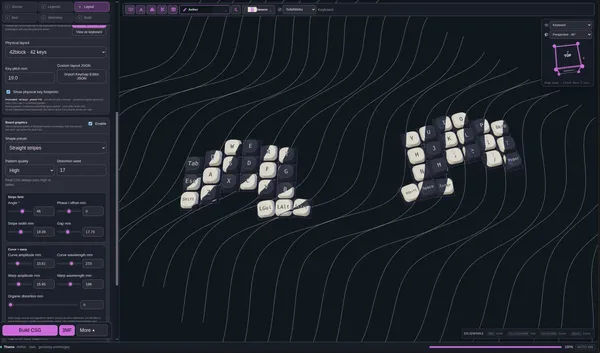
Dammit I think I made an editor
What started as a Joke, a test to gippity, has turned into personal software that I now depend on. Now from anywhere I can make a post to my website in just a few keystrokes. I can put it in the feed I want, encrypt it if I want, and it's live in like 12s.
DHH is such an OG [1] tech founder, I don’t think I realized his first paychecks from 37Signals was in the form of apple tech. What a shift to being such an apple fanboy to rage quitting and building a great linux distro that is siphoning his followers out of Mac.
I love the reminder of Gary V’s Jab, Jab, Right Hook. Meaning that you should build a following first, give, give, teach, show you have value then ask for something. The host mentioned one day they were frustrated with something, his co-founder suggested basecamp, and his response was buy it. Not shop around, see if theres something better, just buy it. He said these are my people, they’ve already given so much that I have no questions to whether or not we should give them money.
References:
[1]: /og/
Microsoft can only 50k
Microsoft can only build software that takes 50,000 people.

As always with Charity Majors this was a pretty great interview. Lots of repeat ideas with some good nuggets.
One common new theme here is getting comfortable shipping code you have never seen before. Pointing out there are few real differences in the before and the now, a lot of the same priciple apply to get the right #obervability stack setup, the right deployment patterns setup. Now we don’t have a person that immediately jumps up and yell’s I wrote that, Sorry everyone, and has a fix in 2 minutes because they know the exact failure mode they caused in an instant.
Charity truely believes the kids will be alright. She is working with some high school aged kids making some incredible projects right now. The industry will need to learn how to re-embrace juniors and the non grey-beards.
Why I’m sharing this link.
No one wants to on call vibes
No one wants to be on call for ai/agentic/vibes.
At the same time no one wants to give it up
2026-08-13 Notes
notes for 2026-08-13

Untitled 2026-08-11
https://youtu.be/e1snsuY4lTI
daily 2026-08-10
Moving waylonwalker.com to the builder admin so that I get live builds on the main waylonwalker.com site, automated reader updates, updates from git push....

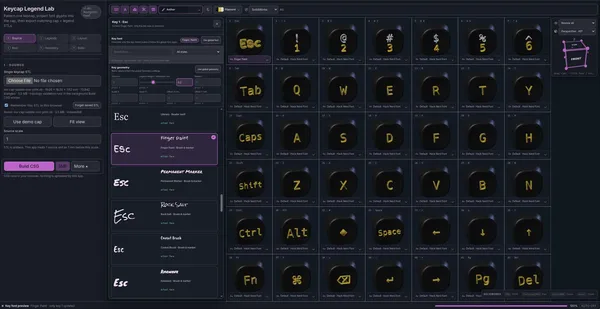





Blogging and blog setups
Jack Baty's blog — posts, journal, notes.
baty.net · baty.net [1]
Damn this hits. I’m trying to change it up, but I’m far on the right. constantly greasing the pipeline and writing about it. or lately just not writing at all.
[2]
Shots fired from Rakhim [3]
References:
[1]: https://baty.net/notes/2026/08/blogging-and-blog-setups/
[2]: https://dropper.waylonwalker.com/api/file/43533900-fc9f-4dcb-842f-207d8154aa70.webp
[3]: https://rakhim.org/honestly-undefined/19/

thinking about headlines
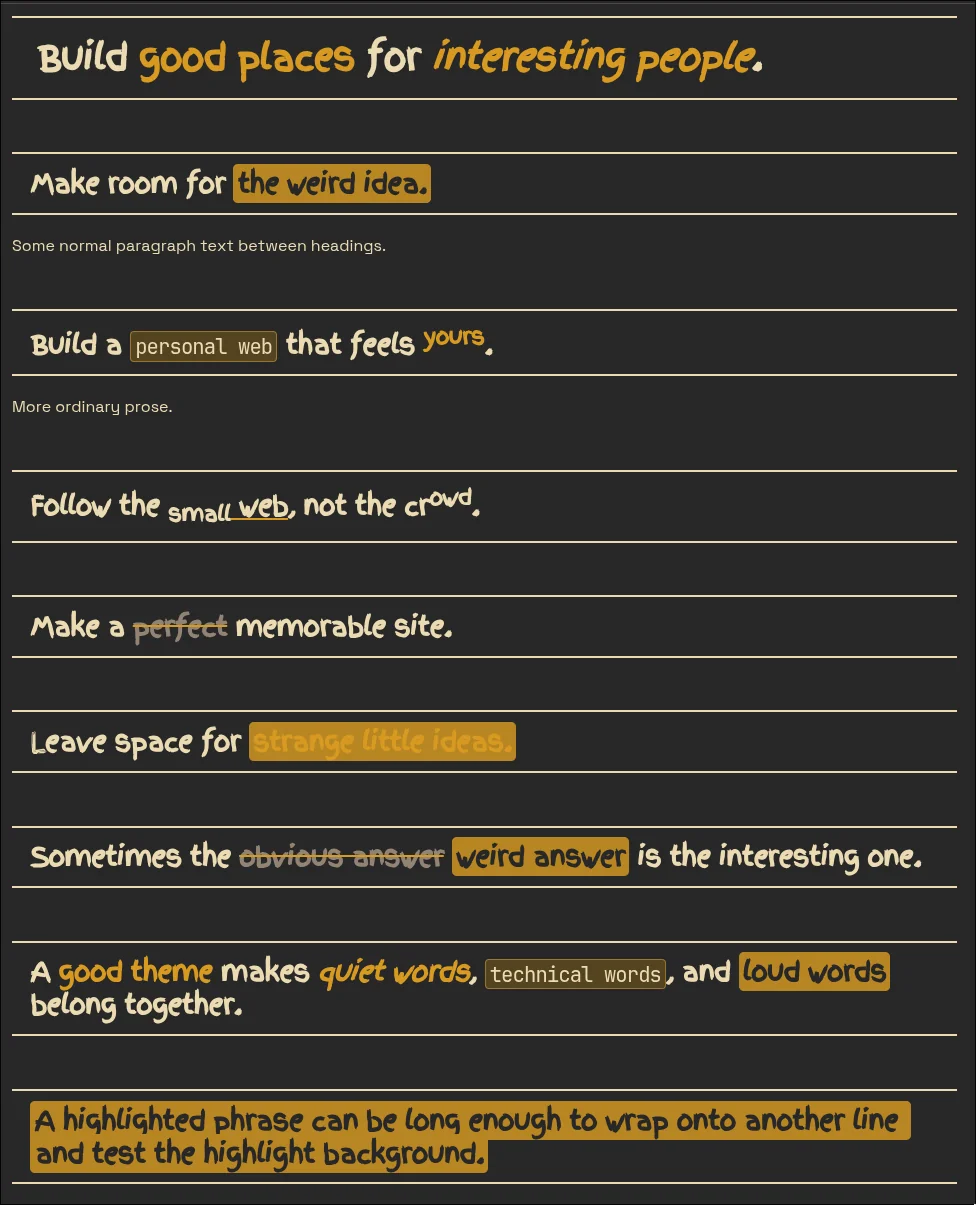
I updated [plaindown](https://waylonwalker.com/) to support _cool_ heading formats, and I'm digging it, markata you are next. Time to make the web weird again and really start writing more again.
---
## The code to make it ~~easy~~ ^**fun**^ to write
Here's the `markdown` that wrote it followed by the output here.
``` md
# Build **good places** for _interesting people_.
## Make room for ==the weird idea.==
Some normal paragraph text between headings.
## Build a `personal web` that feels ^**yours**^.
More ordinary prose.
## Follow the [~small~ web](https://waylonwalker.com), not the cr^owd^.
## Make a ~~perfect~~ memorable site.
## Leave space for ==**strange little ideas.**==
## Sometimes the ~~obvious answer~~ ==weird answer== is the interesting one.
## A **good theme** makes _quiet words_, `technical words`, and ==loud words== belong together.
## ==A...
-
I really like the art style of this game. Love that someone is making something Hollow Knight like in their own style. The bosses though… oddly a little close to hollow knight characters.
[1]
Those flowers
[2]
How is this not one of the city guards
References:
[1]: https://dropper.waylonwalker.com/api/file/e13a0d9a-a012-49a9-b7ab-e3fb9c4d3e84.webp
[2]: https://dropper.waylonwalker.com/api/file/f3366447-2474-40e5-b1bb-ac136464f70d.webp
-
Interesting tangent here on sleep, Adam talks about jet lag and his experience taking abien to shift his sleep schedule. In his experience it helped fix the sleep schedule, but did nothing to change how he actually felt during that time of re orienting in a new drastically different time zone. He was reminded of all of the sleep studies they did on mythbusters and how they found that it did not matter so much how much “sleep” you got that lying there still and quiet was nearly as effective as sleeping. Knowing this will, like others mentioned, will greatly relieve the sleep pressure I feel on nights of restlessness.
Ping 66
Human say few word, machine make big wow
Helix has got to have one of the easiest configurations. It is this easy to get the markata-go lsp in helix.
markata-go lsp setup --editor helix
# Helix languages.toml (usually ~/.config/helix/languages.toml)
[language-server.markata-go]
command = "markata-go"
args = ["lsp"]

[[language]]
name = "markdown"
language-servers = ["markata-go"]
-
I had no idea how these pipes work, I’ve accidentally spawned so many that have sat there and waited for something to come down the pipe, but did not know this is what was happening.
-
Every Dax Raad interview is worth a listen, this one does not disappoint. They talk about running local dev setups in a vm in the cloud. Always connected, seemlessly upgrading hardware without you needing to buy sell or trade a thing. They talk about the one model that drove them into psycosis, I’m pretty sure it was 5.6 sol, but it could not be revealed at the time. Software engineering is still required alive and well even through the agentic era here.
-
Great reference to 11 laws of the universe.
Bluesky
Bluesky Social · bsky.app [1]
So much nuance in model selection its hard to keep up.
References:
[1]: https://bsky.app/profile/thdxr.com/post/3mqsgohylgd2v
-
Completely missing the point of physical media. I don’t see why preserving physical media is a win for xbox right now. The game is not on disk. In 30 years when the game servers are gone, I wont be able to play the game. I wont be able to buy cheap used copies in 6 months as people beat the game. I wont be able to trade in games I’ve beat to get a different game at a low cost. own nothing and be happy.