Newsboat

Web browsers are a black hole of productivity. I try to use them as little as possible when it is time to focus. I try to use , , or with ipython, or --help...

Copy this post

Web browsers are a black hole of productivity. I try to use them as little as possible when it is time to focus. I try to use help, ?, or ?? with ipython, or –help at the command line as much as possible. What about that time I am trying to see what my online friends are posting on their sites? I used to used google reader quite heavily before that was taken down.

Newsboat #

I am going to give a terminal rss reader a try for a bit and see how that goes for me. I have really struggled to get into an rss reader since google reader died.

installation #

I installed with the reccomended snap for Ubuntu.

sudo snap install newsboat

Adding feeds #

super simple

Running help for newsboat directed me towards their config files at the bottom.

❯ newsboat --help
newsboat r2.22
usage: /snap/newsboat/3849/usr/local/bin/newsboat [-i <file>|-e] [-u <urlfile>] [-c <cachefile>] [-x <command> ...] [-h]
    -e, --export-to-opml        export OPML feed to stdout
    -r, --refresh-on-start      refresh feeds on start
    -i, --import-from-opml=<file>   import OPML file
    -u, --url-file=<urlfile>    read RSS feed URLs from <urlfile>
    -c, --cache-file=<cachefile>    use <cachefile> as cache file
    -C, --config-file=<configfile>  read configuration from <configfile>
    -X, --vacuum            compact the cache
    -x, --execute=<command>...  execute list of commands
    -q, --quiet         quiet startup
    -v, --version           get version information
    -l, --log-level=<loglevel>  write a log with a certain loglevel (valid values: 1 to 6)
    -d, --log-file=<logfile>    use <logfile> as output log file
    -E, --export-to-file=<file> export list of read articles to <file>
    -I, --import-from-file=<file>   import list of read articles from <file>
    -h, --help          this help
        --cleanup           remove unreferenced items from cache

Files:
    - configuration:  /home/nic/snap/newsboat/3849/.newsboat/config
    - feed URLs:      /home/nic/snap/newsboat/3849/.newsboat/urls
    - cache:          /home/nic/snap/newsboat/3849/.newsboat/cache.db

Support at #newsboat at https://freenode.net or on our mailing list https://groups.google.com/g/newsboat
For more information, check out https://newsboat.org/

I just need to edit its urls file.

nvim ~/snap/newsboat/3849/.newsboat/urls

The Urls file is just a list of urls to rss feeds. Adding mine in allowed me to see all of my posts.

https://waylonwalker.com/rss.xml

Config #

I took most of my config from a blog post that I found by Evan Travers. It set some sane defaults to the reading width and vim keys.

# https://evantravers.com/articles/2020/04/15/reworking-my-rss-reading/
# Hide feeds where all the items are read.
show-read-feeds no

# Make the text width readable
text-width 50

# Use multiple threads to download all the news faster.
reload-threads 11

# browser ~/bin/newsboat-browser.sh
# browser "/usr/bin/brave-browser %u"

# unbind keys
unbind-key ENTER
unbind-key j
unbind-key k
unbind-key J
unbind-key K
unbind-key ^D
unbind-key ^U
unbind-key o
unbind-key g
unbind-key G

# bind keys - vim style
bind-key j down
bind-key k up
bind-key l open
bind-key h quit
bind-key ^D pagedown
bind-key ^U pageup
bind-key b toggle-source-view
bind-key U toggle-show-read-feeds
bind-key u show-urls
bind-key g home
bind-key G end
bind-key b open-in-browser-and-mark-read
bind-key B open-in-browser
bind-key i sort
bind-key I rev-sort

GUI Browser #

No matter how many different guides I tried I keedp getting error code 127 when trying to open-in-browser. Please let me know if you know how to fix this. For now I am just going to roll with it.

Here’s how it looks #
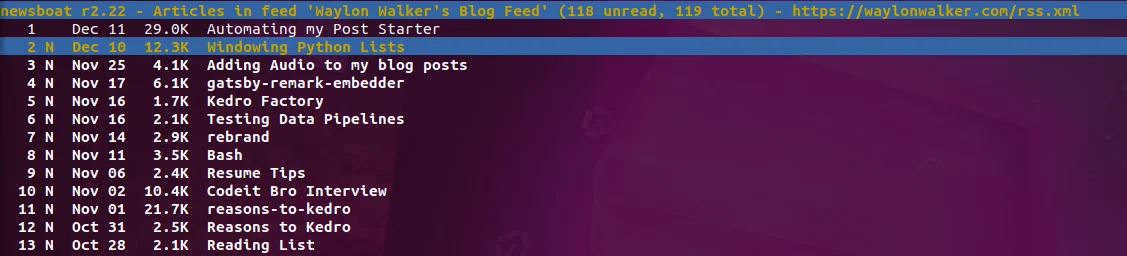
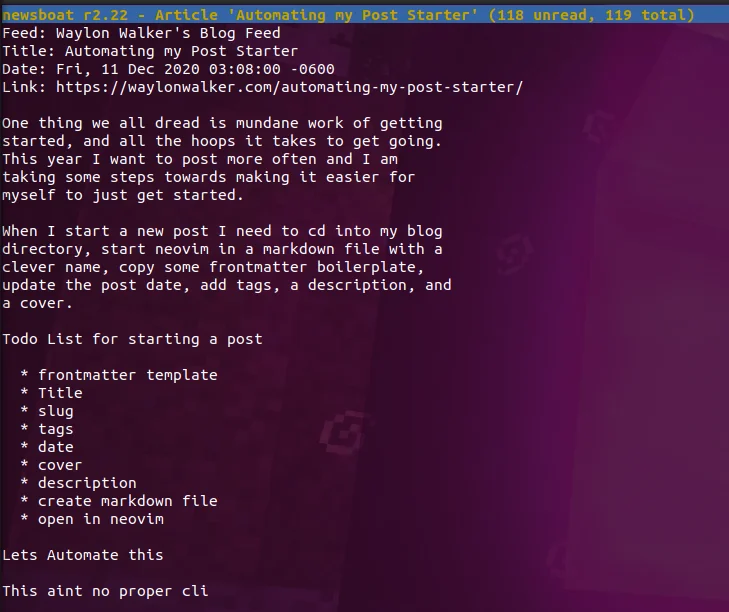
newsboat feed

browsing a feed in newsboat

newsboat article

reading an article in newsboat

Interactions (1)

🔗 1 Mention

Curtis McHale
Curtis McHale

Terminal RSS with Newsboat

I’ve been falling in love with the simplicity of terminal based apps lately and that started in part with Newsboat the terminal based RSS reader I’ve been using for a few months. I’ve already written a short post about setting up Newsboat with Nix Home Manager but wanted to take a deeper dive into the tool today.

Why Terminal?

The first question you may be asking is why on earth would you use a terminal based tool? First, I love keyboard commands and most of the RSS readers I tried on Linux simply didn’t have a good set of keyboard commands, that is if they even worked and were under active development.

Second, by choosing a TUI app, I can take my RSS reader to macOS or Windows should I ever make one of those platforms my computing environment of choice.

Third, the few RSS readers that worked on Linux and were still under somewhat active development were resources hogs. I’d open one and my fans would instantly spin to full speed on my laptop. I’m usually plugged in so battery life isn’t as big a deal, but the fan noise is annoying and simply knowing that an app is sucking down resources gets under my skin.

Okay so Newsboat

First lets dive into my current home-manager Newsboat1 configuration below.

  programs.newsboat = {    enable = true;    autoReload = true;    reloadTime = 10;    extraConfig = "urls-source \"feedbin\"feedbin-login \"[email protected]\"feedbin-passwordfile \"~/.newsboat/feedbin-password\"text-width 100reload-threads 11show-read-feeds no## keybindingsunbind-key junbind-key kunbind-key x## rebindingbind-key j downbind-key k upbind-key x quit# Theme newsboat# Color chart: https://www.calmar.ws/vim/256-xterm-24bit-rgb-color-chart.html# Color docs: https://newsboat.org/releases/2.37/docs/newsboat.html#_colorscolor listnormal         color237 color254color listnormal_unread  color237  color254 boldcolor listfocus_unread   color237  color250 boldcolor listfocus          color237 color254 boldcolor background         color254 color254color article            color237 color254color end-of-text-marker color8  defaultcolor info               color4  color15 boldcolor hint-separator     color4 color15color hint-description   color4 color15color title              color4 color15 boldhighlight article \"^(Feed|Title|Author|Link|Date): .+\" color237 color254 boldhighlight article \"^(Feed|Title|Author|Link|Date):\" color237 color254 boldhighlight article \"https?://[^ ]+\" color4 color254 boldhighlight article \"\[[0-9]+\]\" color4 color254 bold    ";  };

One of my first issues with Newsboat was how slow it was to reload my feeds, taking a minute or two. This was fixed by adding the reload-threads 11 line and now my hundred or so feeds are checked for new content in about 20 seconds.

Next, while Newsboat has default keyboard commands for navigating the interface I’m very used to vim style navigation. This was easily achieved by first making sure a few keys were not mapped, then mapping them to the vim-style mappings I wanted. Now j and k navigate up/down in the article lists.

The final hurdle was the barely readable white text on black background that Newsboat comes with. Newsboat has a fairly comprehensive theme setup but it’s not that obvious at the beginning. I suggest using the two links embedded in my configuration to find which elements can be changed and what each color is.

I started my theme with a catppuccin Newsboat theme but it didn’t really work so I used that as a basis to understand how to modify the Newsboat interface and then come up with the theme you see in the screenshots of Newsboat.

My Newsboat theme

I’ve still got some tweaks I want to make to my theme, but it’s far more readable than it started out. I’d also like to take some inspiration and write some of my own custom tooling around Newsboat to send things directly to Obsidian or whatever read later service I end up using.

Extra Links

  1. All Home Manager does is compile my settings down to the expected config file for Newsboat. It does this for many apps and system settings which lets me control most of my system from a single file. ↩︎

#linux #newsboat #rss #terminal