THIS is the future of homelab, excited to see someone who knows so much more about hardware than I do get excited about this.
Posts tagged: homelab
All posts with the tag "homelab"
40 posts
latest post 2026-04-08
Publishing rhythm
paynepride dot com outage on vacation The day after I leave for vacation I start getting SSL errors on every homelab service I host for myself and others. The culprit was my Cloudflare API token... My mental data-lake · pype.dev oof, outage on the homelab during vacation, brutal. I can think of a couple of similar solutions to what @pype has done to tailscale in, but I’m not sure that I could do this remotely. On one hand I’m so glad that cloudflared just takes care of certs on the other hand this really brings a gap in my understanding of what the heck I would do if it were broken. An untested DR plan is not a DR plan. An untested backup does not exist.
The Right Reasons To Run Kubernetes In Your Homelab
Running kubernetes in your homelab is a fantastic way to learn, explore, express yourself, and run services that you use. The Right Reasons To Run Kubernetes In Your Homelab There are not many You want to learn kubernetes You like kubernetes You want to learn to scale There are also The Wrong Reasons To Run Kubernetes In Your Homelab You want to learn kubernetes Homelabbing is a such a great way to learn new skills, deploy real apps that you use. Create new custom apps for your specific use cases that no one else has. You should absolutely run kubernetes in your homelab if you want to learn it. I would recommend to start locally, pull up kind, minikube, or k3d and start from your local machine before putting it on a server. When you decide you are ready for a server, you probably don’t need any crazy hardware. You can probably run on some old retired Dell Optiplex or an old desktop someone is throwing out as it no longer runs windows. You like kubernetes Hell Yeah Brother, 100% no bett…
I learned to today that setting MEMORY on your minecraft server causes the
JVM to egregiously allocate all of that memory. Not setting it causes slow
downs and potential crashes, but setting INIT_MEMORY and MAX_MEMORY gives
us the best of both worlds. It is allowed to use more, but does not gobble it
all up on startup.
In this economy we need to save all the memory we can!
Here is a non-working snippet for a minecraft server deployment in kubernetes.
      containers:
        - name: dungeon
          image: itzg/minecraft-server
          env:
            - name: EULA
              value: "true"
            - name: INIT_MEMORY
              value: "512M"
            - name: MAX_MEMORY
              value: "3G"
and in docker compose
  dungeon:
    image: itzg/minecraft-server
    environment:
      EULA: "true"
      INIT_MEMORY: "512M"
      MAX_MEMORY: "3G"
The Wrong Reasons To Run Kubernetes In Your Homelab
Running kubernetes in your homelab is complex, time consuming, there are almost no docs to help you (homelab focused docs for things you want to install), and nothing is copy paste. You have to make everything happen yourself. The Wrong Reasons To Run Kubernetes In Your Homelab I run compose and think kubernetes is the next logical step Techno Tim runs it I heard it’s what cool kids do Kubernetes BTW Talos Linux looks cool I found a cool helm chart on GitHub I need scale There are also The Right Reasons To Run Kubernetes In Your Homelab. I run compose and think kubernetes is the next logical step No it’s not. It’s much different than running docker, compose, swarm. It’s meant for scale, it’s complex, it’s made for enterprise, not your local development or your homelab. It can do these things, it can do them quite well, but it’s not the target audience. Techno Tim runs it I heard it’s what cool kids do You need to rethink who the cool kids are, touch some grass. Tim also does it for his…
Today I learned that while .stignore and .gitignore look very similar they
are not. My obsidian directory had been locked up for a few weeks and I had no
idea why until I logged into the web ui and saw errors. The errors were some
confusing regex validator not matching. I don’t know what the exact error was,
but I went in and only ignored the files I cared about instead of the entire
gitignore. Primarily I was getting conflicts in my .git directory.
Today I learned how to use tar over ssh to save hours in file transfers. I keep all of my projects in ~/git (very creative I know, I’ve done it for years and haven’t changed). I just swapped out my main desktop from bazzite to hyprland, and wanted to get all of my projects back. Before killing my bazzite install I moved everything over (16GB of many small files), it took over 14 hours, maybe longer. I had started in the morning and just let it churn.
This was not going to happen for re-seeding all of my projects on my new system, I knew there had to be a better way, I looked at rsync, but for seeding I ran into this tar over ssh technique and it only took me 6m51s to pull all of my projects off of my remote server.
ssh [email protected] 'tar -C /tank/git -cpf - .' \
  | tar -C "$HOME/git" -xpf -
trying forgejo
WIP
GitHub Ensloppification The one where I say goodbye to GitHub dbushell.com · dbushell.com David’s got me looking at Forgejo. I’ve seen a lot of GitHub jumpers just this week, and I’ve been tempted for a long time to self host one anyways, so it might be time. I don’t have hard issues with anything, I just like self hosting my own personal stuff. On the flipside, I hope this does not turn yet another thing to shit. I lived through the download software from sourceforge and hope you get the right download now button and not the one from the virus ad. I’m not putting my really public/useful projects on a self hosted platform… well not as the only source, I see how that comes off edgy. I like having some trust in the platform. Currently theres a lot of issues with M$ and GitHub using you for your data, but I don’t think injecting virus, malware, bitcoin miners is a worry I have coming from a GitHub release, unless it was put there by the author.
Should I kubernetes My Homelab
Yes Ok we should probably dive deeper into this, but good chance if you are here and have made it this far you it would probably be a fine choice. The choice is quite time and skill dependant. Time First thing up, if you like copy pasting thing into your homelab, changing a few config options, but mostly running it as the docs instructed, kubernetes is not for you. The homelab/self hosting space is heavily reliant on docker compose, 90% of the things you want to run will likely have a docker command, and likely a docker compose example that you can copy paste and get running right away. Maybe 5% of projects have something for kubernetes, you Will have to do it yourself. Kubernetes is very DIY in the self hosting space, and not very plug and play. Skill
csi-driver-smb/deploy/example/smb-provisioner at master · kubernetes-csi/csi-driver-smb This driver allows Kubernetes to access SMB Server on both Linux and Windows nodes. - kubernetes-csi/csi-driver-smb GitHub · github.com Great guide to setting up a samba server right in kubernetes. I tried it out after too long of playing with trying to get connected to a samba share on ucore, no idea what was wrong, but this just works, and will live in my homelab no matter what distro I’m on, no playbook required to set it up, just good ol k8s manifest. TBH I cheated and haven’t set up the secrets yet, so its not quite in argocd or in my github repo, but POC is there and it works as advertised without issue.
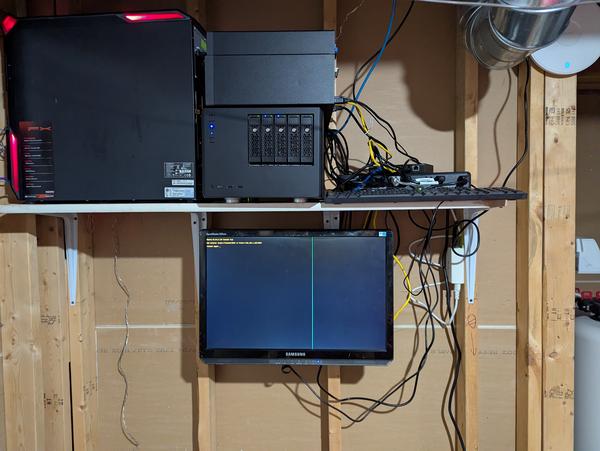
Lab Update Update on the lab setup and what I’ve been working on recently. Cloudy with a Chance of Tech · blog.thomaswimprine.com Always enjoy a good read through someone elses setup. I appreciate the desire for pi clusters they are cute, they seem cheap, but feel a bit overrated (at least for those of us with relatively cheap electricity). I love seeing the refurb “tiny desktops” getting a second useful life in a homelab after they have serve their useful life in the corporate world sitting behind the monitor of some reception desk. These things rock, they are underrated, x86_64, not ARM, so they just work. Until ARM becomes more normalized in the datacenter this is where its at.
Backups interrupted by full disk usage I just got a message from HCIO that my primary backup script is late... This happens every now and then but I decided to check on it... Quickly in and I... My mental data-lake · pype.dev I’m way behind on my notification game and need to pick it up. maybe I’ll look into hcio as well. maybe I’ll look into something that goes straight to signal or just get things working on ntfy. An 80GB log file is massive and the kind of thing id like to see notifications more.
Helm - Postiz Documentation Install Postiz using Kubernetes and Helm Postiz Documentation · docs.postiz.com I didn’t realize that postiz had a helm chart, I just hand rolled mine based on the compose file they provide. I went from running the compose stack locally to running in my homelab with kubernetes. I am using cnpg rather than a postgres container which I really like the workflow of as far as backup and restore. The one hiccup I ran into was changing the domain from localhost to my homelab domain killed all of my integrations and they needed the redirect url updated.
Perils of Self-Hosting We speak to Kevin and Patricia from Traefik, discuss Alex's recent ZFS snafu and we wonder if the new Chromecasts can match up to the Nvidia Shield. Self-Hosted · selfhosted.show Interesting takes on Diun here. I agree that I like to be in control of updates and pinning not to latest. both seemed like they weren’t going to run it because they can look up the latest version. Maybe I need to be less aggressive on keeping things up to date and its a me problem. I just got diun setup and hooked into ntfy, and I kinda like the automated checklist of new images that I can review and update. To be a bit more clear, having control over changes coming in from others, even if I dont care to see the changelog, it is nice to roll out an update, have it in your git history, watch it deploy and work like before, if not roll back and read the changelog. For internal applications I’m down for automated releases like argo image updater give you, this thing has already gone through review, launch the damn thing at least to a dev space.
Changing k8s Storage Class - Migration Job
I’m setting up longhorn in my homelab, and I ran into an issue where I initially setup some pvcs under longhorn, and later realized that to get longhorn to snapshot and backup I needed to hand edit volumes after the fact or change storage class. I’m all in on gitops so option 1 was not an option. So changing storageclass it is. Now the issue is that you CANNOT mutate storageclass on a provisioned pvc, it is an immutable attribute. Migration Job This migration job will create a new pvc with the new storageclass and move the data from the old pvc to the new pvc. Existing Pods This migration job will not work if you have a pod using the old pvc. You will need to shutdown the pod and delete it. Apply the manifests and wait for the job to complete. Cleanup I had chatgpt create me a script to help me find what is using the pvc so that it can be deleted. I had still had cronjob pods completed, so I had to delete them first.
homelab drive ids
Drive Bay 1 ata-ST4000VN008-2DR166_ZDHBZSWZ +————————————————————————-+ | [ Power] [ Reset] | +————————————————————————-+ | [ BAY 5] 3TB WD30EFRX WMC4N0D3J9R7 ext4 /mnt/sdf4 | +————————————————————————-+ | [ BAY 4] 14TB EXOS ZTM09R9N zfs main pool mirror /mnt/main | +————————————————————————-+ | [ BAY 3] 14TB EXOS ZTM0AALS zfs main pool mirror /mnt/main | +——————————————-+ | [ BAY 2] 4TB IRONWOLF ZDHBZV3N zfs tank pool mirror /mnt/tank | +————————————————————————-+ | [ BAY 1] 4TB IRONWOLF ZDHBZSWZ zfs tank pool mirror /mnt/tank | +————————————————————————-+
Resetting a lost admin password — Nextcloud 36 Administration Manual docs.nextcloud.com This is a handy line to reset your admin password in nextcloud.
2025-nas
Current inventory Silverstone micro-atx case 5 3.5" hot swap drive drive bays 2 3.5" 3.5" drive bays 2 Seagate 4TB 3.5" drive (trust worthy drives) 1 WD 3TB 3.5" (could be a trash drive for stuff that does not matter) ryzen 3300G 16gb Gskill Trident Z rgb ram 500GB nvme ssd - I have this installed in a machine I would like to keep there, but not hurt if I pulled it Dream Build $169 seagate exos x16 $79 motherboard ASUS Prime B450M-A II - has 6 sata ports $79 motherboard ASROCK B450M PRO4 R2.0 only has 4 sata ports $85 power supply CORSAIR RM650 $89 Crucial 64GB ram $89 2TB nvme 4 16TB drive option 169*4 + 79 + 85 + 89 + 89 = $1018 2 16TB drive option 169*2 + 79 + 85 + 89 + 89 = $680 only 2 4TB drive 79 + 85 + 89 + 89 = $342 2 16TB drive - 16GB RAM I think this is my option I’m leaning towards, good modular power supply, 500GB nvme from budget list. 169*2 + 79 + 85 + 30 = $532 using my existing 500Gb nvme drive 169*2 + 79 + 85 = $502 using only existing 4TB drives 79 + 85 = $164 Budget…
Calendar data could not load. Try again.