“You should never build a CMS” | Sanity Lee Robinson migrated cursor.com off Sanity. He made good points. Here Sanity.io · sanity.io Such a good breakdown of the leerob article, that is hitting everywhere right now. Feels like sanity was just a bit late to getting things right and it would have just worked for them how leerob was trying to use it, but MCP sucked so he jumped. Reading their loose descriptions of a CMS, its an interesting realization to realize I’m rolling my own cms. I kinda feel like theres a few inspiration features to take from here, but I have no regrets. As a developer I like being able to build my own tools, I like being able to search and edit from nvim, and not have to write GROQ queries, and transforms. There were some really good points here that as I get more and more content on my personal site, I do kinda feel it. I’m surprised there is not more tooling that does some of these things for piles of markdown. pinning this to re-read later, feels like a lot of good tidbits here.
I’ve been using this one for awhile now, I have a post type that I only edit
from my phone, but I have all the post numbered. I set up a template in
obsidian for using templater, the template goes right in the static site repo,
I point templater to the templates directory and this has been working pretty
seamlessly for awhile.
---date:<% tp.date.now("YYYY-MM-DD HH:mm:ss") %>templateKey:myposttypepublished:truetags:- myposttype<%*const folder = "pages/myposttype";// get all files in the vault, keep only those inside the folderconst files = app.vault.getFiles().filter(f => f.path.startsWith(folder + "/"));// extract numeric suffixes from filenames like myposttype-123.mdconst nums = files.map(f => {const m = f.basename.match(/^myposttype-(\d+)$/);return m ? parseInt(m[1], 10) :null;}).filter(n => n !== null);// next number (start at 1 if none exist)const next = (nums.length ? Math.max(...nums) :0) + 1;// include the .md extension when movingconst newPath = `${folder}/myposttype-${next}`;await tp.file.move(newPath);%>---
Dang Strong takes against markdown here with a strong push for bespoke content models/structures. This idea is completely foreign and wild to me. I get it that markdown has its issues with flavors, add ons and what not, but overall its mostly transportable, its a skill that works most content sites and writing tools. I am so far on the other side that I seek out tools with markdown as an option and lean away from wsiwyg tools with specialized data formats on the backend. I’ll end with, I’m also a dev that creates very simplified content and maybe seeing the backend of a site with lots of custom fields would be very eye opening for me.
Marp: Markdown Presentation Ecosystem Marp (also known as the Markdown Presentation Ecosystem) provides an intuitive experience for creating beautiful slide decks. You only have to focus on writing your story in a Markdown document. marp.app Intersting markdown presentation tool, Looks very simple. I really like split on much better than by h1 or h2. Their theme looks really nice in the screenshots.
Today I was playing with markdown split panels. I want to be able to compare and constrast occasionually, today the inspiration hit to do this using admonitions. Mobile Users 🔄 You will need to rotate your device to see the side by side feature. The Markdown This is what I am going for, one admonition that is easy to remember, that nests inside of itself, and I can put as much markdown on the inside that I want. Here is the result of that markdown. I Have two opinions Left Opinion supporting arguments lorem ipsum ipsum dolor lorem ipsum ipsum dolor Right Opinion supporting arguments lorem ipsum ipsum dolor lorem ipsum ipsum dolor Vsplit Hello World Here is a hello world application written in the typer cli framework for cli. Vsplit
bic Static blog generator, in bash bic · bic.sh Intereresting someone built a blog generator in bash. it comes with normal markdown to html, static content, robots.txt, sitemap, rss, and tags. It uses pandoc to take markdown to html and mustache for page templates.
Wikilinks are a core concept within obsidian to link to documents by Slug wrapped in double square brackets. These are commonly used within wiki site generators.
[[slug]]
Obsidian gives you a keybinding alt+enter to go to that file, but if it does not exist it will create the file for you in the root of the project. It’s a nice way to quickly make new documents.
Hotkey to open link under at the text cursor position while typing in edit mode I find myself not wanting to leave the keyboard for navigation and think a keyboard-only shortcut that could open a link at the text cursor position is at would be really handy for this case. Obsidian Forum · forum.obsidian.md Obsidian has a go to definition like feature, the keybind is alt+enter, I would have never guessed this one.
It was not obvious to me, but if you have a wikilink such as Trying Obsidian, you can jump to the file in obsidian, just like you can with lsp go to definition, the keybinding is alt + enter.
I’ve long used copier to create all of my posts for my blog, and it works
really well for my workflow. I think of a title, call a template, and give it
a title. out of the box obsidian did not seem to work this way. It seems like
it wants me to right click a file tree and make a new file using the tree, this
is not my jam.
Here is what I came up with to replace my til template.
---
date: <% tp.file.creation_date() %>
templateKey: til
title: <%*
  const originalFileName = await tp.system.prompt("Enter file name");
  const toTitleCase = str => str.replace(
    /\w\S*/g,
    txt => txt.charAt(0).toUpperCase() + txt.substr(1).toLowerCase()
  );
  const title = toTitleCase(originalFileName);
  tR += title + '\n'; // Add the title to the template result
-%>
published: true
tags:
  -
---
<%*
const fileName = originalFileName.toLowerCase().replace(/\s+/g, '-');
const newFilePath = `pages/til/${fileName}`;
await tp.file.move(newFilePath);
-%>

<% tp.file.cursor() %>
tR is a return value, and it gets placed directly into the place it is in the file
to.file.cursor() creates a tab-index point so I can tab into the content
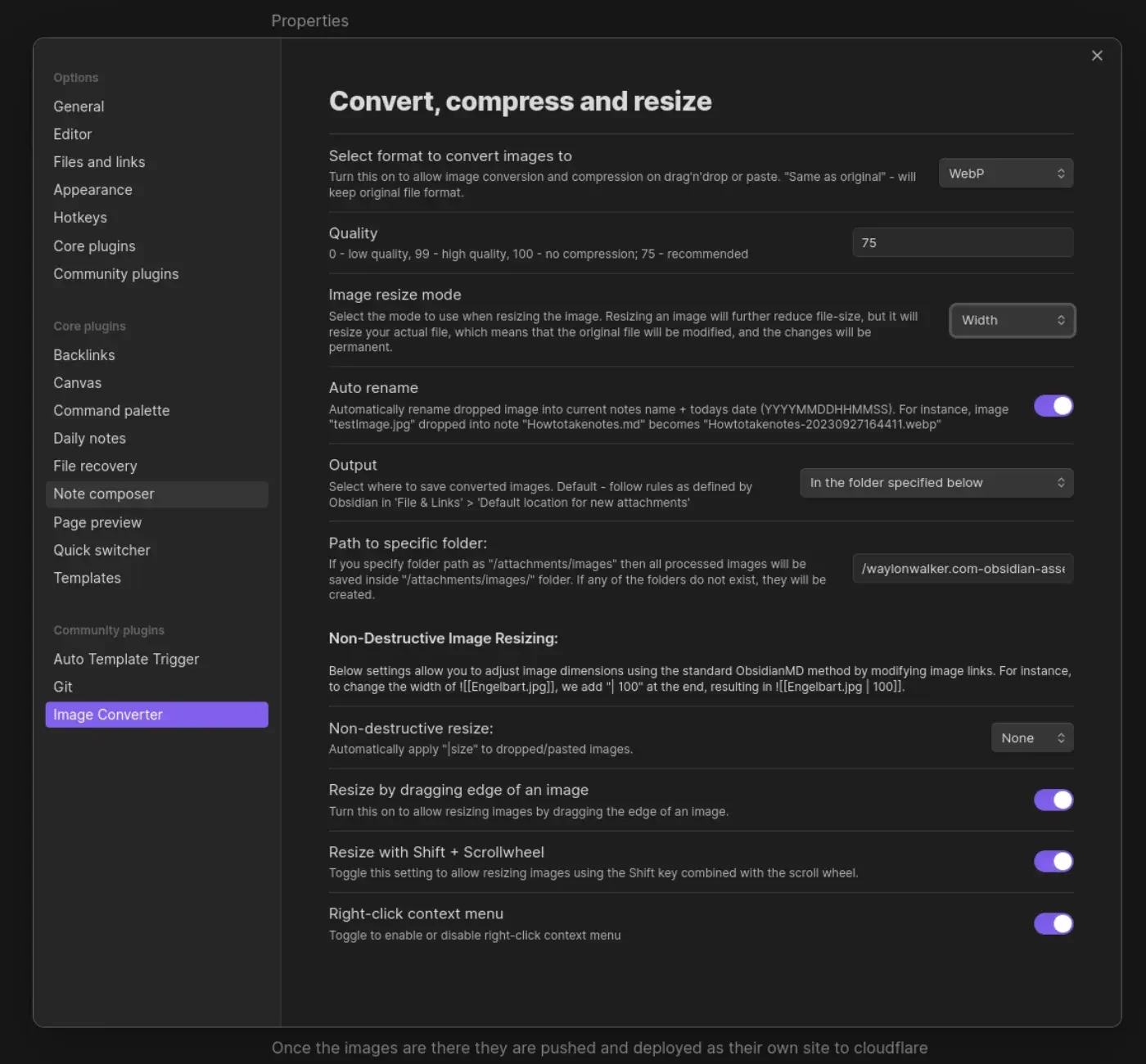
I’m giving obsidian a go as an editor for my blog and one of the main things I
want to fix in my workflow is the ability to quickly drop in images. on first
look through the community plugins I found Image Converter. I set it up to
convert to webp and drop them in a git submodule. I may make it something
other than a git repo in the future, but I’ve learned that adding images to my
blog repo quickly makes it heavy and hard to clone on other machines.
Once the images are there they are pushed and deployed as their own site to
cloudflare pages. I made a quick edit to my sick wikilink hover plugin for
my blog. if it sees a wikilink ending in webp, convert the domain over to
obsidian-assets.waylonwalker.com, and clean up the remaining "! " that the
python md-it library leaves behind.
Note
after first try I needed to increase the width from 600 to 1400, the image in this post was unreadable.