This morning I had a machine crash on me and came back to an error.
Error
zsh: corrupt history file /home/u_walkews/.zsh_history
Dammit I don’t want to redo my shell history, I checked with a clanker and they
came up with this solution using strings that only prints printable
characters.
I’ve been deploying my site old school for most of this year, rsync to a volume
mounted to nginx. I ran into an issue today where I updated my site and all of
the pages updated first, followed by upload. The issue this created was that
the new cache busted css files were not up yet and the site had no styles for a
brief period during upload.
I found that delaying updates and delaying deletes until the new content exists
first solves this problem pretty well. Theres still possiblility of jank while
uploading to a live directory and not doing some sort of hot swap, but I’m good
with this low budget option for now.
Session ID: ses_3444b09b1ffeXTEr3ELFg5qqtg
Created: 3/4/2026, 7:55:24 PM
Updated: 3/4/2026, 8:52:32 PM
---
User # [1]
I want to spec out a cli for tmux session switching in go.
- responsive to terminal size
- works in tmux popup
- shows list of tmux sessions with favorites pinned at the top
keymap
- j/k arrow navigation
- tab to switch sections
- asdfqwertzxcvb to pick a session (letter listed next to the session)
- space to select a session, then arrows j/k move that session up in priority and hotkey letter
---
Assistant (Build · gpt-5.3-codex · 2.4s) # [2]
Thinking:
Initiating brainstorming skill load
Tool: skill
Input:
{
"name": "brainstorming"
}
Output:
<skill_content name="brainstorming">
# Skill: brainstorming
# Brainstorming Ideas Into Designs
## Overview
Help turn ideas into fully formed designs and specs through natural collaborative dialogue.
Start by understanding the current project context, then ask questions one at a time to refine the idea. Onc...
I’ve been thinking about this for awhile now. For years now, fuzzy pickers and
last session have been my go to. They have served me well. I can typically
only keep so much in my head anyways. I’m often doing a hub and spoke pattern
between main project, notes, and infra repo, maybe two projects. Don’t get me
wrong, I regularly run with a dozen or more sessions running at a time, but
only two to three are in my immediate context at any point anyways.
The Design # [1]
harpoon for tmux
press a hotkey followed by one more keystroke, currently any left hand letter
SIMPLE, FAST, thats of utmost importance, what I want are sessions that I can
can be assigned in order of importance from middle row, top row, bottom row.
I added this binding to my tmux config. Now I can press c-a a to go to the
first session, c-a s to go to the second session. c-a and pause to think
j/k to navigate, space to pick up a session and move it, x to kill it.
bind-key -n c-a popup -E '~/go/bin/tgo'
Enter the ag...
In the age of agents sometimes work gets done on so many different worktrees
and branches its hard to tell if there is already a PR or any of them or not,
the great gh cli has us covered.
gh pr list --head fix/markata-go-connections-graph
Ansible Vault keeps secrets out of sight, but the ciphertext changes on every
encrypt. That turns Git [1] diffs into noise and makes it hard to tell if anything
actually changed. Decrypting, editing, and re-encrypting often leaves
uncertainty about whether any plaintext changed. This is amplified when secret
repos are tightly coupled to dependent repositories. A typical cycle includes
decrypting, adding a key, updating a value, applying changes, and returning
later with little clarity about what changed while secrets were in plaintext.
Today a new workflow was created with @gpt-5.2-codex to keep diffs clean and
avoid re-encrypting when the plaintext is identical.
[2]Waylon Walker
This repo has ansible vaulted secrets and an encrypt/decrypt process, but no
way to compare. Please research compare options. The goal is to avoid
changing files on encrypt/decrypt when plaintext is unchanged, ideally by
comparing decrypted content and reusing the remote encrypted file.
@gpt-5.2-codex
...
-
Yeah there’s some basics, you know things you might expect like using standard error and standard out correctly. One thing I’ll say on that because I think this is commonly misunderstood, standard error is not for errors, it’s for any information that isn’t part of the normal output. So you know often times that’s warnings and errors, but it might just be progress information. You know anytime that you just need to have something go to the user that’s what it’s there for." (6:15 - 6:42)
I’ve definitely done this sin in my own tooling before, and it does make things harder to use. I think I still take err/out at face value. I really like the translation Jeff gave here, one is for normal output, i.e. what the user asked for and the other is extra information. So if I wanted to list something and pipe it into something else, stdout only captures the list, thats it. if you have a bunch of information about config warnings, showing environment, are you sure questions, none of that is captured.
When using two GitHub accounts the gh cli gives very easy gh auth switch workflow from the cli.
from the docs
gh auth switch –help
Switch the active account for a GitHub host.
This command changes the authentication configuration that will
be used when running commands targeting the specified GitHub host.
If the specified host has two accounts, the active account will be switched
automatically. If there are more than two accounts, disambiguation will be
required either through the --user flag or an interactive prompt.
# list accountsgh auth status
# switch accounds (interactive if more than 2, i've never seen this personally)gh auth switch
setting COLUMNS env var to a number greater than 0 will make the terminal resize to that number of columns.
COLUMNS=80 uvx --from rich-cli rich myscript.py
Note
Not all programs respct the COLUMNS env var, but rich does, and a lot of
stuff I’m building uses rich.
I discovered this when I was trying to make a low effort readme generated from
the code, but did not depend on the size of terminal it was ran on.
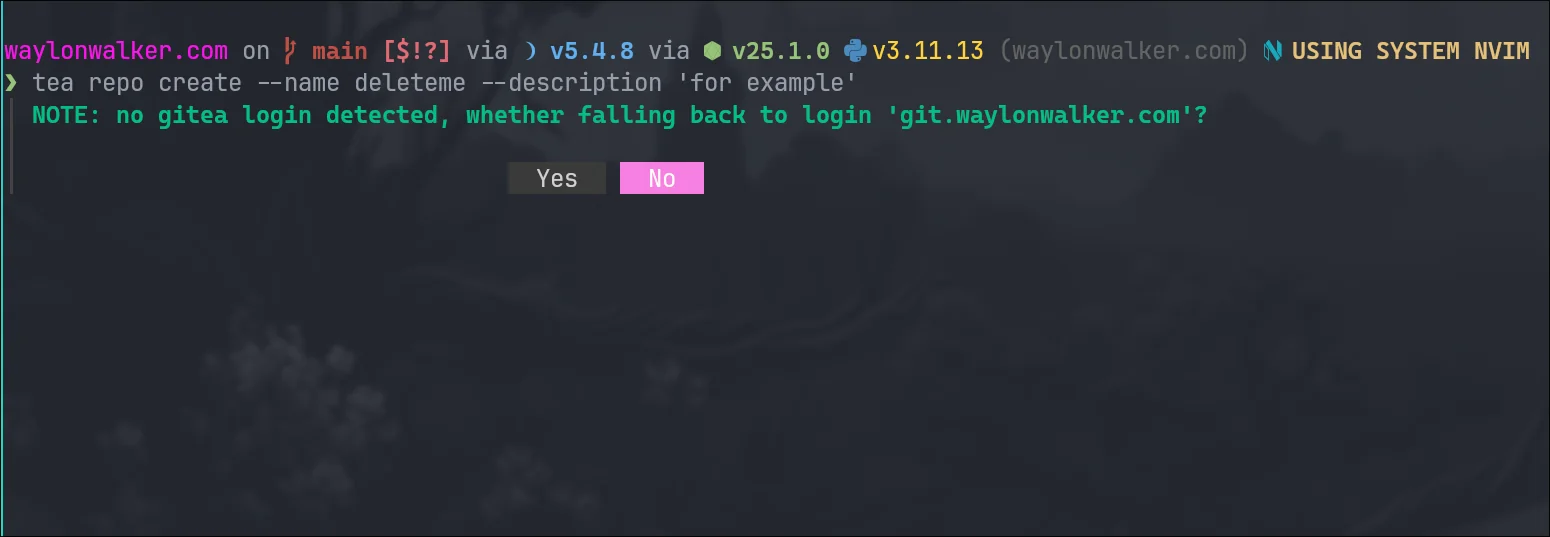
The tea command for gitea (used by forgejo) has a flag for login. With gitea
you can have multiple accounts logged in. When you try to run a command such
as repo create it will prompt you which login to use, but I learned that you
can bake it in to all of them with --login <login-name>
❯ tea repo create --name deleteme --description 'for example'┃ NOTE: no gitea login detected, whether falling back to login 'git.waylonwalker.com'?
-
Atuin desktop sounds dope AF, tried to install it off the AUR [1] and it was broken for me. Seems early and the dev team is all in on mac. They have an official .deb and .rpm. I’ll have to try again later, maybe the binary will work.
The idea of building out runbooks from my Atuin data sounds dope AF. It sounds like a mix of markdown and executable cells like a jupyter notebook, but not. Really pitching hard to those of us in the system administration, dev ops, SRE space. Having something that you walk through when a system goes down and you are feeling panicked in DR mode sounds relieving.
References:
[1]: /aur/
Today I learned how to use tar over ssh to save hours in file transfers. I
keep all of my projects in ~/git (very creative I know, I’ve done it for years
and haven’t changed). I just swapped out my main desktop from bazzite to
hyprland, and wanted to get all of my projects back. Before killing my
bazzite install I moved everything over (16GB of many small files), it took
over 14 hours, maybe longer. I had started in the morning and just let it
churn.
This was not going to happen for re-seeding all of my projects on my new
system, I knew there had to be a better way, I looked at rsync, but for seeding
I ran into this tar over ssh technique and it only took me 6m51s to pull all of
my projects off of my remote server.
[1]2025-07-09 Notes [1] from yesterday I have temporal stuff kind of going with postiz in a windsurf session working on [[thoughts-to-nostr]] Been cleaning up my z" loading="lazy">
2025-07-10 Notes | Nic Payne
2025-07-09 Notes [2] from yesterday I have temporal stuff kind of going with postiz in a windsurf session working on [[thoughts-to-nostr]] Been cleaning up my z
pype.dev
big fan of eza and dust, I like these aliases to have some common commands at my fingertips. I often use the tree command and yes it sometimes goes too deep to actually be useful.
alias lt='eza -T --level=2' # Tree view, 2 levels deep
alias ltt='eza -T --level=3' # Tree view, 3 levels deep
alias du1='dust -d 1' # Show only 1 level deep
alias du2='dust -d 2' # Show 2 levels deep
References:
[1]: https://pype.dev/2025-07-10-notes/
[2]: /2025-07-09-notes/
I am a linux user through and through. Desktop, server, vms, containers,
everything except my phone is linux. With this I spend a lot of time in the
terminal, and have been a long time user of !! to rerun the last command, but
with the ability to tack something on at the beginning or end.
TIL about fc, which opens the last command in your shell history in your
$EDITOR or pass in your editor -e nvim.
yaya yaya, I know you can also up-arrow c-e, but what fun is that, it’s barely a
flex. fc just looks big brained and like you really know what you are doing.
You can unset multiple environment variables at once. I did not know this was a
thing, its something that ended up happening organically on a call and asking
someone to run unset. They had never done it before and did not know how it
works, but did exactly as I said instead of what I meant. I like this handy
shortcut doing it in one line rather than each one individually, I will be
using this in the future. You might need this for something like
running aws cli commands with localstack.
It’s sad to see textualize.io close the doors, but textual is still alive and
maintained as a n open source project. I tried to use it very early, and
struggled, this was before docs and tutorials really existed, before a lot of
the widgets and components existed. Then as we all do I got busy and moved on
to other things in life and did not have the capacity to build TUIs.
I like tuis # [1]
I like tuis, I like staying in the terminal. I use
lf [2] daily to move files around when I
want something more than mv and cp. I use
k9s [3] hourly to monitor and manage my
kubernetes cluster.
Are they worth the effort?? # [4]
As awesome as tui’s are, they are more effort to build, and less automatable.
I feel like the first stage into automation of a project really needs to be a
good cli, and this is often good enough for the project and I move on.
m9a (em - nine - ah) # [5]
inspired by k9s
Like I said I really like k9s and use it all the time, It really makes running
kubectl commands a ...
Today I’m upgrading my distrobox, but don’t want to end up in a situation where
I can’t get anything done becauase I work out of my distrobox.
distrobox ls
distrobox stop devtainer
distrobox create --clone devtainer --name devtainer-20250409
distrobox enter devtainer