I just learned that forgejo has a push to create repo feature and it is a
gamechanger. Upon first try it didn’t work, with just a couple of environment
variables I was up and running with push to create.
notify.wayl.one on main is 📦 v0.1.62 v3.14.4 NO PYTHON VENV SET USING SYSTEM NVIM
❯ git remote add origin https://git.waylonwalker.com/waylon/notify.wayl.one
notify.wayl.one on main is 📦 v0.1.62 v3.14.4 NO PYTHON VENV SET USING SYSTEM NVIM
❯ git push
remote: Push to create is not enabled for users.
fatal: unable to access 'https://git.waylonwalker.com/waylon/notify.wayl.one/': The requested URL returned error: 403
So I added the following environment variables.
Author: Waylon S. Walker <[email protected]>
Date: Wed May 6 21:56:53 2026 -0500
enable push to create
diff --git a/k8s/forgejo/deployment.yaml b/k8s/forgejo/deployment.yaml
index d77daab..9346763 100644
--- a/k8s/forgejo/deployment.yaml
+++ b/k8s/forgejo/deployment.yaml
@@ -91,6 +91,10 @@ spec:
value: "0.0.0.0"
- name: FORGEJO__server__HTTP_PORT
value: "3000"
+ - name: FORGEJO__repository__ENABLE_PUSH_CREATE_USER
+ value: "true"
+ - name: FORGEJO__repository__ENABLE_PUSH_CREATE_ORG
+ value: "tru...
Posts tagged: git
All posts with the tag "git"
25 posts
latest post 2026-05-06
Publishing rhythm
📝 Git Notes
See old revisions of one file # [1]
git log --oneline -- <file>
git log -n 2 --oneline -- <file>
Checkout an old revision of a file # [2]
git checkout <commit> -- path/to/file
fuzzy pick a file and check out an old revision # [3]
#!/usr/bin/env bash
set -euo pipefail
file="${1:-}"
if [[ -z "${file}" ]]; then
file="$(git ls-files | fzf --prompt="select file > ")" || exit 0
fi
if [[ -z "${file}" ]]; then
exit 0
fi
if ! git rev-parse --is-inside-work-tree >/dev/null 2>&1; then
echo "Not a git repository." >&2
exit 1
fi
if ! git ls-files --error-unmatch -- "${file}" >/dev/null 2>&1; then
echo "File is not tracked by git: ${file}" >&2
exit 1
fi
choice="$(
git log --follow --pretty=format:'%h %ad %s' --date=short -- "${file}" |
fzf --ansi --no-sort --reverse \
--preview-window=down:70% \
--prompt="checkout revision > " \
--preview "git show --color=always {1}^..{1} -- '${file}' 2>/dev/null || git show --color=always {1} -- '${file}'"
)"
if [[ -z "${choice}" ]]; then
...
--name-status is a great way to see what files have changed in a git [1] diff
alongside the status code. I recently used this in a script to create a report
of new and modified files during a build.
git diff --name-status
git diff --name-status origin/main
git diff --name-status --staged
git diff --name-status 'HEAD@{3 days ago}'
References:
[1]: /glossary/git/
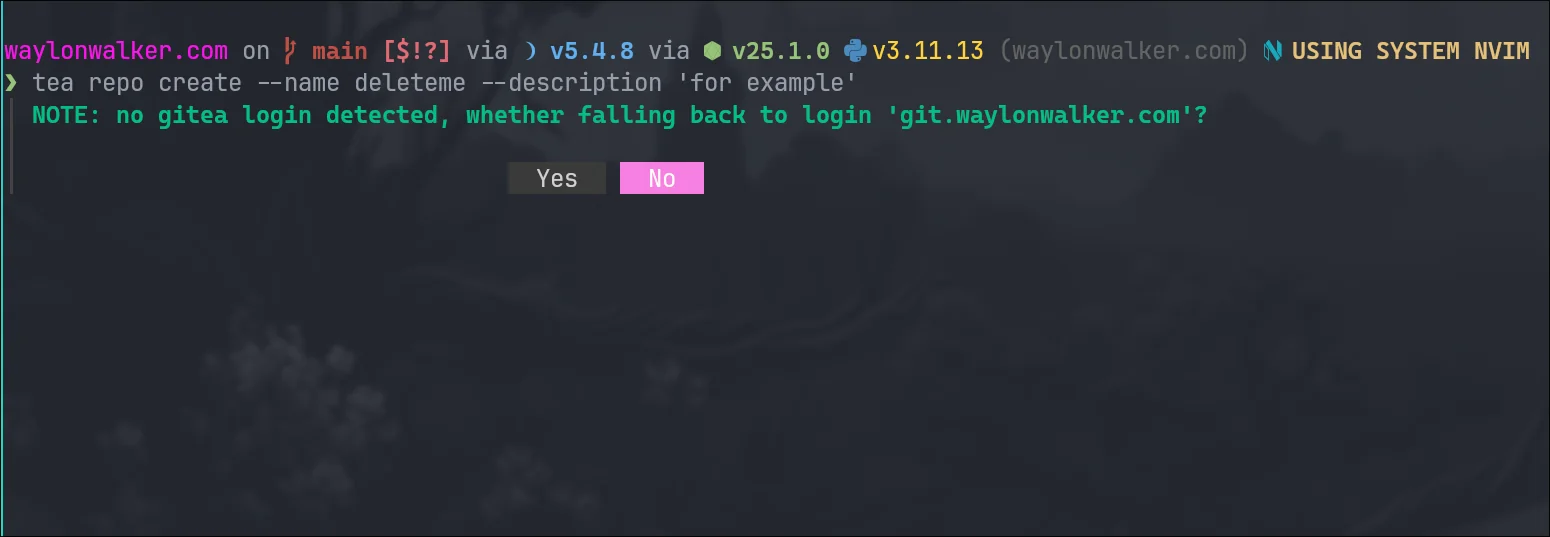
The tea command for gitea (used by forgejo) has a flag for login. With gitea
you can have multiple accounts logged in. When you try to run a command such
as repo create it will prompt you which login to use, but I learned that you
can bake it in to all of them with --login <login-name>
❯ tea repo create --name deleteme --description 'for example'
┃ NOTE: no gitea login detected, whether falling back to login 'git.waylonwalker.com'?
[1]
tea repo create --name deleteme --description 'for example' --login git.wayl.one
References:
[1]: https://dropper.waylonwalker.com/file/11dc820d-1680-414c-9624-cd970b057a74.webp
You already have a git server: (Maurycy's blog)
maurycyz.com [1]
It’s so easy to forget low level tech sometimes. Things that are dead simple and just work without a hitch. git is one of those rock solid things thats very easy to remember all that it does, this is a classic use case.
This just works
cd /parent/directory/for/repo
git clone ssh://username@server/path/to/repo
In order to recieve you must update the remote to allow recieve.
git config receive.denyCurrentBranch updateInstead
Now you can pull update push.
It’s funny how this was the way I first learned to do Continuous Deployment to a RHEL7 machine, also how Heroku worked, but its so easy to forget this solution is there. I come across it every few years and immediately have a few use cases in mind.
Note
This post is a thought [2]. It’s a short note that I make
about someone else’s content online #thoughts
References:
[1]: https://maurycyz.com/misc/easy_git/
[2]: /thoughts/
Learn to use email with git!
git-send-email.io [1]
This site gives us a glimpse into the development workflow using git [2] over email, without remote centralized servers. I found it interesting how patches can be sent with an optional cover letter nearly like a pr would be made.
Note
This post is a thought [3]. It’s a short note that I make
about someone else’s content online #thoughts
References:
[1]: https://git-send-email.io/
[2]: /glossary/git/
[3]: /thoughts/
Repository Mirrors | Forgejo – Beyond coding. We forge.
forgejo.org [1]
Forgejo supports repository mirrors, I think this is how I am going to handle migrating all of my github repos into forgejo. over time I’ll probably go through and delete a bunch of unnecessary one from github, ones that might have a user or two I might keep on github. I have such small scale projects with almost no users I am not sure that It really matters for me or not.
Note
This post is a thought [2]. It’s a short note that I make
about someone else’s content online #thoughts
References:
[1]: https://forgejo.org/docs/latest/user/repo-mirror/
[2]: /thoughts/
Let's Make Sure Github Doesn't Become the only Option - Edward Loveall
blog.edwardloveall.com [1]
This post is a masterclass in blogging, cross linking, backing up your ideas with posts from other great sources. I have a week of reading inside this post, and need to come back later when Im not sick.
Note
This post is a thought [2]. It’s a short note that I make
about someone else’s content online #thoughts
References:
[1]: https://blog.edwardloveall.com/lets-make-sure-github-doesnt-become-the-only-option
[2]: /thoughts/
-
Damn Prime covers this so well from all angles. Can’t overstate the importance of that last step. Look at the issues, and raise an issue if there is not one before putting in a bunch of hard work. Make sure that the maintainers are open for your changes and no one else is already working on it.
Note
This post is a thought [2]. It’s a short note that I make
about someone else’s content online #thoughts
References:
[1]: /glossary/git/
[2]: /thoughts/
Some Git poll results
Julia Evans · jvns.ca [1]
great poll of git [2] questions
poll: did you know that in a git merge conflict, the order of the code is different when you do a merge/rebase?
merge:
<<<<<<< HEAD
YOUR CODE
OTHER BRANCH’S CODE
c694cf8aabe
rebase:
«««< HEAD
OTHER BRANCH’S CODE
YOUR CODE
d945752 (your commit message)
This one explains a lot. I think I knew this, I might have seen it somewhere, but I have definitely noticed it go both ways and confuse the crap out of me. Feels very similar to how --ours and --theirs flip flops.
Note
This post is a thought [3]. It’s a short note that I make
about someone else’s content online #thoughts
References:
[1]: https://jvns.ca/blog/2024/03/28/git-poll-results/
[2]: /glossary/git/
[3]: /thoughts/
[1]
Recently I added two new bash/zsh aliases to make my git [2] experience just a tad
better.
trackme # [3]
Most of our work repos were recently migrated to new remote urls, we scriped
out the update to all of the repos, but I was left with a tracking error for
all of my open branches. To easily resolve this I just made an alias so that I
can just run trackme anytime I see this error.
There is no tracking information for the current branch.
Please specify which branch you want to merge with.
See git-pull(1) for details
git pull <remote> <branch>
If you wish to set tracking information for this branch you can do so with:
git branch --set-upstream develop origin/<branch>
getting the branch # [4]
The following command will always return the currently checked out branch name.
git symbolic-ref --short HEAD
Injecting this into the suggested git command as a subshell gives us this
alias that when ran with trackme will automatically fix tracking for my
branch.
alias trackme='git branch --set-upstream-to=origin/$(git symbolic-ref --short HEAD)'
rebasemain # [5]
I sometimes get a bit lazy at checking main for changes before submitting any
prs, so again I made a quick shell...
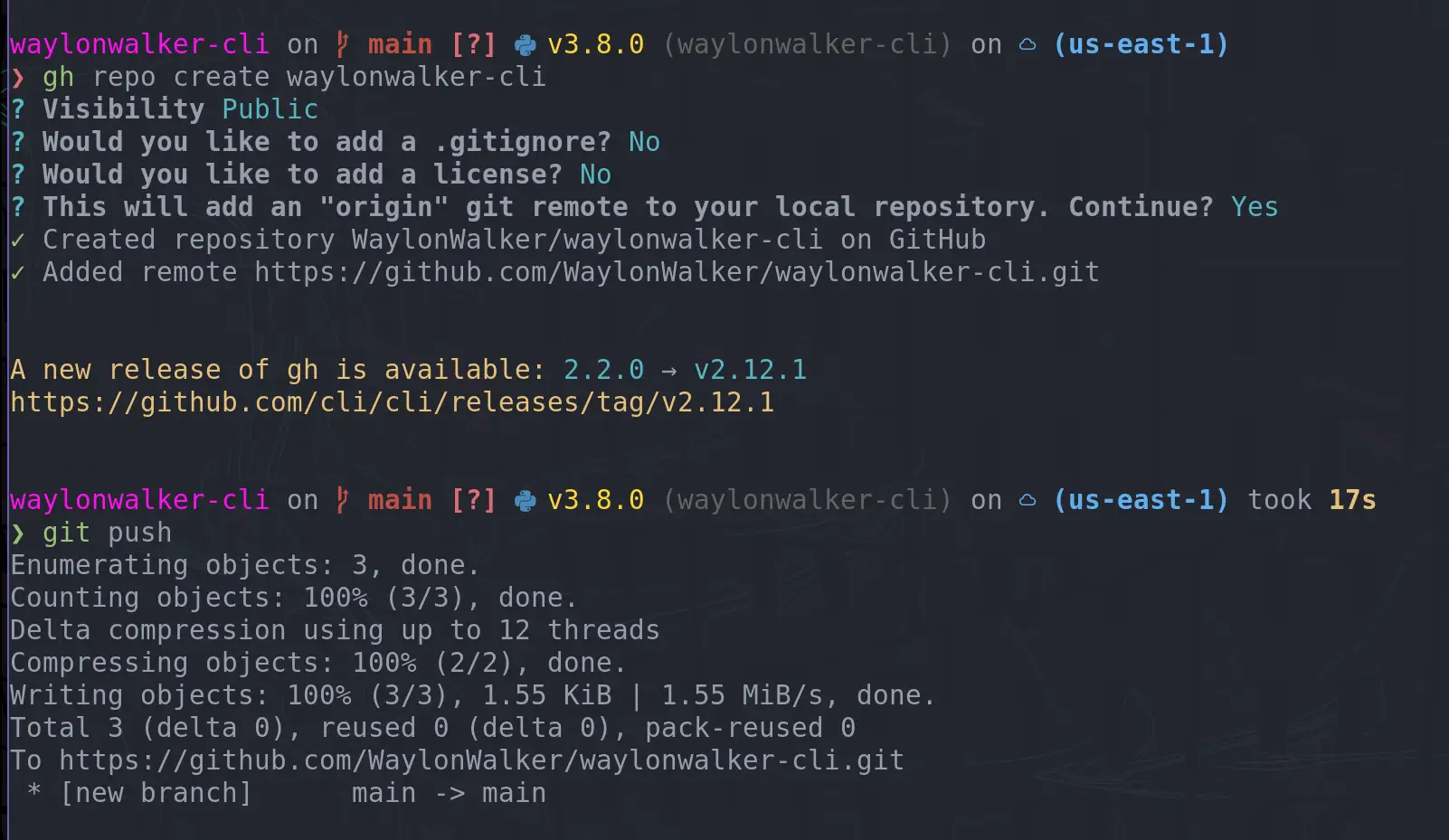
I love getting faster in my workflow, something I have recently added in is
creating GitHub repos with the cli. I often create little examples of
projects, but they just end up on my machine and not anywhere that someone else
can see, mostly because it takes more effort to go create a repo. TIL you can
create a repo right from the command line and push to it immediately.
gh repo create waylonwalker-cli
[1]
want to see what this repo I created is about? # [2]
Check out what I created here.
pipx run waylonwalker
References:
[1]: https://dropper.waylonwalker.com/api/file/3a889b2a-d83f-4f42-a849-1c34b8e6365c.webp
[2]: #want-to-see-what-this-repo-i-created-is-about
Sometimes you have a pretty old branch you are trying to merge into and you are
absolutely sure what you have is what you want, and therefore you don’t want to
deal with any sort of merge conflicts, you would rather just tell git [1] to use my
version and move on.
update main # [2]
The first step is to make sure your local copy of the branch you are moving
into is up to date.
git checkout main
git pull
update your feature branch # [3]
It’s also worth updating your feature branch before doing the merge. Maybe you
have teammates that have updated the repo, or you popped in a quick change from
the web ui. It’s simple and worth checking.
git checkout my-feature
git pull
start the merge # [4]
Merge the changes from main into my-feature branch.
git merge main
Now is where the merge conflict may have started. If you are completely sure
that your copy is correct you can --ours, if you are completely sure that
main is correct, you can --theirs.
git checkout --ours .
git merge --continue
This will pop open your configured git.core.editor or $EDTIOR. If you have
not configured your editor, it will default to vim. Close vim with <escape>:x, accepting the
merge message.
Now push y...
I am getting ready to do some timeseries analysis on a git [1] repo with python, my
first step is to figure out a way to list all of the git commits so that I can
analyze each one however I want. The GitPython library made this almost
trivial once I realized how.
from git import Repo
repo = Repo('.')
commits = repo.iter_commits()
This returns a generator, if you are iterating over them this is likely what
you want.
commits
# <generator object Commit._iter_from_process_or_stream at 0x7f3307584510>
The generator will return git.Commit objects with lots of information about
each commit such as hexsha, author, commited_datetime, gpgsig, and
message.
next(commits)
# <git.Commit "d125317892d0fab10a36638a2d23356ba25c5621">
References:
[1]: /glossary/git/
I was editing some blog posts over ssh, when I ran into
this error. gpg was failing to sign my commits. I
realized that this was because I could not answer to the
desktop keyring over ssh, but had no idea how to fix it.
Error # [1]
This is the error message I was seeing.
gpg failed to sign the data ssh
The fix # [2]
The fix ended up being pretty simple, but quite a ways down this stack overflow post [3].
This environment variable tells gpg that we are not logged
into a desktop and it does not try to use the desktop
keyring, and asks to unlog the gpgkey right in the
terminal.
export GPG_TTY=$(tty)
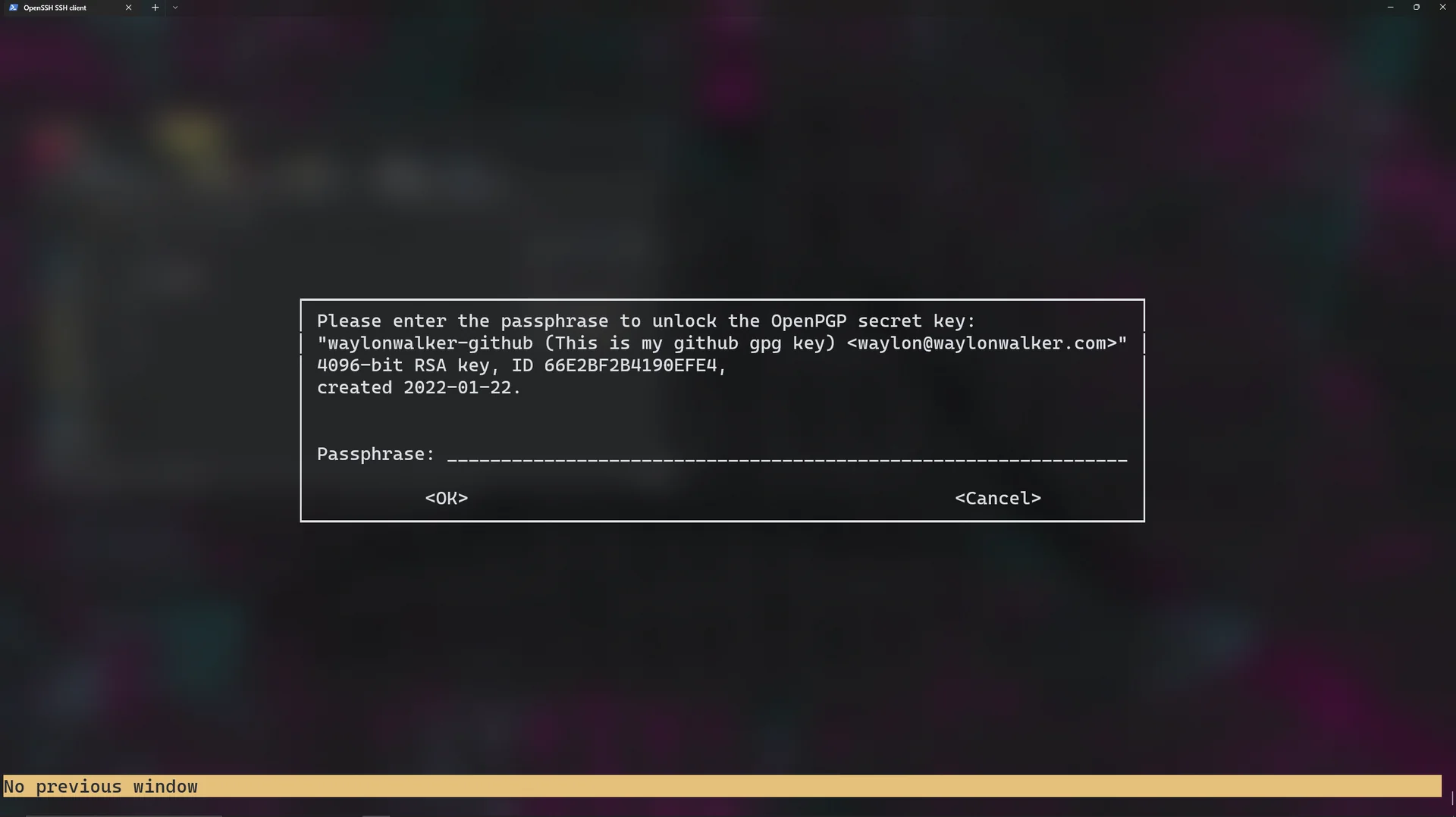
The log in menu # [4]
This is what it looks like when it asks for the passphrase.
[5]
EDIT-another way # [6]
So this did not fix the issue on Arch BTW, and I have seen it not work for wsl
users either. This did work for me and reported to have worked by a wsl user
on a github issue.
echo '' | gpg --clearsign
This will unlock the gpg key then let you commit.
References:
[1]: #error
[2]: #the-fix
[3]: https://stackoverflow.com/questions/41052538/git-error-gpg-failed-to-sign-data/41054093
[4]: #the-log-in-menu
[5]: https://images.waylonwalker.com/gpg-passphrase-unlock.png
[6]:...
Sometimes you get a PR on a project, but cannot review it without wrecking your
current working setup. This might be because it needs to be compiled, or a new
set of requirements. Git [1] worktrees is a great way to chekout the remote branch
in a completely separate directory to avoid changing any files in your current
project.
# pattern
# git worktree add -b <branch-name> <PATH> <remote>/<branch-name>
git worktree add -b fix-aws-service-cnsn /tmp/project origin/fix-aws-service-cnsn
This will create a new directory /tmp/project that you can review the branch
fix-aws-service-cnsn from the remote origin. If you have setup different remotes locally you can check for the name of it with git remote -v
References:
[1]: /glossary/git/
GitPython is a python api for your git [1] repos, it can be quite handy when you
need to work with git from python.
Use Case # [2]
I recently made myself a handy tool for making screenshots in python and it
need to do a git commit and push from within the script. For this I reached
for GitPython.
How I Quickly Capture Screenshots directly into My Blog [3]
Installation # [4]
GitPython is a python library hosted on pypi that we will want to install
into our virtual environments using pip.
pip install GitPython
Create a Repo Object # [5]
Import Repo from the git library and create an instance of the Repo object by
giving it a path to the directory containing your .git directory.
from git import Repo
repo = Repo('~/git/waylonwalker.com/')
Two interfaces # [6]
from the docs
It provides abstractions of git objects for easy access of repository data,
and additionally allows you to access the git repository more directly using
either a pure python implementation, or the faster, but more resource
intensive git command implementation.
I only needed to use the more intensive but familar to me git command
implementation to get me project off the ground. There is a good
tutorial [...
Setting up your git [1] pager to your liking can help you navigate diffs and logs
much more efficiently. You can set it to whatever pager you like so that your
keys feel nice and smooth and your fingers know exactly what to do. You might
even gain a few extra features.
Setting the pager # [2]
You can set the pager right from your command line with the following command.
git config --global core.pager 'more'
You can also set your pager by editing your global .gitconfig file which by
default is set to ~/.gitconfig.
[core]
pager = more
Color # [3]
In my experience you need to turn colors off with nvim. bat handles them and
looks good either way, but nvim will be plain white and display the color
codes as plain text if color is on.
git config --global color.pager no
Pagers I have tried # [4]
Here are some various configs that I tried. For some reason line numbers in
bat really bothered me, but when in nvim they felt ok. I am going to try
running both of them for a few days and see which I like better. I think
having some of my nvim config could be really handy for things like yanking a
commit hash to the system clipboard without touching the mouse.
# bat
git config --global...
If you have ever mistyped a git [1] command very close to an existing one
you have likely seen this message.
❯ git chekout dev
git: 'chekout' is not a git command. See 'git --help'.
The most similar command is
checkout
Automatically run the right one # [2]
What you might not have known is that you can configure git to just run
this command for you.
# Gives you 0.1 seconds to respond
git config --global help.autocorrect 1
# Gives you 1 seconds to respond
git config --global help.autocorrect 10
# Gives you 5 seconds to respond
git config --global help.autocorrect 50
Fat Fingers Gone # [3]
Now when you typo a git command it will autmatically run after the
configured number of tenths of a second.
❯ git chkout get-error
WARNING: You called a Git command named 'chkout', which does not exist.
Continuing in 1.0 seconds, assuming that you meant 'checkout'.
M pages/blog/how-i-deploy-2021.md
M pages/hot_tips/001.md
M pages/templates/gratitude_card.html
M plugins/index.py
M plugins/publish_amp.py
M plugins/render_template_variables.py
M plugins/youtube.py
M requirements.txt
M static/index.html
Switched to branch 'get-error'
My config # [4]
I’m rocking 10 for now just to see how I ...
So worktrees, I always thought they were a big scary things. Turns out they
are much simpler than I thought.
Myth #1 # [1]
no special setup
I thought you had to be all in or worktrees or normal git [2], but not both. When
I see folks go all in on worktrees they start with a bare repo, while its true
this is the way you go all in, its not true that this is required.
Lets make a worktree # [3]
Making a worktree is as easy as making a branch. It’s actually just a branch
that lives in another place in your filesystem.
# checkout a new worktree called compare based on main in /tmp/project
git worktree add -b compare /tmp/project main
# checkout a new worktree called compare based on HEAD in /tmp/project
git worktree add -b compare /tmp/project
# checkout a worktree from an existing feature branch in /tmp/project
git worktree add /tmp/project my-existing-feature-branch
The worktree that you create is considered a linked worktree, while the
original worktree is called the main worktree
Note that I put this in my tmp directory because I don’t expect it to live very
long, my recent use case was to compare two files after a big formatting
change. You put these where you want, bu...