
It’s crazy how many people are discovering linux here and are like why would I use this, oh it has tiling, it has workspaces. No shit so does every other good desktop environment that has come out in the last 10 years. All of these reviews are missing the polish that you don’t recognize until you have done it by hand. Full disk encryption setup with nothing more than a password. Agents properly use pkexec to ask for sudo permissions with a message saying what they are running. Out of the box I get snapshots and boot into snapshot. If I like using agents and I add an API key, I get a crash agent when any application fails if I choose to click the notification to have the agent fix my issue. Themes have polish that no other distro can claim. There are many good looking themes that automatically theme so many of the applications. You can do all of this yourself and maybe you should if you really like Linux and want to understand. The magic is how it is all assembled. The community being built to make it work on so many different devices, with a taste for speed and design.
Posts tagged: linux
All posts with the tag "linux"
135 posts
latest post 2026-09-02
Publishing rhythm
I’m playing with omarchy on an old laptop and decided I want to share it with my kids without sharing what I also set up as my sudo password.
lsblk -f
Look for the one labeled crypto_LUKS
sudo cryptsetup luksChangeKey /dev/nvme0n1p2
Then you will be asked for your sudo password, previous full disk encryption password, then the new one twice.
Now my laptop can be shared without sharing my private sudo password.
First, find your usb disk. You should be able to identify it by size and name using lsblk.
lsblk -o NAME,SIZE,MODEL,TRAN,RM,MOUNTPOINTS
Here I see my good ol Trans-It Drive. It’s not fancy. It wasn’t even at the time it was new, but I have it and it works. Next, we run the disk destroyer dd to copy raw bytes right on to the drive.
Warning
This is a full reformat of the drive, nothing on the drive will be recoverable afterwards. I keep this drive around as a boot disk and it just changes distro occasionally.
sudo dd if=~/Downloads/omarchy-4.0.1.iso of=/dev/sdb bs=4M status=progress conv=fsync
Note
Don’t forget the bs, the default block size is so slow it will take an eternity to copy a linux iso on to a boot drive.
Installing omarchy #
I wanted to give omarchy quatro a try, here is the session to get it.
~ NO PYTHON VENV SET USING SYSTEM NVIM
❯ lsblk -o NAME,SIZE,MODEL,TRAN,RM,MOUNTPOINTS
NAME SIZE MODEL TRAN RM MOUNTPOINTS
sda 119.2G SAMSUNG MZNLN128HAHQ-000H1 sata 0
├─sda1 1G 0
└─sda2 118.2G 0
sdb 7.6G Trans-It Drive usb 1
├─sdb1 5.8G 1
└─sdb2 23M 1
zram0 93.9G 0 [SWAP]
nvme0n1 931.5G Samsung SSD 980 1TB nvme 0
├─nvme0n1p1 1G nvme 0 /boot
└─nvme0n1p2 930.5G nvme 0 /var/log
/var/cache/pacman/pkg
/home
/
~ NO PYTHON VENV SET USING SYSTEM NVIM
❯ sudo dd if=~/Downloads/omarchy-4.0.1.iso of=/dev/sdb bs=4M status=progress conv=fsync
A quote from Linus Torvalds And this was a debug session from hell, enormously helped by an AI doing much of the grunt-work. I'd like to call it my tireless helper, but the AI several … Simon Willison’s Weblog · simonwillison.net Will models become more stubborn as we use them more and feed us using them as long running agents where we simply ask for what seems to be an impossible task to be spit out by the almighty clanker with all of the time in the world to try every way possible, add obnoxious amounts of telemetry, and somehow digest the flood of data it brings back?
I don’t run into Windows file endings very often, so when I see little ^M’s
all over your file, I think “shit I know what these are and can’t remember”
They represent the Windows carriage return.
Linux vs Unix Line Endings #
The difference here is that Unix uses \n and Linux uses \r\n, going all the
way back to the typewriter it represents the two keys that a typist would have
to press to get a new line and return the carriage back to the beginning.
Vim/Neovim #
When I open up a file and see this garbage all over, it’s not cozy, I want them gone, I don’t want them all over my editor. I’m not sure what this would look like on Windows, I haven’t been able to afford a Windows machine in years, but its gross on my machine.
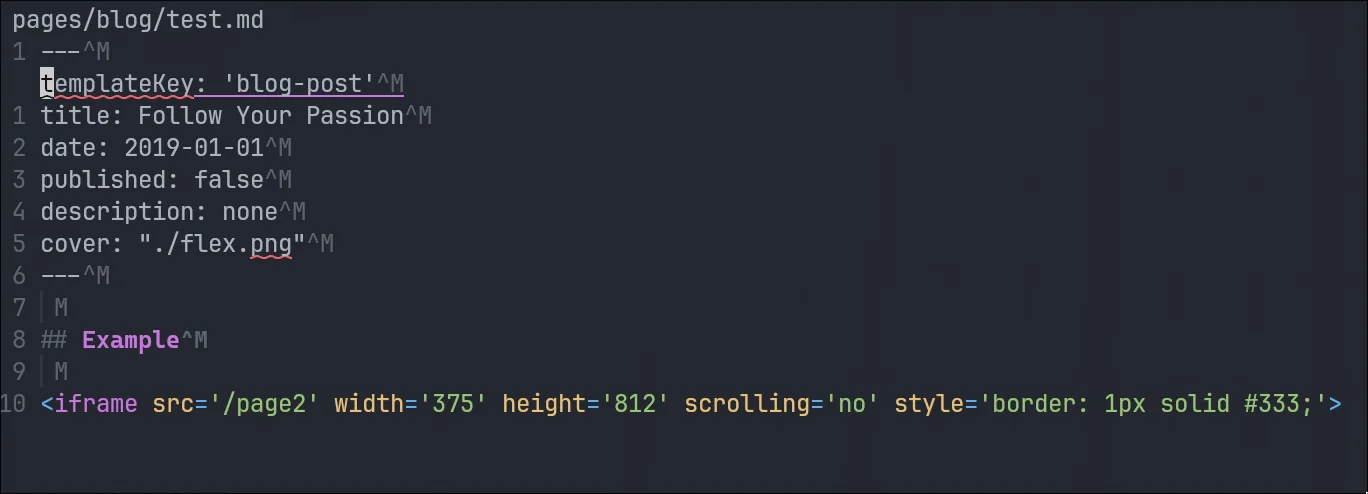
Remove them with a substitution command from normal mode.
:%s/\r//g
removing carriage returns with a substitution command
I’ve been running fedora coreos on my home servers for awhile. I really liked
the stability I got from bazzite, and have since enjoyed the stability of
fedora coreos. Since it’s an immutable system I’ve never quite known if I need
to reboot or not, and was unsure how to check for updates. Today I learned you
can use rpm-ostree status to see if your
fedora coreos system is up to date.
rpm-ostree status
For me it listed security advisories with a count of each severity unknown, low, moderate, and important.
This morning I had a machine crash on me and came back to an error.
Error
zsh: corrupt history file /home/u_walkews/.zsh_history
Dammit I don’t want to redo my shell history, I checked with a clanker and they
came up with this solution using strings that only prints printable
characters.
cp ~/.zsh_history ~/.zsh_history.bak
mv ~/.zsh_history ~/.zsh_history.corrupt
touch ~/.zsh_history
chmod 600 ~/.zsh_history
strings ~/.zsh_history.corrupt > ~/.zsh_history
chmod 600 ~/.zsh_history
Malicious Aur Packages Jun 2026
Recent Arch linux vulnerabilities are a good reminder of a few things. AUR is not the official package repo The AUR is community driven AUR packages are not always safe The first thing I’m doing to stop myself from running any aur updates automatically is removing any arch helper. Currently the reported vulnerabilities are supply chain attacks limited to the aur, keep your arch system up do date, BUT do not update packages from the AUR right now. In fact I’m auditing my aur usage and removing anything I have not used in awhile. Here is a nice script I’m using to walk through my packages and get rid of things I installed and probably don’t need anymore. Supply chain attacks are getting real scary in 2026, maybe we should listen to Ginger Bill a bit closer.

Stow comes with a local and global ignore list that you can use to ignore certain files or directories.
If you put Perl regular expressions, one per line, in a .stow-local-ignore file within any top level package directory, in which case any file or directory within that package matching any of these regular expressions will be ignored. In the absence of this package-specific ignore list, Stow will instead use the contents of ~/.stow-global-ignore, if it exists. If neither the package-local or global ignore list exist, Stow will use its own built-in default ignore list, which serves as a useful example of the format of these ignore list files:
Example given from the docs
RCS
.+,v

CVS
\.\#.+       # CVS conflict files / emacs lock files
\.cvsignore

\.svn
_darcs
\.hg

\.git
\.gitignore
\.gitmodules

.+~          # emacs backup files
\#.*\#       # emacs autosave files

^/README.*
^/LICENSE.*
^/COPYING
Reference #
https://www.gnu.org/software/stow/manual/html_node/Types-And-Syntax-Of-Ignore-Lists.html
😂 Should I be concerned that My 12yo installed Arch BTW on his own?
Use a linux vps, It’s easy, just follow these simple instructions.
gpus are awesome and I need one for Bambu Studio to be usable in a
distrobox. Adding the --nvidia flag to distrobox create bind mounts the
nvidia /dev/ devices and sets up the necessary environment variables. Once
we are in there are a couple of packages to install to make it work.
distrobox create --name bambu-studio --image archlinux:latest --nvidia
distrobox enter bambu-studio
sudo pacman -S nvidia-utils lib32-nvidia-utils vulkan-icd-loader
nvidia-smi
glxinfo | gprep OpenGL
sudo pacman -Syu --needed base-devel git
git clone https://aur.archlinux.org/paru-bin.git
cd paru-bin
makepkg -si
paru -S bambustudio-bin

bambu-studio

distrobox-export --app bambu-studio
👏👏👏preach it prime! M$ continues to prove that they are not making products for you something else is affoot and shit you don’t want is shoved down your throat and forced on you. Prime points out that the agentic is prompt injected itself😂. Rather than making a better os experience it’s assuming you are stupid and need everything done for you. But what I don’t get here in the text scaling example. Why the F does it not just fix it for me. When I ask the machine to make text bigger it puts a flashy circle where to click. This is a one time setup for someone who gives no fucks to remember how to do it. Why is the machine doing this weird hand holding watching us do it’s work rather than just doing it? I like the pattern when you change display setting it gives you a counter that reverts everything if for some reason shit is so bad you can’t even see it. Do that, not this help me click bs. Now in parallel we have steam making Linux desktop better and better. Allowing you to just access the hardware you own to do what you want to do with it. Providing a fantastic hands off out of the box experience for the price of the hardware. No ongoing fees, no upgrade cycle, soft lock, aribraray c…
The Year of the Linux Desktop is a meme, every year is the year of the Linux desktop as it gains rounding errors of market share. Outside of Linux nerds, developers that use servers on the regular, cheap asses reviving old hardware that is dead in the eyes of other OS’s, the average user wont even notice a difference with the right distro. I ran bazzite with plasma for over a year, It would be super beginner friendly while allowing users customization on levels never seen on non-Linux machines. Other than adobe, roblox, and EA games with easy anti-cheat most users probably aren’t going to run in to any issues. They probably wont even notice at this point, which is where the meme comes in. Why would anyone switch if its not noticeably different for the average user, they wont, until what is working for them stops working for them.

"Pacman is currently in use, please wait." / Pacman & Package Upgrade Issues / Arch Linux Forums bbs.archlinux.org I ran into this issue today, never have I ever before though. Omarchy looking a bit sus on me. This was even after a fresh boot, no pacman process running. just realized I forgot to check yay which it has installed for me. I had to force it in.
Today I learned how to use tar over ssh to save hours in file transfers. I keep all of my projects in ~/git (very creative I know, I’ve done it for years and haven’t changed). I just swapped out my main desktop from bazzite to hyprland, and wanted to get all of my projects back. Before killing my bazzite install I moved everything over (16GB of many small files), it took over 14 hours, maybe longer. I had started in the morning and just let it churn.
This was not going to happen for re-seeding all of my projects on my new system, I knew there had to be a better way, I looked at rsync, but for seeding I ran into this tar over ssh technique and it only took me 6m51s to pull all of my projects off of my remote server.
ssh [email protected] 'tar -C /tank/git -cpf - .' \
  | tar -C "$HOME/git" -xpf -
Today I needed to make a backup of some config. I wanted to add a timestamp so that I knew when the backup was made. This would make unique backups easy, and I could tell when they were made.
cp configfile configfile.backup.$(date %s)
If you want to decrypt the timestamp into something more human readable. You can list backup files, strip out the timestamp, and then convert it to a human readable date.
/bin/ls | grep backup | sed 's/configfile.backup.//' | xargs -I {} date -d @{}
or just throw it to the date command by hand.
date -d @1755895402
DHH (@dhh) on X Rewiring your muscle memory for copy/paste when you go from Mac to Omarchy is an important rite of passage. Not friction to be whittled away. We need more rituals in society. More tokens of sacrifi... X (formerly Twitter) · x.com Today I learned that its spelled “Rite of Passage”, and is short for ritual. Mac has so many of these things that are just different, but do not let you reconfigure them and you are stuck with it. copy / paste I don’t get, the 3 times I’ve touched a mac since I was a kid its frustrated me. Is it lock in? or is it them actually thinking this is the right way and you all shall do as we say.
Calendar data could not load. Try again.