Posts tagged: linux

All posts with the tag "linux"

127 posts latest post 2026-04-18
Publishing rhythm
Mar 2026 | 1 posts
Stow is an incredible way to manage your dotfiles. It works by managing symlinks between your dotfiles directory and the rest of the system. You can then make your dotfiles directory a git [1] repo and have it version controlled. In my honest opinion, when I was trying to get started the docs straight into deep detail of things I frankly don’t really care about and jumped right over how to use it. When using stow its easiest to keep your dotfiles directory (you may name it what you want) in your home directory, with application directories inside of it. Then each application directory should reflet the same diretory structure as you want in your home directory. zsh # [2] Here is a simple example with my zshrc. mkdir ~/dotfiles cd ~/dotfiles mkdir zsh mv ~/.zshrc zsh stow --simulate zsh You can pass in the –simulate if you wish, it will tell you if there are going to be any more errors or not, but it wont give much more than that. WARNING: in simulation mode so not modifying filesystem. Once your ready you can stow your zsh application. stow zsh nvim # [3] A slightly more complicated example is neovim since its diretory structure does not put configuration files directl...
The copier answers file is a key component to making your templates re-runnable. Let’s look at the example for my setup.py. ❯ tree ~/.copier-templates/setup.py /home/walkers/.copier-templates/setup.py ├── [[ _copier_conf.answers_file ]].tmpl ├── copier.yml ├── setup.cfg └── setup.py.tmpl 0 directories, 4 files Inside of my [[ _copier_conf.answers_file ]].tmpl file is this, a message not to muck around with it, and the ansers in yaml form. The first line is just a helper for the blog post. # ~/.copier-templates/setup.py/\[\[\ _copier_conf.answers_file\ \]\].tmpl # Changes here will be overwritten by Copier; NEVER EDIT MANUALLY [[_copier_answers|to_nice_yaml]] Inside my copier.yml I have setup my _answers_file to point to a special file. This is because this is not a whole projet template, but one just for a single file. # copier.yml # ... _answers_file: .setup-py-copier-answers.yml Once I change the _answers_file I was incredibly stuck Run it # [1] I’m making a library of personal copier templates in my ~/.copier-templates directory and I am going to run it from there. copier copy ~/.copier-templates/setup.py Results # [2] After rendering the template we have the followi...

pipx examples

count lines of code # [1] pipx run pygount markata pipx run pygount markata --format=summary pipx run pygount markata --suffix=cfg,py,yml References: [1]: #count-lines-of-code
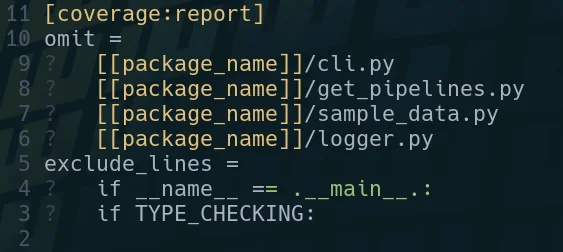
I’ve been stuck many times looking at a vim buffer with little question marks at the beginning of each line and trying to get rid of them. for so long I didn’t know what they were so trying to get rid of them was impossible. [1] It turns out they are tabs, and you can get rid of the little leading question marks with this substitution command. :%s/\t/ /g References: [1]: https://images.waylonwalker.com/vim-tab-characters.png
tmux popups can be sized how you like based on the % width of the terminal on creation by using the flags (h, w, x, y) for height, width, and position. # normal popup tmux popup figlet "Hello" # fullscreen popup tmux popup -h 100% -w 100% figlet "Hello" # 75% centered popup tmux popup -h 100% -w 75% figlet "Hello" # 75% popup on left side tmux popup -h 100% -w 75% -x 0% figlet "Hello" Sorry, your browser doesn't support embedded videos. example running these commands
One of the most useful skills you can acquire to make you faster at almost any job that uses a computer is getting good at finding text in your current working diretory and identifying the files that its in. I often use the silver searcher ag or ripgrep rg to find files in large directories quickly. Both have a sane set of defaults that ignore hidden and gitignored files, but getting them to list only the filenames and not the matched was not trivial to me. I’ve searched throught he help/man pages many times looking for these flags and they always seem to evade me. ag # [1] Passing the flag -l to ag will get it to list only the filepath, and not the match. Here I gave it a --md as well to only return markdown filetypes. ag supports a number of filetypes in a very similar way. ag nvim --md -l rg # [2] Giving rg the --files-with-matches flag will yield you a similar set of results, giving only the filepaths themselves and not the match statement. Also passing in the -g "*.md" will similarly yield only results from markdown files. rg --files-with-matches you -g "*.md" References: [1]: #ag [2]: #rg
pyenv provides an easy way to install almost any version of python from a large list of distributions. I have simply been using the version of python from the os package manager for awhile, but recently I bumped my home system to Ubuntu 21.10 impish, and it is only 3.9+ while the libraries I needed were only compatable with up to 3.8. I needed to install an older version of python on ubuntu I’ve been wanting to check out pyenv for awhile now, but without a burning need to do so. installing # [1] Based on the Readme it looked like I needed to install using homebrew,so this is what I did, but I later realized that there is a pyenv-installer repo that may have saved me this need. Installing Homebrew on Linux [2] List out install candidates # [3] You can list all of the available versions to install with pyenv install --list. It does reccomend updating pyenv if you suspect that it is missing one. At the time of writing this comes out to 532 different versions! pyenv install --list Let’s install the latest 3.8 patch # [4] Installing a version is as easy as pyenv install 3.8.12. This will install it, but not make it active anywhere. pyenv install 3.8.12 let’s use python 3.8...
Installing brew on linux proved quite easy and got pyenv running for me within 4 commands. I had never used homebrew before, honestly I thought it was a mac only thing for years. Today I wanted to try out pyenv, and the reccommended way to install was using homebrew. I am not yet sure if I want either in my normal workflow, so for now I am just going to pop open a new terminal and install homebrew and see how it goes. /bin/bash -c "$(curl -fsSL https://raw.githubusercontent.com/Homebrew/install/HEAD/install.sh)" echo 'eval "$(/home/linuxbrew/.linuxbrew/bin/brew shellenv)"' >> /home/walkers/.zprofile eval "$(/home/linuxbrew/.linuxbrew/bin/brew shellenv)" That was it, now homebrew is working. Starting a new shell and running the command to install pyenv worked. brew install pyenv Links # [1] - homebrew [2] References: [1]: #links [2]: https://brew.sh/
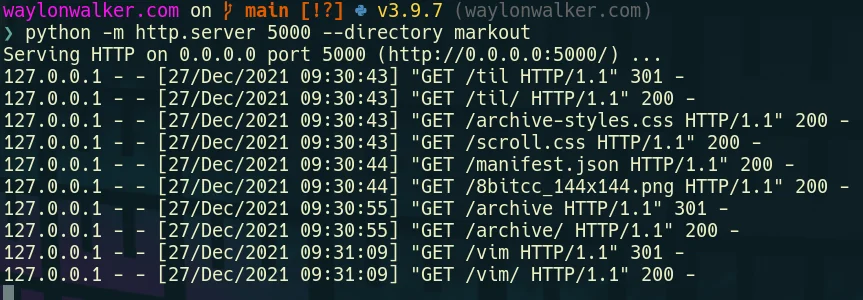
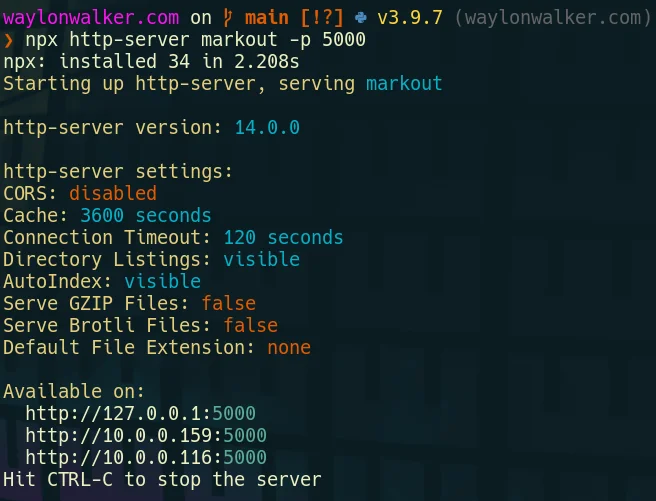
When I first moved to vim from and ide like vscode or sublime text one of my very first issues was trying to preview my website at localhost:8000. There had always just been a button there to do it in all of my other editors, not vim. There are not many buttons for anything in vim. While there is probably a plugin that can run a webserver for me in vim, it’s not necessary, we just need the command line we are already in. running a separate process # [1] You will need a way to run another process alongside vim, here are a couple ideas to get you going that are not the focus here.style - use background jobs - c-z to send a job to the background - fg to bring it back - use a second terminal - use a second tab - use tmux and run it in a separate split/window - use an embeded nvim terminal running a development webserver from the command line # [2] Python already exists on most linux systems by default, and most are now on python3. If you are on windows typing python will take you directly to the windows store to install it, or you can also use wsl. # python3 python -m http.server # running on port 5000 python -m http.server --directory markout 5000 # for the low chance ...

You must use augroup with autocmd in vim | Here's how

If you are running vim autocmd’s without a group, you’re killing your performance. Granted your probably not sourcing your vimscript files with autocmd’s too often, but every time you source that vimscript you are adding another command that needs to run redundantly. https://youtu.be/2ITTn4Dl0lc This is what I had # [1] Not silky smooth For WAAY too long I have had something like this in my vimrc or init.vim. It formats my python for me on every save, works great except if I source my dotfiles more than once I start adding how many times black runs. autocmd bufwritepre *.py execute 'Black' Why is a bare autocmd bad # [2] let me demonstrate Lets create a new file called format.vim and give it the :so %. Works great, it starts telling me that its formatting. autocmd bufwritepre *.py :echo("formatting with black") [3] BUT as every time I give it the :so % it formats an extra time on every single save. Setting up an augroup # [4] I’ve been told I need an augroup to prevent ...

Code Review from the comfort of vim | Diffurcate

I often review Pull requests from the browser as it just makes it so easy to see the diffs and navigate through them, but there comes a time when the diffs get really big and hard to follow. That’s when its time to bring in the comforts of vim. https://youtu.be/5NKaZFavM0E Plugins needed # [1] This all stems from the great plugin by AndrewRadev [2]. It breaks a down into a project. So rather than poping into a pager from git [3] diff, you can pipe to diffurcate and it will setup a project in a tmp directory for you and you can browse this project just like any other except it’s just a diff. Plug 'AndrewRadev/diffurcate.vim' My aliases # [4] First to quickly checkout PR’s from azure devops I have setup an alias to fuzzy select a pr and let the az command do the checkout. alias azcheckout='az repos pr checkout --id $(az repos pr list --output table | tail -n -2 | fzf | cut -d " " -f1)' Next I have a few aliases setup for checking diffs. The first one checks what is staged vs the...

Setup a yaml schema | yamlls for a silky smooth setup

I’ve gone far too long without a good setup for editing yaml files, I am missing out on autocomplete and proper diagnostics. This ends today as I setup yaml-language-server in neovim. https://youtu.be/xo4HrFoKF4c The video for this one is part of a challenge-playlist [1] I put out for myself to constantly improve my dotfiles for all of December. init.vim # [2] I have my init.vim setup to only source other modules, if you want everything in a single config, feel free to do as you wish. I broke mine up earlier this year as I doubled into nvim and am not going back. source ~/.config/nvim/plugins.vim lua require'waylonwalker.cmp' lua require'waylonwalker.lsp-config' Plugin setup # [3] You will need the following plugins. I use plug, if you don’t you will have to convert the syntax over to the plugin manager you use. neovim/nvim-lspconfig [4] is for configuring the lsp. It comes with a bunch of sane defaults for most servers, so you pretty much just have to call setup on that serv...

Open files FAST from zsh | or bash if thats your thing

https://youtu.be/PQw_is7rQSw I am often in a set of tmux splits flying back and forth, accidentally close my editor, so when I come back to that split and hit my keybinds to edit files I enter them into zsh rather than into nvim like I intended. Today I am going to sand off that rough edge and get as similar behavior to nvim as I can with a couple of aliases. Make sure you check out the YouTube video to see all of my improvements. what’s an alias # [1] If you have never heard of an alias before it’s essentially a shortcut to a given command. You can pass additional flags to the underlying command and they will get passed in. Most of the time they are just shorter versions of commands that you run often or even like in this case a common muscle memory typo that occurs for you. My new alias’s for fuzzy editing files from zsh # [2] Here are the new aliases that I came up with to smooth out my workflow. These give me a similar feel to how these keys work in neovim but from zsh. #...

How linux users install a text editor

In honor of the neovim 0.6.0 release, I decided to do a funny skit installing neovim, and fix up my install script in the process as part of my challenge to fix up my dotfiles. I ran into one snag where I was not updating the repo that I cloned. I moved it to the directory I now keep third-party git [1] repos and set it to update with ansible. https://youtu.be/64oKLphhBuo The thing that took me the longest to realize was…. I had a path issue pointing me to an old install of the appimage over the fresh build, fixed that up and now we are on 0.7.0 nightly. Related Links # [2] https://neovim.io/ https://github.com/neovim/neovim https://github.com/neovim/neovim/releases/tag/v0.6.0 References: [1]: /glossary/git/ [2]: #related-links

30 days dotfile ricing

https://youtu.be/Jq1Y48F_rOU I am challenging myself to 30 days of dotfile ricing. I have been on linux desktop for a few months now and have a pretty good workflow going, I have the coarse edits done to my workflow, but it has some rough edges that need sanded down. It’s time to squash some of those little annoyances that still exist in my setup. This is primarily going to be focused on productivity, but may have a few things to just look better. This will comprise heavily of aliases, zsh, and nvim config. Follow the YouTube channel [1] or the rss feed [2] to stay up to date. References: [1]: https://youtube.com/waylonwalker [2]: https://waylonwalker/rss/

Update Alternatives in Linux

update-alternatives --query python update-alternatives: error: no alternatives for python sudo update-alternatives --install /usr/local/bin/python python `which python3.8` 2 # update-alternatives: using /usr/bin/python3.8 to provide /usr/local/bin/python (python) in auto mode sudo update-alternatives --install /usr/local/bin/python python `which python2.7` 5 # update-alternatives: using /usr/bin/python2.7 to provide /usr/local/bin/python (python) in auto mode update-alternatives --query python # Name: python # Link: /usr/local/bin/python # Status: auto # Best: /usr/bin/python2.7 # Value: /usr/bin/python2.7 # # Alternative: /usr/bin/python2.7 # Priority: 5 # # Alternative: /usr/bin/python3.8 # Priority: 2 sudo update-alternatives --install /usr/local/bin/python python `which python3.8` 20 # update-alternatives: using /usr/bin/python3.8 to provide /usr/local/bin/python (python) in auto mode

JUT | Read Notebooks in the Terminal

Trying to read a .ipynb file without starting a jupyter server? jut has you covered. https://youtu.be/t8AvImnwor0 watch the video version of this post on YouTube [1] install # [2] jut is packaged and available on pypi so installing is as easy as pip installing it. pip install jut [3] ! This is my first time including snippets of the video in the article like this, let me know what you think! examples # [4] jut https://cantera.org/examples/jupyter/thermo/flame_temperature.ipynb jut https://cantera.org/examples/jupyter/thermo/flame_temperature.ipynb --head 3 jut https://cantera.org/examples/jupyter/thermo/flame_temperature.ipynb --tail 2 [5] what are all the commands available for jut? # [6] Take a look at the help of the jut cli to explore all the options that it offers. jut --help There is some good information on the projects readme [7] as well. [8] without installing # [9] using pipx Don’t want jut cluttering up your venv, or want to save yourself from making a ...

I made a neovim plugin

I’ve slowly adding more and more lua functions into my neovim configuration, and recently I noticed a pattern for a class of functions that reach out to run shell commands that can be abstracted away. https://youtu.be/8m5ipBuopPU Telegraph.nvim # [1] Check out the project readme [2] for the most up to date details on the plugin itself. Motivation # [3] I want a simple way to make remaps into shell commands that can open new tmux windows, popups, or just run a command with context from the editor. For example I want to make remaps to do things like open the current file in lookatme. # vim :terminal nnoremap <leader>s <cmd>Telegraph pipx run lookatme {filepath} --live-reload --style gruvbox-dark<cmd> # tmux session nnoremap <leader><leader>s <cmd>lua require'telegraph'.telegraph({cmd='pipx run lookatme {filepath} --live-reload --style gruvbox-dark', how='tmux'})<CR> # tmux popup nnoremap <leader><leader>S <cmd>lua require'telegraph'.telegraph({cmd='pipx run lookatme {filepath...

tmux targeted session

https://youtu.be/5KE7Il7SOEk This is something that I made up but use every single day, this is what keeps much of what is on my blog or my teams private work wiki going. I have a few very important directories that I have assigned directly to a hotkey for fast session switching. bind -n M-i new-session -A -s waylonwalker_com "cd ~/git/waylonwalker.com/ && nvim" bind i popup -E -h 95% -w 95% -x 100% "tmux new-session -A -s waylonwalker_com 'cd ~/git/waylonwalker.com/ && nvim'" bind -n M-I popup -E "tmux new-session -A -s waylonwalker_com 'cd ~/git/waylonwalker.com/ && nvim'" tmux new-session [1] This one is building off of yeserday’s new-session post, make sure you check that one out as well. How I navigate tmux in 2021 [2] for more information on how I navigate tmux, check out this full post Also check out the full YouTube tmux-playlist [3] to see all of the videos in this series. References: [1]: /tmux-new-session/ [2]: /tmux-nav-2021/ [3]: https://www.youtube.com/playlist?...