This one is one that I’ve been using quite often, I did’t have a hotkey for it,
I just used the rm shell command.
!!rm %<TAB><CR>
When you type !! from normal mode it will automatically put you in command
mode with .! pre-filled, then you just type rm and <TAB> to
auto-complete the current file name, and <CR> to execute the command.
:.!rm %<TAB><CR>
Making it better # [1]
The one quirk that I don’t like about this is that the buffer remains open
after deleting, and sometimes I forget to close it and end up re-creating it by
mistake when running :wall or :xall.
Create a DeleteFile command with vim command.
:command! DeleteFile execute "!rm %" | bdelete!
Create a DeleteFile command with lua.
vim.api.nvim_create_user_command(
'DeleteFile',
function()
-- Delete the current file from disk
vim.cmd('!rm %')
-- Close the buffer without saving
vim.cmd('bdelete!')
end,
{}
)
References:
[1]: #making-it-better
Posts tagged: neovim
All posts with the tag "neovim"
26 posts
latest post 2025-09-02
Publishing rhythm
-
vim usage is becoming normie level. Just like archinstall made it too easy to install arch and brought normies into the ecosystem. It killed ArchBTW^TM^, distros like lazyvim have killed vimBTW^TM^. It used to be that to run arch, vim, nvim you had to read the docs, and go deep on understanding. running archinstallor lazyvim make it so easy to get started that you miss all of the details, you no longer have to understand ctags, quickfix, what an lsp is, or even how to set your own keybindings. You just use the damn thing, like you would with VSC****. No shame to anyone who does this, but you are probably missing out on a bunch of really useful features of a very core tool in your workflow.
Just discovered Sylvan Franklin in this post and he is cracked, sub now.
Note
This post is a thought [1]. It’s a short note that I make
about someone else’s content online #thoughts
References:
[1]: /thoughts/
my nvim spellcheck setup
I’ve gone too long without a proper spellcheck setup in nvim. I know it’s
there, I just don’t use it, I don’t have the right keybinds, like I do with
vim date [1], to make it work, and its clunky.
Default keybinds # [2]
- z= show spell suggestions
- zg add word to dictionary
- zw remove word from dictionary
- ]s jump to next misspelled word
- [s jump to previous misspelled word
I really struggle with bracketed keybinds, they don’t flow for me. I have to
shift into it and hit two keys, you cant just pop through them with intent, it
always feels clunky to me.
Custom keybinds # [3]
I barely use F-keys in my keymap so that was free game. On my keyboard I have
F1-F9 in a numpad layout on my right hand, so F4-F6 are home row, these are
super easy to pop through and update. I really refrain from using such high
real estate keys like this unless it’s for something good, and I do a lot of
writing in nvim, so fingers crossed I use the heck out of it.
- jump to next misspelled word
...
fixed long standing nvim startup error
Here’s the diff, this is it.
local M = {}
M.setup = require("waylonwalker.setup")
M.settings = require("waylonwalker.settings")
+ M.lazy = require("waylonwalker.lazy")
M.options = require("waylonwalker.options")
M.globals = require("waylonwalker.globals")
M.keymap = require("waylonwalker.keymap")
- M.lazy = require("waylonwalker.lazy")
M.autocmds = require("waylonwalker.autocmds")
M.util = require("waylonwalker.util")
M.plugins = require("waylonwalker.plugins")
M.snippets = require("waylonwalker.snippets")
return M
The error # [1]
On first install of my dotfiles I’m presenting with this flashbang of an error
filling the screen with red background. Its kinda hard to read, I’m not deep
into lua and reading their tracebacks. It pops up in this pager that if I
scroll too far it quits and the error is gone before I know what it is or how
it got there.
[2]
For the longest time it just felt like it randomly showed up without much warning.
I sent ai at the issue # [3]
I...
Testing fresh nvim installs can be a pain, and hard to di without borking your
known good install. I’ve been using NVIM_APPNAME to run a test nvim in a
sandbox that wont bork my main install. This usually runs for me in under a
minute, can be down under 15s if I remove some of the TreeSitter installs at
the end. This beats a full docker build of my full devtainer to test out nvim
packaging woes.
rm ~/.cache/wwtest -rf
rm ~/.local/share/wwtest -rf
rm ~/.config/wwtest -rf
cp -r nvim/.config/nvim/ ~/.config/wwtest
NVIM_APPNAME=wwtest nvim --headless "+Lazy sync" +qa
NVIM_APPNAME=wwtest nvim --headless "+TSUpdateSync" "+sleep 5000m" +qa
NVIM_APPNAME=wwtest nvim --headless "+MasonUpdate" +qa
NVIM_APPNAME=wwtest nvim --headless "+TSInstallSync! c cpp go lua python rust tsx javascript typescript vimdoc vim bash yaml toml vue just" +qa
NVIM_APPNAME=wwtest nvim --headless "+MasonInstall lua-language-server rustywind ruff ruff-lsp html-lsp typescript-language-server beautysh fixjson isort markdownlint stylua yamlfmt python-lsp-server" +qa
NVIM_APPNAME=wwtest nvim
I’ve started to use this as a just recipe to run before deploying a new
version of my dotfiles. So far its pairing nicely with...
When I want to put a date in a document like a blog post from vim I use !!date
from insert mode. Note that entering !! from normal mode puts you in command
mode with :.! filled out. This runs a shell command, i.e. date for this
example.
It outputs the following
Fri Jan 31 08:46:11 PM CST 2025
You can also pass in a date such as tommorrow by pasdding in the -d date -d tomorrow.
It outputs the following
Sat Feb 1 08:53:20 PM CST 2025
codeium just taught me this one with autocomplete
:put =strftime('%Y-%m-%d')
This outputs the following
2025-01-31
What I like about the :put =strftime( method is that you can add a format,
but that is a lot more for me to remember than !!date
A few weeks later # [1]
I’m going through a bunch of blog posts and dont want my date formats to change
to the Wed Feb format so I broke down and made these keybindings. I think I’m
still going to be using .!date a lot, but these keybindings will be nice for
editing blog post frontmatter.
set("n", "<leader>dd", "<cmd>put =strftime('%Y-%m-%d')<cr>", { noremap = true, silent = true })
set("n", "<leader>dt", "<cmd>put =strftime('%Y-%m-%d %H:%M:%S')<cr>", { noremap = true, silent = true })
- dd 2025-02-...
I built out a tool for myself to manage my nvim configuration, and I wanted to
quickly see which one I am running in my starship prompt. Here’s the config I
ended up with. It warns if the NVIM_APPNAME environment variable is not set, and
it shows which nvim I am using if it is set.
[custom.nvim-manager-system]
when = '[[ ! -n "${NVIM_APPNAME}" ]]'
style = "bold yellow"
symbol = '[ ](fg:#15AABF)'
format = '$symbol[USING SYSTEM NVIM]($style)'
[env_var.NVIM_APPNAME]
style = "green"
symbol = '[ ](fg:#15AABF)'
format = '[$symbol${env_value}]($style)'
variable = "NVIM_APPNAME"
nvim-manager
I recently built a cli application as a nearly-one-shot-app called
nvim-manager [1]. It manages your
nvim dotfiles install.
[2]
Why # [3]
How is nvim manager any better # [4]
nvim-manager allows you to install pinned versions of your dotfiles, your
friends dotfiles, and distros in ~/.config. This allows you to have stable
versions that will not break installed while you change things.
I’m sure most of us have experienced the pain of installing one plugin, only to
update all of your plugins and break something.
Or, you have small changes on every machine you use, because they are all just
a bit different and now you have big merge conflicts to deal with.
All of this aside you can install a distro to get you by, or a known working
version of your own dotfiles.
So all these versions in ~/.config # [5]
ya, thats the magic of NVIM_APPNAME, I can boot up any of these intalled
working versions in an instant with NVIM_APPNAME=nvim-waylonwalker-v0.0.1 nvim. I can still cowboy up an...
[1]
Definitely need to give codecompanion.nvim a try, it looks like a competitor to windsurf but in nvim. It looks so feature complete that its hard to grasp all of what it does.
Note
This post is a thought [2]. It’s a short note that I make
about someone else’s content online #thoughts
References:
[1]: /static/https://github.com/olimorris/codecompanion.nvim
[2]: /thoughts/
[1]
New release out for nvim-manager that supports installing pre-configured distros. It’s such a breeze to install these now, its been fun to go through each of them. The currently included distros are.
- LazyVim
- AstroVim
- kickstart
- NvChad
- LunarVim
Note
This post is a thought [2]. It’s a short note that I make
about someone else’s content online #thoughts
References:
[1]: /static/https://github.com/WaylonWalker/nvim-manager/releases/tag/v0.0.2
[2]: /thoughts/
Releases · WaylonWalker/nvim-manager
manage dotfiles with nvim_appname. Contribute to WaylonWalker/nvim-manager development by creating an account on GitHub.
GitHub · github.com [1]
First release of nvim-manager is out. Your dotfiles change a lot, sometimes it’s hard to manage all of the places you have installed them and potentially made hand edits to. nvim-manager allows you to easily make static releases of your dotfiles, and keep your nvim install from breaking by leveraging NVIM_APPNAME and pinned releases of your dotfiles stored in ~/.config. In this directory you might have many nvim configurations installed, nvim-manager automates the process of installing and updating from your dotfiles, while keeping previous pinned versions untouched.
Note
This post is a thought [2]. It’s a short note that I make
about someone else’s content online #thoughts
References:
[1]: https://github.com/WaylonWalker/nvim-manager/releases
[2]: /thoughts/
GitHub - ngalaiko/tree-sitter-go-template: Golang template grammar for tree-sitter
Golang template grammar for tree-sitter. Contribute to ngalaiko/tree-sitter-go-template development by creating an account on GitHub.
GitHub · github.com [1]
This setup fixed my nvim syntax highlighting in helm templates.
Note
This post is a thought [2]. It’s a short note that I make
about someone else’s content online #thoughts
References:
[1]: https://github.com/ngalaiko/tree-sitter-go-template
[2]: /thoughts/
-
cool video on expanding vim with cli.
piping commands into vim # [1]
[2]
write a healthcheck # [3]
[4]
Note
This post is a thought [5]. It’s a short note that I make
about someone else’s content online #thoughts
References:
[1]: #piping-commands-into-vim
[2]: https://dropper.waylonwalker.com/api/file/4283e98a-9b12-4f8a-9799-a097d5f3184d.webp
[3]: #write-a-healthcheck
[4]: https://dropper.waylonwalker.com/api/file/d90a8c88-4748-4dfe-8569-b51c023c825b.webp
[5]: /thoughts/
[1]
A new completion plugin that I might give a try. Readme makes it sound like its built on some fast teck that allows them to handle a lot of items and run more frequently. The videos look like they don’t have some of the same issues cmp does for me. Maybe its my configuration, but I’m pretty sure it does not update when you backspace and things like that.
Note
This post is a thought [2]. It’s a short note that I make
about someone else’s content online #thoughts
References:
[1]: /static/https://github.com/Saghen/blink.cmp
[2]: /thoughts/
E576: Error while reading ShaDa file: there is an item at position 270498 that must not be there: Missing itemsare for internal uses only · Issue #6875 · neovim/neovim
v0.2.0 Vim 8.0 works well. macOS Sierra 10.12.5 (16F73) iTerm2 v3.0.15 $TERM: screen-256color Actual behaviour When I start neovim by nvim, it prints an error message which is E576: Error while rea...
GitHub · github.com [1]
I hit an interesting error after updating my nvim plugins today. I’m sti not even quite sure what a ShaDa file is, but I found min in my nvim state directory, unlike this issue that mentions it being in share.
The Error.
Error while reading ShaDa file:
The Fix
mv ~/.local/state/nvim/shada/main.shada ~/.local/state/nvim/shada/main.shada.bak
Note
This post is a thought [2]. It’s a short note that I make
about someone else’s content online #thoughts
References:
[1]: https://github.com/neovim/neovim/issues/6875
[2]: /thoughts/
These are SICK, gonna be using this a lot. (Thanks @evantravers 🥰.) · jesseleite/dotfiles@4979400
My dotfiles 💾. Contribute to jesseleite/dotfiles development by creating an account on GitHub.
GitHub · github.com [1]
helix inspired treesitter select outwards and select inwards.
Note
This post is a thought [2]. It’s a short note that I make
about someone else’s content online #thoughts
References:
[1]: https://github.com/jesseleite/dotfiles/commit/49794006cbc9dc0e743925ec1a7122514d7148be
[2]: /thoughts/
Switching configs in Neovim
How to maintain multiple Neovim configurations and switch between them
Michael Uloth · michaeluloth.com [1]
Switching between nvim configs can be really easy to do since they implemented the NVIM_APPNAME Environment Variable.
NVIM_APPNAME=nvim-lazyvim nvim
Now config will be loaded from ~/.config/nvim-lazyvim
Michael lays out some aliases in the full article.
alias v='nvim' # default Neovim config
alias vz='NVIM_APPNAME=nvim-lazyvim nvim' # LazyVim
alias vc='NVIM_APPNAME=nvim-nvchad nvim' # NvChad
alias vk='NVIM_APPNAME=nvim-kickstart nvim' # Kickstart
alias va='NVIM_APPNAME=nvim-astrovim nvim' # AstroVim
alias vl='NVIM_APPNAME=nvim-lunarvim nvim' # LunarVim
Note
This post is a thought [2]. It’s a short note that I make
about someone else’s content online #thoughts
References:
[1]: https://michaeluloth.com/neovim-switch-configs/
[2]: /thoughts/
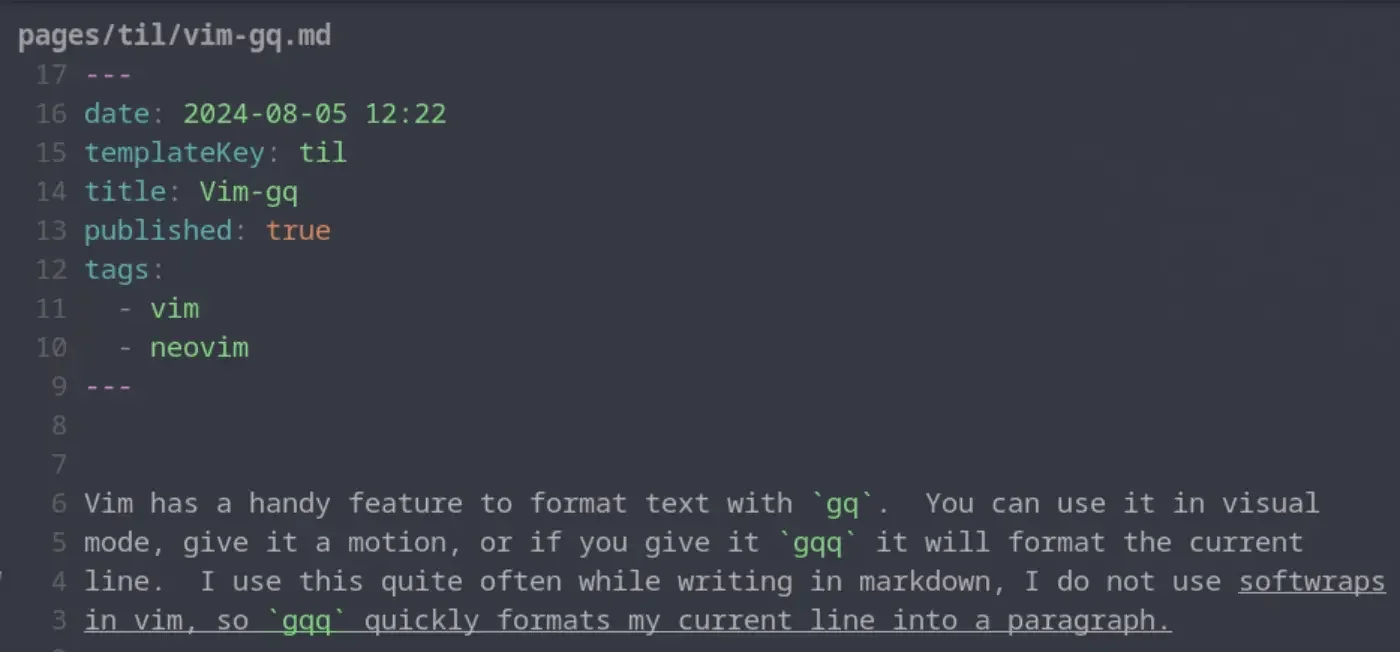
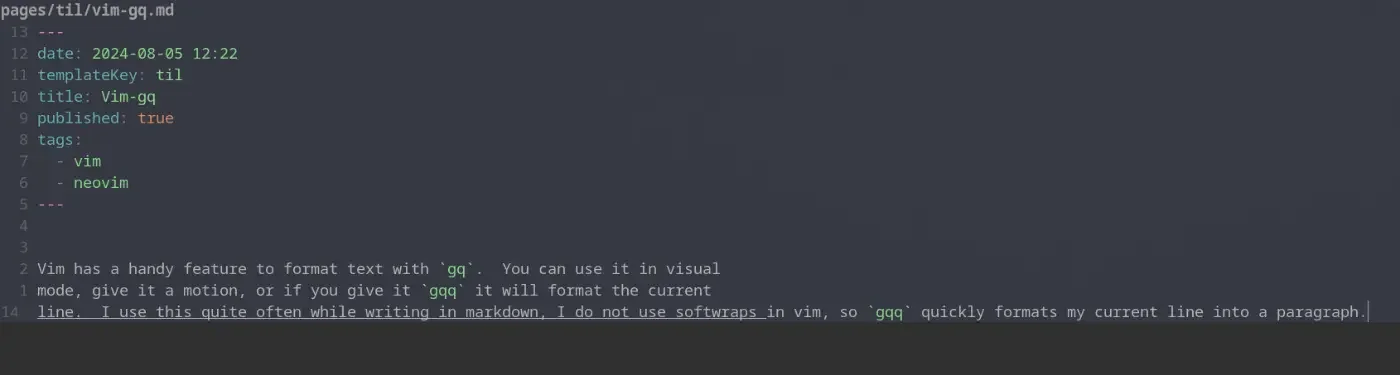
Vim has a handy feature to format text with gq. You can use it in visual
mode, give it a motion, or if you give it gqq it will format the current line.
I use this quite often while writing in markdown, I do not use softwraps in vim,
so gqq quickly formats my current line into a paragraph. Once I have done
this for a single line one time I typically switch to the motion for around
paragraph gqap to format the whole paragraph and not just the current line.
before formatting # [1]
[2]
after formattting # [3]
[4]
References:
[1]: #before-formatting
[2]: https://dropper.waylonwalker.com/api/file/01c19159-c0b5-4920-b73c-774284b09940.webp
[3]: #after-formattting
[4]: https://dropper.waylonwalker.com/api/file/e068e445-43e0-4e27-ac30-ac11e9cb9088.webp
-
I found this statement quite intriguing.
multi-cursors are just macros.
This is quite a philisophical video and mostly prime talking about the things that make vim vim, and what prime needs in and editor vs what he can live without.
Note
This post is a thought [1]. It’s a short note that I make
about someone else’s content online #thoughts
References:
[1]: /thoughts/
![[None]]
I figured out the killer combination for python lsp servers, ruff and jedi! ruff does all of the diagnostics and formatting, then jedi handles all the code objects like go to definition and go to reference.
local servers = {
ruff_lsp = {},
jedi_language_server = {},
}
Note
This post is a thought [1]. It’s a short note that I make
about someone else’s content online #thoughts
References:
[1]: /thoughts/