Markata got a shout out part way through the latest episode of LNL, I will go back, re-listen and take some of the feedback. His thoughts on Markata were interesting. On one hand it really is a thing for me that works for me, and as a person with too many side projects I don’t have the focus to really give it polish. On the other hand it really confirms why listen to podcasts, news, finger on the pulse, opinions and how often these guys are wrong, they are not the expert they probably look at 6 things like this a week. He said that it was some sort of javascript thing, that maybe he could fix or customize with javascript if he wanted, kinda shocking, I thought maybe I accidentally added node modules or something dumb, nope, I have a whopping 1.4% js. So most of the comments were plain wrong. I get it he probably peeked at it for 30s and realized it wasn’t the thing for his problem. At the same time I should probably do a better job at marketing what it really is, cleaning up the docs and demo.
It’s sad to see textualize.io close the doors, but textual is still alive and maintained as a n open source project. I tried to use it very early, and struggled, this was before docs and tutorials really existed, before a lot of the widgets and components existed. Then as we all do I got busy and moved on to other things in life and did not have the capacity to build TUIs. I like tuis I like tuis, I like staying in the terminal. I use lf daily to move files around when I want something more than and. I use k9s hourly to monitor and manage my kubernetes cluster. Are they worth the effort?? As awesome as tui’s are, they are more effort to build, and less automatable. I feel like the first stage into automation of a project really needs to be a good cli, and this is often good enough for the project and I move on. m9a (em - nine - ah) inspired by k9s Like I said I really like k9s and use it all the time, It really makes running kubectl commands a breeze and much less verbose. I don’t know…
I was looking back at my analytics page today and wondered what were my
posts about back at the beginning. My blog is managed by markata so I
looked at a few ways you could pull those posts up. Turns out it’s pretty
simple to do, use the markata map with a filter.
I realize that I never did a post on markata 0.8.0, so here it is. 0.8.0 was released on Jan 2, 2024, just over a year ago at this point. This was the release that we got pydantic support, and multi feeds. Pydantic Support Was kinda big Markata is leaning on pydantic for configuration and Post models. These models are filled with validators such that you can give it an empty markdown post and it will figure out some pretty sane default values for the frontmatter. From there you can progressively enhance your post with more information like title, date, tags, slug, description. validators are awesome!! for instance I don’t set the description on many of my posts by hand, I let the auto_description grab the first bit of text from the post most of the time. Multi Feeds Markata==0.8.1 brought multiple feeds into the mix, and started to take place of RSS and sitemap. Feeds are a list of posts that are configured with a slug, filter, sort, reverse, description, and a template. These feeds th…
A side effect of Markata DidYouMean is that we are able to implement some rudimentary search based on slug, title, tags, and description. I made a video of the early work on using this side effect to search for content on markata.dev. This was first implemented to solve 404 pages giving users a way to try to find the page that they tried to access. But it turned out to be a decent way to search through the docs.
In 2024 I built my own reader after years of being bitter about google killing reader more than a decade prior. Seealso All the way back in 2020 I made a post on what I wanted to build into my own reader. It went long forgotten until I tried to make this post and slugs clashed. Reader-2020 Built on markata I built it on top of my own static site generator markata, feedparser ( 🐍 Parsing RSS feeds with Python), some jinja templating, and tailwind. After putting all the work I have into markata, it makes projects like this fairly easy to build out with just a custom loader to load new posts in.
I’ve added htmx to my blog. It’s extra bloatware that I long avoided, but it’s so damn convenient. Ok so it’s not bloatware, but it’s not the theme I was going for. I wanted my site to be as lightweight as possible. I had at one point gone too far and had Mb’s of react that did not provide any value for the end user. can it be done with jinja Feed Partials markata pre-release 0.8.1.dev10 has been released with support for feed partials on pypi. It’s now part of my blog Commit aa233 added support for recent posts on each page to be loaded off of this partial.
I just implemented a latest blog post link in Markata by asking for the first
post slug from the blog feed. The implementation uses the jinja_md plugin to
render jinja against the markdown and a tag to redirect.
My latest blog post is [[ {{ markata.feeds.blog.posts[0].slug }} ]].  Click the
link if you are not automatically redirected.

<meta http-equiv="Refresh" content="0; url='/{{ markata.feeds.blog.posts[0].slug }}'" />
Feeds are setup in markata.toml configuration. They provide a handy way to
create an html feed, rss feed, and quickly reference a filtered set of posts
like this.
# you will need to enable the jinja_md plugin along with the defaults[markata]hooks=["markata.plugins.jinja_md","default",]# set up the blog feed[[markata.feeds]]slug='blog'template="feed.html"filter="date<=today and templateKey in ['blog-post'] and published"sort="date"reverse=true
For more information on markata check out the full markata post.
This post is a work in progress. Markata is the static site generator that I created to build my website about this site. I built it for me and I enjoy using it. I know everying it can do and I can extend it to do more easily. I have set it up for some friends to also use it and am proud that it helps them publish their content. It’s a meme to create your own static site generator to make your website. Yes its funny, I don’t recommend it if your not ready for the level of work that comes with it, but at the end of the day it’s very rewarding and a great way to learn. Static Sites were all the rage JAMStack was 🔥 Gatsby and Next.js hit the scene as the next generation of static site builders and were getting big around the time I started building my site in 2017. They were based on react. I dove into react and learned it enough to build my website, but I really lacked the depth of knowledge in the js ecosystem to really work on it effectively. For instance when it got slow, it was hard…
The first example that you can use right now is markata-gh. It will render
repos by GitHub topic and user using the gh cli, which is available in github
actions!
Get it with a pip install
pip install markata-gh
Use it with some jinja in your markdown.
## Markata plugins

It uses the logged in uer by default.

{% gh_repo_list_topic "markata" %}

You can more explicitly grab your username, and a topic.
{% gh_repo_list_topic "waylonwalker", "personal-website" %}
The jinja extension details are for another post, but this is how markata-gh
exposes itslef as a jinja extension.
classGhRepoListTopic(Extension):tags={"gh_repo_list_topic"}def__init__(self,environment):super().__init__(environment)defparse(self,parser):line_number=next(parser.stream).linenotry:args=parser.parse_tuple().itemsexceptAttributeError:raiseAttributeError("Invalid Syntax gh_repo_list_topic expects <username>, or <username>,<topic> both must have the comma")returnnodes.CallBlock(self.call_method("run",args),[],[],"").set_lineno(line_number)defrun(self,username=None,topic=None,caller=None):"get's markdown to inject into post"returnrepo_md(username=username,topic=topic)
Markata 0.5.0 is now out, and it’s huge. Even though it’s the backend of this
blog I don’t actually have that many posts directly about it. I’ve used it a
bit for blog fuel in generic ways, like talking about pluggy and diskcache, but
very little have I even mentioned it.
Over the last month I made a big push to get 0.5.0 out, which adds a whole
bunch of new configurability to markata.
Before cutting all of my personal projects over to hatch. The first thing I
did was to setup a solid github action,
hatch-actionthat I can resue.
It automatically bumps versions, using pre-releases on all branches other than
main, with special branches for bumping major, minor, patch, dev, alha, beta,
and dev.
To convert the project over to hatch, and get rid of setup.py/setup.cfg, I ran
hatch new --init. This automatically grabs all the metadata for the project
and makes a pyproject.toml that has most of what I need.
hatch new --init
I then manually moved over my isort config, put flake8 config into .flake8,
and dropped setup.cfg.
Part of my hatch-action is to run a before-command, for markata, this runs
all of my linting and testing in one hatch script called lint-test. If this
fails CI will fail and I can read the report in the logs, make a fix and
re-publish.
My typical workflow is to work on features in their own branch where they do
not automatically version or publish, they keep the same version they were
branched off of. Then I do a pr to develop, which will do a minor,dev bump
and publish a pre-relese to pypi.
# starting with version 0.0.0
Feature1 -- │
Feature2 -- ├── dev 0.1.0.dev1,2,3 ── main 0.1.0
Feature3 -- │
I will let several features collect in develop before cutting a full relese
over to main. This gives me time to make sure the solution is what makes the
most sense, I try to use it in a few projects, and generally its edges show,
and another pr is warranted to make the feature useful for more use cases.
After running and using these new releases in a few projects, I am confident
that its ready and release to main.
hatch makes building and publishing pretty straightforward. It’s one command
inside my hatch-action to build and one to publish. On each project that uses
my hatch-action I only need to give it a token that I get from PyPi.
A long needed feature of markata has been the ability to really configure out
templates with configuration rather. It’s been long that you needed that if
you really want to change the style, meta tags, or anything in the head you
needed to write a plugin or eject out of the template and use your own.
If this does not take you far enough yet, you can still eject out and use your
own template pretty easy. If you are going for a full custom site it’s likely
that this will be the workflow for awhile. Markata should only get better and
make this required less often as it matures.
Once you have this in your markata.toml you can put whatever you want in your
own template.
Markata is a great python framework that allows you to go from markdown to a
full website very quickly. You can get up and running with nothing more than
Markdown. It is also built on a full plugin architecture, so if there is extra
functionality that you want to add, you can create a plugin to make it behave
like you want.
The talk is live on YouTube. Make sure you check out the other videos from the
conference. There were quite a few quality talks that deserve a watch as well.
Markata I open sourced the static site framework that I use to build my-blog among other side projects. It’s a plugins all the way down static site generator, that makes me happy to use. {% gh_repo_list_topic “waylonwalker”, “markata” %} Repos used to build this blog my-blog is built on a number of small repos. I set it up this way so that creating content is fast and easy to do. I don’t have to worry about carrying around large images with my lightweight text files just to make some posts. {% gh_repo_list_topic “waylonwalker”, “personal-website” %} Kedro I am a heavy user of the kedro framework, and a big advocate for using some sort of DAG framework for your data pipelines. kedro is built all in python which makes it easy for a python dev like me to extend, run, maintain, and deploy. {% gh_repo_list_topic “waylonwalker”, “kedro” %} Neovim Plugins I use vim for all of my text editing needs. It brings me joy to make any part of it just a bit smoother. I have written a few plugins that…
a sprinter edging out his opponent by Dall-e
It’s about time to release Markata 0.3.0. I’ve had 8 pre-releases since the
last release, but more importantly it has about 3 months of updates. Many of
which are just cleaning up bad practices that were showing up as hot spots on
my pyinstrument reports
Markata started off partly as a python developer frustrated with using nodejs
for everything, and a desire to learn how to make frameworks in pluggy. Little
did I know how flexible pluggy would make it. It started out just as my blog
generator, but has turned into quite a bit more.
Over time this side project has grown some warts and some of them were now
becoming a big enough issue it was time to cut them out.
I like to use my tils articles for examples and tests like this as there are
enough articles for a good test, but they are pretty short and quick to render.
mkdir ~/git/tils/tils
cp  ~/git/waylonwalker.com/pages/til/ ~/tils/tils -r
cd ~/git/tils/tils
python3 -m venv .venv --prompt $(basename $PWD)# --pre installs pre-releases that include a b in their version namepip install markata --pre
markata clean
markata build
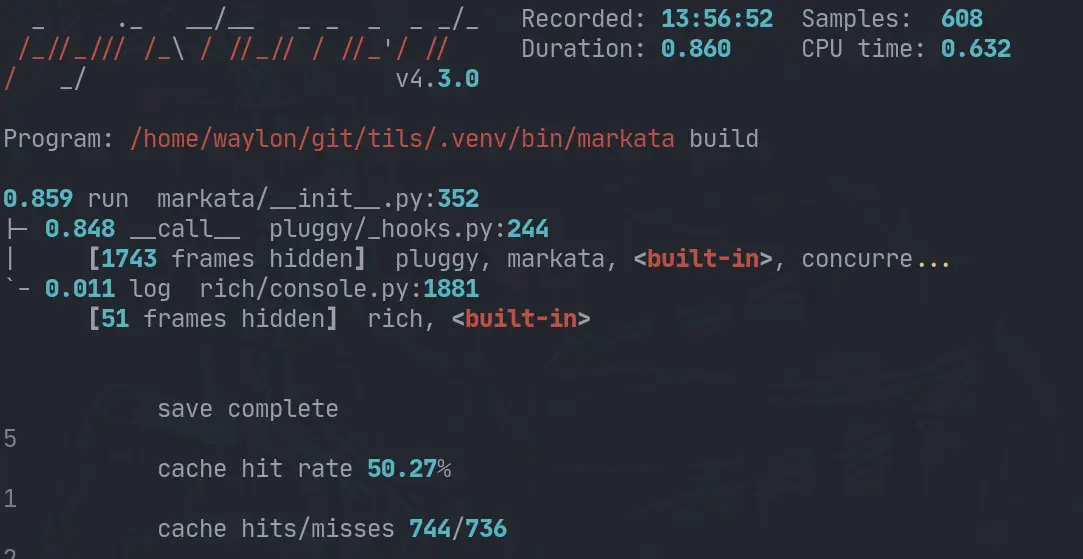
These measurements were taken with pyinstrument mostly out of convenience since
there is already a pyinstrument hook built in, but also because I like
pyinstrument.
Here is the pyinstrument report from the last run.
Most of these changes revolve in how the lifecycle is ran. It was trying to be
extra cautious and run previous steps for you if it thought it might be
needes, in reality it was rerunning a few steps multiple times no matter what.
The other thing I turned off by default, but can be opted into, is
beautifulasoup’s prettify. That was one of the slower steps ran on my site.
It should be out by the time you see this, I wanted to compare the changes I
had made and make sure that it was still making forward progress and thought I
would share the results.
https://youtu.be/-42A5210HYo Super fun steam Broadcasted live on Twitch – Watch live at https://www.twitch.tv/waylonwalker We worked on markata todoui, a command tui trello board written in python using only markdown files to store the data. I love markdown and I want to make this my workflow. During this stream we get RAIDED by TEEJ_DV! and chat about tmux a bit before calling the changes to markata-tui good and signing off. dotfiles: https://github.com/WaylonWalker/devtainer today’s project: https://github.com/WaylonWalker/markata-todoui website: https://waylonwalker.com/