Posts tagged: git

All posts with the tag "git"

24 posts latest post 2026-01-15
Publishing rhythm
Jan 2026 | 1 posts

Once you give a branch the big D (git branch -D mybranch) its gone, its lost from your history. It’s completely removed from your log. There will be no reference to these commits, or will there?

Checkout is your savior, all you need is the commit hash.

your terminal is still open

We have all done this, you give branch the big D only to realize it was the wrong one. Don’t worry, not all is lost, this is the easiest to recover from. When you run the delete command you will see something like this.

...

It’s nearly impossible to completely loose a file if it is commited to git. It’s likely harder to fully remove the file than it is to recover it, but how do we go about recovering those precious files that we have lost.

Listing all the deleted files in all of git history can be done by combining git log with --diff-filter. The log gives you lots of options to show different bits of information about the commit that happened at that point. It’s even possible to get a completely clean list of files that are in your git history but have been deleted.

These various commands will show all files that were ever deleted on your current branch.

# This one includes the date, commit hash, and Author git log --diff-filter D # this one could be a git alias, but includes empty lines git log --diff-filter D --pretty="format:" --name-only # this one has the empty lines cleaned up git log --diff-filter D --pretty="format:" --name-only...

...

git

Git commands such as diff, log, whatchanged all take a flag called --diff-filter. This can filter for only certain types of diffs, such as added (A), modified (M), or deleted (D).

You can find the full description by searching for --diff-filter in the man git diff page.

--diff-filter=[(A|C|D|M|R|T|U|X|B)...[*]] Select only files that are Added (A), Copied (C), Deleted (D), Modified (M), Renamed (R), have their type (i.e. regular file, symlink, submodule, ...) changed (T), are Unmerged (U), are Unknown (X), or have had their pairing Broken (B). Any combination of the filter characters (including none) can be used. When * (All-or-none) is added to the combination, all paths are selected if there is any file that matches other criteria in the comparison; if there is no file that matches other criteria, nothing is selected. Also, these upper-case letters can be downcased to exclude. E.g....

git

Git has a built in way to rebase all the way back to the beginning of time. There is no need to scroll through the log to find the first hash, or find the total number of commits. Just use --root.

Git reflog can perform some serious magic in reviving your hard work from the dead if you happen to loose it.

You must git commit! If you never commit the file, git cannot help you. You might look into your trashcan, filesystem versions, onedrive, box, dropbox. If you have none of this, then you are probably hosed.

I really like to practice these techniques before I need to use them so that I understand how they work in a low stakes fashion. This helps me understand what I can and cannot do, and how to do it in a place that does not matter in any way at all.

This is what I did to revive a dropped docker-compose.yml file. The idea is that if I can find the commit hash, I can cherry-pick it.

...

Right inside the git docs, is states that the git reflog command runs git reflog show by default which is an alias for git log -g --abbrev-commit --pretty=oneline

This epiphany deepens my understanding of git, and lets me understand that most git log flags might also work with git log -g.

Here are some git commands for you to try out on your own that are all pretty similar, but vary in how much information they show.

# These show only first line of the commit message subject, the hash, and index git reflog git log -g --abbrev-commit --pretty=oneline # similar to git log, this is a fully featured log with author, date, and full # commit...

...

I’ve never found a great use for a global .gitignore file. Mostly I fear that by adding a lot of the common things like .pyc files it will be missing from the project and inevitably be committed to the project by someone else.

Within the past year I have added some tools to my personal setup that are not required to run the project, but works really well with my setup. They are direnv and pyflyby. Since these both support project level configuration, are less common, and not in most .gitignore templates they make for great candidates to add to a global .gitignore file.

Like any .gitignore it supports gits wildignore syntax. I made a ~/dotfiles/git/.global_gitignore file, and added the following to it.

.envrc .pyflyby .copier-defaults .venv*/ .python-version markout .markata.cache

Once I had this file, I stowed it into ~/.global_gitignore.

...

git

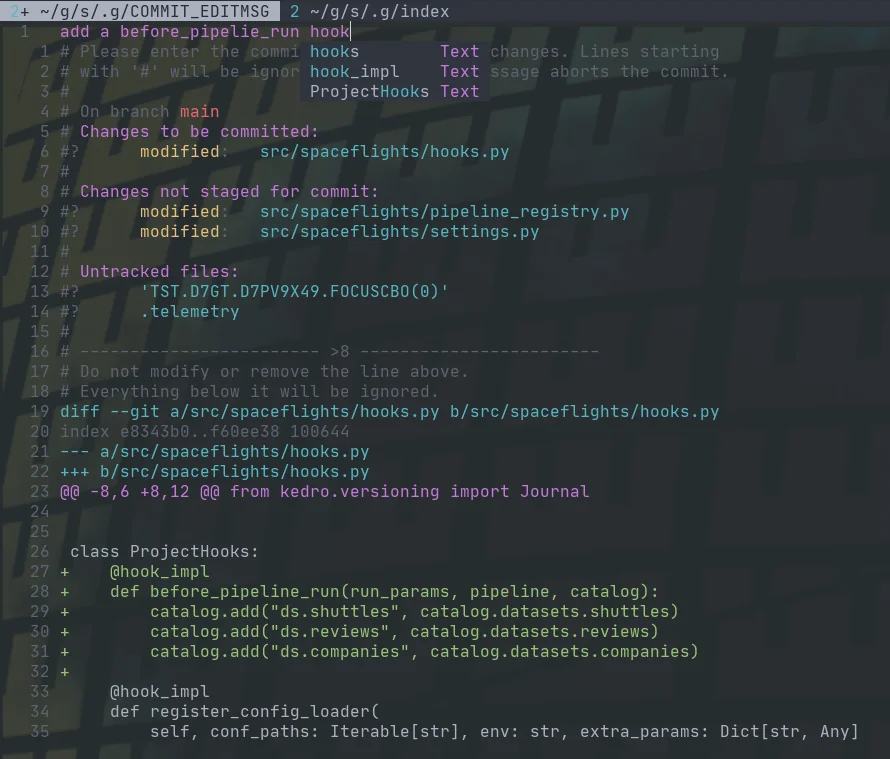
Fugitive comes with a pretty sick way to commit files and see the diff at the same time with verbose commit. Opening the fugitive menu with :G brings up your git status, you can stage files with s, unstage them with u, toggle them with -, and toggle their diff with >. Once you have staged your files for commit, you can commit with cc, but today I found that you can commit verbose with cvc. This brings up not only a commit widow with your git status shown, but the diff that you are about to commit.

example of a verbose commit in fugitive

How I configure git

Git can be a bit tricky to get configured correctly. I often stumble into config issues weeks after setting up a new machine that I did not even notice. These are my notes to remind me how I configure git.

How to use git cherry pick

~/git via 🐍 v3.8.5 ❯ mkdir git-cherry-pick-learn ~/git via 🐍 v3.8.5 ❯ cd git-cherry-pick-learn ~/git/git-cherry-pick-learn ❯ git init Initialized empty Git repository in /home/walkews/git/git-cherry-pick-learn/.git/ git-cherry-pick-learn on  main ❯ touch readme.md git-cherry-pick-learn on  main [?] ❯ git status On branch main No commits yet Untracked files: (use &#34;git add <file>...&#34; to include in what will be committed) readme.md nothing added to commit but untracked files present (use &#34;git add&#34; to track) git-cherry-pick-learn on  main [?] ❯ git add . git-cherry-pick-learn on  main [+] ❯ git commit -m &#34;init readme&#34; [main (root-commit) ebd1ff2] init readme 1 file changed, 0 insertions(+), 0 deletions(-) create mode 100644 readme.md git-cherry-pick-learn on  main ❯ echo &#34;Learn Cherry Pick&#34; Learn Cherry Pick git-cherry-pick-learn on  main ❯ git add . git-cherry-pick-learn on  main ❯ git commit -m &#34;add title...

Trim unused git branches

Trim branches no longer on origin # git remote prune origin --dry-run git remote prune origin Find branches already merged # git checkout main # list remote branches that have already been merged into main git branch -r --merged # list local branches that have already been merged into main git branch --merged

Gitui is a blazing fast terminal git interface

Gitui is a terminal-based git user interface (TUI) that will change the way that you work with git. I have been a long-time user of the git cli, and it’s been hard to beat, mostly because there is nothing that keeps my fingers on the keyboard quite like it, except gitui which comes with some great ways to very quickly walk through a git project.

Go to their [releases]https://github.com/extrawurst/gitui/releases) page, download the latest build, and pop it on your PATH. I have the following stuffed away in some install scripts to get the latest version.

install latest release

...

2 min read

Fix git commit author

I was 20 commits into a hackoberfest PR when I suddenly realized they they all had my work email on them instead of my personal email 😱. This is the story of how I corrected my email address on 19 individual commits after already submitting for a PR.

stop the bleeding

Before anything else set the email correctly!

...

3 min read

List the latest files to change in a git repo

while read file; do echo $(git log --pretty=format:%ad -n 1 --date=raw -- $file) $file; done < <(git ls-tree -r --name-only HEAD | grep static/stories) | sort -r | head -n 3 | cut -d &#34; &#34; -f 3

Strip Trailing Whitespace from Git projects

A common linting error thrown by various linters is for trailing whitespace. I most often use flake8. I generally have [pre-commit](https://waylonwalker.com/pre-commit-is-awesome hooks setup to strip this, but sometimes I run into situations where I jump into a project without it, and my editor lights up with errors. A simple fix is to run this one-liner.

bash

git grep -I --name-only -z -e '' | xargs -0 sed -i -e 's/[ \t]\+\(\r\?\)$/\1/'

pre-commit article

...

Master No More

It’s been a long time coming. We use some very harsh language within tech so much sometimes that we become numb to it. It’s time to do my very small part in this movement and purge this language from my active repos starting with this blog right here.

Large Refactor At The Command Line

this post follows my method of refactoring code bases from the command line, read more about that in this article.

...

2 min read 💬 4