Quick-Start Guide | K3s This guide will help you quickly launch a cluster with default options. Make sure your nodes meet the requirements before proceeding. docs.k3s.io I recently spun up k3s in my homelab. I’m trying to offload some work off of my free tier fly.io app in order to keep it free tier without crashing. My main hiccup so far was the machine I am running on runs zfs on root, and it would not start the master node. Rather than figuring out how to make zfs play nice I just pointed k3s to a drive that is not zfs.
Posts tagged: containers
All posts with the tag "containers"
85 posts
latest post 2026-03-24
Publishing rhythm
How to run pods as systemd services with Podman Podman is well known for its seamless integration into modern Linux systems, and supporting systemd is a cornerstone in these efforts. Linux commonly uses th... redhat.com podman comes with a nice command for generating systemd service files (units).
GitHub - wagoodman/dive: A tool for exploring each layer in a docker image A tool for exploring each layer in a docker image. Contribute to wagoodman/dive development by creating an account on GitHub. GitHub · github.com Really cool tui to inspect docker imaages that runs with docker.
Relocating the Docker root directory | IBM Z Operational Log and Data Analytics 5.1.0 If the space in the file system where the Docker root directory is located is not adequate and cannot be increased, you must relocate the directory. ibm.com A very straightforward guide to moving your docker data, such as container storage to a different location. In my case I wanted it off of my boot drive.
Podman - ArchWiki wiki.archlinux.org I kept running into limits in the number of subuid and subgid’s I had on my system by default. As always thank the arch wiki guide for having the most comprehensive yet consice guide to setup podman. What I needed to do to fix the error.
gistfile1.txt text [registries.search] registries = ['docker.io'] functions. You might get errors like: Various documentation (redhat blog entries, pages) say that dockerhub is a default, but without this step it’s clearly not. By default podman will not pull images from docker.io and will need setup. This guide worked for me.
In my adventure to put more homelab in docker, I moved our modded minecraft setup to docker.
Getting Mods #
So far I have found all of our mods from curse forge. modpacks make getting multiple mods working together much easier, someone else has already vetted a pack of often times 100+ mods that all play well together. I have yet to get these working in docker, I will, but for not I just have individual mods.
download file #
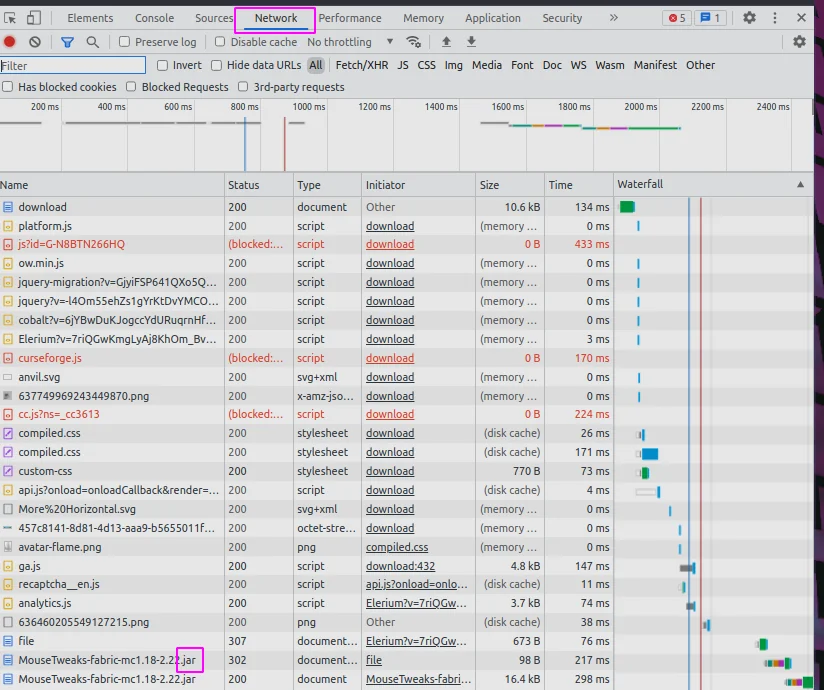
under the hood docker is using wget to get the mod. The link you click on from curseforge will block wget. What I do is pop open the devtools (f12 in chrome), click on the network tab, click the download link on the web page, and watch the real link show up.
Docker-compose #
I am using docker compose, it makes the command much easier to start, and all the things needed stored in a file. I am not using compose to run multiple things, just for the simple start command.
Create a directory for your server and add the following to a
docker-compose.yml file.
version: "3.8"

services:
  mc:
    container_name: walkercraft
    image: itzg/minecraft-server
    ports:
      - 25565:25565
    environment:
      EULA: "TRUE"
      TYPE: "FORGE"
      VERSION: 1.16.5
      MODS_FILE: /extras/mods.txt
      REMOVE_OLD_MODS: "true"
    tty: true
    stdin_open: true
    restart: unless-stopped
    ports:
      - 25565:25565
    volumes:
      - ./minecraft-data:/data
      - ./mods.txt:/extras/mods.txt:ro

volumes:
  data:
mods.txt #
Once you have your mod file link from the network tab add them to a mods.txt file next to your docker-compose file.
https://media.forgecdn.net/files/3620/189/engineersdecor-1.16.5-1.1.16.jar
start your server #
Once you have made it this far starting the server is pretty simple.
docker compose up -d
kill your server #
If your still in the same directory, taking down the server should be pretty easy as well.
docker compose down

# if that does not work you can kill it
docker ps
# copy the id of your container
docker kill <id>
I’ve ran a Minecraft server at home since December 2017 for me and my son to play on. We start a brand new one somewhere between every day and every week. The older he gets the longer the server lasts.
In all these years, I’ve been popping open the command line and running the server manually, and even inside of Digital Ocean occasionally to play a more public server with a friend.
My buddy Nic has been sharing me some of his homelab setup, and it’s really got me to thinking about what I can run at home, and Dockerizing all the things. Today I found a really sweet github repo that had a minecraft server running in docker with a pretty incredible setup.
I ended up running the first thing in the Readme that included a volume mount. If you are going to run this container, I HIGHLY reccomend that you make sure that you have your world volume mounted, otherwise it will die with your docker container.
Docker Compose #
With the following stored as my docker-compose.yml in a brand new and
otherwise empty directory I was ready to start the server for the night.
version: "3"

services:
  mc:
    container_name: walkercraft
    image: itzg/minecraft-server
    ports:
      - 25565:25565
    environment:
      EULA: "TRUE"
    tty: true
    stdin_open: true
    restart: unless-stopped
    volumes:
      # attach a directory relative to the directory containing this compose file
      - ./minecraft-data:/data
To start the server we open up the terminal in this directory and run the follwing command.
docker compose up -d
Once its up and running we can run commands on the server simply by attaching to it.
docker attach walkercraft
A few common commands we run in the server #
We play very casually most of the time so we will set keepInventory to true so that we do not loose our inventory when we die. Sometimes we also op ourselve so that we can toggle gamemode into creative.
# set the game to keep your inventory when you die.
/gamrule keepInventory true

# give everyone operater priveledges to they can run commands
/op @a

# give playername op
/op playername
📝 Docker Deep Dive - Notes
https://www.hanselminutes.com/784/doing-open-source-with-brian-douglas Play With Docker A handy way to try weird things in docker is using play-with-docker. You get a four hour session for free, after four hours everything will be deleted, but you can start a new session. Installing Docker on Linux Installing on Ubuntu. Running Docker commands without sudo In order to run docker commands without using sudo you need to add docker to your group. Architecture and Theory Container - Isolated area of an OS with resource usage limits applied. Namespaces and Control Groups are hard, which is why containers were unusable by mortals before docker. Namespaces Isolation Each container looks and feels like a regular OS. It has its own eth0, users, kernel. These are completely isolated from every other container running on the system. Namespaces are analogous to what Hypervisors do on hardware. Process ID (pid) Network (net) Filesystem/mount (mnt) Inter-proc comms (ipc) UTS (uts) User (usr) Control…
Calendar data could not load. Try again.