Today I learned that docker creates an empty /.dockerenv file to indicate that
you are running in a docker container. Other runtimes like podman commonly use
/run/.containerenv. kubernetes uses neither of these, the most common way to
detect if you are running in kubernetes is to check for the presence of the
KUBERNETES_SERVICE_HOST environment variable. There will also be a directory
at /var/run/secrets/kubernetes.io/serviceaccount that contains the service
account credentials if you are running in kubernetes.
Posts tagged: docker
All posts with the tag "docker"
18 posts
latest post 2026-03-18
Publishing rhythm
I learned to today that setting MEMORY on your minecraft server causes the
JVM to egregiously allocate all of that memory. Not setting it causes slow
downs and potential crashes, but setting INIT_MEMORY and MAX_MEMORY gives
us the best of both worlds. It is allowed to use more, but does not gobble it
all up on startup.
In this economy we need to save all the memory we can!
Here is a non-working snippet for a minecraft server deployment in kubernetes.
      containers:
        - name: dungeon
          image: itzg/minecraft-server
          env:
            - name: EULA
              value: "true"
            - name: INIT_MEMORY
              value: "512M"
            - name: MAX_MEMORY
              value: "3G"
and in docker compose
  dungeon:
    image: itzg/minecraft-server
    environment:
      EULA: "true"
      INIT_MEMORY: "512M"
      MAX_MEMORY: "3G"
Diun
Receive notifications when a Docker image is updated on a Docker registry
crazymax.dev [1]
Diun, looks like a very interesting tool to monitor for image updates, it does not make any change, it only makes notifications. This feels like an easy start to getting image updates started with low effort, keep git [2] ops, but requires manual updates. I see this as a tool that would be a great start and pair well with automated image updaters to ensure they are working as expected.
References:
[1]: https://crazymax.dev/diun/
[2]: /glossary/git/
I recently noticed that my og images were missing emoji. They were taken using headless chrome in a container. I fixed it by adding an emoji font in the containerfile / dockerfile.
RUN apt-get update && apt-get install -y \
    # Add fonts with emoji support
    fonts-noto-color-emoji \
    && rm -rf /var/lib/apt/lists/*
Before #
Here’s what they were looking like with broken emoji fonts.
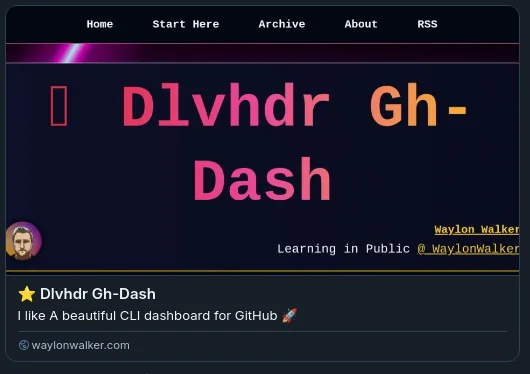
After #
And now with the fixed emoji font.

I put thought bubbles on my thoughts posts and stars on my github stars posts
Today I learned that the docs in postiz are a bit behind, (fantastic docs btw, they are to the point, and cover almost all of what you need). The docs state that you need to include an R2 bucket to handle uploads.
This issue shows that more work has been done, one of which is local storage. The compose file they use in the quick start has the required env variables to set this up.
      STORAGE_PROVIDER: "local"
      UPLOAD_DIRECTORY: "/uploads"
      NEXT_PUBLIC_UPLOAD_DIRECTORY: "/uploads"
looking into my running instance I can see my images there.
⬢ [devtainer] ❯ podman exec postiz ls /uploads/2025/01/09
811747b3f703f5d9a7f10aff5103412ff0.jpeg
a221db10a76f0c414171ab417379b09ec.jpeg
docker context (and an issue to question your sanity) | Nic Payne
docker contexts are great, would recommend putting them in your prompt though (via starship or something else)... here's why I like to manage my containers
pype.dev [1]
Dang context can really cause you to pull your hair out. Context seems so freaking convenient, but I’ve avoided it and just ssh in for these reasons. Maybe I’ll come around eventually but for now ssh is my friend.
References:
[1]: https://pype.dev/docker-context-and-an-issue-to-question-your-sanity
Add a healthcheck to your FastAPI app | Nic Payne
I'm building a few FastAPI apps to throw in docker and run on my homelab... I wanted to add healthchecks and here's a simple way to do it Make sure to
pype.dev [1]
Nice example of adding a healthcheck to fastapi [2], and integrating it with docker. Don’t forget to include curl in the install, nice touch.
References:
[1]: https://pype.dev/add-a-healthcheck-to-your-fastapi-app
[2]: /fastapi/
External Link
containers.github.io [1]
bootc is the underlying technology that enables OS’s like bazzite, and Aurora from the uBlue ecosystem.
References:
[1]: https://containers.github.io/bootc/
Production-ready Python Docker Containers with uv
Starting with 0.3.0, Astral’s uv brought many great features, including support for cross-platform lock files uv.lock. Together with subsequent fixes, it has become Python’s finest workflow too...
Hynek Schlawack · hynek.me [1]
Hynek has a sick dockerfile setup for using uv in python projects.
References:
[1]: https://hynek.me/articles/docker-uv/
[1]
This page is gold. It lays out all of the distrobox assemble api with some good examples of how to get access to things like podman and kind from inside of containers.
Especially this example.
[tumbleweed_distrobox]
image=registry.opensuse.org/opensuse/distrobox
pull=true
additional_packages="acpi bash-completion findutils iproute iputils sensors inotify-tools unzip"
additional_packages="net-tools nmap openssl procps psmisc rsync man tig tmux tree vim htop xclip yt-dlp"
additional_packages="git git-credential-libsecret"
additional_packages="patterns-devel-base-devel_basis"
additional_packages="ShellCheck ansible-lint clang clang-tools codespell ctags desktop-file-utils gcc golang jq python3"
additional_packages="python3-bashate python3-flake8 python3-mypy python3-pipx python3-pycodestyle python3-pyflakes python3-pylint python3-python-lsp-server python3-rstcheck python3-yapf python3-yamllint rustup shfmt"
additional_packages="kubernetes-client helm"
init_hooks=GOPATH="${HOME}/.local/share/system-go" GOBIN=/usr/local/bin go install github.com/golangci/golangci-lint/cmd/golangci-lint@latest;
init_hooks=GOPATH="${HOME}/.local/share/system-go" GOBIN=/usr/local/bin go install g...
add init hooks and exported bins · WaylonWalker/devtainer@2e4c6da
🐳 (dotfiles) My personal development docker container base image - add init hooks and exported bins · WaylonWalker/devtainer@2e4c6da
GitHub · github.com [1]
Today I learned that you can use init_hooks to access host machine commands from inside a distrobox container. This is super handy for things that you cannot get to from inside the container and need ran outside (docker, podman, flatpak, xdg-open).
init_hooks=ln -sf /usr/bin/distrobox-host-exec /usr/local/bin/podman;
References:
[1]: https://github.com/WaylonWalker/devtainer/commit/2e4c6da537f5672209d1b3922fad754190aef938#diff-38878343c551520f8af2a3986e5f6085b03df197a56a92abc42a44b200f0264aR19
-
Docker no Docker, what!!!
So fly.io uses Dockerfiles to deploy your app, but no docker. They use containerd to download your docker images into firecracker microvms to run your app. Firecracker is the same tech that runs aws lambda functions.
Fascinating short post on the beans under the hood at fly.io and how they scale your app globally.
Best practices for Docker in production
You
talkpython.fm [1]
Great listen for anyone interested in productionizing python code with docker. Itamar brings up some
Don’t trust base images for security, upgrade your packages. Vulnerabilties become published and solved giving the bad guys istructions how to wreck your day and these fixes wont come to your docker application for up to two weeks due to image build tatency.
For job based containers pre-compile your pyc for faster startup.
Alpine linux is probably not what you want for python. Many packages such as postgres ship pre-copiled binaries that work for most linux distributions wich use glibc, but alpine uses musl so the binaries will be incompatable requiring you to need to install a bunch of build dependencies.
References:
[1]: https://talkpython.fm/episodes/show/323/best-practices-for-docker-in-production
External Link
stackoverflow.com [1]
The convention of “z-pages” comes from google and reduces the likelihood of collisions with application endpoints and keep the convention across all applications.
References:
[1]: https://stackoverflow.com/questions/43380939/where-does-the-convention-of-using-healthz-for-application-health-checks-come-f
GitHub - jesseduffield/lazydocker: The lazier way to manage everything docker
The lazier way to manage everything docker. Contribute to jesseduffield/lazydocker development by creating an account on GitHub.
GitHub · github.com [1]
I’ve been using this for a few weeks now and it’s fantastic. It’s reminds me of lazygit, it gives a nice quick interface into the things I need and it just works. Yes I can git [2] status to see what changed, then diff the files, then commit hunks, but lazygit can do that in just a few keystrokes. lazydocker does this for docker. It gives me a nice view into whats running, what’s eating up disk space, and the networks I have. And if I see I have a bunch of exited containers, there is a bulk command righ there to clean them up.
tldr docker ps on steroids
[3]
References:
[1]: https://github.com/jesseduffield/lazydocker
[2]: /glossary/git/
[3]: https://github.com/jesseduffield/lazydocker/blob/master/docs/resources/demo3.gif?raw=true
GitHub - wagoodman/dive: A tool for exploring each layer in a docker image
A tool for exploring each layer in a docker image. Contribute to wagoodman/dive development by creating an account on GitHub.
GitHub · github.com [1]
Really cool tui to inspect docker imaages that runs with docker.
References:
[1]: https://github.com/wagoodman/dive
Relocating the Docker root directory
If the space in the file system where the Docker root directory is located is not adequate and cannot be increased, you must relocate the directory.
ibm.com [1]
A very straightforward guide to moving your docker data, such as container storage to a different location. In my case I wanted it off of my boot drive.
References:
[1]: https://www.ibm.com/docs/en/z-logdata-analytics/5.1.0?topic=compose-relocating-docker-root-directory
gistfile1.txt [1]
text
On void linux.
Under `/etc/containers/` there is a file called `registries.conf`. It is complemented by `man 5 containers-registries.conf`.
Change (for me lines 11-12) which say
[registries.search]
registries = []
to
[registries.search]
registries = ['docker.io']
(drawn from https://www.projectatomic.io/blog/2018/05/podman-tls/)
---
Without the above you won’t be able to use basic podman functions. You might get errors like:
- Error: unable to pull fedora:28: image name provided is a short name and no search registries are defined in the registries config file.
- Error: unable to pull stripe/stripe-cli: image name provided is a short name and no search registries are defined in the registries config file.
---
Various documentation (redhat blog entries, man podman pages) say that dockerhub is a default, but without this step it’s clearly not.
Good luck. Feel free to use the comment box below if you have a github account.
By default podman will not pull images from docker.io and will need setup. This guide worked for me.
References:
[1]: https://gist.github.com/isomorphisms/3114ab86960656a729a6b4653001aae2
In my adventure to put more homelab in docker, I moved our modded minecraft setup to docker.
Getting Mods #
So far I have found all of our mods from curse forge. modpacks make getting multiple mods working together much easier, someone else has already vetted a pack of often times 100+ mods that all play well together. I have yet to get these working in docker, I will, but for not I just have individual mods.
download file #
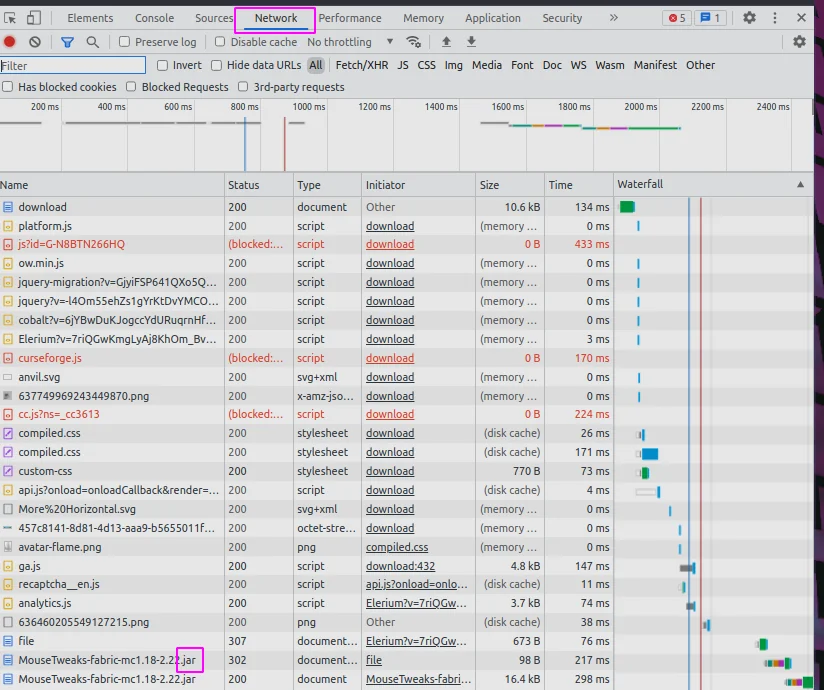
under the hood docker is using wget to get the mod. The link you click on from curseforge will block wget. What I do is pop open the devtools (f12 in chrome), click on the network tab, click the download link on the web page, and watch the real link show up.
Docker-compose #
I am using docker compose, it makes the command much easier to start, and all the things needed stored in a file. I am not using compose to run multiple things, just for the simple start command.
Create a directory for your server and add the following to a
docker-compose.yml file.
version: "3.8"

services:
  mc:
    container_name: walkercraft
    image: itzg/minecraft-server
    ports:
      - 25565:25565
    environment:
      EULA: "TRUE"
      TYPE: "FORGE"
      VERSION: 1.16.5
      MODS_FILE: /extras/mods.txt
      REMOVE_OLD_MODS: "true"
    tty: true
    stdin_open: true
    restart: unless-stopped
    ports:
      - 25565:25565
    volumes:
      - ./minecraft-data:/data
      - ./mods.txt:/extras/mods.txt:ro

volumes:
  data:
mods.txt #
Once you have your mod file link from the network tab add them to a mods.txt file next to your docker-compose file.
https://media.forgecdn.net/files/3620/189/engineersdecor-1.16.5-1.1.16.jar
start your server #
Once you have made it this far starting the server is pretty simple.
docker compose up -d
kill your server #
If your still in the same directory, taking down the server should be pretty easy as well.
docker compose down

# if that does not work you can kill it
docker ps
# copy the id of your container
docker kill <id>
I’ve ran a Minecraft server at home since December 2017 for me and my son to play on. We start a brand new one somewhere between every day and every week. The older he gets the longer the server lasts.
In all these years, I’ve been popping open the command line and running the server manually, and even inside of Digital Ocean occasionally to play a more public server with a friend.
My buddy Nic has been sharing me some of his homelab setup, and it’s really got me to thinking about what I can run at home, and Dockerizing all the things. Today I found a really sweet github repo that had a minecraft server running in docker with a pretty incredible setup.
I ended up running the first thing in the Readme that included a volume mount. If you are going to run this container, I HIGHLY reccomend that you make sure that you have your world volume mounted, otherwise it will die with your docker container.
Docker Compose #
With the following stored as my docker-compose.yml in a brand new and
otherwise empty directory I was ready to start the server for the night.
version: "3"

services:
  mc:
    container_name: walkercraft
    image: itzg/minecraft-server
    ports:
      - 25565:25565
    environment:
      EULA: "TRUE"
    tty: true
    stdin_open: true
    restart: unless-stopped
    volumes:
      # attach a directory relative to the directory containing this compose file
      - ./minecraft-data:/data
To start the server we open up the terminal in this directory and run the follwing command.
docker compose up -d
Once its up and running we can run commands on the server simply by attaching to it.
docker attach walkercraft
A few common commands we run in the server #
We play very casually most of the time so we will set keepInventory to true so that we do not loose our inventory when we die. Sometimes we also op ourselve so that we can toggle gamemode into creative.
# set the game to keep your inventory when you die.
/gamrule keepInventory true

# give everyone operater priveledges to they can run commands
/op @a

# give playername op
/op playername
📝 Docker Deep Dive - Notes
https://www.hanselminutes.com/784/doing-open-source-with-brian-douglas
Play With Docker # [1]
A handy way to try weird things in docker is using
play-with-docker [2]. You get a four hour session for
free, after four hours everything will be deleted, but you can start a new
session.
Installing Docker on Linux # [3]
Installing on Ubuntu.
wget -qO- https://get.docker.com/ | sh
Running Docker commands without sudo # [4]
In order to run docker commands without using sudo you need to add docker to
your group.
sudo usermod -aG docker ubuntu
Architecture and Theory # [5]
Container - Isolated area of an OS with resource usage limits applied.
Namespaces and Control Groups are hard, which is why containers were unusable
by mortals before docker.
Namespaces # [6]
Isolation
Each container looks and feels like a regular OS. It has its own eth0, users,
kernel. These are completely isolated from every other container running on
the system.
Namespaces are analogous to what Hypervisors d...