What a great campfire story Casey stumbled into. Whether any of this is true few will ever know, but its very reasonable that a race condition and a stalled job to apply configuration caused by someone who left the company 10 years ago caused an outage. I find it hilarious that they call this guy he answers, yup I still know the password, but how do I know you’re legit, I’m not just handing out the password. Casey did a stand up job telling this story.
Posts tagged: cloud
All posts with the tag "cloud"
14 posts
latest post 2025-12-07
Publishing rhythm
Another Big Cloud Outage Nov 2025
Today I woke up to finding out that cloudflare hade a widespread outage. My Reader uses tailwind cdn for styles and it was down. Otherwise it was not so impactful to me and felt kike they were quick to have it up. I’m not really researching here, just jotting thoughts down from a parking lot waiting for pickup. It feels like we are seeing a lot of these lately. They feel much more frequent. It feels like a whole industry was sold on 9’s and reliability of big cloud that we just aren’t getting. There’s a huge push to go back to self hosting, racking and stacking. I think this is great. I love it. I’m a big proponent for ownership and self hosting. It’s not the right move for everything and everyone, and is certainly not something to make a knee jerk reaction about in the moment of frustration. There’s a lot of things that are just impossible to do yourself, cdn caching, edge compute, ddos protection. These companies are not magic they are vulnerable to changes just like you and I. It re…
Cloud is cooked bois. Seriously too much dumb shit relies on the cloud. Too much critical shit relies on single AZ’s. If normies are literally loosing sleep over an AWS outage (queue the Uncle Roger Voice), You’ve Fucked up. It’s wild to even think about a bed relying on the cloud let alone fully stop working when UE-1 goes down. I want to live in a world of opt in FEATURES, things that bring value to a product because it makes it better. Somehow a bed smells suspiciously like a cash grab for a subscription because its cloud connected. And yet for some reason it takes 16GeeeBee’s per month. I don’t own one of these, and I don’t want to. I don’t want a subscription for everything, I want my shit to just work. The future we are headed towards a world that is ever more reliant on a few key clouds. Which is fine. It’s fantastic that small companies can start and scale without owning an infrastructure team. It’s great that they have the ability to give us many nines of reliability. Some things just don’t need the cloud.
Ben Dicken (@BenjDicken) on X I am once again begging you to put your database servers and application servers in the same region. X (formerly Twitter) · x.com This is a really great animation of latency across different aws regions based on us-east-1.
External Link fafo.fm This episode really got me thinking about the difference between HA and DR and my approach to each one. They talk about it from the perspective of a cach cow kind of app rather than a homelab or internal tooling, but think of HA as 9’s how many 9s are we willing to pay for, tink of DR as dollars how many dollars will we loose during the period of recovery. So much more in the episode, a lot of talk around cloud vendors and what they give you vs a purpose build platform with HA and DR in mind.
Deploy to Fly using a Depot builder Using Fly.io's new Depot builder, we'll walk you through how to deploy a TypeScript service globally with speed. Depot · depot.dev Here the integration to depot appears to be opt in using the flag on. This must have changed over time though because today it was giving me issues and I had to opt out using. Looks like a great service and I just learned about them on their bad day.
@changelog) on X — 🗣️@dhh on Kubernetes' migration pitch: “Oh, we’re on Amazon? Flip the switch, George! Let’s move over to GCP.” Vs reality: "Flip the switch, George! We’ll start having the meetings about the meetings about how we can move out four years from now."" loading=“lazy”> Changelog ( @changelog) on X 🗣️@dhh on Kubernetes' migration pitch: “Oh, we’re on Amazon? Flip the switch, George! Let’s move over to GCP.” Vs reality: "Flip the switch, George! We’ll start having the meetin… X (formerly Twitter) · x.com switching cloud providers, theres no easy way. K8s was supposed to get us there, haha, the deep integrations with each vendor just keep locking us in
such a sick episode with dax. SST’s free tier will be free as long as aws allows a free tier, their free tier literally costs them nothing. They talked about keeping SST small, the limitations that brings, but also the number of problems that just go away when you only have 3 people building. Lots of process disappears, everyone can trust everyone, no one needs to wait for approval, everyone is their own PM and just builds cool shit. They don’t have to worry about big costs and making payroll because they are profitable so much higher than their costs. If they can get through phase one of just being the go platform for a very specific audience of users, and gain marketshare, the ideas of offerings on top of this are endless.
External Link medium.com Imagine waking up to a $1,300 for running an example project! That sounds like peanuts for a cloud bill but for an individual trying to learn that hits my monthly budget real hard. That’s what happened to Marciej, make sure you check out the full article and give them a 👏 on Medium if you have an account. The more I see things come out about aws, the more it makes me sick, and confirm my feelings that I cannot possibly use them for a side project without some real $$ planning to come out of it. Yes, S3 charges for unauthorized requests (4xx) as well[1]. That’s expected behavior. They offer no DDOS protection against 4xx or 5xx requests against your bucket. Absolutely bonkers that you have ZERO control over this. This response just feels absolutely gross. I notified the AWS security team. I suggested that they restrict the unfortunate S3 bucket name to protect their customers from unexpected charges, and to protect the impacted companies from data leaks. But they were unwilling to address misconfigurations of third-party products. It sounds like this guy followed some default instructions for an example site, HOW MANY OTHERS have done this or will do this? A…
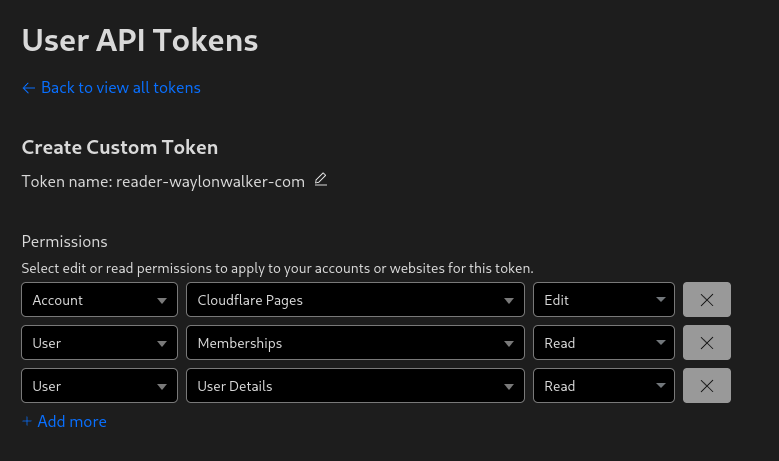
Before deploying to cloudflare pages with wrangler you need a cloudflare api token. You can get one at dash.cloudflare.com/profile/api-tokens.
Install Wrangler #
Next install wrangler using npm.
npm i -g wrangler
Create a Project #
Before you deploy to cloudflare pages you need to create a project. You might already have one, or you might want to create one in the webui, but you have the option to create it at the command line with wrangler.
npx wrangler pages deploy markout --project-name reader-waylonwalker-com --branch markout
Deploy #
Now you can deploy your static application using wrangler to cloudflare pages.
In this example I have my application built into the markout directory, and since the production branch is named
markoutI need to pass that in here as well.
wrangler pages deploy markout --project-name reader-waylonwalker-com --branch markout
waylon walker (@_WaylonWalker) on X Which is more complicated X (formerly Twitter) · twitter.com Wow, shocked at these results. All this time I’ve been told and believed that k8s is incredibly hard, and you need a $1M problem before you think about it because it will take a $1M team to maintain it. So far my experience has been good, and I definitely do not have a $1M problem in my homelab.
Delete a Postgres Cluster - Fly.io Fly.io · fly.io Deleting a fly postgres db cluster was not straightforward to me as the app name is not inferred from the toml like it is for the main app.
Client Challenge pypi.org Super useful way to show a tree view of an s3 bucket’s structure!
Upon first running an aws cli command using localstack you might end up with the following error.
Unable to locate credentials. You can configure credentials by running "aws configure".
Easy way #
The easy easiest way is to leverage a package called awscli-local.
pipx install awscli-local
Leveraging the awscli #
If you want to use the cli pro
pipx install awscli

aws config --profile localstack
# put what you want for the keys, but enter a valid region like us-east-1

alias aws='aws --endpoint-url http://localhost:4566 --profile localstack'
I ran into an issue where I was unable to ask localstack for its status. I would run the command and it would tell me that it didn’t have permission to read files from my own home directory. Let’s fix it
The issue #
I would run this to ask for the status.
localstack status
And get this error
PermissionError: [Errno 13] Permission denied: '/home/waylon/.cache/localstack/image_metadata'
What happened #
It dawned on me that the first time I ran localstack was straight docker, not the python cli. When docker runs it typically runs as root unless the Dockerfile sets up a user and group for it.

How to fix it #
If you have sudo access to the machine you are on you can recursively change
ownership to your user and group. I chose to just give myself ownership of my
whole ~/.cache directory you could choose a deeper directory if you want. I
feel pretty safe giving myself ownership to my own cache directory on my own
machine.
whoami
# waylon

chown -R waylon:waylon ~/.cache
Now it’s working #
Running localstack status now gives me a nice status message rather than an error.
❯ localstack status
┌─────────────────┬───────────────────────────────────────────────────────┐
│ Runtime version │ 1.2.1.dev                                             │
│ Docker image    │ tag: latest, id: dbbfe0ce0008, 📆 2022-10-15T00:51:03 │
│ Runtime status  │ ✖ stopped                                             │
└─────────────────┴───────────────────────────────────────────────────────┘
Calendar data could not load. Try again.