Deploy to Fly using a Depot builder
Using Fly.io's new Depot builder, we'll walk you through how to deploy a TypeScript service globally with speed.
Depot · depot.dev [1]
Here the integration to depot appears to be opt in using the --depot flag on fly deploy. This must have changed over time though because today it was giving me issues and I had to opt out using fly deploy --depot='false'. Looks like a great service and I just learned about them on their bad day.
References:
[1]: https://depot.dev/blog/how-to-build-with-depot-on-fly
Posts tagged: infra
All posts with the tag "infra"
11 posts
latest post 2024-12-25
Publishing rhythm
Using OPNsense with Tailscale · Tailscale Docs
Set up a Tailscale VPN on OPNsense. Get secure communication across your devices without the need for complex configuration.
Tailscale · tailscale.com [1]
On reboot of my opnsense router it did not tailscale up. I’m not sure if a key expired or what happened. The fix was to first enable ssh, then ssh in and run tailscale up.
enable ssh # [2]
In opnsense System > Settings > Administration > Secure Shell > Enable Secure Shell
tailscale up # [3]
ssh <opnsense ip>
8 # to select shell
tailscale up
Follow the link to log in.
disable ssh # [4]
now uncheck secure shell to lock down the opnsense machine.
In opnsense System > Settings > Administration > Secure Shell > Enable Secure Shell
References:
[1]: https://tailscale.com/kb/1097/install-opnsense
[2]: #enable-ssh
[3]: #tailscale-up
[4]: #disable-ssh
Taildrop · Tailscale Docs
Send files between your personal devices on a Tailscale network.
Tailscale · tailscale.com [1]
Tailscale comes with a feature called taildrop that lets you easily share files between machines on your tailnet. If you have tailscale on ios/android it shows up as a share target when you try to share something, and you can pick the machine to share with.
What was not obvious to me was how to receive the file on linux. The linux tailscale service does not automatically receive the file, which can be kinda nice that you can put it where you want, but was not obvious to me at first. Use this command to receive files.
sudo tailscale file get .
References:
[1]: https://tailscale.com/kb/1106/taildrop?tab=linux
[1]
Damn, supply chain vector attacks are wild. Random guy in Primes stream was getting $40k offers to buy their open source project while in university and they have never made anything from it. What a social engineering attack this is. It would be so easy to make it look like a good deal and that the package was going to a good new owner who has real resources to maintain it.
References:
[1]: /static/https://www.youtube.com/watch?si=6NK4iCu1b1rCDo7a&t=555&v=mmlHQyMOK7Y&feature=youtu.be
Queueing – An interactive study of queueing strategies
In this blog, we go on an interactive journey to understand common queueing strategies for handling HTTP requests.
encore.dev [1]
Absolutely sick post. This is top tier animated blog posts. This posts demos how different queuing systems work with fantastic interactive demos.
References:
[1]: https://encore.dev/blog/queueing
External Link
tech.ahrefs.com [1]
2024 has been a wild year for infra with going “back” to on prem being made popular by @dhh [2]. Well it looks like ahrefs saw right through the cloud trends an decided to ride the anti cloud train until it came back around to the station.
Being just a bit critical of the article it is impossible to get an apples to apples without actually running something of this scale and spending too much to find out. I cant imagine raw ec2 and ebs being the cheapest route into aws. They used no serverless tech in their article, but I digress, because I like this own your shit and build good product train.
What about People?!
This follow up does dive into the typical gut reaction that people cost a lot of money, you must account for them. You see when you hire people who are actually good at what they do, and run lean a lot of cost goes away, you have levels of management that disappear, levels of tooling that don’t need to exist, departments of IT don’t need to exist.
Colo’s are the new hotness, and will continue to grow!
---
I just notices that they didn’t even account for egress, support and taxes, egress costs would make a difference.
References...
-
such a sick episode with dax.
SST’s free tier will be free as long as aws allows a free tier, their free tier literally costs them nothing.
They talked about keeping SST small, the limitations that brings, but also the number of problems that just go away when you only have 3 people building. Lots of process disappears, everyone can trust everyone, no one needs to wait for approval, everyone is their own PM and just builds cool shit. They don’t have to worry about big costs and making payroll because they are profitable so much higher than their costs.
If they can get through phase one of just being the go platform for a very specific audience of users, and gain marketshare, the ideas of offerings on top of this are endless.
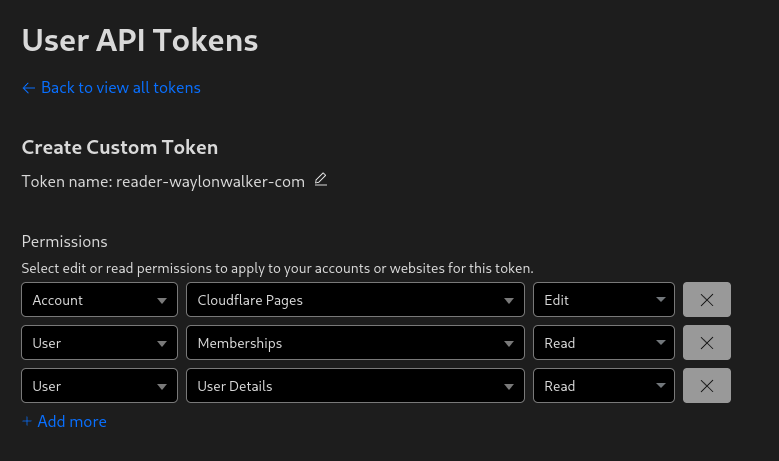
Before deploying to cloudflare pages with wrangler you need a cloudflare api token. You can get one at dash.cloudflare.com/profile/api-tokens.
Install Wrangler #
Next install wrangler using npm.
npm i -g wrangler
Create a Project #
Before you deploy to cloudflare pages you need to create a project. You might already have one, or you might want to create one in the webui, but you have the option to create it at the command line with wrangler.
npx wrangler pages deploy markout --project-name reader-waylonwalker-com --branch markout
Deploy #
Now you can deploy your static application using wrangler to cloudflare pages.
In this example I have my application built into the markout directory, and since the production branch is named
markoutI need to pass that in here as well.
wrangler pages deploy markout --project-name reader-waylonwalker-com --branch markout
-
I am converting my docker compose env secrets over to k8s secrets. This guide was clear and to the point how I can replicate this exact workflow.
First set the secret, the easiest way is to use kubectl wtih –from-literal because it automatically base64 encodes for you.
kubectl create secret generic minio-access-key --from-literal=ACCESS_KEY=7FkTV**** -n shot
If you don’t use the --from-literal you will have to base64 encode it.
echo "7FkTV****" | openssl base64
Once you have your secret deployed, you have to update the container spec in your deployment manifest to get the valueFrom secretKeyRef.
spec:
containers:
- env:
- name: ACCESS_KEY
valueFrom:
secretKeyRef:
key: ACCESS_KEY
name: minio-access-key
- name: SECRET_KEY
valueFrom:
secretKeyRef:
key: SECRET_KEY
name: minio-secret-key
image: registry.wayl.one/shot-scraper-api
name: shot-wayl-one
ports:
- containerPort: 5000
protocol: TCP
resources: {}
restartPolicy: Always
waylon walker (@_WaylonWalker) on X
Which is more complicated
X (formerly Twitter) · twitter.com [1]
Wow, shocked at these results. All this time I’ve been told and believed that k8s is incredibly hard, and you need a $1M problem before you think about it because it will take a $1M team to maintain it. So far my experience has been good, and I definitely do not have a $1M problem in my homelab [2].
[1]
References:
[1]: https://twitter.com/_WaylonWalker/status/1718300097174270193
[2]: /homelab/
Delete a Postgres Cluster
Documentation and guides from the team at Fly.io.
Fly · fly.io [1]
Deleting a fly postgres db cluster was not straightforward to me as the app name is not inferred from the toml like it is for the main app.
fly apps destroy <pg-app-name>
fly pg db list -a <pg-app-name>
References:
[1]: https://fly.io/docs/postgres/managing/deleting/