Using Netlify Analytics to Build a List of Popular Posts
Writing about the big beautiful mess that is making things for the world wide web.
blog.jim-nielsen.com [1]
This is a sick feature of Jim’s blog, I am really inspired by this. I am not sure how to do it for my own. I honestly think the easiest non locked in way would be to just use google search console results. It’s definitely a different way to think about it, but most of my traffic is coming from google search, so it would be a pretty good ballpark estimate.
References:
[1]: https://blog.jim-nielsen.com/2020/using-netlify-analytics-to-build-list-of-popular-posts/
Posts tagged: blog
All posts with the tag "blog"
78 posts
latest post 2026-03-23
Publishing rhythm
605: Jim Nielsen on Subversive URLs, Blogging + AI, and Design Engineers
Jim Nielsen joins us to about URLs and linking as the new subversive way to maintain the web, paying for news in Canada, should content creators be worried about AI, the case for design engineers, …
ShopTalk · shoptalkshow.com [1]
An absolute fantastic episode about blogging, thinking about a web1.0 kind of world today, and what it means moving forward.
Web 1.0 is robust, you own your own destiny, you own your data, you can do what you want. There is no platform to tell you what you can and cannot do. But the future web is stealing your data to build AI models, spam sites are duplicating your content and stealing your SEO. You may or may not care, but at the end whether you get traffic or now you own your web 1.0 sites.
References:
[1]: https://shoptalkshow.com/605/
![[None]]
First I need to fetch my thoughts from the api, and put it in a local sqlite database using sqlite-utils.
fthoughts () {
# fetch thoughts
curl 'https://thoughts.waylonwalker.com/posts/waylonwalker/?page_size=9999999999' | sqlite-utils insert ~/.config/thoughts/database2.db post --pk=id --alter --ignore -
}
Now that I have my posts in a local sqlite database I can use sqlite-utils to enable full text search and populate the full text search on the post table using the title message and tags columns as search.
sthoughts () {
# search thoughts
# sqlite-utils enable-fts ~/.config/thoughts/database2.db post title message tags
# sqlite-utils populate-fts ~/.config/thoughts/database2.db post title message tags
sqlite-utils search ~/.config/thoughts/database2.db post "$*" | ~/git/thoughts/format_thought.py | bat --style=plain --color=always --language=markdown
}
alias st=sthoughts
Now I am ready to search my thoughts, which is a tiny blog format that I created mostly for leaving my own personal comment on web pages, so most of them have a link to some other online content, and their title is based on the authors title.
[1]
[2]
References:
[1]: https://vhs.charm.s...
waylon walker (@_WaylonWalker) on X
Bloggers where do you put your markdown?
X (formerly Twitter) · twitter.com [1]
Most bloggers on my twitter blog right into a file that goes on git [2]. I kinda expected to have more database folk. I have my blog in markdown on git and the editing experience is top notch. I can just find files edit them in MY EDITOR, push them and I got a post. I am running thoughts in a sqlite database with a fastapi [3] backend, and holy crap the instant nature of posting feels so much better. Both sides have good points.
References:
[1]: https://twitter.com/_WaylonWalker/status/1734387536716308693
[2]: /glossary/git/
[3]: /fastapi/
External Link
tushar.lol [1]
Nice message by @tusharsadhwani [2].
Write it down.
You had to dig deeper than face value at something.
Write it down.
You had to combine multiple pages of docs.
Write it down.
Someting was simply not obvious to you at first and it took someone else to give you that ah ha moment.
Write it down.
You had a small discovery that had a marginal impact on your day.
Write it down.
A blog does not have to be a Blog, it can be small meaningful posts. There are absolutely no rules. If you think you are going to end up with too many posts, that is a solvable problem, make a search, curate your favorite posts, make multiple feeds.
At the end of the day.
Write it down.
This post itself is a thought, the smallest component to my blogging strategy.
Write it down.
References:
[1]: https://tushar.lol/post/write-a-blog/
[2]: https://twitter.com/sadhlife
Converting markdown posts to pdf on ubuntu takes a few packages from the standard repos. I had to go through a few stack overflow posts, and nothing seemed to have all the fonts and packages that I needed to convert markdown, but this is what ended up working for me.
Installing all the packages #
sudo apt install \
  pandoc \
  texlive-latex-base \
  texlive-fonts-recommended \
  texlive-extra-utils \
  texlive-latex-extra \
  texlive-xetex
Using pandoc to convert markdown to a pdf #
# older versions of pandoc, I needed this one on ubuntu 18.04
pandoc pages/til/convert-markdown-pdf-linux.md -o convert-markdown-pdf.pdf --latex-engine=xelatex
# newer versions of pandoc, I needed this one on ubuntu 21.04
pandoc pages/til/convert-markdown-pdf-linux.md -o convert-markdown-pdf.pdf --pdf-engine=xelatex
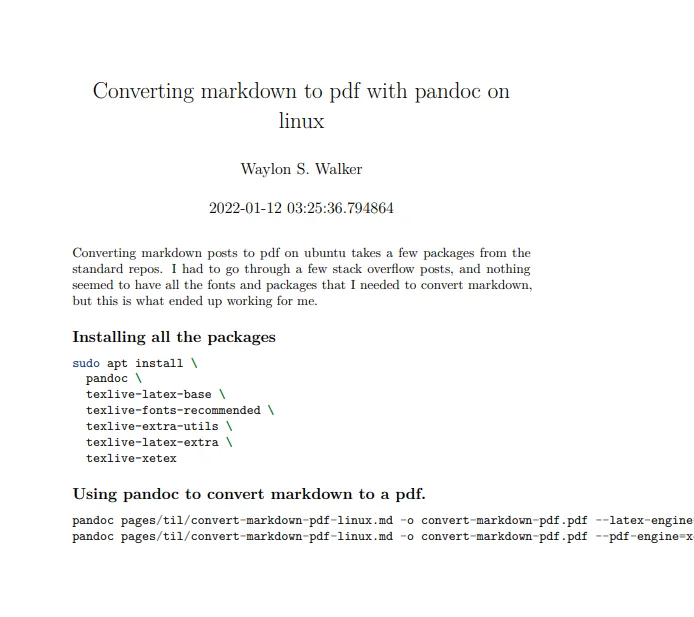
Here is an image of what converting this article over to a pdf looks like. The raw markdown is here.
How I deploy my blog in 2022
How I Continuously Deliver Content to my Blog with Markdown, GitHub, Python, and netlify # [1]
Content at the speed of thought.
well, as fast as I can type
Me # [2]
- Mechanical Engineering
- Data Engineering
- Terminal Junkie
Ask Questions in slido # [3]
Please ask questions in slido # 983 911 | App Dev 1 Track
Slido Poll # [4]
Do you have a personal blog / notes / website?
- Yes - Static, built with python
- Yes - I manage a server running python
- Yes - Not python
- No
we will circle back around in a few minutes
I’ll give away my answer # [5]
- Yes - Static, built with python
Slack Channel: #track-1-appdev # [6]
If you are in the slack give me a 🔥🔥🔥🔥🔥🔥🔥
Let’s light up slack 🔥🔥🔥🔥🔥🔥🔥
4 parts # [7]
- Why
- My workflow
- Under the hood
- Open Source
Part 1 WHY # [8]
2016 # [9]
I want to own my content # [10]
Twitter is a great networking tool, but it’s rare to see anything more
than a few hours old.
I want to own my content # [11]
No one can take my dom...
How I deploy my blog in 2021
How I Continuously Deliver Content to my Blog with Markdown, GitHub, Python, and netlify # [1]
Content at the speed of thought.
well, as fast as I can type
Me # [2]
- Mechanical Engineering
- Data Engineering
- Terminal Junkie
Ask Questions in slido # [3]
Please ask questions in slido # 983 911 | App Dev 1 Track
Slido Poll # [4]
Do you have a personal blog / notes / website?
- Yes - Static, built with python
- Yes - I manage a server running python
- Yes - Not python
- No
we will circle back around in a few minutes
I’ll give away my answer # [5]
- Yes - Static, built with python
Slack Channel: #track-1-appdev # [6]
If you are in the slack give me a 🔥🔥🔥🔥🔥🔥🔥
Let’s light up slack 🔥🔥🔥🔥🔥🔥🔥
4 parts # [7]
- Why
- My workflow
- Under the hood
- Open Source
Part 1 WHY # [8]
2016 # [9]
I want to own my content # [10]
Twitter is a great networking tool, but it’s rare to see anything more
than a few hours old.
I want to own my content # [11]
No one can take my dom...
I Started Streaming on Twitch
I recently started streaming on
twitch.tv/waylonwalker [1] and it’s been a
blast so far.
- python
- kedro
- Data Science
- Data Engineering
- webdev
- digital gardening
Kedro Spaceflights # [2]
It all started with
kedro/issues/606 [3], Yetu
called out for users of kedro to record themselves doing a walk through of
their tutorials. I wanted to do this, but was really stuck at the fact that
recording or editing somewhat polished vide is quite time consuming for me.
[4]
Inspiration # [5]
My introduction to twitch came from
twitch.tv/theprimeagen [6]. I watched him on
YouTube, and then decided to drop into a stream. It was so fun to watch him
live that I started following others in the science and tech category.
- twitch.tv/teej_dv [7] Brilliant neovim core dev, I learn a bunch about nvim every time I watch.
- twitch.tv/cmgriffing [8] Super Chill and engaging chat.
- twitch.tv/cassidoo [9] Fantastic discussion/chat.
- twitch.tv/anthonywritescode [10] Building the python ...
Upcoming Stream
I'm no longer streaming
As much as I would really love to make streaming work, its really hard for
my family situation to make large blocks of time work for me.
https://stackoverflow.com/questions/16720541/python-string-replace-regular-expression
I am starting to stream 3 days per week, before I start work in the morning.
These streams will likely be me just talking through things I am already doing.
Making DAGs do 🔮Magical Things | Open Source 🐍Python | kedro plugins | # [1]
Science & Technology | Every Monday • 7:00 AM - 9:00 AM CDT
On Monday’s I am going to be working on open source packages/plugins for kedro.
- kedro-diff
- test kedro-diff on piplines with history
- setup deploy pipeline
- deply to pypi
🌱 Digital Gardening | Blogging with 🐍Python | Building 🔮Markata a static site generator in python for waylonwalker.com # [2]
Science & Technology | Every Wednesday • 7:00 AM - 9:00 AM CDT
On Wednesday morning I will be working on my personal website and the static
s...
Blogging For Me
I create this blog with one person in mind, me.
There are others like me # [1]
This is not completely selfish, as there are likely many others out there that
think similarly to me. Everyone comes from different backgrounds and varying
levels of experience. In no way do you need to be an expert to create content
others will benefit from.
Accurate # [2]
I am as accurate as possible. I don’t know everything, and If I waited for
that to happen I would never post, or write at such a high level no one else
(including me) would ever want to read.
Generally I know that I am directionally accurate for most of the article. In
fact there is often a part of the article that I don’t feel the best about. It
may have been some code that could have been better. I try to point these
things out. Often when I am and point out where I know there is
improvement to be had I get the most welcoming comments, “that was just fine
how you did that”, or “I tried that myself and saw a better abstraction.
...
Markdown Cli
This is a post that may be a work in progress for awhile, Its a collections of
thoughts on managing my blog, but could be translated into anythiung that is
just a collection of markdown.
Listing things # [1]
- posts
- tags
- draft posts
data # [2]
- frontmatter
- filepath
- content
- template
- html [3]
render content # [4]
- Markdown.Markdown
- support extentsions
frontmatter cleaning. # [5]
- provide ways to hook in or clean up the frontmatter
Markata.Markata methods # [6]
- load
- render
- save
Markata.Post methods # [7]
- load
- render
- save
Markata plugins # [8]
- before_load
- before_post_load
- after_load
- after_post_load
- before_save
- before_post_save
- after_save
- after_post_save
Markata plugins # [9]
- cleanse_frontmatter
- html_feed
- json_feed
- rss_feed
- save_posts
CLI # [10]
$ markata list tags
python
data
$ markata
[
{
"title": "post title",
"description": "this is a post",
"filepath": "path_to.md",
"content": "the ...
My Content Strategy For 2021
I am making another push in 2021 to get my content out in the world and meeting users where they are. See how I plan to execute.
Platforms # [1]
- waylonwalker.com
- Twitter
- DEV
- hashnode
- Medium
- LinkedIn
- Anchor
Markdown # [2]
My content is written in markdown, all markdown. I find that markdown does a really great job at getting out of the way and letting ideas flow onto the page. I am never fussing with fonts and formatting while physically writing posts. Not that I don’t spend way more time than I need to tweak these things on my own personal site where everything gets posted.
Articles # [3]
Much of what I create is inside of short articles that get posted to my personal site waylonwalker.com [4]. These will get cross-posted to DEV [5],
hashnode [6], Medium [7].
I have made cross-posting a bit easier for myself by posting the markdown for each article next to the post on my personal site. Add .md to any post and there is the source.
Should I be giving my art...
Blog Data With Python
Generating an api for a blog is much simpler than one might expect with python.
Markdown # [1]
Frontmatter # [2]
Fill in the blanks # [3]
fix missing data
Fast # [4]
References:
[1]: #markdown
[2]: #frontmatter
[3]: #fill-in-the-blanks
[4]: #fast
Automating my Post Starter
One thing we all dread is mundane work of getting started, and all the hoops it
takes to get going. This year I want to post more often and I am taking some
steps towards making it easier for myself to just get started.
When I start a new post I need to cd into my blog directory, start neovim in a
markdown file with a clever name, copy some frontmatter boilerplate, update the
post date, add tags, a description, and a cover.
Todo List for starting a post # [1]
- frontmatter template
- Title
- slug
- tags
- date
- cover
- description
- create markdown file
- open in neovim
Lets Automate this # [2]
This aint no proper cli # [3]
hot and fast
As with many thing running behind the scenes on this site, I am the one and
only user, I have limited time, so this is going to be a bit hot and fast.
Let’s create a file called new-post.
start the script new-post
#!python
# new-post
👆 Works on my machine
If this were something that had more users than me I would probably use
some...
Adding Audio to my blog posts
This is episode 1 of the Waylon Walker Audio experience, posts from
waylonwalker.com [1]{.hoverlink} in audio form.
So I have had this idea for awhile to add audio to my blog posts. The idea
partly comes from the aws blog, if you have ever been on their blog you will
have noticed that they have a voiced by amazon polly section.
What to Expect # [2]
Honestly I don’t know this is all new to me and I dont have much to go off of.
For now its a test that may or may not work out.
I will say that the time that I have available for clean audio is a bit limited
so expect these to come out in batches as I get time to go back and record.
What Not to Expect # [3]
One thing that makes the aws blog really hard to listen to is the robotic
voice, I definitely don’t want that. This will be voiced by a real human, Me.
At the same time written text doesn’t translate directly to audio well so don’t
necessarily expect the audio to be
word for word.
Code blocks # [4]
There are a lot of code block...
Expand One Line Links
I wanted a super simple way to cross-link blog posts that require as little effort as possible, yet still looks good in vanilla markdown in GitHub. I have been using a snippet that puts HTML [1] into the markdown. While this works, it’s more manual/difficult for me does not look the best, and does not read well as
Goals for new card # [2]
The new card should be fully automated to expand with title, description, and
cover image. Bonus if I am able to attach a comment behind it.
- fully automated
- card expansion
- Title
- description
- cover image
Old Card # [3]
If you can call it a card 🤣. This card was just an image wrapped in an anchor tag and a paragraph tag. I found this was the most consistent way to get an image narrower and centered in both GitHub and dev.to.
<p style='text-align: center'>
<a href='https://waylonwalker.com/notes/eight-years-cat/'>
<img
style='width:500px; max-width:80%; margin: auto;'
src="https://dropper.wayl.one/file/99f80283-2f27-4664-8c4a-d1...
Kedro Factory
Dynamically generate kedro pipelines with yaml or script
Inspiration
- dag-factory [1]
References:
[1]: https://github.com/ajbosco/dag-factory
rebrand
- simple landing page
- https://swyx.io
- joel on software [1]
- recent
- reading lists
- More from waylon just above footer
- 4x2 grid
- link strategy
- latest post
- next/prev
- similar tags
- search in nav
- tag stickers
- simple cards?
- bookmarks?
- nav style stinks
- single post template
- flat routes no need to /blog /notes
- post types
- 🌳 full
- 🌱 budding
- 🖊 Note
- 💻 hot tip
- usage of tags
- MDX
- stories
- slides
- ⚠
- ❌
- ✔
- kedro viz
- charts
- inlink component
- https://joshwcomeau.com/
- auto-card oneline links
- meta posts
- about
- uses
- how site is built
- how to search
- stories
TODO # [2]
- review package.json
- update package.json
Done # [3]
- ahrefs
- fix canonical urls
- fix broken inlinks
- convert to one post template
-
References:
[1]: https://www.joelonsoftware.com/
[2]: #todo
[3]: #done
How to crush amazing posts on DEV
This post was inspired by a comment I left on @dsteenman’s post.
{% post dsteenman/how-long-should-a-blogpost-be-2k6n %}
Most of the time I prefer short as I am more likely to read the whole thing. If its setup as a series I am more likely to work my way through the whole series in a matter of a few sessions. Just my preference
I will say though there are certain articles that fit well to the long format. They are articles that folks tend to come back to often as a reference again and again.
Sections # [1]
- layout is key [2]
- Break it up [3]
- Article types [4]
- superpost [5]
- single post [6]
- series [7]
- discussion [8]
- Post what you want to read [9]
layout is key # [2]
Either way, you go layout is key. You are not Steven King, no matter how great of a writer you are, you are unlikely to hold attention like he can. Most folks reading blogs scan articles first. I often scan, then read. If the article is really good or pertains well to me I will read everything, ...