[1]
Migrating from kedro 0.18.4 to the latest version involves handling the deprecated OmegaConf loader. Switching over does not look as bad as I originally thought.
- installing kedro 0.18.5+
- set the CONFIG_LOADER_CLASS in settings.py
- swap out import statements
- config must be yaml or json
- getting values from config must be done with bracket __getattr__ style not with .get
- any Exceptions caught from Templated config loader will need to be swapped to OmegaConfig exceptions, similar to #3
- templated values must lead with an _
- Globals are handled different
- OmegaConfig does not support jinja2 sytax, but rather a ${variable} syntax
References:
[1]: /static/https://docs.kedro.org/en/stable/configuration/config_loader_migration.html
Posts tagged: kedro
All posts with the tag "kedro"
40 posts
latest post 2025-02-06
Publishing rhythm
Kedro rich is a very new and unstable (it’s good, just not ready) plugin for kedro to make the command line prettier.
Install kedro rich #
There is no pypi package yet, but it’s on github. You can pip install it with the git url.
pip install git+https://github.com/datajoely/kedro-rich
Kedro run #
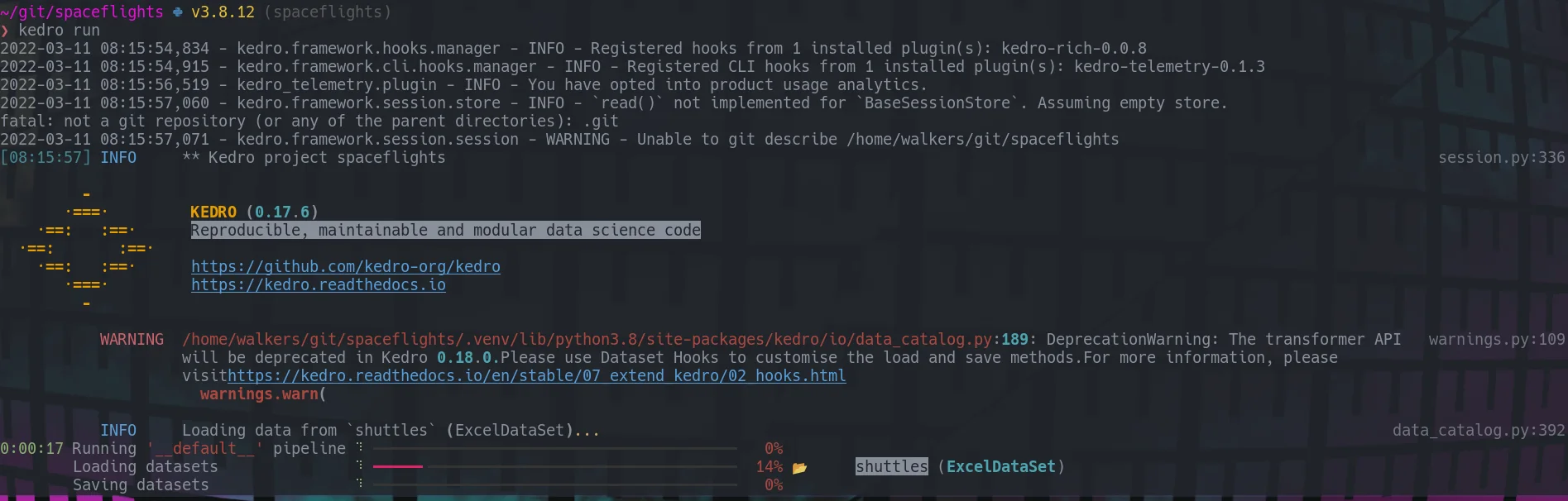
You can run your pipeline just as you normally would, except you get progress bars and pretty prints.
kedro run
Kedro catalog #
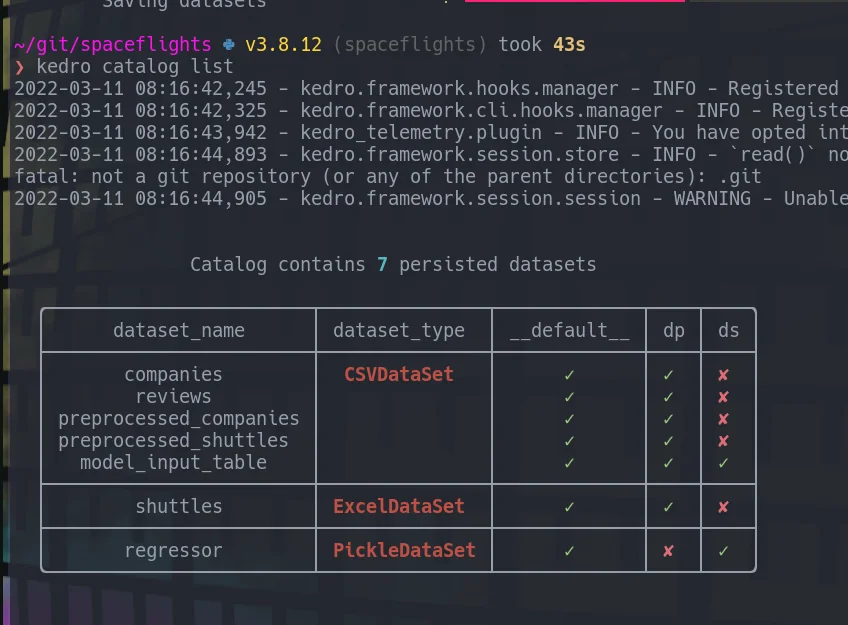
Listing out catalog entries from the command line now print out a nice pretty table.
kedro catalog list
Give it a star #
Go to the GitHub repo and give it a star, Joel deserves it.
I keep my nodes short and sweet. They do one thing and do it well. I turn almost every DataFrame transformation into its own node. It makes it must easier to pull catalog entries, than firing up the pipeline, running it, and starting a debugger. For this reason many of my nodes can be built from inline lambdas.
Examples #
Here are two examples, the first one lambda x: x is sometimes referred
to as an identity function. This is super common to use in the early
phases of a project. It lets you follow standard layering conventions,
without skipping a layer, overthinking if you should have the layer or
not, and leaves a good placholder to fill in later when you need it.
Many times I just want to get the data in as fast as possible, learn about it, then go back and tidy it up.
from kedro.pipeline import node

my_first_node = node(
   func=lambda x: x,
   inputs='raw_cars',
   output='int_cars',
   tags=['int',]
   )

my_first_node = node(
   func=lambda cars: cars[['mpg', 'cyl', 'disp',]].query('disp>200'),
   inputs='raw_cars',
   output='int_cars',
   tags=['pri',]
   )
Note: try not to take the idea of a one liner too far. If your one line function wraps several lines down it probably deserves to be a real function for readability and a good docstring.
As you work on your kedro projects you are bound to need to add more
dependencies to the project eventually. Kedro uses a fantastic command
pip-compile under the hood to ensure that everyone is on the same version of
packages at all times, and able to easily upgrade them. It might be a bit
different workflow than what you have seen, let’s take a look at it.
git-status">git status #
Before you start mucking around with any changes to dependencies make sure that your git status is clean. I’d even reccomend starting a new branch for this, and if you are working on a team potentially submit this as its own PR for clarity.
git status
git checkout main
git checkout -b add-rich-dependency
requirements.in #
New requirements get added to a requirements.in file. If you need to specify an exact version, or a minimum version you can do that, but if all versions generally work you can leave it open.
# requirements.in
rich
Here I added the popular rich package to my requirements.in file. Since
I am ok with the latest version I am not going to pin anything, I am going to
let the pip resolver pick the latest version that does not conflict with any of
my dependencies for me.
build-reqs #
The command kedro build-reqs will tell kedro to recompile the
requirements.txt file that has all of our dependencies pinned down to exact
versions. This ensures that all of our teammates and production workflows use
the same exact versions of packages even if new ones are released after we
installed on our development machines.
kedro build-reqs
git add #
Now that we have our new dependencies ready to go commit those to git, and submit a PR for them if you are working on a team. This is a good way to document the discussion of adding new dependencies to your teams project.
git add requirements.in
git add requirements.txt
git status
git commit -m "FEAT updated dependencies with rich"
git push
# go make a pr
gh pr create --title "feat add rich to dependencies" --body "I added rich as a dependency, and ran pip-compile"
I am a huge believer in practicing your craft. Professional athletes spend most of their time honing their skills and making themsleves better. In Engineering many spend nearly 0 time practicing. I am not saying that you need to spend all your free time practicing, but a few minutes trying new things can go a long way in how you understand what you are doing and make a hue impact on your long term productivity.
Start practicing #
practice building pipelines with #kedro today
Go to your playground directory, and if you don’t have one, make one.
cd ~/playground
get pipx #
Install pipx in your system python. This is one of the very few, and possibly the only python library that deserves to be installed in your system directory, primarily because its used to sanbox clis in their own virtual environment automatically for you.
pip install pipx
make a new project #
From inside your playground directory, start your new kedro project.
This is quite simple and painless. So much so that if you mess this one
up doing something wild, it might be easier to make a new one that
fixing the wild one.
pipx run kedro new
# answer the questions it asks
I use this quite often to try out new things in a safe place.
Make a virtual environment #
Using Conda #
Conda is a fine choice to manage your virtual environments. It used to make things so much easier on windows that it was almost required. Nowadays getting python running on windows has become so much easier that this is less so.
conda create -n my-project python=3.8 -y
conda activate my-project
python  -m pip install --upgrade pip
pip install -e src
one great benefit of conda is that it lets you choose the interpreter to go with your virtual environment.
Your new environment will be listed in your list of conda env here.
conda info --envs
Using venv #
venv is what I use now. Nothing against conda, it works great.
venv just feels a bit lighter and more common. I’ve actually grown to
appreciate that the venv is right where I put it, most often in the
project directory.
python -m venv .venv
source ./.venv/bin/activate
python  -m pip install --upgrade pip
pip install -e src
using pipenv #
pipenv is another fine choice. I like how in one command it makes the
environment and activates it for you. pipenv also puts virtual
environments in the global directory.
pipx run pipenv shell
python  -m pip install --upgrade pip
pip install -e src
Make pipelines #
Now go make some pipelines with your new project, try something wild, break it, and make another.
I just installed a brand new Ubuntu 21.10 Impish Indri, and wanted a kedro project to play with so I did what any good kedroid would do, I went to my command line and ran
pipx run kedro new --starter spaceflights
But what I got back was not what I expected!
Fatal error from pip prevented installation. Full pip output in file:
    /home/walkers/.local/pipx/logs/cmd_2022-01-01_20.42.16_pip_errors.log

Some possibly relevant errors from pip install:
    ERROR: Could not find a version that satisfies the requirement kedro (from versions: none)
    ERROR: No matching distribution found for kedro
Error installing kedro.
This is weird, why cant I run kedro new with pipx? Lets try pip.
pip install kedro
Same issue.
ERROR: Could not find a version that satisfies the requirement kedro (from versions: none)
ERROR: No matching distribution found for kedro
Curious what kedro is? Check out this article.
What’s up #
wrong python version
The issue is that kedro only runs on up to python 3.8, and on Ubuntu
21.10 when you apt install python3 you get python 3.9 and the
standard repos don’t have an old enough version to run kedro.
How to fix this? #
Theres a couple of ways you can fix this? They all involve installing a distribution that does not come from the standard repo.
Where Can I get the right version #
- Anaconda
- Python.org
- deadsnakes
- pyenv
- miniconda
I have two articles that can help you #
How to Install miniconda on linux (from the command line only)
Using miniconda
conda create -n myenv python=3.8
My first impressions with pyenv
Using pyenv
pyenv install 3.8.12
kedro catalog create
I use kedro catalog create to boost my productivity by automatically
generating yaml catalog entries for me. It will create new yaml files for each
pipeline, fill in missiing catalog entries, and respect already existing
catalog entries. It will reformat the file, and sort it based on catalog key.
https://youtu.be/_22ELT4kja4
What is Kedro [1]
👆 Unsure what kedro is? Check out this post.
Running Kedro Catalog Create # [2]
The command to ensure there are catalog entries for every dataset in the passed
in pipeline.
kedro catalog create --pipeline history_nodes
- Create’s new yaml file, if needed
- Fills in new dataset entries with the default dataset
- Keeps existing datasets untouched
- it will reformat your yaml file a bit
- default sorting will be applied
- empty newlines will be removed
CONF_ROOT # [3]
Kedro will respect your CONF_ROOT settings when it creates a new catalog
file, or looks for existing catalog files. You can change the location of your
configuration f...
nvim conf 2021 | IDE’s are slow | Waylon Walker
https://youtu.be/E18m4KkJUnI
---
Slides 👇 # [1]
welcome # [2]
Other possible titles # [3]
- Using Vim as a Team Lead
- I 💜 Tmux
- Why I stopped using @code
- Get there fast
- How I vim
It’s ok # [4]
Use a graphical IDE if it works for you.
Trick it out # [5]
vim is so well integrated into the terminal, take advantage
It wasn’t working for me anymore # [6]
dozens of instances # [7]
As a team lead I bounce betweeen a dozen projects a per day
https://pbs.twimg.com/media/FAEmRjYUcAUk2eR?format=jpg&name=large [8]
Move With Intent # [9]
Running vim inside tmux lets me move swiftly between the exact project I need.
https://twitter.com/_WaylonWalker/status/1438849269407047686/photo/1// [10]: <> (__)
Hub and Spoke # [11]
- direct link to specific projects
- fuzzy into all projects
- fuzzy into open projects
How I navigate tmux in 2021 [12]#hub-and-spoke
Other Things That Make this Possible # [13]
- tmux
- direnv
vim adjacent things
yes, vim is ugly, make it your...
Kedro-Broken-Urls
Broken Urls # [1]
- https://github.com/josephhaaga) [ ] https://example.com/file.h5
- https://raw.githubusercontent.com/kedro-org/kedro/develop/static/img/pipeline_visualisation.png
- https://example.com/file.txt
- https://github.com/jmespath/jmespath.py.
- https://github.com/tsanikgr)
- https://example.com/file.csv
- https://kedro.readthedocs.io/en/latest/04_user_guide/15_hooks.html
- https://kedro.readthedocs.io/en/stable/07_extend_kedro/04_hooks.html
- https://github.com/EbookFoundation/free-programming-books/blob/master/books/free-programming-books.md#python
- https://github.com/quantumblacklabs/private-kedro/blob/develop/docs/source/04_user_guide/04_data_catalog.md
- http://example.com/api/test
- https://example.com/file.parquet
- https://kedro.readthedocs.io/en/stable/11_faq/01_faq.html#how-do-i-upgrade-kedro
- https://example.com/file.xlsx
- https://www.datacamp.com/community/tutorials/docstrings-python
- https://github.com/mmchougule)
- https://example.com/f...
Setting Parameters in kedro
Parameters are a place for you to store variables for your pipeline that can be
accessed by any node that needs it, and can be easily changed by changing your
environment. Parameters are stored in the repository in yaml files.
https://youtu.be/Jj5cQ5bqcjg
What is Kedro [1]
👆 Unsure what kedro is? Check out this post.
parameters files # [2]
You can have multiple parameters files and choose which ones to load by setting
your environment. By default kedro will give you a base and local
parameters file.
- conf/base/parameters.yml
- conf/local/parameters.yml
base # [3]
The base environment should contain all of the default values you want to run.
# /conf/base/parameters.yml
test_size: 0.2
random_state: 3
features:
- engines
- passenger_capacity
- crew
- d_check_complete
- moon_clearance_complete
- iata_approved
- company_rating
- review_scores_rating
NOTE base will always be loaded first.
accessing parameters # [4]
Parameters can be accessed through context or throug...
Writing your first kedro Nodes
https://youtu.be/-gEwU-MrPuA
Before we jump in with anything crazy, let’s make some nodes with some vanilla
data structures.
import node # [1]
You will need to import node from kedro.pipeline to start creating nodes.
from kedro.pipeline import node
func # [2]
The func is a callable that will take the inputs and create the outputs.
inputs / outputs # [3]
Inputs and outputs can be None, a single catalog entry as a string, mutiple
catalog entries as a List of strings, or a dictionary of strings where the key
is the keyword argument of the func and the value is the catalog entry to use
for that keyword.
our first node # [4]
Sometimes in our pipelines our data is coming from an api where we already have
python functions built to pull with. Thats ok, kedro supposrts that with
inputs=None.
def create_range():
return range(100)
make_range = node(
func=create_range,
inputs=None,
outputs='range'
)
second node # [5]
Now we have some data to work from, lets use that as our inpu...
Running your Kedro Pipeline from the command line
Running your kedro pipeline from the command line could not be any easier to
get started. This is a concept that you may or may not do often depending on
your workflow, but its good to have under your belt. I personally do this half
the time and run from ipython half the time. In production, I mostly use docker
and that is all done with this cli.
https://youtu.be/ZmccpLy-OEI
What is Kedro [1]
👆 Unsure what kedro is? Check out this post.
Kedro run # [2]
To run the whole darn project all we need to do is fire up a terminal, activate
our environment, and tell kedro to run.
kedro run
Specific Pipelines # [3]
Running a sub pipeline that we have created is as easy as telling kedro which
one we want to run.
kedro run --pipeline dp
Single Nodes # [4]
While developing a node or a small list of nodes in a larger pipeline its handy
to be able to run them one at a time. Besides the use case of developing a
single node I would not reccomend leaning very heavy on running single nodes,
le...
kedro Virtual Environment
Avoid serious version conflict issues, and use a virtual environment [1] anytime
you are running python, here are three ways you can setup a kedro virtual
environment.
https://youtu.be/ZSxc5VVCBhM
- conda
- venv
- pipenv
conda # [2]
I prefer to use conda as my virtual environment manager of choice as it give me
both the interpreter and the packages I install. I don’t have to rely on the
system version of python or another tool to maintain python versions at all, I
get everything in one tool.
conda create -n my-project python=3.8 -y
conda activate my-project
python -m pip install --upgrade pip
pip install -e src
conda info --envs
- stores environment in a root directory i.e. ~/miniconda3
- conda can use its own way to manage environments environment.yml
- the python interpreter is packaged with the environment
virtualenv # [3]
Virtual env (venv) is another very respectable option that is built right into
python, and requires no additional installs or using a different dis...
Kedro Pipeline Create
Kedro pipeline create is a command that makes creating new
pipelines much easier. There is much less boilerplate that
you need to write yourself.
https://youtu.be/HtyIKqlEoNw
creating a new pipeline # [1]
The kedro cli comes with the following command to scaffold out
new pipelines. Note that it will not add it to your
pipeline_registry, to be covered later, you will need to add
it yourself.
kedro pipeline create example
results # [2]
The directory structure that it creates looks like this.
tree src/kedro_conda/pipelines
src/kedro_conda/pipelines
├── __init__.py
└── example
├── __init__.py
├── nodes.py
├── pipeline.py
└── README.md
References:
[1]: #creating-a-new-pipeline
[2]: #results
Kedro Install
Kedro comes with an install command to install and manage all of your
projects dependencies.
https://youtu.be/IWimEs-hHQg
cd into your project directory and activate env # [1]
You must start by having your kedro project either cloned down
from an existing project or created from kedro new. Then
activate your environment.
Kedro New [2]
this post covers kedro new
kedro Virtual Environment [3]
This post covers creating your virtual environment [4] for kedro
install kedro # [5]
Make sure you have kedro installed in your current
environment, if you dont already have it.
pip install kedro==0.17.4
pip-tools # [6]
Kedro uses the pip-tools package under the hood to pin
dependencies in a very robust way to ensure that the project
will continue to work on everyone’s machine day, including
production, day in and day out. No matter what happens to the
dependencies you have installed.
pip-compile # [7]
The command that kedro uses from pip-tools is pip-compile. It will look at
what yo...
Kedro Git Init
Immediately after kedro new, before you start running kedro install or your first line of code the first
thing you should always do after getting a new kedro template created is to
git init.
https://youtu.be/IGba3ytf_6U
git init # [2]
Its as simple as these three commands to get started.
git init
git add .
git commit -m init
I don’t care if this project is for learning, if it will never have a remote or not, use git.
References:
[1]: /glossary/git/
[2]: #git-init
Kedro New
https://youtu.be/uqiv5LAiJe0
Kedro new is simply a wrapper around the cookiecutter templating library. The
kedro team maintains a ready made template that has everything you need for a
kedro project. They also maintain a few kedro starters, which are very similar
to the base template.
What is Kedro [1]
Unsure what kedro is, Check out yesterdays post on What is Kedro.
pipx # [2]
I reccomend using pipx when running kedro new. pipx is designed for system
level cli tools so that you do not need to maintain a virtual environment [3] or
worry about version conflicts, pipx manages the environment for you.
The kedro team does not reccomend pipx in their docs as they already feel
like there is a bit of a tool overload for folks that may be less familiar with
pipx kedro new
I like using pipx as it gives you better control over using a specific
version or always the latest version, unlike when you run what you have on your
system depends on when you last installed or upgraded.
Kedro Ne...
What is Kedro
Kedro is an unopinionated Data Engineering framework that comes with a somewhat
opinionated template. It gives the user a way to build pipelines that
automatically take care of io through the use of abstract DataSets that the
user specifies through Catalog entries. These Catalog entries are loaded,
ran through a function, and saved by Nodes. The order that these Nodes are
executed are determined by the Pipeline, which is a DAG. It’s the
runner’s job to manage the execution of the Nodes.
https://youtu.be/Wf4rnFsaFFU
---
What is Kedro [1]
This is an updated version of my original what-is-kedro article
---
Hot Take # [2]
If you are doing a series of operations to data with python, especially if you
are using something as supported as pandas, you should be using a framework
that gives you a pipeline as a DAG and abstracts io.
Orchestrators # [3]
Like I said, kedro is unopinionated it does determine where or how your data
should be ran. The kedro team does support the following ...
How I Kedro
https://youtu.be/bw5_FWDVRpU
Ubuntu # [1]
I recently switched over to using Ubuntu, it works well pretty much out of the
box for me. I am using gnome with a dark theme.
Gnome Terminal # [2]
I am still using the built in default gnome terminal, it just works. It does
all the things that I need it to do. It supports transparency renders my fonts
and allows me to highlight things well.
- One Dark Theme
dotfiles # [3]
You can find my
dotfiles [4] on
github. Feel free to read through and take anything that you
find useful. I would encourage you not to steal them, but to
integrate the parts that you want into your own dotfiles.
dotfiles are a very personal thing. They are an extension of
ones fingertips designed for how you think and type.
zsh # [5]
I use zsh as my default shell. I like to use it as my
interactive shell. It works, and does a bit better with
things like tab completion out of the box.
starship # [6]
I use the starship prompt for my shell. It works well out of
the...
Incremental Versioned Datasets in Kedro
Kedro versioned datasets can be mixed with incremental and partitioned datasets
to do some timeseries analysis on how our dataset changes over time. Kedro is
a very extensible and composible framework, that allows us to build solutions
from the individual components that it provides. This article is a great
example of how you can combine these components in unique ways to achieve some
powerful results with very little work.
What is Kedro [1]
👆 Unsure what kedro is? Check out this post.
How does our dataset change over time?? # [2]
This was a question presented to me at work. We had some plots being produces
as the output of our pipeline and the user wanted the ability to compare
results over time. Luckily this was asked early in the project so we were able
to proactively setup versioning on the right datasets.
To enable this all we needed to do now was to add versioned: true and we will
be able to compare results over time. Yes kedro makes it that easy to setup.
set up a proje...