- #minecraft" playlabel="Play: I refuse to change the way I play… 😂🔥 #comedy #videogames #minecraft [1]">
Microsoft has been addding features to Minecraft for over 10 years now. Idk if there was momentum from the mojang theme, but we’ve barely paid attention to any updates in the last five years. The ocean update was huge, caves and cliffs were huge then it trailed off to we play each release on release day, use commands to try out new features, then never touch them again either to play minecraft as we always have or to play a modded pack with crazy new features that really make an impact on gameplay.
References:
[1]: /tags/minecraft/
Publishing rhythm
-
Absolutely incredible what Preston is doing with his time. What a life changing experience this must be for him. Good job to Turso for making this happen. We are going to end up with very feature rich file based databases out of this that the whole world will benefit from.
-
Absolutely love this selfhosted arc of pewdiepie that is going on right now. It’s crazy to witness now fast he is picking up linux / self hosting, and sounds like soon will be programming. In this one he built a $20k AI beast that crushes gippity with power, speed, proximity, and security. No one to take your data, no latency to the data center, no one else bogging down your prompts, just raw speed. It looks absolutely wild. He implemented RAG and gave it a bunch of data about himself and its able to spit out his wife’s name and phone number in under a second. It writes code at blazing pace. This may be the future that we get over the next few years as things shift towards AI there will be more affordable options, and a larger second hand market for building out these highly capable machines.
The Glorious Pipe Operator (Elixir for PHP Devs)
Let's talk about how how the functional pipe operator helps to simplify and improve code readability and composability, and how it contrasts with the fluent interface design pattern commonly used i...
Jesse Leite · jesseleite.com [1]
I’m so glad that python supports method chaining out of the box, very similar to the pipe operator that Jesse mentions here. It makes everything much more readable to follow the flow rather than needing to parse nested funcion calls out(inside()).
References:
[1]: https://jesseleite.com/2025/the-glorious-pipe-operator
-
I greatly appreciated the wide variety of experienced maintainers of large oss projects. From webdev to desktop application. The most common sentiment here was don’t contribute to open source just to contribute to open source. Bring something meaningful to the project. Find a project you like, look at the discussions/issues for work or start some discussions. If there are no meaningful features that you can add to projects that you use and love, make your own thing. Adam from tailwind really hit on this one several times. He has made tailwind extensible so that you don’t have to contribute to tailwind to get new capabilities, you can probably just extend tailwind with your thing. Its likely that it makes a lot more sense or your use case, and if it turns out that it makes sense for everyone have the discussion about bringing it in. The upside to small oss projects is that you can move at whatever pace you want and break them all you want when the user base is just you. As you move your stuff into tailwind you have to be very careful not to break the massive tailwind user base and you have to bend to the release schedule of tailwind.
The other adjacent topic that kept coming ...
rustfs [1] by rustfs [2] is a game-changer in its space. Excited to see how it evolves.
🚀 RustFS is an open-source, S3-compatible high-performance object storage system supporting migration and coexistence with other S3-compatible platforms such as MinIO and Ceph.
References:
[1]: https://github.com/rustfs/rustfs
[2]: https://github.com/rustfs
Rules
- There is no such thing as magic
- Be ready to roll back live deployments
- If CI was too fast be suspicious
- Always be available after a release.
- No one wants to read your slop, if you are too lazy to write it don’t send
it.
- Tech will always fail, we only have some control over blast radius
- strive for a blameless culture
- Need a tool Make a tool
- Recognize the right idea when you hear it.
- Always carry a knife
- One Breath at a time
- Let Glue Dry
- Obsess over quality. [1]
- blocking others is a p0
- creating process is a cardinal sin
References:
[1]: https://x.com/jesseleite85/status/2071574906131673146
You already have a git server: (Maurycy's blog)
maurycyz.com [1]
It’s so easy to forget low level tech sometimes. Things that are dead simple and just work without a hitch. git is one of those rock solid things thats very easy to remember all that it does, this is a classic use case.
This just works
cd /parent/directory/for/repo
git clone ssh://username@server/path/to/repo
In order to recieve you must update the remote to allow recieve.
git config receive.denyCurrentBranch updateInstead
Now you can pull update push.
It’s funny how this was the way I first learned to do Continuous Deployment to a RHEL7 machine, also how Heroku worked, but its so easy to forget this solution is there. I come across it every few years and immediately have a few use cases in mind.
References:
[1]: https://maurycyz.com/misc/easy_git/
Please don't give Reflect Orbital money: (Maurycy's blog)
maurycyz.com [1]
Well done write up about reflecting solar energy back to earth from low orbit space. I did not know this was a thing, apparently it is/isn’t. Solar is a great technology, its largest limitations are that its not consistent. This tech does not fix this problem, what does is efficient long term storage. I’ve seen some crazy ideas going back to my days in school, maybe elementry school. Theres a lot of innovative ways to store potential energy by moving heavy objects uphill whether fluid or solid. The issue is that energy storage at grid scale is HUGE and not efficient enough. Even assuming this idea had any legs at all, it still doesn’t solve the problem of inconsistent power because it still cant go through clouds!
References:
[1]: https://maurycyz.com/misc/sunlight_as_a_service/
External Link
bsky.app [1]
Wild to see the LinkedIn post linked here to see how out of touch this feels. I find it astonishing that they have something so ingrained into gaming culture as twitch, yet build something like Prime Gaming. Maybe I have no idea what Prime gaming is, but it feels like the opposite of ownership. What I get from steam is a sense of ownership. I own the desktop/laptop/handheld, no one cough nintendo cough cough cant remotely disable my device for using it inappropriately. I have a sense of trust with steam that as long as Gabe is alive I own what I paid for and will be able to open up and play anything at any time on any device I want. It might be a $100 dell workstation raised out of the coorporate refurb bin, it might be a high end machine, It could be my 2010 gateway or my 2045 custom build and they are all likely to play a good amount of my library at some level. I still understand that I really own nothing and the moment steam turns off its servers its quite likely that everything is broken, but its by far the best we have. Far from the status quo we are headed towards with subscription and cloud based gaming. If they wanted to disrupt steam they d...
Bazzite (@bazzite_gg) on X
@thesvpanda @_Messier_33 @LeagueOfLegends Unfortunately that game uses some of the worst spyware in the industry, it will never work outside of Windows with secure boot enabled and TPM hardware.
C…
X (formerly Twitter) · x.com [1]
ROASTED
Unfortunately that game uses some of the worst spyware in the industry, it will never work outside of > Windows with secure boot enabled and TPM hardware.
Consider Dota 2 or other mobas by competent developers
References:
[1]: https://x.com/bazzite_gg/status/1983204433627623590
External Link
bsky.app [1]
Great justification for using the cloud. The infrastructure requirement for signal to be such a great app would be massive for a small team with low budget. The cloud is fantastic at unknown scaling, bursts beyond reasonable capacity to run yourself, getting compute everywhere in the world, and offloading huge infrastructure management costs.
DHH is 100% right that we have gone too far, too many things come out cloud first for services that can be ran locally cough such as your bed cough cough. One week ago when the world came to a hault, I did not bat an eye at these small teams with complex requirements going down with AWS.
Their own products seem quite damning to me. It signals that they cannot themselves become resilient to themselves. It shows how hard this problem is, how much cost in complexity and resources it requires. I’m sure there are fail overs that happened successfully that we will never hear about, critical products with large engineering overhead.
References:
[1]: https://bsky.app/profile/meredithmeredith.bsky.social/post/3m46a2fm5ac23
Just starred croc [1] by schollz [2]. It’s an exciting project with a lot to offer.
Easily and securely send things from one computer to another 🐊 📦
References:
[1]: https://github.com/schollz/croc
[2]: https://github.com/schollz
I often want to run an s3 sync in an isolated environment, I don’t want to set
any environment variables, I don’t want anything secret in my history, and I
don’t want to change my dotenv into something that exports variables, I just
want s3 sync to work. dotenv run is the tool that I’ve been using for this,
and this uv one liner lets it run fully isolated from the project.
one liner #
uv tool run --from 'python-dotenv[cli]' dotenv run -- uv tool run --from awscli aws s3 sync s3://bucket data
multi-line #
same thing formatted for readability
uv tool run \
  --from 'python-dotenv[cli]' \
  dotenv run -- \
uv tool run \
  --from awscli \
  aws s3 sync s3://dropper data
There are probably 10 ways to skin this cat, but this is what I did, if you have a better way let me know, I’ll link you below.
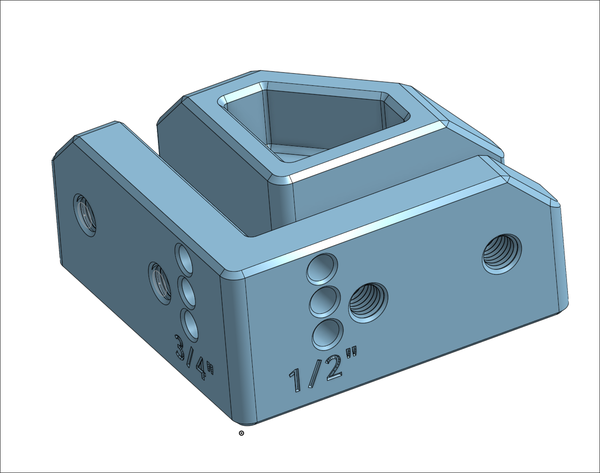
First 3d Printed Threads
Working on an upcoming project that requires some threaded screws. Trying to
keep a low budget on this one with as much to come off of the printer as I can.
It might become a slant3d portals product if it works out. I always like
making test prints for stuff like this especially to see how the feel is off of
the printer that is going to print the final product and take much longer.
First try was a success.
b485b759-719a-4aa0-aa8d-f98e0a5e1ac3-1080p.mp4 [1]
What worked # [2]
I started out looking up standard half inch thread pitch and size, but ran out
of time to get the exact profile of a half inch bolt, so I will need to fix
that later. Th
[3]
The print orientation is critical for strength here. This part is a full 1/2:
so it should be strong either way, but to make sure we are printing the bolt
horizontally to get nice long print layers. To do this we have to give it a
bit of a flat spot on the top and bottom. This does not hurt performance, if
anything it probably helps giv...
-
Atuin desktop sounds dope AF, tried to install it off the AUR [1] and it was broken for me. Seems early and the dev team is all in on mac. They have an official .deb and .rpm. I’ll have to try again later, maybe the binary will work.
The idea of building out runbooks from my Atuin data sounds dope AF. It sounds like a mix of markdown and executable cells like a jupyter notebook, but not. Really pitching hard to those of us in the system administration, dev ops, SRE space. Having something that you walk through when a system goes down and you are feeling panicked in DR mode sounds relieving.
References:
[1]: /aur/
-
Cloud is cooked bois. Seriously too much dumb shit relies on the cloud. Too much critical shit relies on single AZ’s. If normies are literally loosing sleep over an AWS outage (queue the Uncle Roger Voice), You’ve Fucked up. It’s wild to even think about a bed relying on the cloud let alone fully stop working when UE-1 goes down. I want to live in a world of opt in FEATURES, things that bring value to a product because it makes it better. Somehow a bed smells suspiciously like a cash grab for a subscription because its cloud connected. And yet for some reason it takes 16GeeeBee’s per month. I don’t own one of these, and I don’t want to. I don’t want a subscription for everything, I want my shit to just work. The future we are headed towards a world that is ever more reliant on a few key clouds. Which is fine. It’s fantastic that small companies can start and scale without owning an infrastructure team. It’s great that they have the ability to give us many nines of reliability. Some things just don’t need the cloud.