#artificialintelligence #hiring | Gary Vaynerchuk | 120 comments
I care about humanity first, THEN skills .. and in this AI-scaled world, human sh*t will win 🔑
#artificialintelligence #hiring | 120 comments on LinkedIn
LinkedIn · linkedin.com [1]
More Human stuff that’s what we will be doing. Less looking at docs, more architecting (which suspiciously looks like writing docs), more decision making, more explaining. This is a good positive take on AI right now.
References:
[1]: https://www.linkedin.com/posts/garyvaynerchuk_artificialintelligence-hiring-activity-7387261666289373184-BOIo
Publishing rhythm
FastAPI is a modern and efficient web framework for Python, built on top of the Starlette web framework, and pydantic for data validation and serialization.
From the FastAPI documentation #
FastAPI is a modern, fast (high-performance), web framework for building APIs with Python based on standard Python type hints.
The key features are:
- Fast: Very high performance, on par with NodeJS and Go (thanks to Starlette and Pydantic). One of the fastest Python frameworks available.
- Fast to code: Increase the speed to develop features by about 200% to 300%. *
- Fewer bugs: Reduce about 40% of human (developer) induced errors. *
- Intuitive: Great editor support. Completion everywhere. Less time debugging.
- Easy: Designed to be easy to use and learn. Less time reading docs.
- Short: Minimize code duplication. Multiple features from each parameter declaration. Fewer bugs.
- Robust: Get production-ready code. With automatic interactive documentation.
- Standards-based: Based on (and fully compatible with) the open standards for APIs: OpenAPI (previously known as Swagger) and JSON Schema.
Mentioned in 2025 Stack Overflow Survey #
The +5 point increase for FastAPI is one of the most significant shifts in the web framework space. This signals a strong trend towards using Python for building performant APIs and reflects the overall strength of the Python ecosystem.
Starlette
Starlette is a low level web framework for modern (as of 2025) async python development most famously used by FastAPI.
FastAPI.">Starlette has a head request that works right along side your get requests.
This morning I fiddled around with custom routes for GET and HEAD, but had
to manually set some things about the file, and was still missing e-tag in
the end. Turns out as a developer you can just add a head route to
your get routes and starlette will strip the content for you, while
preserving all of those good headers that fastapi FileResponse created
automatically for you.
from fastapi import APIRouter
from fastapi.response import FileResponse
from fastapi import Request
from pathlib import Path

router = APIRouter()

@router.get("/file/{filename}")
@router.head("/file/{filename}")
async def get_file(filename: str, request: Request,):
    headers = {
      "Cache-Control": "no-cache, no-store, must-revalidate",
    }
    from pathlib import Path
    filename = Path(f"data/{filename}")
    if not filename.exists():
        raise HTTPException(status_code=404, detail="File not found")
    return FileResponse(filename, headers=headers)
Here is an example of the response with curl.
❯ curl -I -L "http://localhost:8100/api/file/e5523925-1565-454c-bab3-c70c4deabc83.webp?width=250"
HTTP/1.1 200 OK
date: Wed, 22 Oct 2025 14:16:03 GMT
server: uvicorn
cache-control: no-cache, no-store, must-revalidate
content-type: image/webp
content-length: 17206
last-modified: Tue, 23 Sep 2025 14:03:20 GMT
etag: f891660c1543feb1af7564f08abdd511

❯ curl -I -L "http://localhost:8100/api/file/unknown-file.webp?width=250"
HTTP/1.1 404 Not Found
date: Wed, 22 Oct 2025 14:16:11 GMT
server: uvicorn
content-length: 27
content-type: application/json
Today I learned that while .stignore and .gitignore look very similar they
are not. My obsidian directory had been locked up for a few weeks and I had no
idea why until I logged into the web ui and saw errors. The errors were some
confusing regex validator not matching. I don’t know what the exact error was,
but I went in and only ignored the files I cared about instead of the entire
gitignore. Primarily I was getting conflicts in my .git directory.
pytauri [1] has done a fantastic job with pytauri [2]. Highly recommend taking a look.
Tauri binding for Python through Pyo3
References:
[1]: https://github.com/pytauri
[2]: https://github.com/pytauri/pytauri
The work on fullcontrol [1] by FullControlXYZ [2].
Python version of FullControl for toolpath design (and more) - the readme below is best source of information
References:
[1]: https://github.com/FullControlXYZ/fullcontrol
[2]: https://github.com/FullControlXYZ
I’m impressed by nicegui [1] from zauberzeug [2].
Create web-based user interfaces with Python. The nice way.
References:
[1]: https://github.com/zauberzeug/nicegui
[2]: https://github.com/zauberzeug
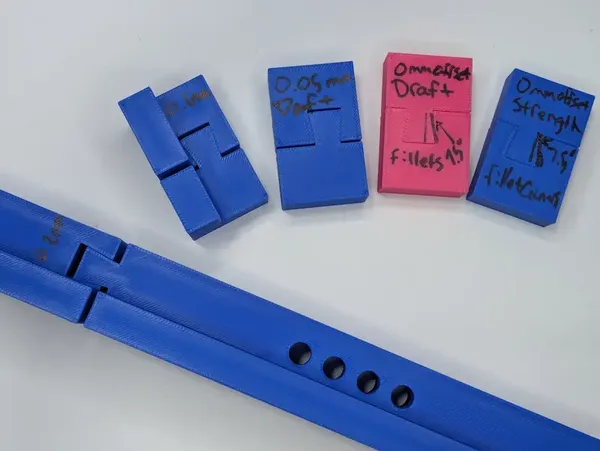
3d Printing Dovetails Experiment
I hit an issue with 3d printing oversized parts that I have not hit before.
I’m working on some jigs for an upcoming woodworking project that will involve
a lot of repetition. We want to utilize some dowel joinery and jigs for
consistency. These parts will be up to 20in in length this is much larger
than my print bed.
I’ve fit things together before # [1]
Here’s where I went wrong, I wasn’t really thinking through my previous
applications. They’ve all been slip fit, primarily print in place joints that
need to move. My go to offset for print in place on my printer is 0.2mm,
sometimes 0.1mm depending on the scale.
knife sharpener double hinge first try [2]
A live hinged [[ knife-sharpener-double-hinge-first-try ]].
[3]
And in the hinges of [[ a-box-of-caps-and-a-macropad ]].
Experimenting for feel # [4]
Fitment like this is a lot dependent on the tolerences of your printer and the
feel you are going for. I went to school as a mechanical engineer and theres a
lot of science b...
-
This is super cool, thanks to Brodie for reading me this content as I do household chores. lowtech magazine [1] is a website ran completely on solar power with only enough battery backup to cover most days. Adding enough to cover all days would increase its carbon footprint and negate the carbon offset of the solar panels it runs on.
It’s fascinating to see a web server running completely off grid in a close power system. These interesting websites are fascinating keep em coming Brodie.
References:
[1]: https://solar.lowtechmagazine.com/
-
The Year of the Linux Desktop is a meme, every year is the year of the Linux desktop as it gains rounding errors of market share. Outside of Linux nerds, developers that use servers on the regular, cheap asses reviving old hardware that is dead in the eyes of other OS’s, the average user wont even notice a difference with the right distro. I ran bazzite with plasma for over a year, It would be super beginner friendly while allowing users customization on levels never seen on non-Linux machines. Other than adobe, roblox, and EA games with easy anti-cheat most users probably aren’t going to run in to any issues. They probably wont even notice at this point, which is where the meme comes in. Why would anyone switch if its not noticeably different for the average user, they wont, until what is working for them stops working for them.

Looking for inspiration? unnamed_game_1_v2 [1] by Mordoria [2].
The Release of Mordoria
References:
[1]: https://github.com/Mordoria/unnamed_game_1_v2
[2]: https://github.com/Mordoria
Litewind
Litewind is Tailwind without the build step
litewindcss.com [1]
This is a sick no-build version of tailwind. I have a couple of projects that the build step of tailwind is cumbersome on, mostly because they are for non-js devs. Some are for backend python devs, some are for folks that mostly want markdown with some styles. This is a perfect no-build tailwind alternative.
References:
[1]: https://litewindcss.com/
python extras are for shipping
Python has two ways of adding optional dependencies to your projects
pyproject.toml file dependency-groups and optional-dependencies.
dependency-groups # [1]
for development
Dependency grooups are used when working on the project, they do not ship with
the project, users cannot select to install them with the project. These are
for things like running tests, linting, or docs. You might want to run these
in ci, or keep your dev machines tight. For the most part you can probably
keep these in dev. Depending on your team, fluency, and tolerance for slower
installs extra packages. Adding too many tight groups might make it hard for
the team to remember all the groups and which one to use and end up with them
using --all-groups anyways.
optional-dependencies # [2]
for users
Optional dependencies are for shipping. These are for your users, not your
development team. This is used for dependencies that are clearly not needed
for all or main use cases. It is annoying to use projects th...
-
anthony has some of the best python highlight videos each year. This might be a good sign, but each year there seems to be less and less that I am chomping at the bit to get to. I thought the remote debugger looked every interesting, his use case for babi seemed very interesting. I wonder what textual would look like built in a 3.14 world, would it still have built its own debugger/console?
uv tool run --python=3.14 babi
Without a process flag you need sudo permissions to attach a pdb debugger similar to gdb.
ps -ef | grep babi
uv tool run --python=3.14 python -m pdb -p8605
[1]
References:
[1]: https://dropper.waylonwalker.com/api/file/b5e1a34d-c198-440a-ab30-4498bfa6962a.png