I love me some styled rss, it's how the OG internet was made to be. You choose what you want to read and when. There is no middleman aggregator infl...
thoughts.waylonwalker.com [1]
[1]
References:
[1]: https://thoughts.waylonwalker.com/post/448
Publishing rhythm
How to make your RSS feed pretty
Life is too short for ugly XML.
cassidoo.co [1]
I love me some styled rss, it’s how the OG [2] internet was made to be. You choose what you want to read and when. There is no middleman aggregator inflating the reach of things they want you to see or suffocating things against them. It’s just you and your internet friends.
Cassidy’s Styled rss [3] # [4]
Cassidy has a quite lovely and easy to read rss feed, with an open source style sheet, that is part of her open source blog template for astro blahg [5], love that name by the way!
[6]
Dave Rupert’s Feed [7] # [8]
I first learned of styled rss feeds from shoptalkshow.com, specifically from Dave Rupert [9].
[10]
Dave uses a pretty bog standard styled rss feed with pretty-feed-v3 [11]. This repo is probably the best place to start if you are looking to style your rss feed.
https://github.com/genmon/aboutfeeds/blob/main/tools/pretty-feed-v3.xsl
My RSS Feed [12] # [13]
My feed comes from my static site generator markata [14], a plugins all the way down static site generator written in python, made for customizing, lacking just about any and all docs so you are on your own.
[15]
Refere...
Today i got hit by this accessibility issue on my site. Low contrast links are not distiniquishable. I had not seen this error title before it was new to me, maybe I have bad memory or maybe it’s new to me.
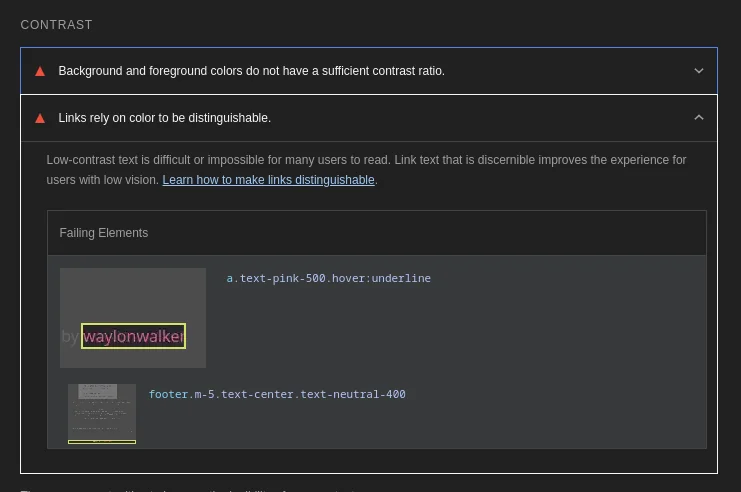
I ended up dropping the background color of the site down a notch as I didn’t
really care for the semi-dark brown anyways. I’m liking the near black
bg-zinc-950 much better now.

Now I got that 100 A11y score in lighthouse.

Dropper
Dropper is a simple file sharing service.
Dropper · dropper.waylonwalker.com [1]
Dropper is a place for me to drop files for quick posts like this.
[2]
References:
[1]: https://dropper.waylonwalker.com/
[2]: https://dropper.waylonwalker.com/api/file/c3a4c39d-c9ab-4e0a-b4c1-b74362877342.webp
Add a healthcheck to your FastAPI app | Nic Payne
I'm building a few FastAPI apps to throw in docker and run on my homelab... I wanted to add healthchecks and here's a simple way to do it Make sure to
pype.dev [1]
Nice example of adding a healthcheck to fastapi [2], and integrating it with docker. Don’t forget to include curl in the install, nice touch.
References:
[1]: https://pype.dev/add-a-healthcheck-to-your-fastapi-app
[2]: /fastapi/
GitHub - casey/just: 🤖 Just a command runner
🤖 Just a command runner. Contribute to casey/just development by creating an account on GitHub.
GitHub · github.com [1]
new versions of just now come with color variables already set.
[group('manage')]
version:
#!/usr/bin/env bash
version=$(cat version)
echo current version {{BOLD}}{{GREEN}}$version{{NORMAL}}
References:
[1]: https://github.com/casey/just?tab=readme-ov-file#constants
pipely/justfile at main · thechangelog/pipely
I like the idea of having like this 20-line Varnish config that we deploy around the world, and it’s like: Look at our CDN! - thechangelog/pipely
GitHub · github.com [1]
I found this nugget in thechangelogs justfile, it lets you add color to your justfile with variables quite easily.
# https://linux.101hacks.com/ps1-examples/prompt-color-using-tput/
_BOLD := "$(tput bold)"
_RESET := "$(tput sgr0)"
_BLACK := "$(tput bold)$(tput setaf 0)"
_RED := "$(tput bold)$(tput setaf 1)"
_GREEN := "$(tput bold)$(tput setaf 2)"
_YELLOW := "$(tput bold)$(tput setaf 3)"
_BLUE := "$(tput bold)$(tput setaf 4)"
_MAGENTA := "$(tput bold)$(tput setaf 5)"
_CYAN := "$(tput bold)$(tput setaf 6)"
_WHITE := "$(tput bold)$(tput setaf 7)"
_BLACKB := "$(tput bold)$(tput setab 0)"
_REDB := "$(tput setab 1)$(tput setaf 0)"
_GREENB := "$(tput setab 2)$(tput setaf 0)"
_YELLOWB := "$(tput setab 3)$(tput setaf 0)"
_BLUEB := "$(tput setab 4)$(tput setaf 0)"
_MAGENTAB := "$(tput setab 5)$(tput setaf 0)"
_CYANB := "$(tput setab 6)$(tput setaf 0)"
_WHITEB := "$(tput setab 7)$(tput setaf 0)"
Usage
echo:
echo {{_BOLD}}{{_GREEN}}hello there{{_RESET}}
References:
[1]: ...
Hurl - Run and Test HTTP Requests
Hurl, run and test HTTP requests with plain text and curl. Hurl can run fast automated integration tests.
hurl.dev [1]
Hurl was mentioned by @gerhard [2] on the latest changelog and Friends [3]. Looks like a feature rich easy to use testing tool that is tested via what looks like a config file.
Hurl is a command line tool that runs HTTP requests defined in a simple plain text format.
It can chain requests, capture values and evaluate queries on headers and body response. Hurl is very versatile: it can be used for both fetching data and testing HTTP sessions.
Hurl makes it easy to work with HTML [4] content, REST / SOAP / GraphQL APIs, or any other XML / JSON based APIs.
References:
[1]: https://hurl.dev/
[2]: https://gerhard.io/
[3]: https://www.youtube.com/watch?v=mvC7497CJJs&t=3001s
[4]: /html/
Today I discovered the Urllink function in bash from the ujust tool from
ublue.it. Seems like a cool trick, but might not work
everywhere.
########
### Special text formating
########
## Function to generate a clickable link, you can call this using
# url=$(Urllink "https://ublue.it" "Visit the ublue website")
# echo "${url}"
function Urllink (){
    URL=$1
    TEXT=$2

    # Generate a clickable hyperlink
    printf "\e]8;;%s\e\\%s\e]8;;\e\\" "$URL" "$TEXT${n}"
}
```j
watchfiles
Simple, modern and high performance file watching and code reload in python.
watchfiles.helpmanual.io [1]
Simple, modern and high performance file watching and code reload in python.
References:
[1]: https://watchfiles.helpmanual.io/
I’m really excited about turso [1], an amazing project by tursodatabase [2]. It’s worth exploring!
Turso Database is a project to build the next evolution of SQLite.
References:
[1]: https://github.com/tursodatabase/turso
[2]: https://github.com/tursodatabase
limbo [1] by tursodatabase [2] is a game-changer in its space. Excited to see how it evolves.
Limbo is a work-in-progress, in-process OLTP database management system, compatible with SQLite.
References:
[1]: https://github.com/tursodatabase/limbo
[2]: https://github.com/tursodatabase
hostnamectl to easily change hostname | Nic Payne
hostnamectl is apparently a linux utility for easily changing your hostname in a variety of ways I learned there's transient and static hostnames, so that&
pype.dev [1]
For some reason the ublue ecosystem does not prompt you to set your hostname on install and you get a hostname like bazzite showing up. Looks like this is the fix.
hostnamectl –static hostname babyblue-aurora
References:
[1]: https://pype.dev/hostnamectl-to-easily-change-hostname
Ansible Galaxy
galaxy.ansible.com [1]
Great examples for working with s3 buckets with ansible.
References:
[1]: https://galaxy.ansible.com/ui/repo/published/amazon/aws/content/module/s3_bucket/#examples
I came across cockpit-identities [1] from 45Drives [2], and it’s packed with great features and ideas.
User and group management plugin for Houston UI (Cockpit)
References:
[1]: https://github.com/45Drives/cockpit-identities
[2]: https://github.com/45Drives
cockpit-file-sharing [1] by 45Drives [2] is a game-changer in its space. Excited to see how it evolves.
A Cockpit plugin to easily manage samba and NFS file sharing.
References:
[1]: https://github.com/45Drives/cockpit-file-sharing
[2]: https://github.com/45Drives
Using OPNsense with Tailscale · Tailscale Docs
Set up a Tailscale VPN on OPNsense. Get secure communication across your devices without the need for complex configuration.
Tailscale · tailscale.com [1]
On reboot of my opnsense router it did not tailscale up. I’m not sure if a key expired or what happened. The fix was to first enable ssh, then ssh in and run tailscale up.
enable ssh # [2]
In opnsense System > Settings > Administration > Secure Shell > Enable Secure Shell
tailscale up # [3]
ssh <opnsense ip>
8 # to select shell
tailscale up
Follow the link to log in.
disable ssh # [4]
now uncheck secure shell to lock down the opnsense machine.
In opnsense System > Settings > Administration > Secure Shell > Enable Secure Shell
References:
[1]: https://tailscale.com/kb/1097/install-opnsense
[2]: #enable-ssh
[3]: #tailscale-up
[4]: #disable-ssh
I’ve been debugging a cloudflared tunnel issue in my homelab all day today, and getting really frustrated. My issue ended up being that it was running twice, once without the correct config file and another with it. I believe that cacheing may have compounded the issue.
In yesterday’s post I setup a cloudflared tunnel on my ubuntu server to expose applications running on the server to the internet. I’m setting up a new server and running cloudflared in its own vm.
setup cloudflared tunnel on ubuntu
Check that dns is pointing to the correct tunnel #
dig subdomain.example.com
traceroute subdomain.example.com
Check that the tunnel is running #
export CLOUDFLARED_TUNNEL_ID = "my-tunnel-id"

cloudflared tunnel list
cloudflared tunnel info $CLOUDFLARED_TUNNEL_ID
I run a cloudflared tunnel on my ubuntu server to expose applications running on the server to the internet. I’m setting up a new server and running cloudflared in its own vm.
Get the cloudflared binary #
sudo wget https://github.com/cloudflare/cloudflared/releases/latest/download/cloudflared-linux-amd64 -O /usr/local/bin/cloudflared

sudo chmod +x /usr/local/bin/cloudflared
#
Now setup the config directory. For the systemd service to work, the config
file needs to be in /etc/cloudflared. I like to give my user rights to edit
the config file without being sudo, we will do that here by creating a group
cloudflared, add ourselves to the group, give ownership of /etc/cloudflared
to the group, give group write access to the directory, and refresh groups.
sudo mkdir -p /etc/cloudflared
sudo groupadd cloudflared
sudo usermod -aG cloudflared $USER
sudo chown -R root:cloudflared /etc/cloudflared
sudo chmod g+w /etc/cloudflared
newgrp cloudflared
login #
Now we can log into the domain zone with cloudflared.
cloudflared tunnel login
This will give a url, follow it in a browser to log in.
cloudflared tunnel create <NAME>
mv ~/.cloudflared/cert.pem /etc/cloudflared/cert.pem
mv ~/.cloudflared/<tunnel-id>.json /etc/cloudflared/<tunnel-id>.json
config #
Now setup config. For the systemd service to work, the config file needs to be in /etc/cloudflared. The config that I have provided below will expose localhost:8000 to tester.example.com
export CLOUDFLARED_TUNNEL_ID=$(ls /etc/cloudflared/*.json | xargs -n 1 basename | sed 's/\.json$//')
mv ~/.cloudflared/${CLOUDFLARED_TUNNEL_ID}.json /etc/cloudflared/${CLOUDFLARED_TUNNEL_ID}.json
mv ~/.cloudflared/cert.pem /etc/cloudflared/cert.pem
echo "
tunnel: $(CLOUDFLARED_TUNNEL_ID)
credentials-file: /etc/cloudflared/$(CLOUDFLARED_TUNNEL_ID).json
ingress:
  - hostname: tester.example.com
    service: http://localhost:8000
  - service: 'http_status:404'
" >> /etc/cloudflared/config.yaml
dns #
Now to get a dns record for tester.example.com to point to the cloudflared tunnel.
cloudflared tunnel route dns $(CLOUDFLARED_TUNNEL_ID) tester.example.com
systemd #
Now install the systemd service.
sudo cloudflared service install
sudo systemctl status cloudflared.service
# if its not running
sudo systemctl start cloudflared.service
Fitting two hard drives and an SSD in a Dell OptiPlex 7010 SFF
The Dell OptiPlex 7010 SFF officially only has room for one 2.5" hard drive internally, I fitted two 3.25" hard drives and a 2.5" SSD in one.
willj.net [1]
This guy fit 2 3.5" drives and an sdd in a dell 7050 SFF. It looks tight, and there it probably not much airflow running in it, but its an impressive project.
References:
[1]: https://willj.net/posts/fitting-two-hard-drives-and-an-ssd-in-a-dell-optiplex-7010-usff/