External Link
meetgor.com [1]
Sometimes, all you need is a mindset shift, a blocker in your mind that holds you back from doing certain things. And for me, I have consumed enough tutorials and posts about Kubernetes, that I need to put to use and create. I have been stuck in the learning cycle, lets push to prod with kubernetes.
This hurts. I know others with this learning style that need to see the full picture before actually doing something with new tech. The way I first got into kubernetes I was looking for the easy route and somehow k8s came up several times as a suggested route Looking for a Heroku replacement, What I found was shocking! [2], So I dove in head first with k3s [3] and kompose [4]. What I found was that it was not all that hard once you start to see how the pieces fit together, no amount of reading tutorials would have gotten me there.
Does anyone care if you use simple yet fragile bash scripts or heavy weight Kubernetes cluster for just clicking buttons and creating and updating rows in a database? No!
You know what, let’s fucking use Kubernetes.
Let’s Gooo. Use what is right for you and stop parroting kubernets is hard, heavy, for big companies, maybe...
Publishing rhythm
External Link
meetgor.com [1]
If you want to use it for the purpose of learning it, please do use it.
Kubernetes as usual is a tool like others, you can’t use one tool everywhere. Where bash scripts work, they just work, where they don’t they fall apart too, kubernetes works like a charm.
Use your grug brains a little and choose wisely! In the end, who the hell cares if you use kubernetes or bash scripts to scale if your users are happy?
Well Said!
References:
[1]: https://www.meetgor.com/thoughts/kubernetes-isn-t-for-you/
Kubernetes Isn
Kubernetes isn
sliplane.io [1]
This post feels like it was written by someone who has never tried kubernetes, someone who reads twitter, listens to t3.gg and thePrimeagen (who cant even container let alone kubernetes). If you cant run linux, use bash, build your own docker images, run docker comfortably. If infra is not your thing kubernetes is probably not for you.
Kubernetes Was Built for Google
Just like how react was built for facebook to solve facebook problems with many teams contributing effectively to the same interactive interfaces. Turns out that react is actually a pretty good product if you have a highly interactive page, and if this is your bread and butter, you can make overly heavy static sites with too much build very effectively. It works and runs much of the internet now.
We are getting serious. We need serious tools.
Big companies use Kubernetes. We should too.
It feels more professional. It sounds like we know what we are doing.
If anyone uses these reasons to pitch kubernetes to me they don’t belong in a position to make any sort of decision. The first one could be a heading with maybe something under it.
But Kubernetes should not be y...
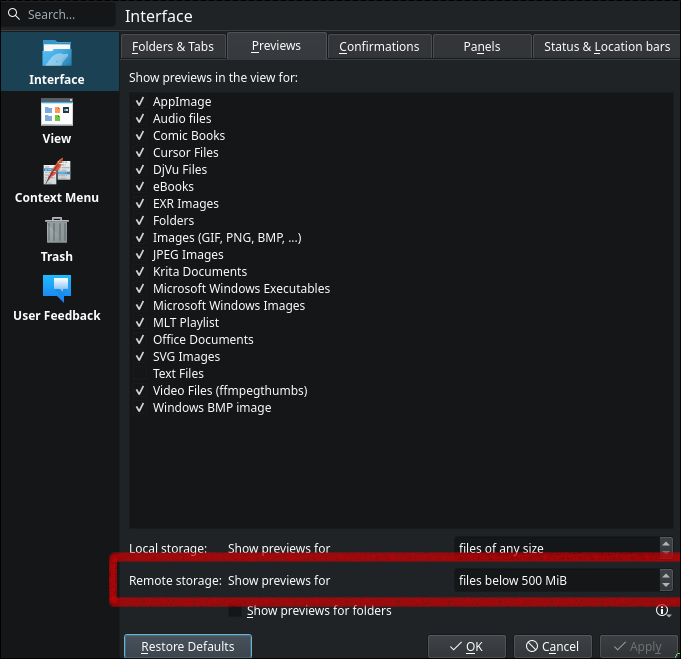
I’ve got a few samba shares going in my homelab, and I’m struggling finding a great app to scroll through vacation photos with my wife. I want something intuitive, non intimidating, and just works. Turns out that the default file browser application for hyprland works great, but you need to enable previews for remote storage for it to work for my use case here.
csi-driver-smb/deploy/example/smb-provisioner at master · kubernetes-csi/csi-driver-smb
This driver allows Kubernetes to access SMB Server on both Linux and Windows nodes. - kubernetes-csi/csi-driver-smb
GitHub · github.com [1]
Great guide to setting up a samba server right in kubernetes. I tried it out after too long of playing with trying to get connected to a samba share on ucore, no idea what was wrong, but this just works, and will live in my homelab [2] no matter what distro I’m on, no playbook required to set it up, just good ol k8s manifest. TBH I cheated and haven’t set up the secrets yet, so its not quite in argocd or in my github repo, but POC is there and it works as advertised without issue.
References:
[1]: https://github.com/kubernetes-csi/csi-driver-smb/tree/master/deploy/example/smb-provisioner
[2]: /homelab/
DHH (@dhh) on X
You have all the time you need, you're just spending it poorly. Don't tell me you don't have time for Linux or kids OR BOTH. You have time for all of it once you stop filling your day with junk act...
X (formerly Twitter) · x.com [1]
The message so many of us need to hear, stop scrolling and start creating. I’m not sure that I have a heavy issue with this, I barely scroll the socials anymore, I have my own rss reader curated with people that I enjoy consuming from. YT is often done as a family activity (with my wife) or listening while doing something like dishes. But I think I’ve been on the other side of this for awhile. There’s something that ticks my brain by twiddling with linux nonsensically or pip install thing-i-heard-about-today and try it. I’m not imune though, I often fill gaps in the day with nonsense short content, but try to avoid the short trap.
References:
[1]: https://x.com/dhh/status/1950462181331349688
-
How many times in one video can Prime say dude just use arch, dude arch would be way easier, dude you know how hard you are making this on yourself.
I do not envy those who desire full size configurability but stuck with the opinions of GatesJobs. Windows and Mac are so rigid, that it makes it impossible to do any level of customizability that I would want to do for productivity.
Unless you Must work on win/mack for some reason of work, you make something for one of them, you use Adobe, or you play competitive online multiplayer with easy anticheat there is a distro for you. The number of things that you need a win/mack for is greatly shrinking, you don’t have to submit yourself to the pain of Gates that this guy has done.
-
Copyparty looks like a feature full self hosted [1] file server, putting this into my check out later when I get back to my desk. Impressive number of features I didn’t even know were a thing all from one .py file.
References:
[1]: /self-host/
-
Ben sold me on the mini pocket pry here. It’s funny how so many minimalist tools become over the top titanium damascus with wild patterns and designs. they look amazing, but are they worth the insane price for simple things? I like my edc to be things I don’t worry about breaking, loosing, or giving away. Fancy ass prybars for $200+ gives me all of those negative feelings I don’t want on my edc.
2025-07-27 Notes
Today Wyatt and I conquered cathulu in Cat quest III.
-
Ben is always good for a banger of a video, this images app is something that i really want in my homelab [1], he did some great polish here! The idea of building vibe coded applications for your own personal use with all of your own personal opinions and workflows is something that has been an appealing part of ai, I’ve definitely tossed a few apps in my homelab that I use occasionally and they do what I ask of them pretty accurately.
This feels great to use, but also seems to kill any startup idea I have, as most of them feel like they could be vibe coded out by someone with a bit of skill and they just host their own. Maybe this is a good thing, maybe we are moving into an era of more people owning their own app they use for themself, maybe i need a security related startup?
References:
[1]: /homelab/
blender donut tutorial 2025
First Launch # [1]
[2]
my setup # [3]
[4]
Add # [5]
shift A
bump resolution scale # [6]
edit -> preferences -> interface -> resolution scale 1.25
[7]
orbit without middle mouse button # [8]
[9]
viewport shading rendered # [10]
[11]
References:
[1]: #first-launch
[2]: https://dropper.waylonwalker.com/api/file/ecd7349a-b04c-4496-8b34-3f2c82bdd790.png
[3]: #my-setup
[4]: https://dropper.waylonwalker.com/api/file/0baedcf5-9b6a-4ee3-b18f-76e695e00a8c.png
[5]: #add
[6]: #bump-resolution-scale
[7]: https://dropper.waylonwalker.com/api/file/d2c9fc7c-c689-4f6f-b2db-96bd8bb59ab3.png
[8]: #orbit-without-middle-mouse-button
[9]: https://dropper.waylonwalker.com/api/file/239a709b-7242-4a75-b100-f3a8cc533364.png
[10]: #viewport-shading-rendered
[11]: https://dropper.waylonwalker.com/api/file/cea5c464-53b2-4926-ab02-31107d84d23f.png
-
I don’t think I ever fully heard the full meaning of vsc*** and why it gets bleeped. I knew that it had to do with M$, but Teej explains it so well here. Its about the editor not really being open sources, but is marketed to be such.
Glossary Web Component
The one where I put the hypercard in the hyperlink
dbushell.com · dbushell.com [1]
I really enjoy David’s Glossary, he has absolutely nailed it. I’m working on one for myself that feels close but not quite. I want to have a list of words that auto glossary to terms for me, maybe this is too much automation and I should just lean on wikilinks, i.e. sick wikilink hover [2], they only take wrapping in brackets. But like David mentions here its a lot of work to make sure they are right on all the older posts. I think it needs to be done with js on my setup, I don’t have no fancy wroker to modify html [3] on the way out, I’m fully static right now, so i would need to do full rebuilds any time the glossary changes, i’m trying to cut down on the number of features that require full site rebuilds and potential cache issues.
References:
[1]: https://dbushell.com/2025/05/07/glossary-web-component/
[2]: /sick-wikilink-hover/
[3]: /html/
An Ode To My 10-Year-Old Thinkpad T440
mbrizic.com [1]
I like reading about old hardware and how to keep it running, sending shit out to e-waste after barely using it for a year makes my skin crawl. I find it interesting how most of these resurrections start with a linux build, and the author giving in and going for linux for the first time and enjoying being able to use something they thought was useless for real work.
That being said I have weird thoughts similar to this guy about being able to take a machine and write a novel somewhere off in the distance, but any time I try to do real work form any laptop these days the ergonomics become so unappealing that I tend to just not do anything away from my desk. Theres something that sounds so great about opening vim on old hardware that could last for hours, sip on coffee and write away, but it never works out like that in practice.
References:
[1]: https://mbrizic.com/blog/thinkpad-t440/
2025-07-24 Notes
Completed the 8-bit dungeon in Cat Quest III with wyatt today.
2025-07-23 Notes
Today I set up hypridle on my hyprland desktop build. It was not too bad, I'm probably going to tweak it as it I go if it bothers me, for now I'm giving it a...
2025-07-22 Notes
Next I ripped a calendar from the docs. When hovered I get a full year calendar, right click gives me only the current month.
Transparent Textures
transparenttextures.com [1]
Fantastic resource of background textures, I will be using this for some projects.
References:
[1]: https://transparenttextures.com/
uv run for running tests on versions of Python
Using uv run with make to replace tox or nox for testing multiple versions of Python locally.
https://daniel.feldroy.com · daniel.feldroy.com [1]
Such a fantastic use of uv, its so fast and flexible and does everything I need that next time I go to set up some more complex testing like this I’m going to lean towards it more than i would something like tox. In the post Daniel sets up matrix testing for testing out different versions of python with the same pytest test suite.
References:
[1]: https://daniel.feldroy.com/posts/2025-07-uv-run-for-testing-python-versions
2025-07-21 Notes
In my adventure to rice out hyprland I set up a sddm theme today, and it looks sick by only changing the wallpaper. I tried out one theme and was pretty...
2025-07-19 Notes
Progress on markata themes, I'm able to get feedback in the terminal. I'm building out a custom color model that will be able to mix and blend colors with...
[1]2025-07-09 Notes [1] from yesterday I have temporal stuff kind of going with postiz in a windsurf session working on [[thoughts-to-nostr]] Been cleaning up my z" loading="lazy">
2025-07-10 Notes | Nic Payne
2025-07-09 Notes [2] from yesterday I have temporal stuff kind of going with postiz in a windsurf session working on [[thoughts-to-nostr]] Been cleaning up my z
pype.dev
big fan of eza and dust, I like these aliases to have some common commands at my fingertips. I often use the tree command and yes it sometimes goes too deep to actually be useful.
alias lt='eza -T --level=2' # Tree view, 2 levels deep
alias ltt='eza -T --level=3' # Tree view, 3 levels deep
alias du1='dust -d 1' # Show only 1 level deep
alias du2='dust -d 2' # Show 2 levels deep
References:
[1]: https://pype.dev/2025-07-10-notes/
[2]: /2025-07-09-notes/
2025-07-18 Notes
fc is pretty great.
-
Love this dudes casual dry humor style, not afraid to poke fun at things with his dry ass satire. that being said, fc is new and as a long time fan of up arrow and !! I will be using this often.
I am a linux user through and through. Desktop, server, vms, containers,
everything except my phone is linux. With this I spend a lot of time in the
terminal, and have been a long time user of !! to rerun the last command, but
with the ability to tack something on at the beginning or end.
TIL about fc, which opens the last command in your shell history in your
$EDITOR or pass in your editor -e nvim.
Rcap of how !! works #
!! pronounces bang bang and will run the last command in your history.
ls -l

!! | wc -l
# ls -l | wc -l

sudo !!
# sudo ls -l | wc -l

!!:s/-l/-l \/tmp
# sudo ls -l /tmp | wc -l
fc enters the chat #
Now making complex edits in your shell can be a bit of a chore, so fc moves
this work to your $EDITOR.
fc
This pops open your $EDITOR with the last command in your history.
sudo ls -l | wc -l

Shell History #
fc shows up in shell history, but !! does not, !! gets replaced by the
command that it becomes.
Up Arrow #
yaya yaya, I know you can also up-arrow c-e, but what fun is that, it’s barely a
flex. fc just looks big brained and like you really know what you are doing.
2025-07-17 Notes
TIL pygments-htmlformatter is a big win for markata, didn't have a chance to take notes yesterday, but I'm really working on templates and themes. It's...
I’ve been a long user of pygments, it’s been the thing that injects <spans>
with funny little class names like sc and si into the code blocks of my
website. I’ve even gone as far as implementing a plugin for
md-it,
but I had no idea how to re-style it. I long ago got a theme that looked good
enough from somewhere and just used it, maybe I pulled something from their
docs site and forgot. Today I learned you can list all the themes easily from
the library itself, and render out new css.
from pygments.styles import get_all_styles
list(get_all_styles())
# [
#     'abap',
#     'algol_nu',
#     'algol',
#     'arduino',
#     'autumn',
#     'borland',
#     'bw',
#     'colorful',
#     'default',
#     'dracula',
#     'emacs',
#     'friendly_grayscale',
#     'friendly',
#     'fruity',
#     'github-dark',
#     'gruvbox-dark',
#     'gruvbox-light',
#     'igor',
#     'inkpot',
#     'lightbulb',
#     'lilypond',
#     'lovelace',
#     'manni',
#     'material',
#     'monokai',
#     'murphy',
#     'native',
#     'nord-darker',
#     'nord',
#     'one-dark',
#     'paraiso-dark',
#     'paraiso-light',
#     'pastie',
#     'perldoc',
#     'rainbow_dash',
#     'rrt',
#     'sas',
#     'solarized-dark',
#     'solarized-light',
#     'staroffice',
#     'stata-dark',
#     'stata-light',
#     'stata',
#     'tango',
#     'trac',
#     'vim',
#     'vs',
#     'xcode',
#     'zenburn'
# ]
from pygments.formatters import HtmlFormatter
from pygments.styles import get_style_by_name
style = get_style_by_name("monokai")
formatter = HtmlFormatter(style=style)
print(formatter.get_style_defs('.highlight'))
And now you get styles that you can add to your css and be any theme from the list above.
pre { line-height: 125%; }
td.linenos .normal { color: inherit; background-color: transparent; padding-left: 5px; padding-right: 5px; }
span.linenos { color: inherit; background-color: transparent; padding-left: 5px; padding-right: 5px; }
td.linenos .special { color: #000000; background-color: #ffffc0; padding-left: 5px; padding-right: 5px; }
span.linenos.special { color: #000000; background-color: #ffffc0; padding-left: 5px; padding-right: 5px; }
.highlight .hll { background-color: #49483e }
.highlight { background: #272822; color: #f8f8f2 }
.highlight .c { color: #959077 } /* Comment */
.highlight .err { color: #ed007e; background-color: #1e0010 } /* Error */
.highlight .esc { color: #f8f8f2 } /* Escape */
.highlight .g { color: #f8f8f2 } /* Generic */
.highlight .k { color: #66d9ef } /* Keyword */
.highlight .l { color: #ae81ff } /* Literal */
.highlight .n { color: #f8f8f2 } /* Name */
.highlight .o { color: #ff4689 } /* Operator */
.highlight .x { color: #f8f8f2 } /* Other */
.highlight .p { color: #f8f8f2 } /* Punctuation */
.highlight .ch { color: #959077 } /* Comment.Hashbang */
.highlight .cm { color: #959077 } /* Comment.Multiline */
.highlight .cp { color: #959077 } /* Comment.Preproc */
.highlight .cpf { color: #959077 } /* Comment.PreprocFile */
.highlight .c1 { color: #959077 } /* Comment.Single */
.highlight .cs { color: #959077 } /* Comment.Special */
.highlight .gd { color: #ff4689 } /* Generic.Deleted */
.highlight .ge { color: #f8f8f2; font-style: italic } /* Generic.Emph */
.highlight .ges { color: #f8f8f2; font-weight: bold; font-style: italic } /* Generic.EmphStrong */
.highlight .gr { color: #f8f8f2 } /* Generic.Error */
.highlight .gh { color: #f8f8f2 } /* Generic.Heading */
.highlight .gi { color: #a6e22e } /* Generic.Inserted */
.highlight .go { color: #66d9ef } /* Generic.Output */
.highlight .gp { color: #ff4689; font-weight: bold } /* Generic.Prompt */
.highlight .gs { color: #f8f8f2; font-weight: bold } /* Generic.Strong */
.highlight .gu { color: #959077 } /* Generic.Subheading */
.highlight .gt { color: #f8f8f2 } /* Generic.Traceback */
.highlight .kc { color: #66d9ef } /* Keyword.Constant */
.highlight .kd { color: #66d9ef } /* Keyword.Declaration */
.highlight .kn { color: #ff4689 } /* Keyword.Namespace */
.highlight .kp { color: #66d9ef } /* Keyword.Pseudo */
.highlight .kr { color: #66d9ef } /* Keyword.Reserved */
.highlight .kt { color: #66d9ef } /* Keyword.Type */
.highlight .ld { color: #e6db74 } /* Literal.Date */
.highlight .m { color: #ae81ff } /* Literal.Number */
.highlight .s { color: #e6db74 } /* Literal.String */
.highlight .na { color: #a6e22e } /* Name.Attribute */
.highlight .nb { color: #f8f8f2 } /* Name.Builtin */
.highlight .nc { color: #a6e22e } /* Name.Class */
.highlight .no { color: #66d9ef } /* Name.Constant */
.highlight .nd { color: #a6e22e } /* Name.Decorator */
.highlight .ni { color: #f8f8f2 } /* Name.Entity */
.highlight .ne { color: #a6e22e } /* Name.Exception */
.highlight .nf { color: #a6e22e } /* Name.Function */
.highlight .nl { color: #f8f8f2 } /* Name.Label */
.highlight .nn { color: #f8f8f2 } /* Name.Namespace */
.highlight .nx { color: #a6e22e } /* Name.Other */
.highlight .py { color: #f8f8f2 } /* Name.Property */
.highlight .nt { color: #ff4689 } /* Name.Tag */
.highlight .nv { color: #f8f8f2 } /* Name.Variable */
.highlight .ow { color: #ff4689 } /* Operator.Word */
.highlight .pm { color: #f8f8f2 } /* Punctuation.Marker */
.highlight .w { color: #f8f8f2 } /* Text.Whitespace */
.highlight .mb { color: #ae81ff } /* Literal.Number.Bin */
.highlight .mf { color: #ae81ff } /* Literal.Number.Float */
.highlight .mh { color: #ae81ff } /* Literal.Number.Hex */
.highlight .mi { color: #ae81ff } /* Literal.Number.Integer */
.highlight .mo { color: #ae81ff } /* Literal.Number.Oct */
.highlight .sa { color: #e6db74 } /* Literal.String.Affix */
.highlight .sb { color: #e6db74 } /* Literal.String.Backtick */
.highlight .sc { color: #e6db74 } /* Literal.String.Char */
.highlight .dl { color: #e6db74 } /* Literal.String.Delimiter */
.highlight .sd { color: #e6db74 } /* Literal.String.Doc */
.highlight .s2 { color: #e6db74 } /* Literal.String.Double */
.highlight .se { color: #ae81ff } /* Literal.String.Escape */
.highlight .sh { color: #e6db74 } /* Literal.String.Heredoc */
.highlight .si { color: #e6db74 } /* Literal.String.Interpol */
.highlight .sx { color: #e6db74 } /* Literal.String.Other */
.highlight .sr { color: #e6db74 } /* Literal.String.Regex */
.highlight .s1 { color: #e6db74 } /* Literal.String.Single */
.highlight .ss { color: #e6db74 } /* Literal.String.Symbol */
.highlight .bp { color: #f8f8f2 } /* Name.Builtin.Pseudo */
.highlight .fm { color: #a6e22e } /* Name.Function.Magic */
.highlight .vc { color: #f8f8f2 } /* Name.Variable.Class */
.highlight .vg { color: #f8f8f2 } /* Name.Variable.Global */
.highlight .vi { color: #f8f8f2 } /* Name.Variable.Instance */
.highlight .vm { color: #f8f8f2 } /* Name.Variable.Magic */
.highlight .il { color: #ae81ff } /* Literal.Number.Integer.Long */
Quickshell
A fully user customizable desktop shell
quickshell · quickshell.org [1]
This has to be the most incredible looking Desktop experience I’ve ever seen, riced to the nines, more polished than macos, more features than kde plasma, this looks incredible and I want to try it and feel it.
https://quickshell.org/assets/showcase/end4.mp4
References:
[1]: https://quickshell.org/
Looking for inspiration? shell [1] by caelestia-dots [2].
A very segsy desktop shell
References:
[1]: https://github.com/caelestia-dots/shell
[2]: https://github.com/caelestia-dots
2025-07-15 Notes
I'm working on hyprland, one thing I am missing from my awesomewm setup is rofi list all running windows. Sometimes I put a browser instance in a different...
-
DT says it so well in this video, I’ve never really been one to shit on software projects, with maybe a VERY small handful of exceptions. The shitting on ubuntu always rubbed me wrong, shitting on flatpak and snap I never got, shitting on systemd because of Leonard Pottering I never got, DT puts it in such good words here. If you don’t like it you are probably not the target audience.
If Ubuntu is too bloated, don’t try to debloat it, this is not windows, we have options, Ubuntu is one option and so much is intertwined together in something like Ubuntu if you think you want to try to “debloat” it good luck. If you have a problem with Snaps, this is probably not for you. You are probably looking for a distro with more control, probably something that you choose everything for.
2025-07-12 Notes
Starting the polkit agent for hyperland arch to handle permission elevation for desktop applications.
Lab Update
Update on the lab setup and what I’ve been working on recently.
Cloudy with a Chance of Tech · blog.thomaswimprine.com [1]
Always enjoy a good read through someone elses setup. I appreciate the desire for pi clusters they are cute, they seem cheap, but feel a bit overrated (at least for those of us with relatively cheap electricity). I love seeing the refurb “tiny desktops” getting a second useful life in a homelab [2] after they have serve their useful life in the corporate world sitting behind the monitor of some reception desk. These things rock, they are underrated, x86_64, not ARM, so they just work. Until ARM becomes more normalized in the datacenter this is where its at.
References:
[1]: https://blog.thomaswimprine.com/blog/2025-07-07-Lab-Update/
[2]: /homelab/
2025-07-11 Notes
Continuing my exploration of Searchcraft I loaded all of my blog into it. It fully posted, indexed, and had my content ready for search in a literal blink....
2025-07-10 Notes
[](https://www.youtube.com/watch?v=VFlLRH3ifcM)
Notes – 17:00 Wed 9 Jul 2025
Notes – 17:00 Wed 9 Jul 2025
dbushell.com · dbushell.com [1]
Enjoying watching David bring together his rss reader day by day. Excited to see where it goes. Im trying to get better at dropping notes like this without a ton of context, without needing to be right, just a note of whats on my mind and what I’m doing.
References:
[1]: https://dbushell.com/notes/2025-07-09T17:00Z/
uv cache prune
If you're running low on disk space and are a uv user, don't forget about uv cache prune: uv cache prune removes all unused cache entries. For example, the cache …
Simon Willison’s Weblog · simonwillison.net [1]
Good point to check on your uv cache if you are running low on disk space. I checked mine today, and it wasn’t too bad so I left it alone.
du -sh `uv cache dir`
References:
[1]: https://simonwillison.net/2025/Jul/8/uv-cache-prune/#atom-everything
2025-07-09 Notes
What a nightmare this glossary plugin turns out to be, it broke my site. I had it really close, then one more change asked for to the llm, an LGTM and did...
[1]
I’m digging these web2app’s from DHH’s omarchy for setting up an opinionated archlinux hyprland. This gives a way to quickly open a web app as an app either with a hotkey or run launcher in its own dedicated window that you can put on it’s own workspace. I really like a workflow of keeping one window per workspace on one monitor and I can quickly navigate between apps with a single hotkey. This gives you the power to switch through things like chat, terminal, browser, steam game with blazing speed from the keybaord, no clicking no searching, just going directly to it.
References:
[1]: /static/https://github.com/basecamp/omarchy/blob/master/install/webapps.sh
Check out kyantech [1] and their project Palmr [2].
🌴 Palmr. is an open-source file-sharing platform focused on privacy and security. It enables users to upload, manage, and share files with features like password protection, custom links, and access control without tracking or limitations. Designed for seamless and secure sharing, Palmr. is completely free.
References:
[1]: https://github.com/kyantech
[2]: https://github.com/kyantech/Palmr
2025-07-08 Notes
Setting up the hyprland run launcher to not be case sensitive.
2025-07-07 Notes
leaning into the rediculous rainbow borders instead of getting rid of them in hyprland.
GitHub - chase/awrit: A full graphical web browser for Kitty terminal with mouse and keyboard support
A full graphical web browser for Kitty terminal with mouse and keyboard support - chase/awrit
GitHub · github.com [1]
awrit is a full graphical browser that runs inside of kitty. I’ve moved on some of my machines away from kitty as the maintainer has seemed so hostile and there are other great therminals out there, but I’m going to give this a go. I have kitty running on my hyprland setup as it is the default anyways. It is actual chromium rendering to a kitty graphics protocol.
References:
[1]: https://github.com/chase/awrit
Smooth clipboard settings for tmux is critical for my workflow. I’m often
grabbing snippets of terminal output to paste into team chats, blog posts, or
llm prompts. Admittedly, I’m often doing this with the mouse, unless it’s
coming from neovim, which I generally do with motions. Moving from an xorg
based setup to hyprland has required me to reconfigure my tmux clipboard
settings. This is what I did.
First install wl-clipboard with AUR.">paru.
paru -S wl-clipboard
Next add this to your tmux config. I’ve long had this config, but with only
the xorg/xclip setup, now this checks for wl-copy, uses it, or falls back to
my old xclip setup.
bind -T copy-mode-vi Enter send-keys -X copy-pipe-and-cancel "bash -c 'command -v wl-copy >/dev/null && wl-copy || xclip -i -f -selection primary | xclip -i -selection clipboard'"
set-option -s set-clipboard off
bind-key -T copy-mode-vi MouseDragEnd1Pane send-keys -X copy-pipe-and-cancel "bash -c 'command -v wl-copy >/dev/null && wl-copy || xclip -i -f -selection primary | xclip -i -selection clipboard'"
command palettes are overrated
Command palettes are slow, and overrated, you should treat yourself better.
You probably installed VSC*** out of the box and your co-workers see you using
the mouse and reprimanded you as they should. Mouse usage is not OK if you are
a software dev, you should have the cheap ass free mouse that came with your
cousins dell machine five years ago and only use if for emergencies. If you
want to be fast you cannot do that by moving cursors to imprecise locations and
clicking with your hand. You are not a caveman, put down the stones and get
with the damn times. You need to be moving with precision.
Stage One, the command palette # [1]
So you are taking your first few baby steps away from that Logitech MX Master
and you need to get shit done, during these infant months the command palette
is your friend. Use it you will be 10x faster than Razer Naga Ron from
accounting. If you are in an IDE like VSC*** or a JEttedBrains editor they
come with a command palette for running commands and f...
2025-07-06 Notes
hyprland volume control, I wasn't sure if I needed something specific for wayland/pipewire, nope pavucontrol just works.
External Link
stackoverflow.com [1]
I need to give this a try for markata glossary
References:
[1]: https://stackoverflow.com/questions/56755439/modifying-hover-in-tailwindcss
2025-07-05 Notes
I might have gpg setup right for kdewallet on hyprland, and I just timed out the request before.