I recently discovered kickstart.css [1] by tjdevries [2], and it’s truly impressive.
Kickstart.nvim alternative written in pure CSS. Requires failwind.nvim
References:
[1]: https://github.com/tjdevries/kickstart.css
[2]: https://github.com/tjdevries
Publishing rhythm
infused-kim [1] has done a fantastic job with kb_zmk_ps2_mouse_trackpoint_driver [2]. Highly recommend taking a look.
A PS/2 mouse & trackpoint driver module for keyboards running the zmk firmware
References:
[1]: https://github.com/infused-kim
[2]: https://github.com/infused-kim/kb_zmk_ps2_mouse_trackpoint_driver
I recently discovered failwind.nvim [1] by tjdevries [2], and it’s truly impressive.
KEKW
References:
[1]: https://github.com/tjdevries/failwind.nvim
[2]: https://github.com/tjdevries
New-caps-for-porta-john
Today I dropped some new caps in the porta-john. I need to do a bunch of
posts on zmk and my journey building the porta-john, I’ve been rocking it for
at least two weeks now pretty solid and I am absolutely loving it. More on
that later.
KLP-Lame-Keycaps # [1]
The model of the caps are
KLP-Lame [2] by
braindefender [3] , they are super rounded and
smooth. They look really good on camera and feel good to the finders.
[4]
I printed these at home on my ender3 s1 pro with a black and purple silk
filliment. I printed all 42 at once using a Printing 42 keys at once [5] technique.
They do have just a bit of a rough texture that you can feel on your figertips.
I printed these on super quality .12mm layer height, while my last set was
printed on draft quality .32mm layer height. They look crazy different in
print quality with the lines of the new caps barely showing, the feel isn’t
nearly as drastic.
The Result # [6]
Check out the final shots as I set up the porta-john with these swee...
[1]
This is the coolest scrappy build, no printer or modeling required, no fancy tools, just straight chisel and claw hammer in soft pine. Im here for it, create the thing that you want to create.
References:
[1]: /static/https://halfwit.github.io/2017/05/08/keyboardblog.html
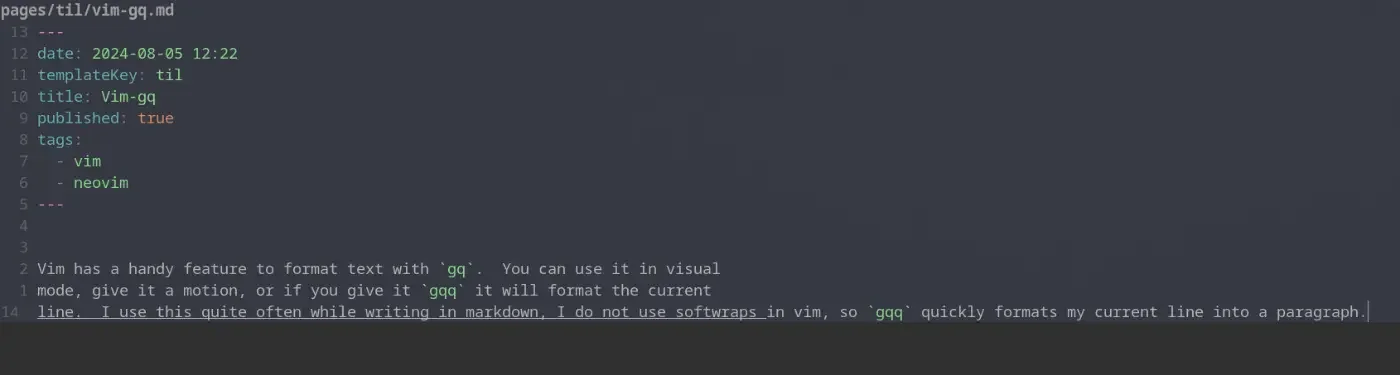
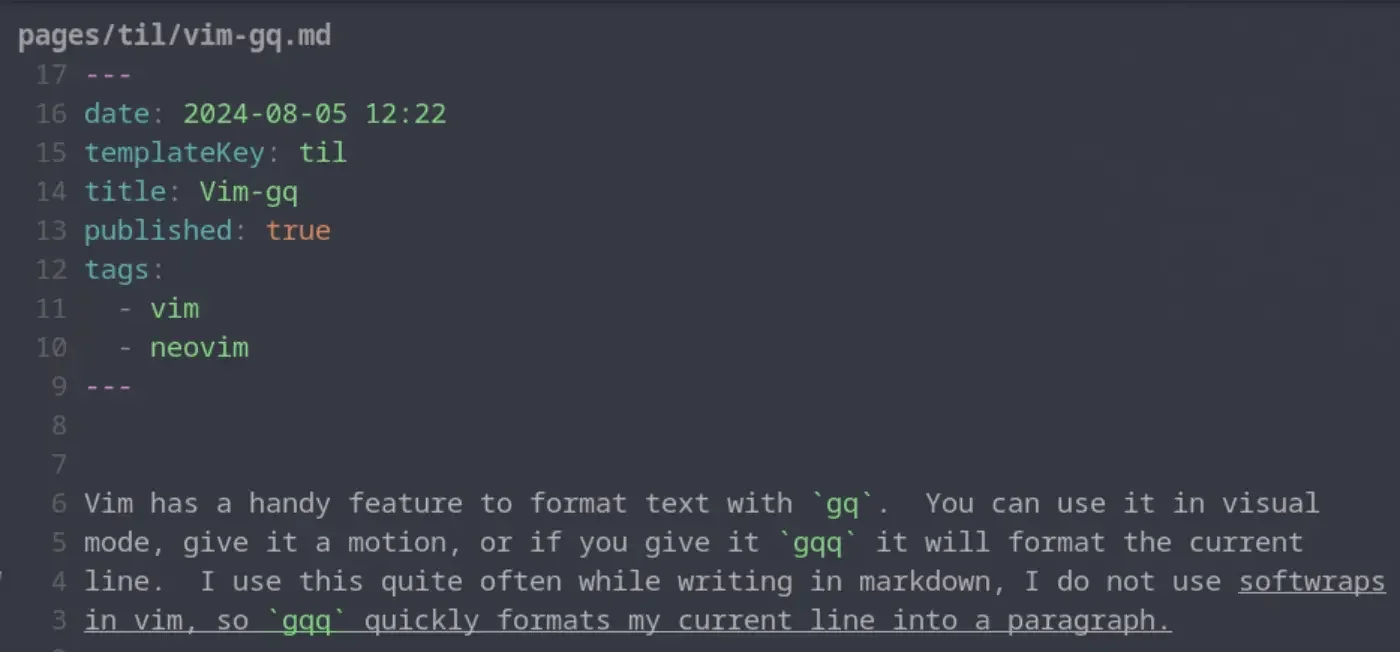
Vim has a handy feature to format text with gq. You can use it in visual
mode, give it a motion, or if you give it gqq it will format the current line.
I use this quite often while writing in markdown, I do not use softwraps in vim,
so gqq quickly formats my current line into a paragraph. Once I have done
this for a single line one time I typically switch to the motion for around
paragraph gqap to format the whole paragraph and not just the current line.
before formatting #
after formattting #
A slug is the part of the url that comes after the domain. Commonly matches the file name of a markdown file many blogging systems. These are typically human readable, unique identifiers for pages within the site.
Wikilinks are a core concept within obsidian to link to documents by Slug wrapped in double square brackets. These are commonly used within wiki site generators.
[[slug]]
Obsidian gives you a keybinding alt+enter to go to that file, but if it does not exist it will create the file for you in the root of the project. It’s a nice way to quickly make new documents.
blogging in 2024
Over the past years couple of years blog traffic has been tanking, for some
time I thought it might have just been me, but then i heard it from Dave Rupert
on Shop Talk show, and it made sense. LLMs and AI is slowly killing the
internet as we know it.
My metrics # [1]
I dug into my emails from the google search console team and found two results
nearly one year apart. Impressions are only 60% of its value a year ago while
clicks are only 35% of where they were a year ago. I’m getting less
impressions and even less clicks.
[2]
May 2023
[3]
June 2024
Suspicions # [4]
What I think is happening is a large portion of users are getting their answers
from ChatGPT, Copilot, and llms like this. A lot of my posts have been filling
gaps in the internet, notes for myself when I struggle to integrate x in y
because there was a gap of how to do so in the docs and stack overflow. Some
small fraction of users have moved on to duck duck go and other non global
warming search engines with AI ...
Hotkey to open link under at the text cursor position while typing in edit mode
I find myself not wanting to leave the keyboard for navigation and think a keyboard-only shortcut that could open a link at the text cursor position is at would be really handy for this case.
Obsidian Forum · forum.obsidian.md [1]
Obsidian has a go to definition like feature, the keybind is alt+enter, I would have never guessed this one.
References:
[1]: https://forum.obsidian.md/t/hotkey-to-open-link-under-at-the-text-cursor-position-while-typing-in-edit-mode/8144
It was not obvious to me, but if you have a wikilink such as Trying Obsidian, you can jump to the file in obsidian, just like you can with lsp go to definition, the keybinding is alt + enter.
The work on KLP-Lame-Keycaps [1] by braindefender [2].
Sculpted and curved keycaps for Kailh Choc and MX switches
References:
[1]: https://github.com/braindefender/KLP-Lame-Keycaps
[2]: https://github.com/braindefender
-
Very inspiring video Jason, these people faced adversity and crushed it. The market is so hard right now, its not easy to get a job, move around, and recover from a layoff. Everyone in this video just showed that you can make it in this industry right now, you just have to be willing to work harder than the rest. The bar is raising, a lot of great people are already putting in hard work to make it.
Community is Key, Theo mentioned that a lot of the companies he works with don’t even post openings, they go to their community first and are often filling spots through lower risk community hires.
-
This is such a cool 3d printed cornhole game.
-
Thor always comes in hard with fire takes in his shorts. Especially if you are early in our career take this in. If you dont yet have kids, but plan to, double take this in.
I’ve long used copier to create all of my posts for my blog, and it works really well for my workflow. I think of a title, call a template, and give it a title. out of the box obsidian did not seem to work this way. It seems like it wants me to right click a file tree and make a new file using the tree, this is not my jam.
Here is what I came up with to replace my til template.
---
date: <% tp.file.creation_date() %>
templateKey: til
title: <%*
  const originalFileName = await tp.system.prompt("Enter file name");
  const toTitleCase = str => str.replace(
    /\w\S*/g,
    txt => txt.charAt(0).toUpperCase() + txt.substr(1).toLowerCase()
  );
  const title = toTitleCase(originalFileName);
  tR += title + '\n'; // Add the title to the template result
-%>
published: true
tags:
  -
---
<%*
const fileName = originalFileName.toLowerCase().replace(/\s+/g, '-');
const newFilePath = `pages/til/${fileName}`;
await tp.file.move(newFilePath);
-%>

<% tp.file.cursor() %>
tRis a return value, and it gets placed directly into the place it is in the fileto.file.cursor()creates a tab-index point so I can tab into the content
Trying Obsidian
I am giving obsidian a try, this is a test post to learn the flow. Something
that has been really hard for me for a long time is images, I don’t include a
lot of images just because it takes so much longer just to get the post out. I
store them in a separate repo, I need to resize and compress them for the web
so they aren’t so big.
Images are easy # [1]
This is my current wallpaper.
[2]
I took he screenshot and just pasted it in.
I have more about my process in this post about Obsidian Image Converter [3].
It’s still just markdown # [4]
I don’t know why it took me so long to understand this but obsidian is just
markdown files. I pretty much just plugged in my existing blog and it picked
up all the tags and was ready to run. I now get some nice visualizations to
help me identify posts that were not ever tagged or maybe left unfinished.
It leans hard on wikilinks # [5]
I just finished moving my backend over to md-it-python, which comes with some
good wiliklink support. I eve...
I’m giving obsidian a go as an editor for my blog and one of the main things I want to fix in my workflow is the ability to quickly drop in images. on first look through the community plugins I found Image Converter. I set it up to convert to webp and drop them in a git submodule. I may make it something other than a git repo in the future, but I’ve learned that adding images to my blog repo quickly makes it heavy and hard to clone on other machines.
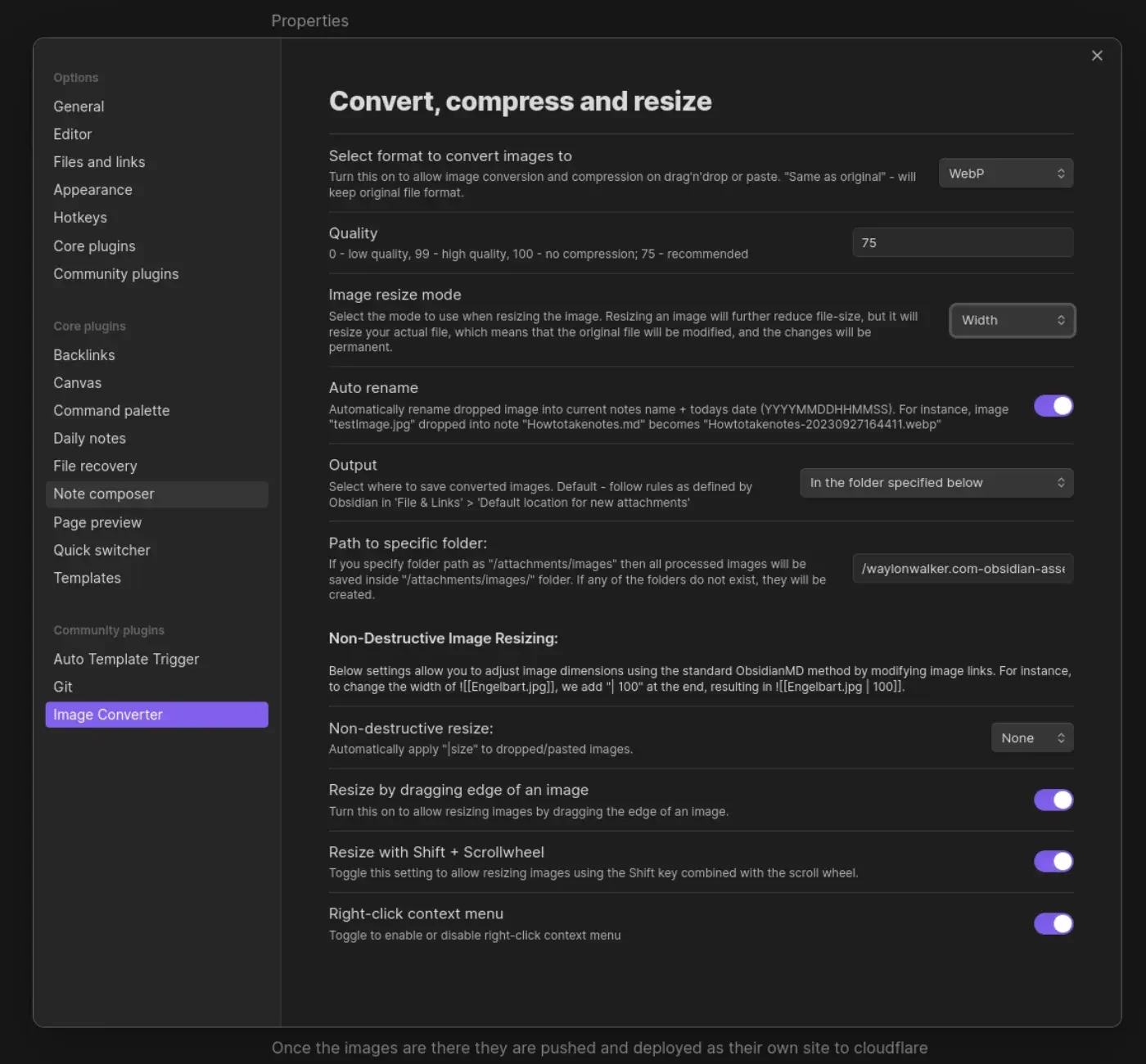
Once the images are there they are pushed and deployed as their own site to
cloudflare pages. I made a quick edit to my sick wikilink hover plugin for
my blog. if it sees a wikilink ending in webp, convert the domain over to
obsidian-assets.waylonwalker.com, and clean up the remaining "! " that the
python md-it library leaves behind.
Note
after first try I needed to increase the width from 600 to 1400, the image in this post was unreadable.
This is part of me getting set up and Trying Obsidian
-
Docker no Docker, what!!!
So fly.io uses Dockerfiles to deploy your app, but no docker. They use containerd to download your docker images into firecracker microvms to run your app. Firecracker is the same tech that runs aws lambda functions.
Fascinating short post on the beans under the hood at fly.io and how they scale your app globally.
Reddit
reddit.com [1]
This is a pretty sick design, touch screen macropad, trackball, ring, and knobs for days. I just want to play with it and see what I can make it do.
As I’m typing I think I just realized that its modular, each rectangle is it’s own section!
References:
[1]: https://www.reddit.com/r/MechanicalKeyboards/comments/1dyf0d8/ultimate_modular_macro_keyboard_kibly/
-
Damn Johnny is always such a positive vibe, just getting steamrolled by this braille shit. WTF are these brand sleeping on. Happy to hear that Andy and Brian are supporting him well.
Also kinds shows what shoes are good when he goes to buy shoes cause no one will send him any and he goes with Etnies.
Johnny keep it going!
yooooooooo its me...
thoughts.waylonwalker.com [1]
[1]
References:
[1]: https://thoughts.waylonwalker.com/post/368
-
Niklas Luhmann created the Zettelkasten method of notetaking, He was the Da Vinci of writing, holding a high standard that we can take inspiration from even today in this digital era.
As many times as I have seem the Zettelkasten covered, I never knew that it roughly translated to little cards in a box.
Four Principles # [1]
Mischa lays out four principles of Zettelkasten.
- Atomic - each card conains one idea
- Link - cards are linked together
- Structure - comes from the links
- Own Words - You write the note in your own words
My blog, tils, and thoughts make up my own zettelkasten. I am not going to say that mine is a perfect representation of his method, but the components are here. rather than building books, my thoughts and tils build up to blog posts. The rate of blog posts I write definitely changes with the seasons of life, as seasons change it becomes a bigger or smaller part of the season.
I really like Mischa’s most important note to Write in your own words, this is what really promotes learning, and proves to yourself that you can form a thought around the topic. Up until recently I’ve wrote everything, but lately I’ve taken to copy pasting some quotes i...
add quick-tap-ms and require-prior-idle-ms · WaylonWalker/zmk-config-42block@cb2cda4
Contribute to WaylonWalker/zmk-config-42block development by creating an account on GitHub.
GitHub · github.com [1]
Even after switching to my hm and ht behaviors I am running into some issues where sometimes I am still accidentally hitting mods(&hm) and layers(&ht) while typing and it’s been getting frustrating. My main issue has been on &ht, they are configured the same so I suspect that my pinkies just move a bit slower over the keys than my pointer/middle finger.
I just added quick-tap-ms and require-prior-idle-ms to my &hm and &ht behaviors, and a few intentionally sloppy passes through monkeytype seem to show that its working well. A few days of trying this will tell whether it was a good fix or if I have maybe gone too far the other way.
The end goal here is to be able to roll over keys faster without worrying about hitting other layers or mods.
References:
[1]: https://github.com/WaylonWalker/zmk-config-42block/commit/cb2cda4cf7b3776995dbc2e8608b60670a2cf8b2
I’ve had a couple of uploads to twitter fail recently and has been a pain. I tried some online converters for convenience, but none of them worked. I reached out to chatgpt and found succeess with this ffmpeg command.
ffmpeg -i input.mp4 \
  -vf "scale=trunc(oh*a/2)*2:min(720\,trunc(ih*a/2)*2)" \
  -c:v libx264 -profile:v high -level:v 4.1 \
  -b:v 3500k -maxrate 3500k -bufsize 7000k \
  -pix_fmt yuv420p \
  -c:a aac -b:a 128k -ar 44100 \
  -movflags +faststart \
  output.mp4
Tickle My Keys
Keyboards so good your fingers will be begging to tickle these keys.
ticklemykeys.com [1]
I’ve been working on something, I’m gong to combine my mechanical engineering skills with my love of great keyboards and start a custom keyboard shop for building custom keyboards for exactly what people need with an emphasis on portability.
References:
[1]: https://ticklemykeys.com/
-
Damn Prime covers this so well from all angles. Can’t overstate the importance of that last step. Look at the issues, and raise an issue if there is not one before putting in a bunch of hard work. Make sure that the maintainers are open for your changes and no one else is already working on it.
References:
[1]: /glossary/git/
sqlite-jiff
I linked to the brand new Jiff datetime library yesterday. Alex Garcia has already used it for an experimental SQLite extension providing a timezone-aware jiff_duration() function - a useful new …
Simon Willison’s Weblog · simonwillison.net [1]
Sqlite is getting rust extensions now, and datetimes make it totally worth if if they work well and and fast, two things that don’t always go together in datetime libraries
References:
[1]: https://simonwillison.net/2024/Jul/23/sqlite-jiff/
There’s a TUI for that with Nick Janetakis (Changelog & Friends #53)
Nick Janetakis is back and this time we're talking about TUIs (text-based user interfaces) — some we've tried and some we plan to try. All are collected from Justin Garrison's Awesome TUIs repo o...
Changelog · changelog.com [1]
50 minutes into this episode they start a discussion on seo, and naming posts. They give Jerod the task of googling for tmux and see how high up the ranking they find Nick, expecting a number one post, and he cant even get to Nick.
The problem? Jerod is such a beginner he doesn’t even know what to search, he starts with a long query about getting started with tmux, but all of Nick’s videos are why you should use advanced features of tmux, but Jerod has yet to discover that these exist.
As experts we often come up wtih a post title for the exact thing that we are trying to teach someone how to do, but yet, they haven’t discussed that they need that feature yet, they just want the getting started guide, or tell me why I should start using tmux. Not why sessions are better than windows, and tabs suck all together.
Definitely an eye opening conversation listening to two experts sit in...
Looking for inspiration? jiff [1] by BurntSushi [2].
A datetime library for Rust that encourages you to jump into the pit of success.
References:
[1]: https://github.com/BurntSushi/jiff
[2]: https://github.com/BurntSushi
I’m really excited about sqlite-jiff [1], an amazing project by asg017 [2]. It’s worth exploring!
No description available.
References:
[1]: https://github.com/asg017/sqlite-jiff
[2]: https://github.com/asg017
The Verge (@verge) on X
Stress testing a snack-proof keyboard
X (formerly Twitter) · x.com [1]
This is a wild keyboard test. This is exactly what I want to see from ticklemykeys.com. I want to make ergomechanical boards that you can use and abuse. I want you to not be afraid to take them with you or to eat a nutrigrain bar in the same room (cough 2015 mac). And If something does go out, I want users to be able to repair it themsleves, key caps, switches, batteries, and microcontrollers should be replacible parts they can get at a good cost from the shop if they have paid for a board.
References:
[1]: https://x.com/verge/status/984764889754456065
all lt keys to hl · WaylonWalker/zmk-config-42block@ce25356
Contribute to WaylonWalker/zmk-config-42block development by creating an account on GitHub.
GitHub · github.com [1]
Today I swapped out all of my keys that are used dual purpose for letters and layers to homerow layers. This prevents goofy things happening when rolling, and prefers-tap makes it so that keys that are rolled over get hit as letters instead of as layers. This was one of my biggest hurdles jumping into zmk, lt as a homerow key just does not behave the same as the ht/hm behaviors with tap-preferred set.
Seealso
See previous commit where I added the hl https://github.com/WaylonWalker/zmk-config-42block/commit/9522c859cdf024a2c2b73931c130ddc907c09ffc
hl: homerow_layer {
compatible = "zmk,behavior-hold-tap";
label = "HOMEROW_LAYER";
bindings = <&mo>, <&kp>;
#binding-cells = <2>;
tapping-term-ms = <150>;
flavor = "tap-preferred";
};
References:
[1]: https://github.com/WaylonWalker/zmk-config-42block/commit/ce25356e88eb2439182201700314133de719457e
I like Infisical’s [1] project infisical [2].
♾ Infisical is the open-source secret management platform: Sync secrets across your team/infrastructure, prevent secret leaks, and manage internal PKI
References:
[1]: https://github.com/Infisical
[2]: https://github.com/Infisical/infisical
Tips for Being Happier, Healthier, More Productive by The GaryVee Audio Experience
Today's podcast episode is an interview I did on the Happier with Gretchen Rubin Podcast with Gretchen Rubin and Elizabeth Craft. We discuss balancing ambition, tenacity, humility, and patience. I …
Spotify for Creators · podcasters.spotify.com [1]
Deep breath, the deepest you can take in
Smile, a real fukin smile not some pansy bullshit
Say I’m not going to give a shit about this when I’m 90
References:
[1]: https://podcasters.spotify.com/pod/show/garyvee/episodes/Tips-for-Being-Happier--Healthier--More-Productive-e2m4184
I came across zmk-config [1] from evantravers [2], and it’s packed with great features and ideas.
No description available.
References:
[1]: https://github.com/evantravers/zmk-config
[2]: https://github.com/evantravers
Can't use System update - invalid signature when validating ASN.1 encoded signature · Issue #1316 · ublue-os/bazzite
Describe the bug Hello, I installed the nvidia KDE version of bazzite just 2 days ago. Today I wanted to update to the most recent release, but unfortunately, I keep getting the following error: Pu...
GitHub · github.com [1]
This fixed my bazzite update issues after the signing key was rotated recently. This team is killing it with such a great user experience.
curl -sL https://fix.universal-blue.org/ | sudo bash
References:
[1]: https://github.com/ublue-os/bazzite/issues/1316
I like Textualize’s [1] project transcendent-textual [2].
Textual apps and libraries
References:
[1]: https://github.com/Textualize
[2]: https://github.com/Textualize/transcendent-textual
Update Kconfig.shield rec by bravekarma · WaylonWalker/zmk-config-ninepad@8b76b76
zmk configuration for ninpad keyboard. Contribute to WaylonWalker/zmk-config-ninepad development by creating an account on GitHub.
GitHub · github.com [1]
This one space killed my whole config and held me back from learning zmk.
References:
[1]: https://github.com/WaylonWalker/zmk-config-ninepad/commit/8b76b76e2f094453aaf7ffe51bb405ce3a25a611
[1]
The trackball spinner looks sick here. I can imagine using that spinner like a scroll wheel.
References:
[1]: /static/https://kbd.news/DragonFruit-2178.html
[1]
They had split ergo boards back in 1983??? WTF who the heck keeps these row stagger boards going. This board looks like endgame material, If this thing was more normal, it’d kill a whole section of the ergo mechanical keyboard industry for good reason.
References:
[1]: /static/https://kbd.news/NEC-M-System-1729.html
-
This keyboard layout looks weird af the mix of column staggar and row stagger is wild. Not sure if its genius or an abomination.
That solenoid though is absolutely wild though, I kinda want one TBH.
and the clear plate with the diodes laid out on it in a herringbone pattern is a very nice touch.


External Link
stackoverflow.com [1]
today I learned that there is an accessibility feature in chrome that allows you to place a text cursor anywhere on the page. I had accidentally done this and it drove me mad that it was there.
References:
[1]: https://stackoverflow.com/questions/75886276/text-cursor-bug-in-my-chrome-browser-that-causes-the-blinking-cursor-to-appear-e
animal well codes
fish room # [1]
fish bubbles
ul d dl l dl ur ul
jellyfish
d l d l d l u r
egg room # [2]
bar dir
given bar codes
top r
mid dr
bot dl
calculated bar codes
num dir
1 r
2 dr
3 d
4 dl
5 l
6 ul
7 u
8 ur
bar code direction
num bar
1 top
2 mid
3 top mid
4 bot
5 top bot
6 mid bot
7 top mid bot
8 empty
egg room decode
6 3 3 6 3 1 3 4
2 4 3 2 8 3 5 8 _
3 5 7 5_ __ 5 2 5 6 3 1 3
3 1 3 6 4 4 6 4 2 4 6 8
6 4 8 7 3 7 6 5 7 6 __
egg room decode dir
ul dd __ dd ul dd rr dd __ dl
dr dl dd __ dr ur__ dd ll ur __
dd ll uu ll __ ____ ll dr ll ul dd rr dd
__ dd rr dd ul dl __ dl ul dl dr dl ul ur
ul dl ur uu __ dd uu ul __ ll uu ul ____
References:
[1]: #fish-room
[2]: #egg-room
-
Hard to argue this take, happy to see that its at the top. With it being such an old language its amazing that it still holds this position, and not surprising that it has warts, and thing that have turn users off from wanting anything to do with it.
timestamped in the link
Command Line Interface Guidelines
An open-source guide to help you write better command-line programs, taking traditional UNIX principles and updating them for the modern day.
clig.dev [1]
This is a pretty sick set of guidelines to help you write better cli programs, I’m definitely coming back to reading this one more in depth later.
References:
[1]: https://clig.dev/
External Link
fullystacked.net [1]
You can explicitly make a script render blocking, nothing will be rendered until this js is ready.
<script blocking="render"
src="important.js"
defer></script>
References:
[1]: https://fullystacked.net/render-blocking-on-purpose/