Hatch allows you to specify direct references for dependencies in your
pyproject.toml file. This is useful when you want to depend on a package that
is not available on PyPI or when you want to use a specific version from a Git
repository. Often used for unreleased packages, or unreleased versions of
packages.
[project]
dependencies = ['markata', 'markata-todoui@git+https://github.com/waylonwalker/markata-todoui']

[tool.hatch.metadata]
allow-direct-references=true
Setting up snapper on Arch
https://www.youtube.com/watch?v=_97JOyC1o2o
snapper
snap-pac
grub-btrfs
Note # [1]
These are mostly my notes to remind myself, I’d Highly reccomend watching
this-video [2] or reading this
arch wiki page [3]
/.snapshots already exists error # [4]
When I started running sudo snapper -c root create-config / I ran into the
following error.
[5]
Creating config failed (creating btrfs subvolume .snapshots failed since it already exists).
remove existing snapshots # [6]
sudo umount /.snapshots
sudo rm -r /.snapshots
configure snapper # [7]
sudo snapper -c root create-config /
sudo snapper -c home create-config /home
btrfs subvolumes # [8]
sudo btrfs subvolume list /
[9]
sudo btrfs subvolume delete /.snapshots
sudo mkdir /.snapshots
# [10]
# you might not see snapshots mounted yet
lsblk
# if you check fstab you will see an entry for it
cat /etc/fstab
# mount it
sudo mount -a
# now you should see /.snapshots mounted
lsblk
You should now see .snapshots in mountpoints.
[11...
{% for year in markata.map(“date.year”, filter=‘published’)|unique %}
{{ year }} #
{% for post in markata.map(‘post’, filter=“published and date.year == “+year|string, sort=‘date’) %}
- [{{ post.title }} - {{ post.date.month }}/{{ post.date.day }}](/{{ post.slug }}) {% endfor %} {% endfor %}
Muck
Steam achievements and progress for Muck - 2.04% complete with 1/49 achievements unlocked.

sein
Steam achievements and progress for sein - 8.77% complete with 5/57 achievements unlocked.
Running My Blog on 3.11-dev
3.10.5: 109.441
3.11-dev: 108.856

xrandr is a great cli to manage your windows in a linux distro using x11, which is most of them. The issue is that I can never remember all the flags to the command, and if you are using it with something like a laptop using a dock the names of all the displays tend to change every time you redock. This makes it really hard to make scripts that work right every time.
Homepage #
Check out the deresmos/xrandr-manager for more details on it.
installation #
xrander-manager is a python cli application that is simply a nice interface into xrandr. So you must have xrandr already installed, which is generally just there on any x11 window manager, I’ve never had to install it.
As with any python cli that is indended to be used as a global/system level cli application I always install them with pipx. This automates the process of creating a virtual environment for xrandr-manager for me, and does not clutter up my system packages with its dependencies that may eventually clash with another that I want to use.
# prereqs (xrandr, pipx)
pipx install xrandr-manager
set main monitor #
First if your main display is not set to the correct monitor set your main display first.
xrandr-manager -m HDMI-0
xrandr-manager -m DP-0
prompt mode #
If you dont know the name of your monitors and and don’t want to dig through
xrandr, you can just run --prompt and tab complete to fill set your main
display.
xrandr-manager --prompt
direction #
This is what I most often use xrandr-manager for. Once you have the main display set you can tell it where to put the other monitor. I’ve only tried this with two monitors, I have no idea what happens with more monitors.
xrandr-manager -d right
xrandr-manager -d left
xrandr-manager -d above
xrandr-manager -d below
mirror #
One thing that I always need to jump through hoops to do is mirror. Occasionally I want to mirror so that more people can see the screen while we are split screen gaming. This has seemed like a pain in any other xrandr utility, but trivial in xrandr-manager.
xrandr-manager --mirror
It logs out the xrandr command #
One nice thing about xrandr-manager is that it echos out the xrandr command that it’s running. This is nice because you can toss this behind a hotkey or an init script.
Guis #
Ya there are guis that do this. I’ve had good luck with arandr. It’s more intuitive to drag windows around like what you would do in windows. Every once in awhile it messes up and my polybar overlaps my windows, or my windows end up only on half the screen.
There are also graphics card specific utilities, Ive used nvidia x server settings and it mostly works similar to arandr.
jq has some syntax that will sneak up on you with complexity. It looks so good,
and so understandable, but everytime I go to use it myself, I don’t get it.
ijq is an interactive alternative to jq that gives you and nice repl that you
can iterate on queries quickly.
paru -Syu ijq
Here are some other articles, I decided to link at the time of writing this article.
JUT | Read Notebooks in the Terminal
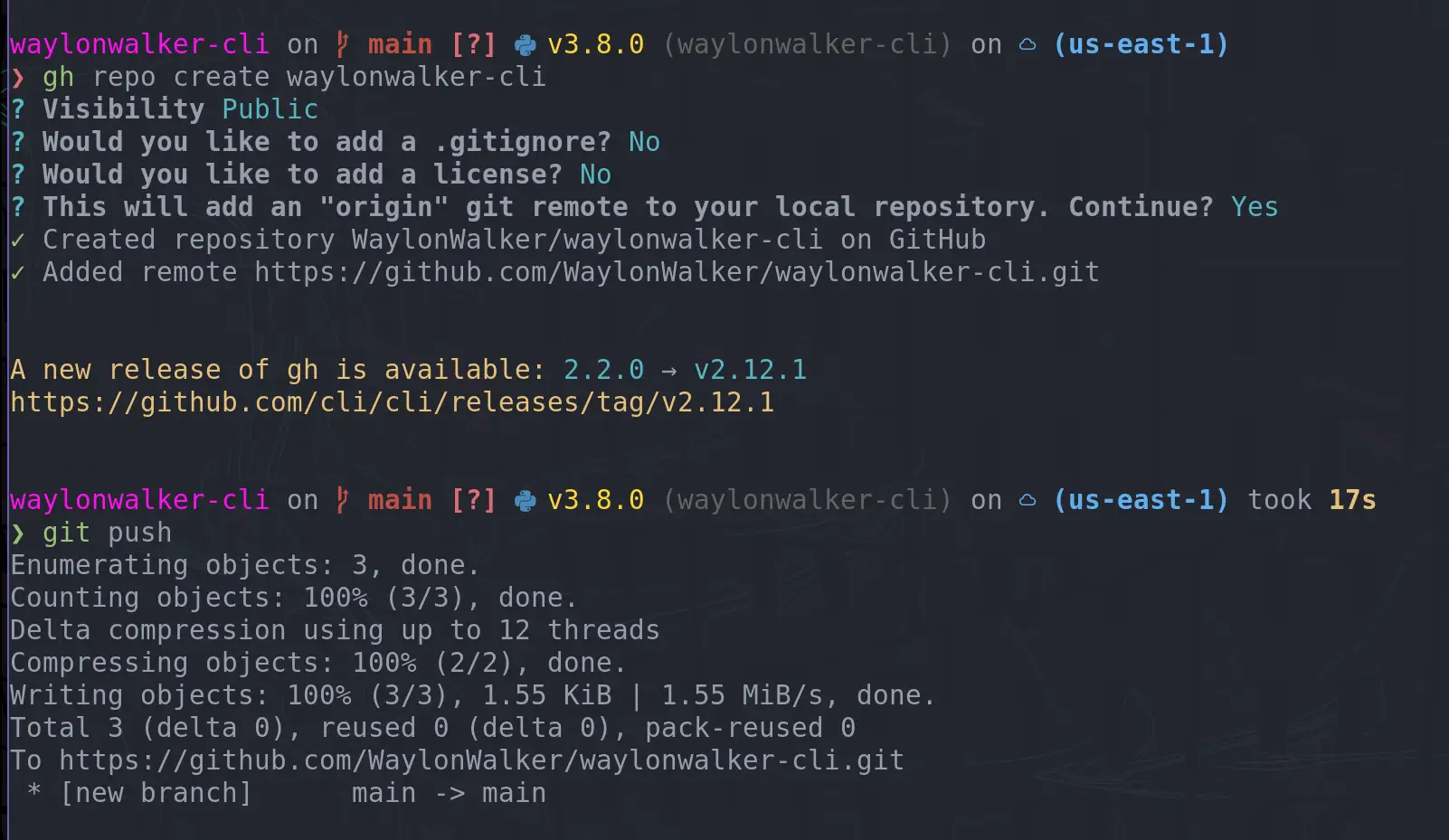
I love getting faster in my workflow, something I have recently added in is creating GitHub repos with the cli. I often create little examples of projects, but they just end up on my machine and not anywhere that someone else can see, mostly because it takes more effort to go create a repo. TIL you can create a repo right from the command line and push to it immediately.
gh repo create waylonwalker-cli
want to see what this repo I created is about? #
Check out what I created here.
pipx run waylonwalker
totally guessed at this post’s date
I’m still trying to understand this one, but this is how you force a python object to stop atexit.
import atexit

class Server:
    def __init__(
        self,
        auto_restart: bool = True,
        directory: Union[str, "Path"] = None,
        port: int = 8000,
    ):
        if directory is None:
            from markata import Markata

            m = Markata()
            directory = m.config["output_dir"]

        self.directory = directory
        self.port = find_port(port=port)
        self.start_server()
        atexit.register(self.kill)

    def start_server(self):
        import subprocess

        self.cmd = [
            "python",
            "-m",
            "http.server",
            str(self.port),
            "--directory",
            self.directory,
        ]

        self.proc = subprocess.Popen(
            self.cmd,
            stderr=subprocess.PIPE,
            stdout=subprocess.PIPE,
        )
        self.start_time = time.time()


    def kill(self):
        self.auto_restart = False
        self.proc.kill()

    def __rich__(self) -> Panel:
        if not self.proc.poll():
            return Panel(
                f"[green]serving on port: [gold1]{self.port} [green]using pid: [gold1]{self.proc.pid} [green]uptime: [gold1]{self.uptime} [green]link: [gold1] http://localhost:{self.port}[/]",
                border_style="blue",
                title="server",
            )

        else:
            if self.auto_restart:
                self.start_server()

            return Panel(f"[red]server died", title="server", border_style="red")
Portal
Steam achievements and progress for Portal - 26.67% complete with 4/15 achievements unlocked.
Whenever you are installing python packages, you should always use a virtual environment. pip makes this easy to follow by adding some configuration to pip.
require-virtualenv #
Pip is the pacakage tool for python. It installs third-party packages and is
configurable. One of the configuration settings that I highly reccommend
everyone to add is require-virtualenv. This will stop pip from installing
any packages if you have not activated a virtualenv.
why #
python packages often require many different dependencies, sometimes packages are up to date and sometimes they require different versions of dependencies. If you install everything in one environment its easy to end up with version conflict issues that are really hard to resolve, especially since your system environment cannot easily be restarted.
PIPX my one exception #
My one exception that I put in my system level packages is pipx. pipx is
very handy as it manages virtual environments for you and is intended for
command line utilities that would end up in your system env or require you to
manually manage virtual environments without it.
pip config #
Your pip config might be found in either ~/.pip/pip.conf or
~/.config/pip/pip.conf. You can either use the pip config set command or
edit one of these files manually.
pip config set global.require-virtualenv True
Now you sould see this in your ~/.config/pip/pip.conf
[global]
require-virtualenv = True
pip config debug #
If you want to know where pip is looking for configuration on your system, and
what files are setting a certain config you can use pip config debug to find
it.
❯ pip config debug

env_var:
env:
global:
  /etc/xdg/xdg-awesome/pip/pip.conf, exists: False
  /etc/xdg/pip/pip.conf, exists: False
  /etc/pip.conf, exists: False
site:
  /home/waylon/git/waylonwalker.com/.venv/pip.conf, exists: False
user:
  /home/waylon/.pip/pip.conf, exists: False
  /home/waylon/.config/pip/pip.conf, exists: True
    global.require-virtualenv: True
saved my bacon #
This setting recently saved me when I modified my .envrc file my virtual
environment deactivated, so when I went to pip install something it gave me an
error that it was not active. Situations like this are an easy way to pollute
your system with packages that it does not need installed.

TLDR #
Run this at your command line to avoid polluting your system environment by mistake before running any pip command.
pip config set global.require-virtualenv True
I’ve been trying to adopt pyenv for a few months, but have been completely blocked by this issue on one of the main machines I use. Whenever I start up ipython I get the following error.
ImportError: No module named '_sqlite3
I talked about why and how to use pyenv along with my first impressions in this post
pyenv/issues/678 #
According to #678 I need to
install libsqlite3-dev on ubuntu to resolve this issue.
install libsqlite3-dev #
libsqlite3-dev can be installed using apt
sudo apt install libsqlite3-dev
But wait…. #
When I make a fresh env and install ipython I still get the same error and I am still not able to use ipython with pyenv.
ImportError: No module named '_sqlite3
re-install python #
After having this issue for awhile an coming back to
#678 several times I realized that
libsqlite3-dev needs to be installed while during install.
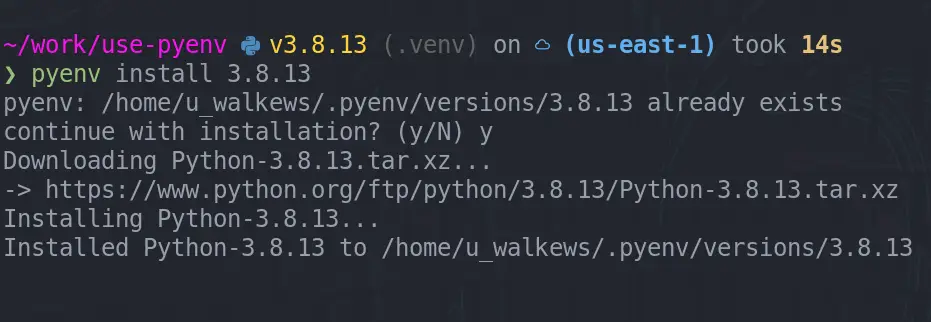
pyenv install 3.8.13
I think I had tried this several times, but was missing the -y option each
time. You gotta read errors like this, I am really good at glossing over them.
Let’s never have this issue again. #
When you spend months living with little errors like this and finally fix it,
its good to make sure that it never happens again. Whenever I start a new
ubuntu machine I run an ansible playbook that does all the setup for me. I
added libsqlite3-dev to my core install in
64c85ca
now it will be on all of my machines and not break again.
Sometimes you have a pretty old branch you are trying to merge into and you are absolutely sure what you have is what you want, and therefore you don’t want to deal with any sort of merge conflicts, you would rather just tell git to use my version and move on.
update main #
The first step is to make sure your local copy of the branch you are moving into is up to date.
git checkout main
git pull
update your feature branch #
It’s also worth updating your feature branch before doing the merge. Maybe you have teammates that have updated the repo, or you popped in a quick change from the web ui. It’s simple and worth checking.
git checkout my-feature
git pull
start the merge #
Merge the changes from main into my-feature branch.
git merge main
Now is where the merge conflict may have started. If you are completely sure
that your copy is correct you can --ours, if you are completely sure that
main is correct, you can --theirs.
git checkout --ours .
git merge --continue
This will pop open your configured git.core.editor or $EDTIOR. If you have
not configured your editor, it will default to vim. Close vim with <escape>:x, accepting the
merge message.
Now push your changes that do not clash with main and finish your pr.
git push
A few of my friends and I all just borked our neovim configs during a plug
update, and because none of us were using :PlugSnapshot it was painful to
recover from.
https://twitter.com/pypeaday/status/1524882893914398732
Lucky for me I did it on a home machine that I only occasionally edit from, so I could still take the snapshot from a working machine before taking the plunge into fixing everying.
Why snapshot #
Snapshotting ensures that you install the same git sha on every single plugin. This way when you have multiple machines running your same vim config, they are all on the same sha of each plugin, and you dont end up with weird things happening on one machine. And then you get to decide when you are ready to update, rather than when it breaks.
- same config everywhere
- you control the update
- in case of a borked update you have a good working place to rever to
Let’s snapshot #
Running :PlugSnapshot will generate the following content in a buffer that
you can save. I chose to save mine in ~/.config/nvim/snapshot.vim.
" Generated by vim-plug
" Fri 13 May 2022 08:01:39 PM CDT
" :source this file in vim to restore the snapshot
" or execute: vim -S snapshot.vim

silent! let g:plugs['Telegraph.nvim'].commit = '92e472f4e83acd60eb3766168e66d02718bfefe0'
silent! let g:plugs['black'].commit = '8ed3e3d07ea3e6d62e3e533e69f96a0ff148cd5d'
silent! let g:plugs['bufutils.vim'].commit = '4634feb1312fd73fab66cfaa860e7af3abde935b'
silent! let g:plugs['cmp-buffer'].commit = 'd66c4c2d376e5be99db68d2362cd94d250987525'
silent! let g:plugs['cmp-calc'].commit = '970fd5f97b4bd363260365b217f694dd6a1182cb'
silent! let g:plugs['cmp-nvim-lsp'].commit = 'ebdfc204afb87f15ce3d3d3f5df0b8181443b5ba'
silent! let g:plugs['cmp-path'].commit = '466b6b8270f7ba89abd59f402c73f63c7331ff6e'
silent! let g:plugs['cmp-rg'].commit = 'fd92d70ff36b30924401b0cf7d4ce7344c8235f7'
silent! let g:plugs['cmp-vsnip'].commit = '0abfa1860f5e095a07c477da940cfcb0d273b700'
silent! let g:plugs['colorbuddy.nvim'].commit = 'cdb5b0654d3cafe61d2a845e15b2b4b0e78e752a'
silent! let g:plugs['compe-tmux'].commit = '3c16f7e73abee43b3ea3e919e8b34c24427d9530'
silent! let g:plugs['coverage-highlight.vim'].commit = '864e03679ea4168661501246147893cc82020917'
silent! let g:plugs['diffurcate.vim'].commit = 'b804675072220ff7c7ebcd24a028aa4aa35f09cc'
silent! let g:plugs['friendly-snippets'].commit = '5fd8b920a3497dec9a3ef939595186b362d041b4'
silent! let g:plugs['fzf'].commit = 'a91a67668e0830a8cf9a792c4949e03b4189f097'
silent! let g:plugs['fzf.vim'].commit = 'd5f1f8641b24c0fd5b10a299824362a2a1b20ae0'
silent! let g:plugs['gitsigns.nvim'].commit = 'ead0d48df801431b990d6b91fa210f7efa30ac38'
silent! let g:plugs['gruvbox-flat.nvim'].commit = '756dbdd3dfd3ed84acb2f9649724df19ae41f904'
silent! let g:plugs['harpoon'].commit = '28762aa04d6395538e26e1efff5213b26720e68f'
silent! let g:plugs['impatient.nvim'].commit = '2337df7d778e17a58d8709f651653b9039946d8d'
silent! let g:plugs['instant.nvim'].commit = 'c02d72267b12130609b7ad39b76cf7f4a3bc9554'
silent! let g:plugs['lsp_extensions.nvim'].commit = '4011f4aec61ba59c734f5dbf52e91f258b99d985'
silent! let g:plugs['lsp_signature.nvim'].commit = 'a351509512687293fd659ba4ee7e34412c3a8f70'
silent! let g:plugs['lspsaga.nvim'].commit = 'cb0e35d2e594ff7a9c408d2e382945d56336c040'
silent! let g:plugs['lualine.nvim'].commit = '18a07f790ed7ed1f11d1b130c02782e9dfd8dd7d'
silent! let g:plugs['nvim-cmp'].commit = '433af3dffce64cbd3f99bdac9734768a6cc41951'
silent! let g:plugs['nvim-compe'].commit = 'd186d739c54823e0b010feb205c6f97792322c08'
silent! let g:plugs['nvim-dap'].commit = 'd6d8317ce9e096029150bc5844916347a9af6f45'
silent! let g:plugs['nvim-dap-python'].commit = '4c7ea25f8ff6de6fa00bf5625d2e76753cced70f'
silent! let g:plugs['nvim-lspconfig'].commit = 'ad9903c66bac88f344890acb6532f63f1cd4dac3'
silent! let g:plugs['nvim-lspinstall'].commit = '79ec2425d6b39cdcb69d379f3e56847f49be73eb'
silent! let g:plugs['nvim-lsputils'].commit = 'ae1a4a62449863ad82c70713d5b6108f3a07917c'
silent! let g:plugs['nvim-spectre'].commit = '345e5dd57773e2b4b425a2515c831108b9808a0f'
silent! let g:plugs['nvim-tree.lua'].commit = 'ce463a53ae269544697c3dedd3d5beae05937405'
silent! let g:plugs['nvim-treesitter'].commit = '3c50297eca950b4b1a7c07b28e586b0576c0a796'
silent! let g:plugs['nvim-web-devicons'].commit = '4febe73506268a02ff15a240abcd7bf3eb9234da'
silent! let g:plugs['onebuddy'].commit = '7e16006e7dde15e3cb72889f736c49409db6ff42'
silent! let g:plugs['onedark.nvim'].commit = 'e520a0c81a5a1997ecffd846ccd9c6e63b7859c6'
silent! let g:plugs['playground'].commit = '13e2d2d63ce7bc5d875e8bdf89cb070bc8cc7a00'
silent! let g:plugs['plenary.nvim'].commit = '9069d14a120cadb4f6825f76821533f2babcab92'
silent! let g:plugs['popfix'].commit = 'ea262861ce3905b90c2c203b74a7be2539f1aba4'
silent! let g:plugs['popup.nvim'].commit = 'b7404d35d5d3548a82149238289fa71f7f6de4ac'
silent! let g:plugs['refactoring.nvim'].commit = '94eaa199ad892f26d2c8594dbbc5656314cf5bdb'
silent! let g:plugs['stylua-nvim'].commit = '8bd7fa127367178dddb9ee06fdce1d7c622d2feb'
silent! let g:plugs['targets.vim'].commit = '8d6ff2984cdfaebe5b7a6eee8f226a6dd1226f2d'
silent! let g:plugs['telescope-dap.nvim'].commit = 'b4134fff5cbaf3b876e6011212ed60646e56f060'
silent! let g:plugs['telescope.nvim'].commit = '8b02088743c07c2f82aec2772fbd2b3774195448'
silent! let g:plugs['termopen.vim'].commit = '3194a991a18a9be2fd9fcf8c4c55fe990c04b2bd'
silent! let g:plugs['undotree'].commit = '08e259be24d4476c1ee745dc735eefd44f90efdc'
silent! let g:plugs['vim-be-good'].commit = 'bc499a06c14c729b22a6cc7e730a9fbc44d4e737'
silent! let g:plugs['vim-commentary'].commit = '3654775824337f466109f00eaf6759760f65be34'
silent! let g:plugs['vim-dispatch'].commit = '00e77d90452e3c710014b26dc61ea919bc895e92'
silent! let g:plugs['vim-doge'].commit = '88d8dfacc3a5f3dfce82ef5221e5e6943e627d85'
silent! let g:plugs['vim-floaterm'].commit = '6244d1739aad6682c6c1d5db18c846c342af6e3e'
silent! let g:plugs['vim-fugitive'].commit = 'b5bbd0d181ebc3cea5c42bdaed13141850432ba1'
silent! let g:plugs['vim-indent-object'].commit = '5c5b24c959478929b54a9e831a8e2e651a465965'
silent! let g:plugs['vim-ipython-cell'].commit = 'f0548d9a8d5e31d5c7f73e8729b55e8eb402852f'
silent! let g:plugs['vim-log-highlighting'].commit = '1037e26f3120e6a6a2c0c33b14a84336dee2a78f'
silent! let g:plugs['vim-quicklink'].commit = '021167741588555501594e1fc31f130b16acefa0'
silent! let g:plugs['vim-repeat'].commit = '24afe922e6a05891756ecf331f39a1f6743d3d5a'
silent! let g:plugs['vim-signify'].commit = '69498f6d49f3eeac06870012416dd9bf867b84f3'
silent! let g:plugs['vim-slime'].commit = '0ea9b35882155996171fd15a5227e673ce2d2c60'
silent! let g:plugs['vim-sneak'].commit = '94c2de47ab301d476a2baec9ffda07367046bec9'
silent! let g:plugs['vim-surround'].commit = '81fc0ec460dd8b25a76346e09aecdbca2677f1a7'
silent! let g:plugs['vim-test'].commit = '2240d7a4b868cb594b7d83544e1b6db4df806e5e'
silent! let g:plugs['vim-tmux-runner'].commit = '54767911fd5e6e2d8e493847149e315ac2e6531a'
silent! let g:plugs['vim-ultest'].commit = 'a99eb0bdf7d901d538b5dd724e2ab3a958c1799c'
silent! let g:plugs['vim-visualstar'].commit = 'a18cd0e7a03311ac709595c1d261ed44b45c9098'
silent! let g:plugs['vim-vsnip'].commit = '8f199ef690ed26dcbb8973d9a6760d1332449ac9'

PlugUpdate!
NOTE! the
PlugUpdate!at the end. I did not catch this at first, if you are like me and automatically source*.vimfiles on save, this will immediately run the update when you save it. If you just took the snapshot though I don’t think it will actually do anything.
Let’s Update #
Now without the snapshot sourced, I will not have any of my plugins pinned.
When I run :PlugUpdate it will update all of my plugins to the latest
versions. Then I can :PlugSnapshot again, and this will kick out an updated
list of sha’s. I will yank this file yyG and paste it into my snapshot.vim
file vGp.
Look at these updates #
We can see these updates with a little :G diff % on the file.
diff --git a/nvim/.config/nvim/snapshot.vim b/nvim/.config/nvim/snapshot.vim
index 88db2b0..837c8e4 100644
--- a/nvim/.config/nvim/snapshot.vim
+++ b/nvim/.config/nvim/snapshot.vim
@@ -1,14 +1,14 @@
 " Generated by vim-plug
-" Fri 13 May 2022 08:01:39 PM CDT
+" Fri 13 May 2022 08:22:17 PM CDT
 " :source this file in vim to restore the snapshot
 " or execute: vim -S snapshot.vim

 silent! let g:plugs['Telegraph.nvim'].commit = '92e472f4e83acd60eb3766168e66d02718bfefe0'
-silent! let g:plugs['black'].commit = '8ed3e3d07ea3e6d62e3e533e69f96a0ff148cd5d'
+silent! let g:plugs['black'].commit = '7f033136ac5e0e5bf6cf322dd60b4a92050eedc4'
 silent! let g:plugs['bufutils.vim'].commit = '4634feb1312fd73fab66cfaa860e7af3abde935b'
-silent! let g:plugs['cmp-buffer'].commit = 'd66c4c2d376e5be99db68d2362cd94d250987525'
-silent! let g:plugs['cmp-calc'].commit = '970fd5f97b4bd363260365b217f694dd6a1182cb'
-silent! let g:plugs['cmp-nvim-lsp'].commit = 'ebdfc204afb87f15ce3d3d3f5df0b8181443b5ba'
+silent! let g:plugs['cmp-buffer'].commit = '12463cfcd9b14052f9effccbf1d84caa7a2d57f0'
+silent! let g:plugs['cmp-calc'].commit = 'f7efc20768603bd9f9ae0ed073b1c129f63eb312'
+silent! let g:plugs['cmp-nvim-lsp'].commit = 'e6b5feb2e6560b61f31c756fb9231a0d7b10c73d'
 silent! let g:plugs['cmp-path'].commit = '466b6b8270f7ba89abd59f402c73f63c7331ff6e'
 silent! let g:plugs['cmp-rg'].commit = 'fd92d70ff36b30924401b0cf7d4ce7344c8235f7'
 silent! let g:plugs['cmp-vsnip'].commit = '0abfa1860f5e095a07c477da940cfcb0d273b700'
@@ -16,60 +16,60 @@ silent! let g:plugs['colorbuddy.nvim'].commit = 'cdb5b0654d3cafe61d2a845e15b2b4b
 silent! let g:plugs['compe-tmux'].commit = '3c16f7e73abee43b3ea3e919e8b34c24427d9530'
 silent! let g:plugs['coverage-highlight.vim'].commit = '864e03679ea4168661501246147893cc82020917'
 silent! let g:plugs['diffurcate.vim'].commit = 'b804675072220ff7c7ebcd24a028aa4aa35f09cc'
-silent! let g:plugs['friendly-snippets'].commit = '5fd8b920a3497dec9a3ef939595186b362d041b4'
-silent! let g:plugs['fzf'].commit = 'a91a67668e0830a8cf9a792c4949e03b4189f097'
+silent! let g:plugs['friendly-snippets'].commit = '627dea2ff1ee8d8a7e6ad365acb3e335c8b25574'
+silent! let g:plugs['fzf'].commit = '6dcf5c3d7d6c321b17e6a5673f1533d6e8350462'
 silent! let g:plugs['fzf.vim'].commit = 'd5f1f8641b24c0fd5b10a299824362a2a1b20ae0'
-silent! let g:plugs['gitsigns.nvim'].commit = 'ead0d48df801431b990d6b91fa210f7efa30ac38'
+silent! let g:plugs['gitsigns.nvim'].commit = 'ffd06e36f6067935d8cb9793905dd2e84e291310'
 silent! let g:plugs['gruvbox-flat.nvim'].commit = '756dbdd3dfd3ed84acb2f9649724df19ae41f904'
-silent! let g:plugs['harpoon'].commit = '28762aa04d6395538e26e1efff5213b26720e68f'
+silent! let g:plugs['harpoon'].commit = 'd3d3d22b6207f46f8ca64946f4d781e975aec0fc'
 silent! let g:plugs['impatient.nvim'].commit = '2337df7d778e17a58d8709f651653b9039946d8d'
 silent! let g:plugs['instant.nvim'].commit = 'c02d72267b12130609b7ad39b76cf7f4a3bc9554'
 silent! let g:plugs['lsp_extensions.nvim'].commit = '4011f4aec61ba59c734f5dbf52e91f258b99d985'
-silent! let g:plugs['lsp_signature.nvim'].commit = 'a351509512687293fd659ba4ee7e34412c3a8f70'
+silent! let g:plugs['lsp_signature.nvim'].commit = 'db324e2ada5bb795d0016ec0ef2b4ae7f11d8904'
 silent! let g:plugs['lspsaga.nvim'].commit = 'cb0e35d2e594ff7a9c408d2e382945d56336c040'
-silent! let g:plugs['lualine.nvim'].commit = '18a07f790ed7ed1f11d1b130c02782e9dfd8dd7d'
-silent! let g:plugs['nvim-cmp'].commit = '433af3dffce64cbd3f99bdac9734768a6cc41951'
+silent! let g:plugs['lualine.nvim'].commit = 'a4e4517ac32441dd92ba869944741f0b5f468531'
+silent! let g:plugs['nvim-cmp'].commit = '9a0c639ac2324e6e9ecc54dc22b1d32bb6c42ab9'
 silent! let g:plugs['nvim-compe'].commit = 'd186d739c54823e0b010feb205c6f97792322c08'
-silent! let g:plugs['nvim-dap'].commit = 'd6d8317ce9e096029150bc5844916347a9af6f45'
-silent! let g:plugs['nvim-dap-python'].commit = '4c7ea25f8ff6de6fa00bf5625d2e76753cced70f'
-silent! let g:plugs['nvim-lspconfig'].commit = 'ad9903c66bac88f344890acb6532f63f1cd4dac3'
+silent! let g:plugs['nvim-dap'].commit = '2249fcfd09cdc27c08e9d2f3be5268ba81db3378'
+silent! let g:plugs['nvim-dap-python'].commit = 'd96bcbf3803283456c900cf25ab0995e8d2f00c0'
+silent! let g:plugs['nvim-lspconfig'].commit = '9ff2a06cebd4c8c3af5259d713959ab310125bec'
 silent! let g:plugs['nvim-lspinstall'].commit = '79ec2425d6b39cdcb69d379f3e56847f49be73eb'
 silent! let g:plugs['nvim-lsputils'].commit = 'ae1a4a62449863ad82c70713d5b6108f3a07917c'
 silent! let g:plugs['nvim-spectre'].commit = '345e5dd57773e2b4b425a2515c831108b9808a0f'
-silent! let g:plugs['nvim-tree.lua'].commit = 'ce463a53ae269544697c3dedd3d5beae05937405'
-silent! let g:plugs['nvim-treesitter'].commit = '3c50297eca950b4b1a7c07b28e586b0576c0a796'
-silent! let g:plugs['nvim-web-devicons'].commit = '4febe73506268a02ff15a240abcd7bf3eb9234da'
+silent! let g:plugs['nvim-tree.lua'].commit = '82ec79aac5557c05728d88195fb0d008cacbf565'
+silent! let g:plugs['nvim-treesitter'].commit = 'f1373051e554cc4642cda719c8023e4e8508eb2d'
+silent! let g:plugs['nvim-web-devicons'].commit = 'bdd43421437f2ef037e0dafeaaaa62b31d35ef2f'
 silent! let g:plugs['onebuddy'].commit = '7e16006e7dde15e3cb72889f736c49409db6ff42'
-silent! let g:plugs['onedark.nvim'].commit = 'e520a0c81a5a1997ecffd846ccd9c6e63b7859c6'
-silent! let g:plugs['playground'].commit = '13e2d2d63ce7bc5d875e8bdf89cb070bc8cc7a00'
-silent! let g:plugs['plenary.nvim'].commit = '9069d14a120cadb4f6825f76821533f2babcab92'
+silent! let g:plugs['onedark.nvim'].commit = '08cde8acf181b3278dafb9c8284726104a11cc0f'
+silent! let g:plugs['playground'].commit = '71b00a3c665298e5155ad64a9020135808d4e3e8'
+silent! let g:plugs['plenary.nvim'].commit = '0a907364b5cd6e3438e230df7add8b9bb5ef6fd3'
 silent! let g:plugs['popfix'].commit = 'ea262861ce3905b90c2c203b74a7be2539f1aba4'
 silent! let g:plugs['popup.nvim'].commit = 'b7404d35d5d3548a82149238289fa71f7f6de4ac'
-silent! let g:plugs['refactoring.nvim'].commit = '94eaa199ad892f26d2c8594dbbc5656314cf5bdb'
-silent! let g:plugs['stylua-nvim'].commit = '8bd7fa127367178dddb9ee06fdce1d7c622d2feb'
+silent! let g:plugs['refactoring.nvim'].commit = '33ac6f3bcfe97447037ded20291d40de34d8912c'
+silent! let g:plugs['stylua-nvim'].commit = 'ce59a353f02938cba3e0285e662fcd3901cd270f'
 silent! let g:plugs['targets.vim'].commit = '8d6ff2984cdfaebe5b7a6eee8f226a6dd1226f2d'
 silent! let g:plugs['telescope-dap.nvim'].commit = 'b4134fff5cbaf3b876e6011212ed60646e56f060'
-silent! let g:plugs['telescope.nvim'].commit = '8b02088743c07c2f82aec2772fbd2b3774195448'
+silent! let g:plugs['telescope.nvim'].commit = '39b12d84e86f5054e2ed98829b367598ae53ab41'
 silent! let g:plugs['termopen.vim'].commit = '3194a991a18a9be2fd9fcf8c4c55fe990c04b2bd'
 silent! let g:plugs['undotree'].commit = '08e259be24d4476c1ee745dc735eefd44f90efdc'
 silent! let g:plugs['vim-be-good'].commit = 'bc499a06c14c729b22a6cc7e730a9fbc44d4e737'
 silent! let g:plugs['vim-commentary'].commit = '3654775824337f466109f00eaf6759760f65be34'
 silent! let g:plugs['vim-dispatch'].commit = '00e77d90452e3c710014b26dc61ea919bc895e92'
-silent! let g:plugs['vim-doge'].commit = '88d8dfacc3a5f3dfce82ef5221e5e6943e627d85'
-silent! let g:plugs['vim-floaterm'].commit = '6244d1739aad6682c6c1d5db18c846c342af6e3e'
-silent! let g:plugs['vim-fugitive'].commit = 'b5bbd0d181ebc3cea5c42bdaed13141850432ba1'
+silent! let g:plugs['vim-doge'].commit = 'd5b08d01f64396557d9912b3830717d45671764b'
+silent! let g:plugs['vim-floaterm'].commit = 'ab7876f86c05c1935eb23a193f4f276132902ac1'
+silent! let g:plugs['vim-fugitive'].commit = 'a8139d37b242c5bc5ceeddc4fcd7dddf2b2c2650'
 silent! let g:plugs['vim-indent-object'].commit = '5c5b24c959478929b54a9e831a8e2e651a465965'
 silent! let g:plugs['vim-ipython-cell'].commit = 'f0548d9a8d5e31d5c7f73e8729b55e8eb402852f'
 silent! let g:plugs['vim-log-highlighting'].commit = '1037e26f3120e6a6a2c0c33b14a84336dee2a78f'
 silent! let g:plugs['vim-quicklink'].commit = '021167741588555501594e1fc31f130b16acefa0'
 silent! let g:plugs['vim-repeat'].commit = '24afe922e6a05891756ecf331f39a1f6743d3d5a'
 silent! let g:plugs['vim-signify'].commit = '69498f6d49f3eeac06870012416dd9bf867b84f3'
-silent! let g:plugs['vim-slime'].commit = '0ea9b35882155996171fd15a5227e673ce2d2c60'
+silent! let g:plugs['vim-slime'].commit = '6e4b81303968f37346925d6907b96ef07788cc82'
 silent! let g:plugs['vim-sneak'].commit = '94c2de47ab301d476a2baec9ffda07367046bec9'
-silent! let g:plugs['vim-surround'].commit = '81fc0ec460dd8b25a76346e09aecdbca2677f1a7'
+silent! let g:plugs['vim-surround'].commit = 'bf3480dc9ae7bea34c78fbba4c65b4548b5b1fea'
 silent! let g:plugs['vim-test'].commit = '2240d7a4b868cb594b7d83544e1b6db4df806e5e'
 silent! let g:plugs['vim-tmux-runner'].commit = '54767911fd5e6e2d8e493847149e315ac2e6531a'
-silent! let g:plugs['vim-ultest'].commit = 'a99eb0bdf7d901d538b5dd724e2ab3a958c1799c'
+silent! let g:plugs['vim-ultest'].commit = '6978fd32e3ca2c1c5591884eea0d57a7ee43d212'
 silent! let g:plugs['vim-visualstar'].commit = 'a18cd0e7a03311ac709595c1d261ed44b45c9098'
 silent! let g:plugs['vim-vsnip'].commit = '8f199ef690ed26dcbb8973d9a6760d1332449ac9'
Commits #
Now I can look through all the versions of my snapshot.vim by opening it,
running :0Gclog and navigating the quickfix list with :cnext and :cprev.
If I want to install one of the old versions while its open in a buffer, all I
need to do is run :source %.
Log #
Now the log of my snapshots.vim looks like this. I saved the working
version, and successfully updated to the latest versions of all plugins, with a
save point I can revert back to.
commit 20e901196b0d9633a42176f1fe1757e45f709fd3
Author: Waylon S. Walker <[email protected]>
Date:   Fri May 13 20:37:03 2022 -0500

    plugupdate

commit f9d76368697b4c4427c0fa8ccd5e2449b6e5a9ff
Author: Waylon S. Walker <[email protected]>
Date:   Fri May 13 20:16:11 2022 -0500

    commit my plugin snapshot
I really like the super clean look of no status menus, no url bar, no bookmarks
bar, nothing. Don’t get me wrong these things are useful, but honestly they
take up screen real estate and I RARELY look at them. What I really want is a
toggle hotkey. I found this one from one of DT’s youtube video’s. I can now
tap xx and both the status bar at the botton and the address bar at the top
disappear.
# ~/.config/qutebrowser/config.py

config.bind("xb", "config-cycle statusbar.show always never")
config.bind("xt", "config-cycle tabs.show always never")
config.bind(
    "xx",
    "config-cycle statusbar.show always never;; config-cycle tabs.show always never",
)