Drafts

Draft and unpublished posts

0 posts

Mermaid diagrams provide a way to display graphs defined as plain text. Some markdown renderers support this as a plugin. GitHub now supports it.

You can define nodes like this in mermaid, and GitHub will now render them as a pretty graph diagram. Its rendered in svg, so its searchable with control f and everything.

graph TD; A-->B; A-->C; B-->D; C-->D-->OUT; E-->F-->G-->OUT

Here is what the example looks like on GitHub

Git has a built in way to rebase all the way back to the beginning of time. There is no need to scroll through the log to find the first hash, or find the total number of commits. Just use --root.

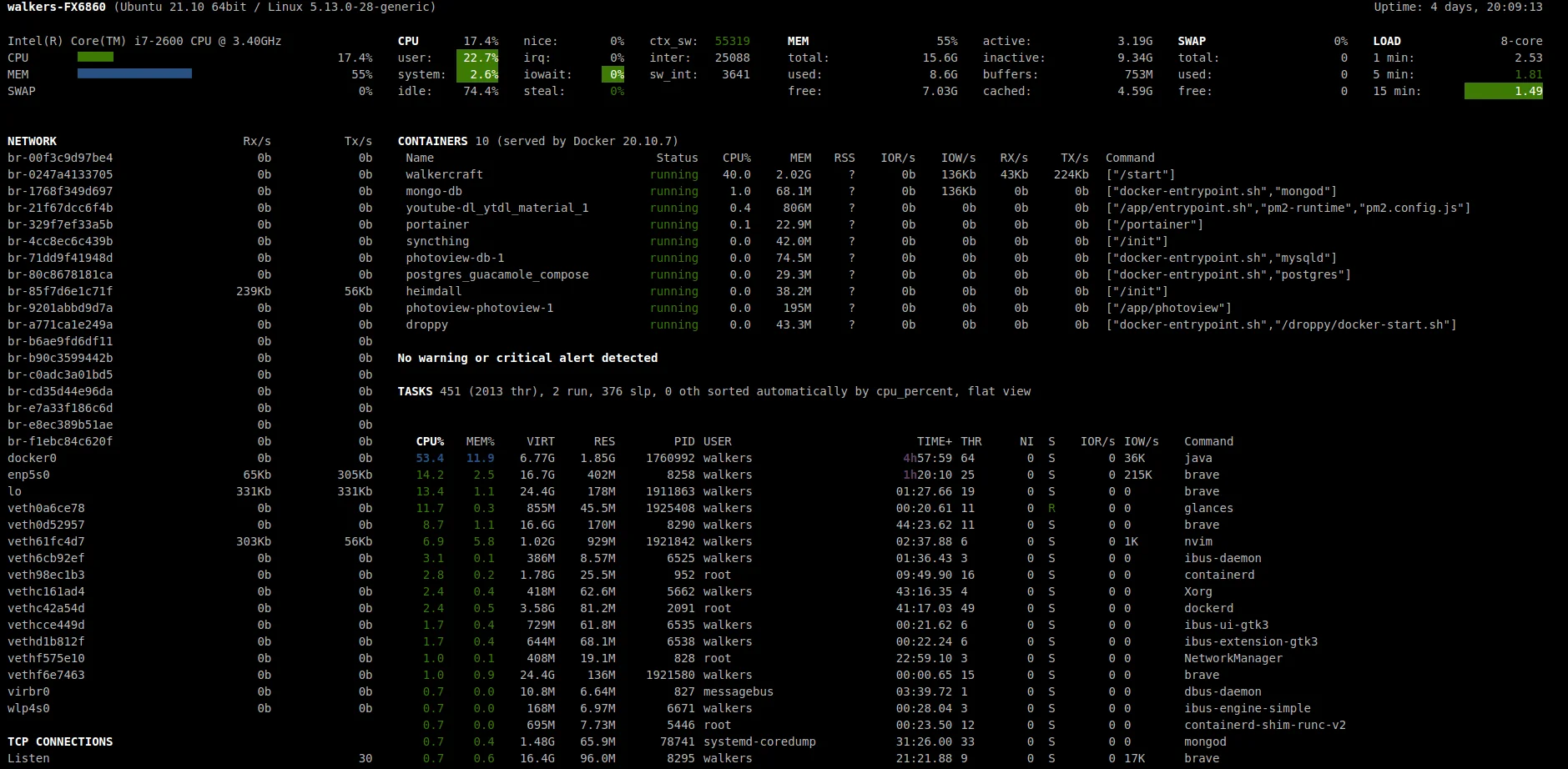
Glances is a system monitor with a ton of features, including docker processes.

I have started using portainer to look at running docker processes, its a great heavy-weight docker process monitor. glances works as a great lightweight monitor to just give you the essentials, ( Name, Status, CPU%, MEM, /MAX, IOR/s, IOW/s, Rx/s, Tx/s, Command)

You will need to install glances to use the glances webui. We can still use pipx to manage our virtual environment for us so that we do not need to do so manually or run the risk of globally installed package dependency hell.

pipx install glances pipx inject glances "glances[docker]"

You will be presented with this success message.

...

Git reflog can perform some serious magic in reviving your hard work from the dead if you happen to loose it.

You must git commit! If you never commit the file, git cannot help you. You might look into your trashcan, filesystem versions, onedrive, box, dropbox. If you have none of this, then you are probably hosed.

I really like to practice these techniques before I need to use them so that I understand how they work in a low stakes fashion. This helps me understand what I can and cannot do, and how to do it in a place that does not matter in any way at all.

This is what I did to revive a dropped docker-compose.yml file. The idea is that if I can find the commit hash, I can cherry-pick it.

...

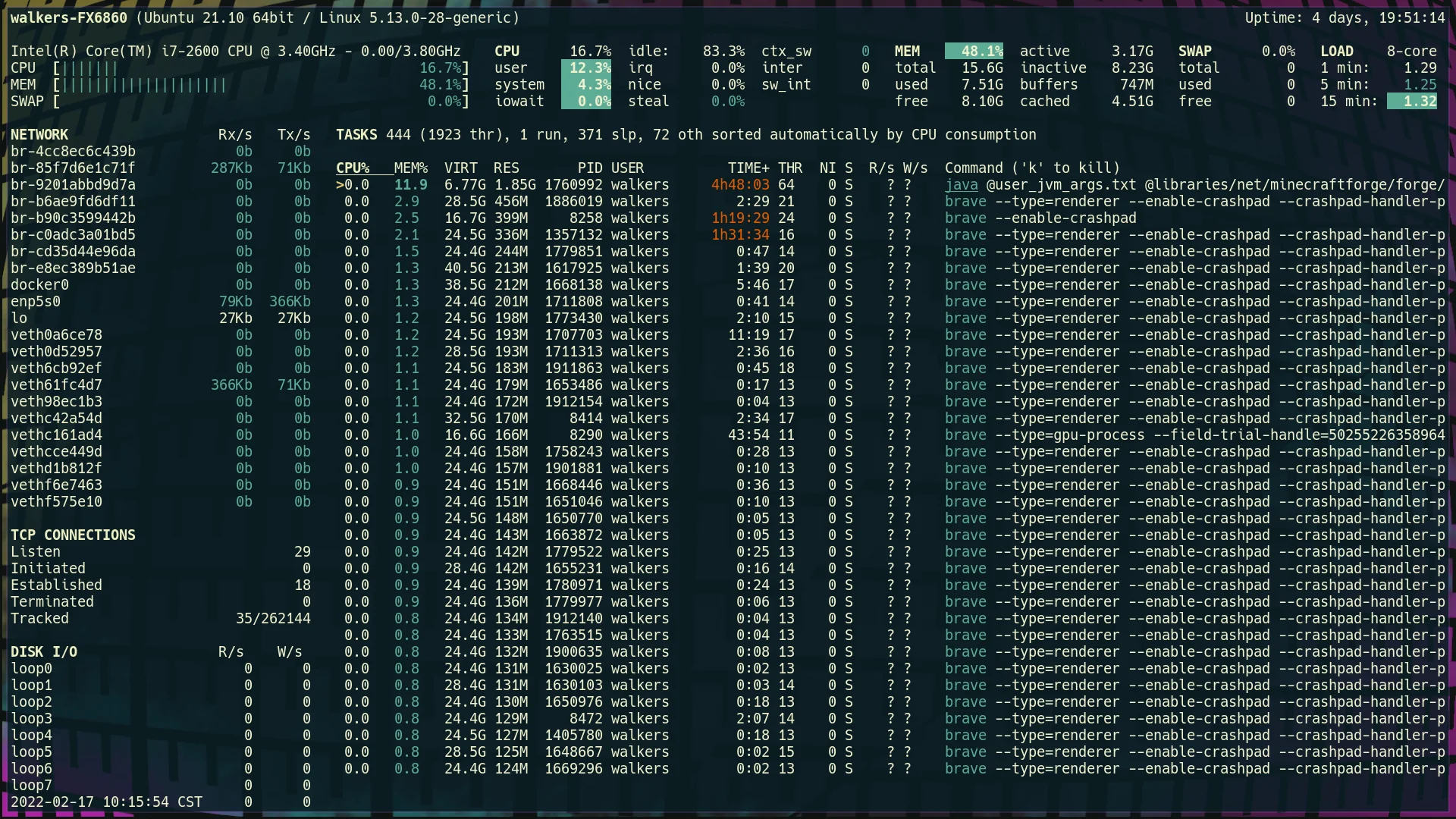
Glances has a pretty incredible webui to view system processes and information like htop, or task manager for windows.

The nice thing about the webui is that it can be accessed from a remote system. This would be super nice on something like a raspberry pi, or a vm running in the cloud. Its also less intimidating and easier to search if you are not a terminal junky.

You will need to install glances to use the glances webui. We can still use pipx to manage our virtual environment for us so that we do not need to do so manually or run the risk of globally installed package dependency hell.

pipx install glances pipx inject glances "glances[web]"

You will be presented with this success message.

...

Right inside the git docs, is states that the git reflog command runs git reflog show by default which is an alias for git log -g --abbrev-commit --pretty=oneline

This epiphany deepens my understanding of git, and lets me understand that most git log flags might also work with git log -g.

Here are some git commands for you to try out on your own that are all pretty similar, but vary in how much information they show.

# These show only first line of the commit message subject, the hash, and index git reflog git log -g --abbrev-commit --pretty=oneline # similar to git log, this is a fully featured log with author, date, and full # commit...

...

Glances is a fully featured system monitoring tool written in python. Out of the box it’s quite similar to htop, but has quite a few more features, and can be ran without installing anything other than pipx, which you should already have installed if you do anything with python.

pipx run glances

Once you run this you will be in a tui application similar to htop. You can kill processes with k, use left and right arrows to change the sorting column, and up and down to select different processes.

python requirements text files can in fact depend on each other due to the fact that you can pass pip install arguments right into your requirements.txt file. The trick is to just prefix the file with a -r flag, just like you would if you were installing it with pip install

Lets create two requirements files in a new directory to play with.

mkdir requirements-nest cd requirements-nest touch requirements.txt requirements_dev.txt

Then add the following to each requirements file.

# requirements.txt kedro[pandas.ParquetDataSet]

# requirements_dev.txt -r requirements.txt ipython 

Installing #

Installing requirements_dev.txt will install both ipython and pandas since it includes the base requirements file.

...

In my adventure to put more homelab in docker, I moved our modded minecraft setup to docker.

So far I have found all of our mods from curse forge. modpacks make getting multiple mods working together much easier, someone else has already vetted a pack of often times 100+ mods that all play well together. I have yet to get these working in docker, I will, but for not I just have individual mods.

under the hood docker is using wget to get the mod. The link you click on from curseforge will block wget. What I do is pop open the devtools (f12 in chrome), click on the network tab, click the download link on the web page, and watch the real link show up.

I am using docker compose, it makes the command much easier to start, and all...

...

Reading eventbridge rules from the command line can be a total drag, pipe it into visidata to make it a breeze.

I just love when I start thinking through how to parse a bunch of json at the command line, maybe building out my own custom cli, then the solution is as simple as piping it into visidata. Which is a fantastic tui application that had a ton of vim-like keybindings and data features.

Anyone just starting out their vim customization journey is bound to run into this error.

E5520: <Cmd> mapping must end with <CR>

I did not get it #

I’ll admit, in hindsight it’s very clear what this is trying to tell me, but for whatever reason I still did not understand it and I just used a : everywhere.

If you run :h <cmd> you will see a lot of reasons why you should do it, from performance, to hygene, to ergonomics. You will also see another clear statement about how to use <cmd>.

E5520 <Cmd> commands must terminate, that is, they must be followed by <CR> in the {rhs} of the mapping definition. Command-line mode is never entered.

When to map with a : #

You still need to map your remaps with a : if you do not close it with a <cr>. This might be something like prefilling a command with a search term.

...

Hydroneer

Steam achievements and progress for Hydroneer - 0.0% complete with 0/78 achievements unlocked.

6 min

The default keybinding for copy-mode <prefix>-[ is one that is just so awkward for me to hit that I end up not using it at all. I was on a call with my buddy Nic this week and saw him just fluidly jump into copy-mode in an effortless fashion, so I had to ask him for his keybinding and it just made sense. Enter, that’s it. So I have addedt his to my ~/.tmux.conf along with one for alt-enter and have found myself using it way more so far.

To do this I just popped open my ~/.tmux.conf and added the following. Now I can get to copy-mode with <prefix>-Enter which is control-b Enter, or alt-enter.

bind Enter copy-mode bind -n M-Enter copy-mode

More on copy-mode #

I have a full video on copy-mode you can find here.

tmux copy-mode

One thing about moving to a tiling window manager like awesome wm or i3 is that they are so lightweight they are all missing things like bluetooth gui’s out of the box, and you generally bring your own. Today I just needed to connet a new set of headphones, so I decided to just give the bluetoothctl cli a try. It seems to come with Ubuntu, I don’t think I did anything to get it.

bluetoothctl

Running bluetoothctl pops you into a repl/shell like bah, python, or ipython. From here you can execute bluetoothctl commands.

Here is what I had to do to connect my headphones.

# list out the commands available help # scan for new devices and stop when you see your device show up scan on scan off # list devices devices paired-devices # pair the device pair XX:XX:XX:XX:XX:XX # now your device should show up in the paired list paired-devices # connet the device connect XX:XX:XX:XX:XX:XX

help #

Here is the output of the help menu on my machine, it seems pretty straight forward to block, and remove devices from here.

...

I often run shell commands from python with Popen, but not often enough do I set up error handline for these subprocesses. It’s not too hard, but it can be a bit awkward if you don’t do it enough.

import subprocess from subprocess import Popen # this will run the shell command `cat me` and capture stdout and stderr proc = Popen(["cat", "me"], stdout=subprocess.PIPE, stderr=subprocess.PIPE) # this will wait for the process to finish. proc.wait()

reading from stderr #

To get the stderr we must get it from the proc, read it, and decode the bystring. Note that we can only get the stderr object once, so if you want to do more than just read it you will need to store a copy of it.

proc.stderr.read().decode()

Better Exception #

Now that we can read the stderr we can make better error tracking for the user so they can see what to do to resolve the issue rather than blindly failing.

Samba is an implementation of the smb protocol that allows me to setup network shares on my linux machine that I can open on a variety of devices.

I think the homelab is starting to intrigue me enought to dive into the path of experimenting with different things that I might want setup in my own home. One key piece of this is network storage. As I looked into nas, I realized that it takes a dedicated machine, or one virtualized at a lower level than I have capability for right now.

To get goind I am going to make a directory /srv/samba/public open to anyone on my network. I am not going to worry too much about it, I just want something up and running so that I can learn.

Install samba, open the firewall, and edit the smb.conf

...

A super useful tool when doing PR’s or checking your own work during a big refactor is the silver searcher. Its a super fast command line based searching tool. You just run ag "<search term>" to search for your search term. This will list out every line of every file in any directory under your current working directory that contains a match.

It’s often useful to need some extra context around the change. I recently reviewed a bunch of PR’s that moved schema from save_args to the root of the dataset in all yaml configs. To ensure they all made it to the top level DataSet configuraion, and not underneath save_args. I can do a search for all the schemas, and ensure that none of them are under save_args anymore.

I’ve ran a Minecraft server at home since December 2017 for me and my son to play on. We start a brand new one somewhere between every day and every week. The older he gets the longer the server lasts.

In all these years, I’ve been popping open the command line and running the server manually, and even inside of Digital Ocean occasionally to play a more public server with a friend.

My buddy Nic has been sharing me some of his homelab setup, and it’s really got me to thinking about what I can run at home, and Dockerizing all the things. Today I found a really sweet github repo that had a minecraft server running in docker with a pretty incredible setup.

I ended up running the first thing in the Readme that included a volume mount. If you are going to run this container, I HIGHLY reccomend that you make sure that you have your world volume mounted, otherwise it will die with your docker container.

...

Installing rust in your own ansible playbook will make sure that you can get consistent installs accross all the machines you may use, or replicate your development machine if it ever goes down.

I try to install everything that I will want to use for more than just a trial inside of my ansible playbook. This way I always get the same setup across my work and home machines, and anytime I might setup a throw away vm.

This is how rust reccomends that you install it on Ubuntu. First update your system, then run their installer, and finally check that the install was successful.

# system update sudo apt update sudo apt upgrade # download and run the rust installer curl https://sh.rustup.rs -sSf | sh # confirm your installation is successful rustc --version

Ansible Install #

The first thing I do in my playbooks is to check if the tool is already installed. Here I chose to look for cargo, you could also look for rustc.

...