Drafts

Draft and unpublished posts

0 posts

In looking for a way to automatically generate descriptions for pages I stumbled into a markdown ast in python. It allows me to go over the markdown page and get only paragraph text. This will ignore headings, blockquotes, and code fences.

import commonmark import frontmatter post = frontmatter.load("post.md") parser = commonmark.Parser() ast = parser.parse(post.content) paragraphs = '' for node in ast.walker(): if node[0].t == "paragraph": paragraphs += " " paragraphs += node[0].first_child.literal

It’s also super fast, previously I was rendering to html and using beautifulsoup to get only the paragraphs. Using the commonmark ast was about 5x faster on my site.

When I originally wrote this post, I did not realize at the time that commonmark duplicates nodes. I still do not understand why, but I have had success duplicating them based on the source position of the node with the snippet below.

Creating a minimal config specifically for git commits has made running git commit much more pleasant. It starts up Much faster, and has all of the parts of my config that I use while making a git commit. The one thing that I often use is autocomplete, for things coming from elsewhere in the tmux session. For this cmpe-tmux specifically is super helpful.

The other thing that is engrained into my muscle memory is jj for escape. For that I went agead and added my settings and keymap with no noticable performance hit.

Here is the config that has taken

~/.config/nvim/init-git.vim

...

For an embarassingly long time, til today, I have been wrapping my dict gets with key errors in python. I’m sure I’ve read it in code a bunch of times, but just brushed over why you would use get. That is until I read a bunch of PR’s from my buddy Nic and notice that he never gets things with brackets and always with .get. This turns out so much cleaner to create a default case than try except.

Lets consider this example for prices of supplies. Here we set a variable of prices as a dictionary of items and thier price.

prices = {'pen': 1.2, 'pencil', 0.3, 'eraser', 2.3}

Except KeyError #

What I would always do is try to get the key, and if it failed on KeyError, I would set the value (paper_price in this case) to a default value.

try: paper_price = prices['paper'] except KeyError: paper_price = None

.get #

What I noticed Nic does is to use get. This feels just so much cleaner that it’s a one liner and feels much easier to read and...

...

I was listening to shipit37 with Vincent Ambo talking about building fully declaritive systems with nix. Vincent is building out Nixery and strongly believes that standard versioning systems are flawed. If we have good ci setup, and every commit is a good commit the idea of a release is just some arbitrary point in history that the maintainer decided was a good time to release, and has less to do about features and quality.

Since many things still want to see a version number, there is one automatic always increasing number that is a part of every single git repo, and that is the commit count. Nixery is versioned by commit count. When counting on the main branch there is no way for two points in time to share the same version. The git cli will...

BeautifulSoup is a DOM like library for python. It’s quite useful to manipulate html. Here is an example to find_all html headings. I stole the regex from stack overflow, but who doesn’t.

sample.html

Lets make a sample.html file with the following contents. It mainly has some headings, <h1> and <h2> tags that I want to be able to find.

<!DOCTYPE html> <html lang="en"> <body> <h1>hello</h1> <p>this is a paragraph</p> <h2>second heading</h2> <p>this is also a paragraph</p> <h2>third heading</h2> <p>this is the last paragraph</p> </body> </html>

Get the headings with BeautifulSoup #

Lets import our packages, read in our sample.html using pathlib and find all headings...

...

I keep my nodes short and sweet. They do one thing and do it well. I turn almost every DataFrame transformation into its own node. It makes it must easier to pull catalog entries, than firing up the pipeline, running it, and starting a debugger. For this reason many of my nodes can be built from inline lambdas.

Here are two examples, the first one lambda x: x is sometimes referred to as an identity function. This is super common to use in the early phases of a project. It lets you follow standard layering conventions, without skipping a layer, overthinking if you should have the layer or not, and leaves a good placholder to fill in later when you need it.

Many times I just want to get the data in as fast as possible, learn about it, then go back and tidy it up.

from kedro.pipeline import node my_first_node = node( func=lambda x: x, inputs='raw_cars', output='int_cars', tags=['int',] ) my_first_node = node( func=lambda cars: cars[['mpg', 'cyl', 'disp',]].query('disp>200'), inputs='raw_cars', output='int_cars', tags=['pri',] )

Note: try not to take the idea...

I’ve never found a great use for a global .gitignore file. Mostly I fear that by adding a lot of the common things like .pyc files it will be missing from the project and inevitably be committed to the project by someone else.

Within the past year I have added some tools to my personal setup that are not required to run the project, but works really well with my setup. They are direnv and pyflyby. Since these both support project level configuration, are less common, and not in most .gitignore templates they make for great candidates to add to a global .gitignore file.

Like any .gitignore it supports gits wildignore syntax. I made a ~/dotfiles/git/.global_gitignore file, and added the following to it.

.envrc .pyflyby .copier-defaults .venv*/ .python-version markout .markata.cache

Once I had this file, I stowed it into ~/.global_gitignore.

...

git

Today I discovered a sweet new cli for compressing images. squoosh cli is a wasm powered cli that supports a bunch of formats that I would want to convert my website images to.

First the main feature of squoosh is a web app that makes your images smaller right in the browser, using the same wasm. It’s sweet! There is a really cool swiper to compare the output image with the original, and graphical dials to change your settings.

What is even cooler is that once you have settings you are happy with and are really cutting down those kb’s on your images, there is a copy cli command button! If you have npx (which you should if you have nodejs and npm) already installed it just works without installing anything more.

...

As you work on your kedro projects you are bound to need to add more dependencies to the project eventually. Kedro uses a fantastic command pip-compile under the hood to ensure that everyone is on the same version of packages at all times, and able to easily upgrade them. It might be a bit different workflow than what you have seen, let’s take a look at it.

Before you start mucking around with any changes to dependencies make sure that your git status is clean. I’d even reccomend starting a new branch for this, and if you are working on a team potentially submit this as its own PR for clarity.

git status git checkout main git checkout -b add-rich-dependency

requirements.in #

New requirements get added to a requirements.in file. If you need to specify an exact version, or a minimum version you can do that, but if all versions generally work you can leave it open.

# requirements.in rich

Here I added the popular rich package to my requirements.in file. Since I am ok with the latest version I am not going to pin anything,...

...

I am a huge believer in practicing your craft. Professional athletes spend most of their time honing their skills and making themsleves better. In Engineering many spend nearly 0 time practicing. I am not saying that you need to spend all your free time practicing, but a few minutes trying new things can go a long way in how you understand what you are doing and make a hue impact on your long term productivity.

What is Kedro

practice building pipelines with #kedro today

Go to your playground directory, and if you don’t have one, make one.

...

One of the first things I noticed broken in my terminal based workflow moving from Windows wsl to ubuntu was that my clipboard was all messed up and not working with my terminal apps. Luckily setting tmux and neovim to work with the system clipboard was much easier than it was on windows.

First off you need to get xclip if you don’t already have it provided by your distro. I found it in the apt repositories. I have used it between Ubuntu 18.04 and 21.10 and they all work flawlessly for me.

I have tmux setup to automatically copy any selection I make to the clipboard by setting the following in my ~/.tmux.conf. While I have neovim open I need to be in insert mode for this to pick up.

# ~/tmux.conf bind -T copy-mode-vi Enter send-keys -X copy-pipe-and-cancel "xclip -i -f -selection primary | xclip -i -selection clipboard" bind-key -T copy-mode-vi MouseDragEnd1Pane send-keys -X copy-pipe-and-cancel "xclip -selection clipboard -i"

To get my yanks to go to the system clipboard in neovim, I just added unnamedplus to my existing clipboard variable.

...

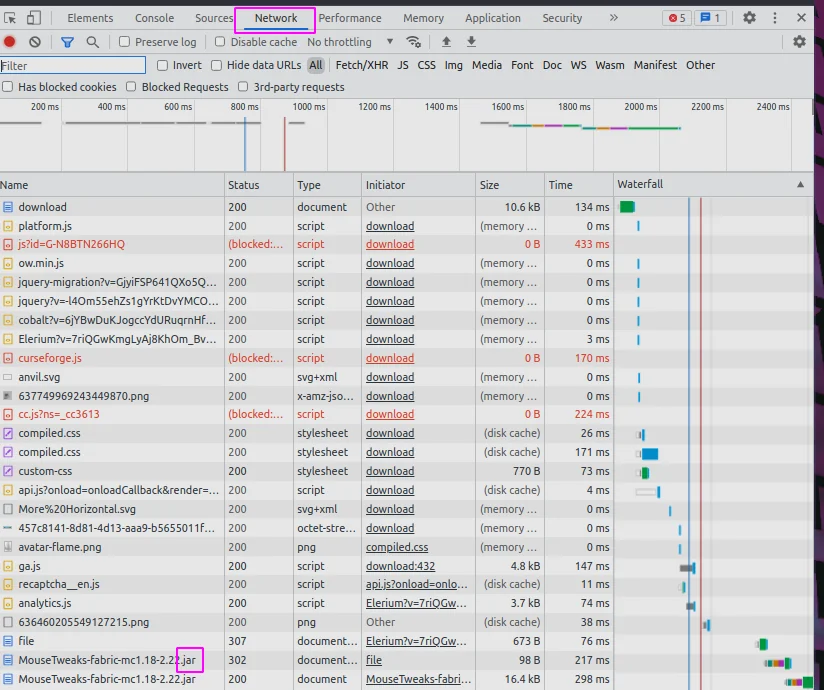
With the latest version of minecraft it requires a very new, possibly the latest, version of java. Lately we have been getting into modded minecraft and I maintain the server for us. It’s been tricky to say the least. One hurdle I recently hit involves having the wrong version of java.

I was getting this error trying to get a 1.12.2 forge server running.

Caused by: java.lang.ClassCastException: class jdk.internal.loader.ClassLoaders$AppClassLoader cannot be cast to class java.net.URLClassLoader (jdk.internal.loader.ClassLoaders$AppClassLoader and java.net.URLClassLoader are in module java.base of loader ‘bootstrap’)

In researching our errors, I found this on a forum.

...

I have added a hotkey to my copier template setup to quickly access all my templates at any time from tmux. At any point I can hit <c-b><c-b>, thats holding control and hitting bb, and I will get a popup list of all of my templates directory names. Its an fzf list, which means that I can fuzzy search through it for the template I want, or arrow key to the one I want if I am feeling insane. I even setup it up so that the preview is a list of the files that come with the template in tree view.

bind-key c-b popup -E -w 80% -d '#{pane_current_path}' "\ pipx run copier copy ~/.copier-templates/`ls ~/.copier-templates |\ fzf --header $(pwd) --preview='tree ~/.copier-templates/{} |\ lolcat'` . \ "

I’ve had this on my systems for a few weeks now and I am constantly using it for my tils,

I often pop into my blog from neovim with the intent to look at just a single series of posts, til, gratitude, or just see todays posts. Markata has a great way of mapping over posts and returning their path that is designe exactly for this use case.

Markata listing out posts from the command line

To tie these into a Telescope picker you add the command as the find_command, and comma separate the words of the command, with no spaces. I did also --sort,date,--reverse in there so that the newest posts are closest to the cursor.

nnoremap geit <cmd>Telescope find_files find_command=markata,list,--map,path,--filter,date==today<cr> nnoremap geil...

...

Copier allows you to run post render tasks, just like cookiecutter. These are defined as a list of tasks in your copier.yml. They are simply shell commands to run.

The example I have below runs an update-gratitude bash script after the copier template has been rendered.

# copier.yml num: 128 _answers_file: .gratitude-copier-answers.yml _tasks: - "update-gratitude"

I have put the script in ~/.local/bin so that I know it’s always on my $PATH. It will reach back into the copier.yml and update the default number.

I’ve referenced a video from Anthony Sotile in passing conversation several times. Walking through his gradual typing process has really helped me understand typing better, and has helped me make some projects better over time rather than getting slammed with typing errors.

https://youtu.be/Rk-Y71P_9KE

Run Mypy as is, don’t get fancy yet. This will not reach into any functions unless they are alreay explicitly typed. It will not enforce you to type them either.

pip install mypy mypy . # or your specific project to avoid .venvs mypy src # or a single file mypy my-script.py

Step 2 #

Next we will add check-untyped-defs, this will start checking inside functions that are not typed. To add this to your config create a setup.cfg with the following.

...

In order to make an auto title plugin for markata I needed to come up with a way to reverse the slug of a post to create a title for one that does not explicitly have a title.

Here I have a path available that gives me the articles path, ex. python-reverse-sluggify.md. An easy way to get rid of the file extension, is to pass it into pathlib.Path and ask for the stem, which returns python-reverse-sluggify. Then from There I chose to replace - and _ with a space.

article["title"] = ( Path(article["path"]).stem.replace("-", " ").replace("_", " ").title() )

To turn this into a markata plugin I put it into a pre_render hook.

I really appreciate that in linux anything can be scripted, including setting the wallpaper. So everytime I disconnect a monitor I can just rerun my script and fix my wallpaper without digging deep into the ui and fussing through a bunch of settings.

feh --bg-scale ~/.config/awesome/wallpaper/my_wallpaper.png

I set my default wallpaper with feh using the command above.

Leaning in on feh, we can use fzf to pick a wallpaper from a directory full of wallpapers with very few keystrokes.

alias wallpaper='ls ~/.config/awesome/wallpaper | fzf --preview="feh --bg-scale ~/.config/awesome/wallpaper/{}" | xargs -I {} feh --bg-scale ~/.config/awesome/wallpaper/{}'

I have mine alias’d to wallpaper so that I can quickly run it from my terminal.

Getting docstrings from python’s ast is far simpler and more reliable than any method of regex or brute force searching. It’s also much less intimidating than I originally thought.

First you need to load in some python code as a string, and parse it with ast.parse. This gives you a tree like object, like an html dom.

py_file = Path("plugins/auto_publish.py") raw_tree = py_file.read_text() tree = ast.parse(raw_tree)

Getting the Docstring #

You can then use ast.get_docstring to get the docstring of the node you are currently looking at. In the case of freshly loading in a file, this will be the module level doctring that is at the very top of a file.

module_docstring = ast.get_docstring(tree)

Walking for all functions

...