Drafts

Draft and unpublished posts

0 posts

Setting up your git pager to your liking can help you navigate diffs and logs much more efficiently. You can set it to whatever pager you like so that your keys feel nice and smooth and your fingers know exactly what to do. You might even gain a few extra features.

You can set the pager right from your command line with the following command.

git config --global core.pager 'more'

You can also set your pager by editing your global .gitconfig file which by default is set to ~/.gitconfig.

[core] pager = more

Color #

In my experience you need to turn colors off with nvim. bat handles them and looks good either way, but nvim will be plain white and display the color codes as plain text if color is on.

...

If you have ever mistyped a git command very close to an existing one you have likely seen this message.

❯ git chekout dev git: 'chekout' is not a git command. See 'git --help'. The most similar command is checkout

Automatically run the right one #

What you might not have known is that you can configure git to just run this command for you.

# Gives you 0.1 seconds to respond git config --global help.autocorrect 1 # Gives you 1 seconds to respond git config --global help.autocorrect 10 # Gives you 5 seconds to respond git config --global help.autocorrect 50

Fat Fingers Gone #

Now when you typo a git command it will autmatically run after the configured number of tenths of a second.

...

yq is a command line utility for parsing and querying yaml, like jq does for json.

I love that all of these modern tools built in go and rust, just give you a zipped up executable right from GitHub releases, but it’s not necessarily straight forward how to install them. yq does one of the best jobs I have seen, giving you instructions on how to get a specific version and install it.

I use a bunch of these tools, and for what its worth I trust the devs behind them to make sure they don’t break. This so far has worked out well for me, but if it ever doesn’t I can always pick an older version.

Since I am all trusting of them I just want the latest version. I do not want to update a shell script with new versions, or even care about what then next version is, I just want it. Luckily you can script the release page for the latest version on all that I have came accross.

...

Last Thursday I learned about pytest-mock at a local python meetup. The presenter showed how he uses pytest-mock for his work, and it was kinda eye opening. I knew what mocking was, but I had not seen it in this context.

Watching him use pytest-mock I realized that mocking was not as hard as I had made it out to be. You can install pytest-mock, use the mocker fixture, and patch objects methods with what you want them to be.

pytest-mock is out on pypi and can be installed with pip.

python -m pip install pytest-mock

What I actually did #

Sometimes I fall victim to making these posts nice and easy to follow. It takes more steps than just pip install, you need a place to practice in a nice sandbox. Here is how I make my sandboxes.

...

Python 3.8 came out two and a half years ago and I have yet to really lean in on the walrus operator. Partly because it always seemed like something kinda silly (my use cases) to require a python version bump for, and partly because I really didn’t understand it the best. Primarily I have wanted to use it in comprehensions, but I did not really understand how.

Now that Python 3.6 is end of life, and most folks are using at least 3.8 it seems time to learn and use it.

:=

The assignment operator in python is more commonly referred to as the walrus operator due to how := looks like a walrus. It allows you to assign and use a variable in a single expression.

...

Kedro rich is a very new and unstable (it’s good, just not ready) plugin for kedro to make the command line prettier.

There is no pypi package yet, but it’s on github. You can pip install it with the git url.

pip install git+https://github.com/datajoely/kedro-rich

Kedro run #

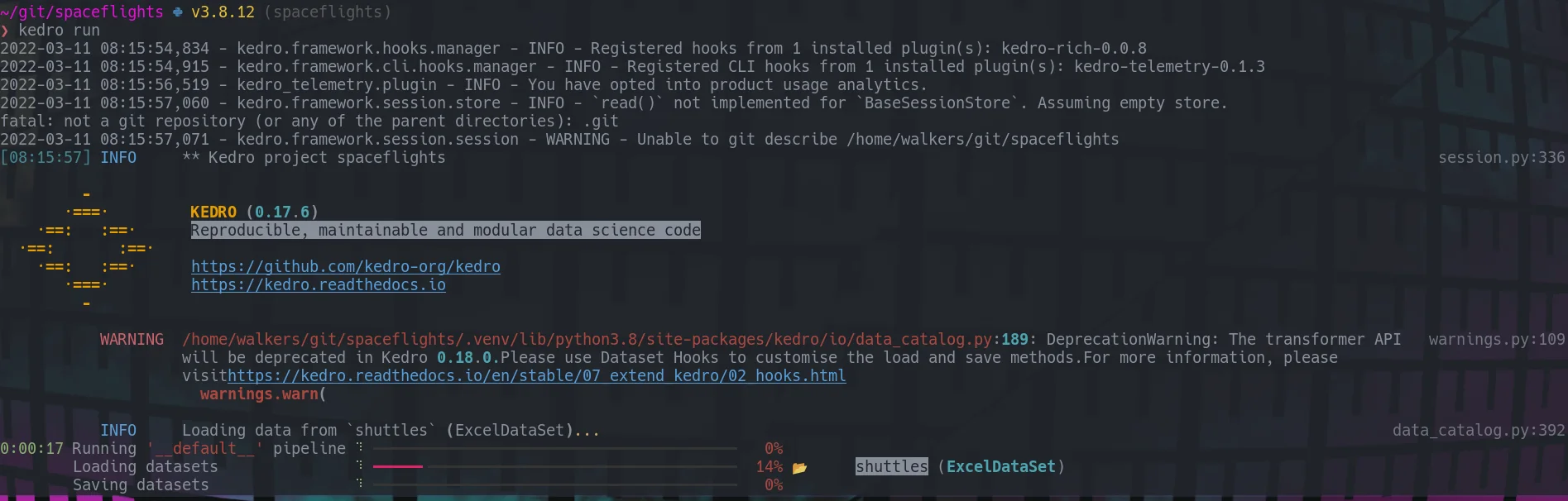
You can run your pipeline just as you normally would, except you get progress bars and pretty prints.

kedro run

kedro rich pretty run

Kedro catalog #

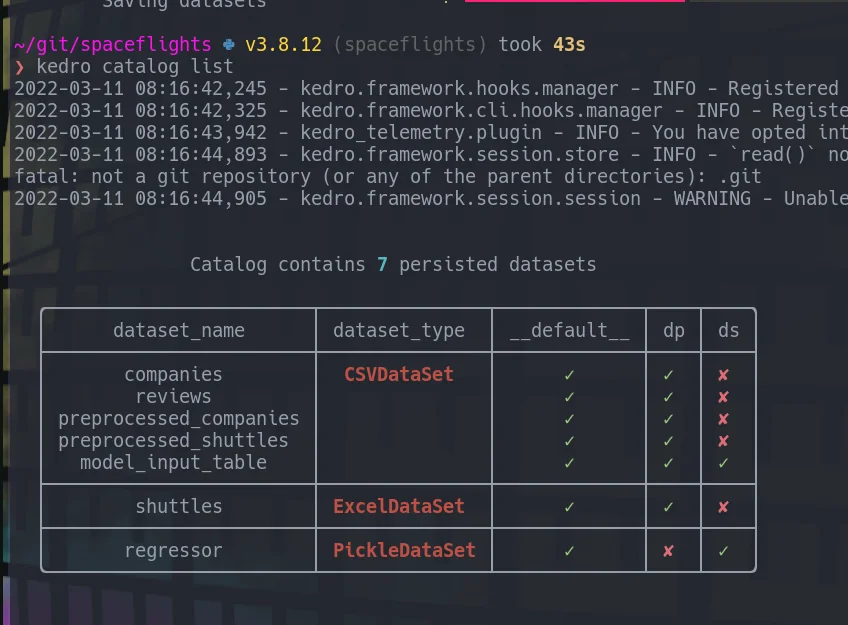
Listing out catalog entries from the command line now print out a nice pretty table.

...

So worktrees, I always thought they were a big scary things. Turns out they are much simpler than I thought.

no special setup

I thought you had to be all in or worktrees or normal git, but not both. When I see folks go all in on worktrees they start with a bare repo, while its true this is the way you go all in, its not true that this is required.

Making a worktree is as easy as making a branch. It’s actually just a branch that lives in another place in your filesystem.

...

Has no upstream branch errors in git can be such a damn productivity killer. You gotta stop your flow and swap over the branch, there is a config so that you don’t have to do this.

If you have not yet configured git to always push to the current branch, you will get a has no upstream branch error if you don’t explicitly set it.

Let’s show an example

git checkout -b feat/ingest-inventory-data git add conf/base/catalog.yml git commit -m "feat: ingest inventory data from abc-db" git push

You will be presented with the following error.

...

git

I write many of these posts from a 10 year old desktop that sits in my office these days. It does a very fine job running all of the things I need it to for my side work, but sometimes I want a mobile setup. I don’t really want to spend the $$ on a new laptop just for the few times I want to be somewhere else in the house. What I do have though is a chromebook.

I’ve tried to get the chromebook into my workflow in the past, but have failed. Much because by the time I got all of my tools up and running in the linux vm it was taking up quite a bit of space on the device and made it harder for others to use as a chromebook.

Today I am giving it a second try, but this time with ssh.

Before doing anything I checked to see if sshd is already running. Using the following command.

...

Mermaid gives us a way to style nodes through the use of css, but rather than using normal css selectors we need to use style <nodeid>. This also applies to subgraphs, and we can use the name of the subgraph in place of the nodeid.

graph TD; a --> A A --> B B --> C style A fill:#f9f,stroke:#333,stroke-width:4px style B fill:#f9f,stroke:#333,stroke-width:4px subgraph one a end style one fill:#BADA55

produces the following graph

style one fill:#BADA55

I recently found a really great plugin by mhinz to open files in neovim from a different tmux split, without touching neovim at all.

neovim-remote is not a neovim plugin at all, it’s a python cli that you can install with pip. Unlike the repo suggests, I use pipx to install nvr.

pipx install neovim-remote

How I use it #

I have this added to my .envrc that is in every one of my projects....

...

Mermaid provides some really great ways to group or fence in parts of your graphs through the use of subgraphs.

Here we can model some sort of data ingest with some raw iot device and our warehouse in different groups.

graph TD; subgraph raw_iot a end subgraph warehouse A --> B B --> C end graph TD;

subgraph raw_iot a end subgraph warehouse A --> B B --> C end 

connecting subgroups #

If we want to connect them, we can make a connection between a and A outside of the subgraphs.

graph TD; subgraph raw_iot a end a --> A subgraph warehouse A --> B B --> C end graph TD;

subgraph raw_iot a end a --> A subgraph warehouse A --> B B --> C end 

separation of concerns #

It’s also possible to specify subgraphs separate from where you...

If you have ever ran which <command> and see duplicate entries it’s likely that you have duplicate entries in your $PATH. You can clean this up with a one liner at the end of your bashrc or zshrc.

Since GitHub started supporting mermaid in their markdown I wanted to take another look at how to implement it on my site, I think it has some very nice opportunities in teaching, documenting, and explaining things.

The docs kinda just jumped right into their mermaid language and really went through that in a lot of depth, and skipped over how to implement it yourself, turns out its pretty simple. You just write mermaid syntax in a div with a class of mermaid on it!

<script src='https://unpkg.com/[email protected]/dist/mermaid.min.js'></script> <div class='mermaid'> graph TD; a --> A A --> B B --> C </div>

You just write mermaid syntax in a div with a class of mermaid on it!

The above gets me this diagram.

...

There is GNU coreutils command called mktemp that is super handy in shell scripts to make temporary landing spots for files so that they never clash with another instance, and will automatically get cleaned up when you restart, or whenever /tmp gets wiped. I’m not sure when that is, but I don’t expect it to be long.

Here are some examples of making temp directories in different places, my favorite is mktemp -dt mytemp-XXXXXX.

# makes a temporary directory in /tmp/ with the defaul template tmp.XXXXXXXXXX mktemp # makes a temporary directory in your current directory mktemp --directory mytemp-XXXXXX # shorter version mktemp -d mytemp-XXXXXX # same thing, but makes a file mktemp mytemp-XXXXXX # makes a temporary directory in your /tmp/ directory (or what ever you have configured as your TMPDIR) mktemp --directory --tmpdir mytemp-XXXXXX # shorter version mktemp -dt mytemp-XXXXXX # same thing, but makes a file mktemp --tmpdir mytemp-XXXXXX # shorter version mktemp -t mytemp-XXXXXX

Use Case #

Here is a sample script that shows how to capture the tempdir as...

...

Once you give a branch the big D (git branch -D mybranch) its gone, its lost from your history. It’s completely removed from your log. There will be no reference to these commits, or will there?

Checkout is your savior, all you need is the commit hash.

your terminal is still open

We have all done this, you give branch the big D only to realize it was the wrong one. Don’t worry, not all is lost, this is the easiest to recover from. When you run the delete command you will see something like this.

...

It’s nearly impossible to completely loose a file if it is commited to git. It’s likely harder to fully remove the file than it is to recover it, but how do we go about recovering those precious files that we have lost.

Listing all the deleted files in all of git history can be done by combining git log with --diff-filter. The log gives you lots of options to show different bits of information about the commit that happened at that point. It’s even possible to get a completely clean list of files that are in your git history but have been deleted.

These various commands will show all files that were ever deleted on your current branch.

# This one includes the date, commit hash, and Author git log --diff-filter D # this one could be a git alias, but includes empty lines git log --diff-filter D --pretty="format:" --name-only # this one has the empty lines cleaned up git log --diff-filter D --pretty="format:" --name-only...

...

git

Git commands such as diff, log, whatchanged all take a flag called --diff-filter. This can filter for only certain types of diffs, such as added (A), modified (M), or deleted (D).

You can find the full description by searching for --diff-filter in the man git diff page.

--diff-filter=[(A|C|D|M|R|T|U|X|B)...[*]] Select only files that are Added (A), Copied (C), Deleted (D), Modified (M), Renamed (R), have their type (i.e. regular file, symlink, submodule, ...) changed (T), are Unmerged (U), are Unknown (X), or have had their pairing Broken (B). Any combination of the filter characters (including none) can be used. When * (All-or-none) is added to the combination, all paths are selected if there is any file that matches other criteria in the comparison; if there is no file that matches other criteria, nothing is selected. Also, these upper-case letters can be downcased to exclude. E.g....

git

As I am toying around with textual, I am wanting some popup user input to take over. Textual is still pretty new and likely to change quite significantly, so I don’t want to overdo the work I put into it, So for now on my personal tuis I am going to shell out to tmux.

The main issue is that when you are in a textual app, it kinda owns the input. So if you try to run another python function that calls for input it just cant get there. There is a textual-inputs library that covers this, and it might work really well for some use cases, but many of my use cases have been for things that are pre-built like copier, and I am trying to throw something together quick.

textual is still very beta

Part of this comes down to the fact that textual is still very beta and likely to change a lot, so all of the work I have done with it is for quick and dirty, or fun side projects.

...

Big announcement recently that obs studio now builds out to a flatpak, hopefully making it easier for all of us to install, especially us near normies that don’t regularly compile anything from source.

I did not have flatpak installed so the first thing I had to do was get the flatpak command installed, and add their default repo.

sudo apt install flatpak flatpak remote-add --if-not-exists flathub https://flathub.org/repo/flathub.flatpakrepo

Once I had flatpak, I was able to get obs installed with the following command.

flatpak install flathub com.obsproject.Studio

Once Installed it fired right up for me with the next command they suggested.

...