In python, a string is a string until you add special characters.
In browsing twitter this morning I came accross this tweet, that showed that
you can use is accross two strings if they do not contain special characters.
https://twitter.com/bascodes/status/1492147596688871424
I popped open ipython to play with this. I could confirm on 3.9.7, short
strings that I typed in worked as expected.
waylonwalker ↪main v3.9.7 ipython
❯ a = "asdf"
waylonwalker ↪main v3.9.7 ipython
❯ b = "asdf"
waylonwalker ↪main v3.9.7 ipython
❯ a is b
True
Using the upper() method on these strings does break down.
waylonwalker ↪main v3.9.7 ipython
❯ a.upper() is b.upper()
False
waylonwalker ↪main v3.9.7 ipython
❯ a = "ASDF"
waylonwalker ↪main v3.9.7 ipython
❯ b = "ASDF"
waylonwalker ↪main v3.9.7 ipython
❯ a is b
True
If You can also see this in the id of the objects as well, which is the memmory
address in CPython.
waylonwalker ↪main v3.9.7 ipython
❯ id(a)
140717359289568
waylonwalker ↪main v3.9.7 ipython
❯ id(b)
140717359289568
waylonwalker ↪main v3.9.7 ipython
❯ id(a.upper())
140717359581824
waylonwalker ↪main v3.9.7 ipython
❯ id(b.upper())
140717360337824
Finally just as the post shows if...
Posts tagged: python
All posts with the tag "python"
312 posts
latest post 2026-05-06
Publishing rhythm
I often run shell commands from python with Popen, but not often enough
do I set up error handline for these subprocesses. It’s not too hard,
but it can be a bit awkward if you don’t do it enough.
Using Popen # [1]
import subprocess
from subprocess import Popen
# this will run the shell command `cat me` and capture stdout and stderr
proc = Popen(["cat", "me"], stdout=subprocess.PIPE, stderr=subprocess.PIPE)
# this will wait for the process to finish.
proc.wait()
reading from stderr # [2]
To get the stderr we must get it from the proc, read it, and decode the
bystring. Note that we can only get the stderr object once, so if you want to
do more than just read it you will need to store a copy of it.
proc.stderr.read().decode()
Better Exception # [3]
Now that we can read the stderr we can make better error tracking for the
user so they can see what to do to resolve the issue rather than blindly
failing.
err_message = proc.stderr.read().decode()
if proc.returncode != 0:
# the process was not successful
if "No such file" in err_message:
raise FileNotFoundError('No such file "me"')
References:
[1]: #using-popen
[2]: #reading-from-stderr
[3]: #better-exception
In looking for a way to automatically generate descriptions for pages I
stumbled into a markdown ast in python. It allows me to go over the
markdown page and get only paragraph text. This will ignore headings,
blockquotes, and code fences.
import commonmark
import frontmatter
post = frontmatter.load("post.md")
parser = commonmark.Parser()
ast = parser.parse(post.content)
paragraphs = ''
for node in ast.walker():
if node[0].t == "paragraph":
paragraphs += " "
paragraphs += node[0].first_child.literal
It’s also super fast, previously I was rendering to html [1] and using
beautifulsoup to get only the paragraphs. Using the commonmark ast was
about 5x faster on my site.
Duplicate Paragraphs # [2]
When I originally wrote this post, I did not realize at the time that
commonmark duplicates nodes. I still do not understand why, but I have had
success duplicating them based on the source position of the node with the
snippet below.
from itertools import compress
import commonmark
import frontmatter
post = frontmatter.load("post.md")
parser = commonmark.Parser()
ast = parser.parse(post.content)
# find all paragraph nodes
paragraph_nodes = [
n[0]
for n in ast.walker()
if n[0...
For an embarassingly long time, til today, I have been wrapping my dict
gets with key errors in python. I’m sure I’ve read it in code a bunch
of times, but just brushed over why you would use get. That is until I
read a bunch of PR’s from my buddy Nic and notice that he never gets
things with brackets and always with .get. This turns out so much
cleaner to create a default case than try except.
Example # [1]
Lets consider this example for prices of supplies. Here we set a variable of
prices as a dictionary of items and thier price.
prices = {'pen': 1.2, 'pencil', 0.3, 'eraser', 2.3}
Except KeyError # [2]
What I would always do is try to get the key, and if it failed on KeyError, I
would set the value (paper_price in this case) to a default value.
try:
paper_price = prices['paper']
except KeyError:
paper_price = None
.get # [3]
What I noticed Nic does is to use get. This feels just so much cleaner that
it’s a one liner and feels much easier to read and understand that if there is
no price for paper we set it to None.
paper_price = prices.get('paper', None)
We can just as easily set the default to other values. Let’s consider sales
for instance. If there is not a record f...
BeautifulSoup is a DOM like library for python. It’s quite useful to
manipulate html [1]. Here is an example to find_all html headings. I stole
the regex from stack overflow, but who doesn’t.
Make an example # [2]
sample.html
Lets make a sample.html file with the following contents. It mainly has
some headings, <h1> and <h2> tags that I want to be able to find.
<!DOCTYPE html>
<html lang="en">
<body>
<h1>hello</h1>
<p>this is a paragraph</p>
<h2>second heading</h2>
<p>this is also a paragraph</p>
<h2>third heading</h2>
<p>this is the last paragraph</p>
</body>
</html>
Get the headings with BeautifulSoup # [3]
Lets import our packages, read in our sample.html using pathlib and find all
headings using BeautifulSoup.
from bs4 import BeautifulSoup
from pathlib import Path
soup = BeautifulSoup(Path('sample.html').read_text(), features="lxml")
headings = soup.find_all(re.compile("^h[1-6]$"))
And what we get is a list of bs4.element.Tag’s.
>> print(headings)
[<h1>hello</h1>, <h2>second heading</h2>, <h2>third heading</h2>]
I recently added a heading_link plugin to markata, you might notice the
🔗’s next to each heading on this page, that is powered by this exact
techniq...
I keep my nodes short and sweet. They do one thing and do it well. I
turn almost every DataFrame transformation into its own node. It makes
it must easier to pull catalog entries, than firing up the pipeline,
running it, and starting a debugger. For this reason many of my nodes
can be built from inline lambdas.
Examples # [1]
Here are two examples, the first one lambda x: x is sometimes referred
to as an identity function. This is super common to use in the early
phases of a project. It lets you follow standard layering conventions,
without skipping a layer, overthinking if you should have the layer or
not, and leaves a good placholder to fill in later when you need it.
Many times I just want to get the data in as fast as possible, learn
about it, then go back and tidy it up.
from kedro.pipeline import node
my_first_node = node(
func=lambda x: x,
inputs='raw_cars',
output='int_cars',
tags=['int',]
)
my_first_node = node(
func=lambda cars: cars[['mpg', 'cyl', 'disp',]].query('disp>200'),
inputs='raw_cars',
output='int_cars',
tags=['pri',]
)
Note: try not to take the idea of a one liner too far. If your
one line function wraps several lines down it probably deserv...
As you work on your kedro projects you are bound to need to add more
dependencies to the project eventually. Kedro uses a fantastic command
pip-compile under the hood to ensure that everyone is on the same version of
packages at all times, and able to easily upgrade them. It might be a bit
different workflow than what you have seen, let’s take a look at it.
git status # [2]
Before you start mucking around with any changes to dependencies make sure that
your git status is clean. I’d even reccomend starting a new branch for this,
and if you are working on a team potentially submit this as its own PR for
clarity.
git status
git checkout main
git checkout -b add-rich-dependency
requirements.in # [3]
New requirements get added to a requirements.in file. If you need to specify
an exact version, or a minimum version you can do that, but if all versions
generally work you can leave it open.
# requirements.in
rich
Here I added the popular rich package to my requirements.in file. Since
I am ok with the latest version I am not going to pin anything, I am going to
let the pip resolver pick the latest version that does not conflict with any of
my dependencies for me.
build-reqs # [4]
...
I am a huge believer in practicing your craft. Professional athletes
spend most of their time honing their skills and making themsleves
better. In Engineering many spend nearly 0 time practicing. I am not
saying that you need to spend all your free time practicing, but a few
minutes trying new things can go a long way in how you understand what
you are doing and make a hue impact on your long term productivity.
What is Kedro [1]
Start practicing # [2]
practice building pipelines with #kedro today
Go to your playground directory, and if you don’t have one, make one.
cd ~/playground
get pipx # [3]
Install pipx in your system python. This is one of the very few, and
possibly the only python library that deserves to be installed in your
system directory, primarily because its used to sanbox clis in their own
virtual environment [4] automatically for you.
pip install pipx
make a new project # [5]
From inside your playground directory, start your new kedro project.
This is quite simple and painless. So much so that if you mess this one
up doing something wild, it might be easier to make a new one that
fixing the wild one.
pipx run kedro new
# answer the questions it asks
I u...
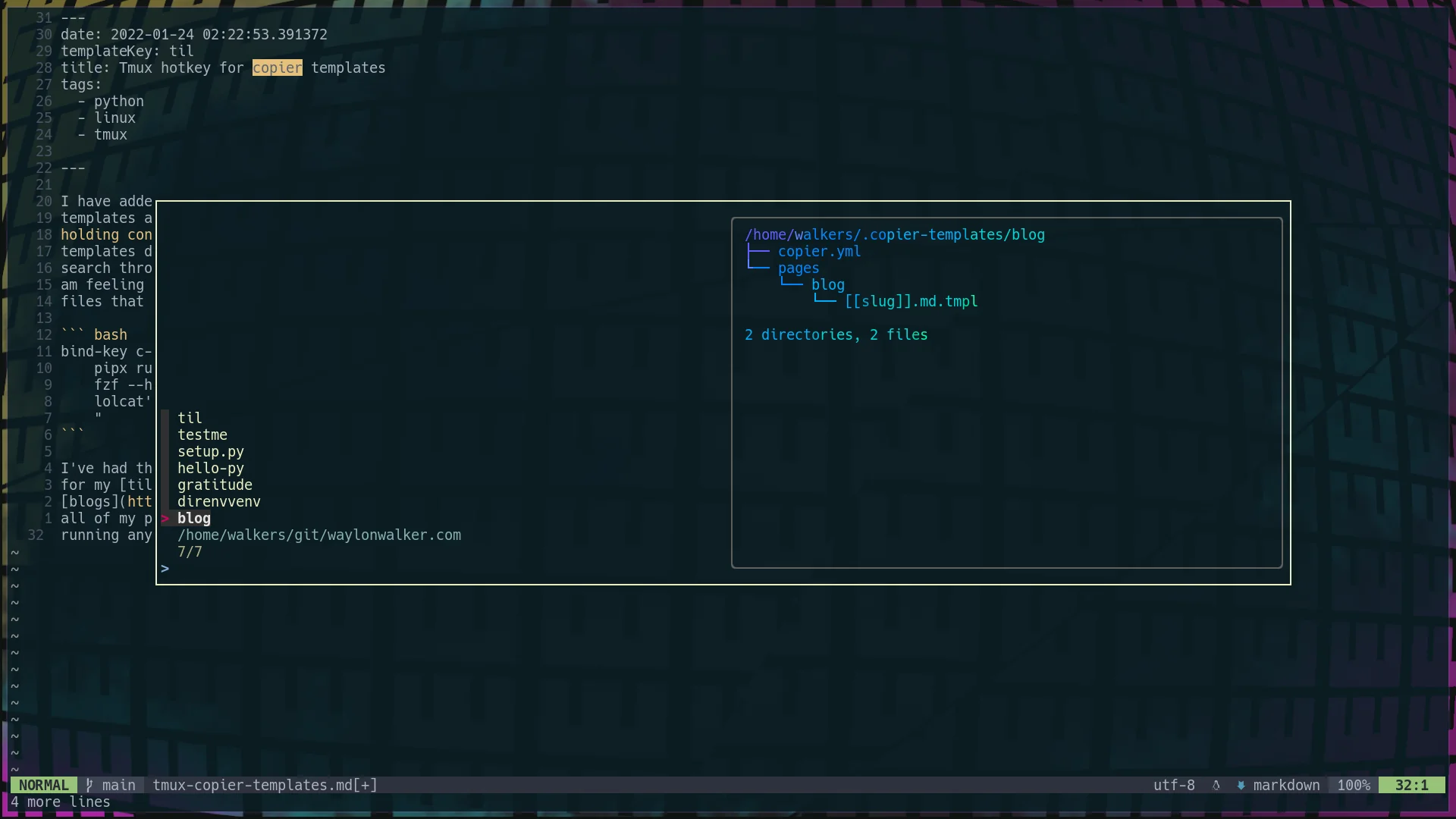
I have added a hotkey to my copier template setup to quickly access all my
templates at any time from tmux. At any point I can hit <c-b><c-b>, thats
holding control and hitting bb, and I will get a popup list of all of my
templates directory names. Its an fzf list, which means that I can fuzzy
search through it for the template I want, or arrow key to the one I want if I
am feeling insane. I even setup it up so that the preview is a list of the
files that come with the template in tree view.
bind-key c-b popup -E -w 80% -d '#{pane_current_path}' "\
pipx run copier copy ~/.copier-templates/`ls ~/.copier-templates |\
fzf --header $(pwd) --preview='tree ~/.copier-templates/{} |\
lolcat'` . \
"
I’ve had this on my systems for a few weeks now and I am constantly using it
for my tils [1],
blogs [2], and my .envrc file that goes into
all of my projects to make sure that I have a virtual environment [3] installed and
running any time I open it.
[4]
References:
[1]: https://waylonwalker.com/til/
[2]: https://waylonwalker.com/archive/
[3]: /virtual-environment/
[4]: https://images.waylonwalker.com/copier-templates-tmux-popup.png
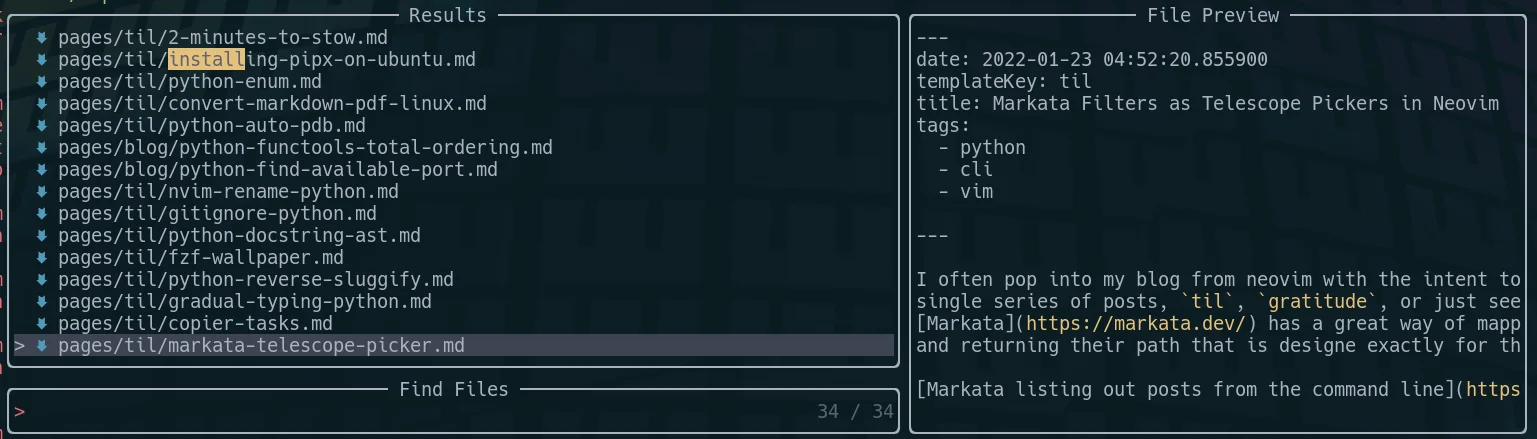
I often pop into my blog from neovim with the intent to look at just a
single series of posts, til, gratitude, or just see todays posts.
Markata [1] has a great way of mapping over posts
and returning their path that is designe exactly for this use case.
[2]
To tie these into a Telescope picker you add the command as the
find_command, and comma separate the words of the command, with no
spaces. I did also --sort,date,--reverse in there so that the newest
posts are closest to the cursor.
nnoremap geit <cmd>Telescope find_files find_command=markata,list,--map,path,--filter,date==today<cr>
nnoremap geil <cmd>Telescope find_files find_command=markata,list,--map,path,--filter,templateKey=='til',--sort,date,--reverse<cr>
nnoremap geig <cmd>Telescope find_files find_command=markata,list,--map,path,--filter,templateKey=='gratitude',--sort,date,--reverse<cr>
NOTE telescope treates each word as a string, do not wrap an extra
layer of quotes around your words, it gets messy.
[3]
References:
[1]: https://markata.dev/
[2]: https://images.waylonwalker.com/markta-list-todays-posts.png
[3]: https://images.waylonwalker.com/markata-list-telescope-picker.png
Copier allows you to run post render tasks, just like cookiecutter. These are
defined as a list of tasks in your copier.yml. They are simply shell
commands to run.
The example I have below runs an update-gratitude bash script after the
copier template has been rendered.
# copier.yml
num: 128
_answers_file: .gratitude-copier-answers.yml
_tasks:
- "update-gratitude"
I have put the script in ~/.local/bin so that I know it’s always on my
$PATH. It will reach back into the copier.yml and update the default
number.
#!/bin/bash
# ~/.local/bin/update-gratitude
current=`awk '{print $2}' ~/.copier-templates/gratitude/copier.yml | head -n 1`
new=`expr $current + 1`
echo $current
echo $new
sed -i "s/$current/$new/g" ~/.copier-templates/gratitude/copier.yml
I’ve referenced a video from Anthony Sotile in passing conversation several
times. Walking through his gradual typing process has really helped me
understand typing better, and has helped me make some projects better over time
rather than getting slammed with typing errors.
https://youtu.be/Rk-Y71P_9KE
Step 1
Run Mypy as is, don’t get fancy yet. This will not reach into any functions
unless they are alreay explicitly typed. It will not enforce you to type them
either.
pip install mypy
mypy .
# or your specific project to avoid .venvs
mypy src
# or a single file
mypy my-script.py
Step 2 # [1]
Next we will add check-untyped-defs, this will start checking inside
functions that are not typed. To add this to your config create a
setup.cfg with the following.
[mypy]
check_untyped_defs = True
Step 3 # [2]
The final stage to this series is to add disallow_untyped_defs. This will
start requiring all of your functions to be type hinted. This one is probably
the toughest, because as you type functions mypy can uncover more issues for
you to fix. Often times the list of errors grows before it shrinks.
[mypy]
check_untyped_defs = True
disallow_untyped_defs = True
Anthony’s video # [3...
In order to make an auto title plugin for markata I needed to come up
with a way to reverse the slug of a post to create a title for one that
does not explicitly have a title.
slugs
a slug is generally all lowercase and free of spaces, and is a way to
make website routes (urls)
Here I have a path available that gives me the articles path, ex.
python-reverse-sluggify.md. An easy way to get rid of the file
extension, is to pass it into pathlib.Path and ask for the stem, which
returns python-reverse-sluggify. Then from There I chose to replace
- and _ with a space.
article["title"] = (
Path(article["path"]).stem.replace("-", " ").replace("_", " ").title()
)
To turn this into a markata plugin I put it into a pre_render hook.
from pathlib import Path
from markata.hookspec import hook_impl, register_attr
@hook_impl
@register_attr("articles")
def pre_render(markata) -> None:
for article in markata.filter('title==""'):
article["title"] = (
Path(article["path"]).stem.replace("-", " ").replace("_", " ").title()
)
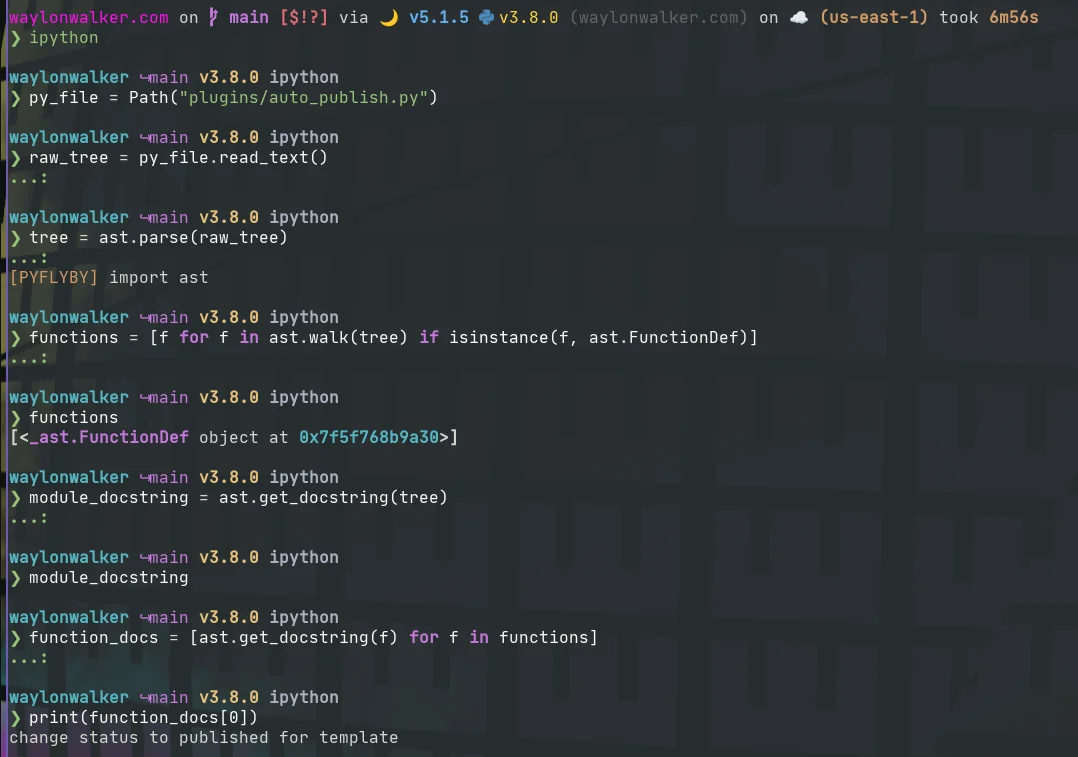
Getting docstrings from python’s ast is far simpler and more reliable than any
method of regex or brute force searching. It’s also much less intimidating
than I originally thought.
Parsing # [1]
First you need to load in some python code as a string, and parse it with
ast.parse. This gives you a tree like object, like an html [2] dom.
py_file = Path("plugins/auto_publish.py")
raw_tree = py_file.read_text()
tree = ast.parse(raw_tree)
Getting the Docstring # [3]
You can then use ast.get_docstring to get the docstring of the node you are
currently looking at. In the case of freshly loading in a file, this will be
the module level doctring that is at the very top of a file.
module_docstring = ast.get_docstring(tree)
Walking for all functions # [4]
To get all of the functions docstrings we can use ast.walk to look for nodes
that are an instance of ast.FunctionDef, then run get_docstring on those
nodes.
functions = [f for f in ast.walk(tree) if isinstance(f, ast.FunctionDef)]
function_docs = [ast.get_docstring(f) for f in functions]
ast.walk docs: Recursively yield all descendant nodes in the tree starting at node
(including node itself), in no specified order. This is useful ...
Many tools such as ripgrep respect the .gitignore file in the directory
it’s searching in. This helps make it incredibly faster and generally
more intuitive for the user as it just searches files that are part of
thier project and not things like their virtual environments, node
modules, or compiled builds.
Editors like vscode often do not include files that are .gitignored in
their search either.
pathspec is a pattern matching library that implements git [1]’s wildmatch
pattern so that you can ignore files included in your .gitignore
patterns. You might want this to help make your libraries more
performant, or more intuitive for you users.
import pathspec
from pathlib import Path
markdown_files = Path().glob('**/*.md')
if (Path(".gitignore").exists():
lines = Path(".gitignore").read_text().splitlines()
spec = pathspec.PathSpec.from_lines("gitwildmatch", lines)
markdown_files = [
file for file in markdown_files if not spec.match_file(str(file))
]
pathspec home page [2]
References:
[1]: /glossary/git/
[2]: https://github.com/cpburnz/python-path-specification
I don’t use refactoring tools as much as I probably should. mostly
because I work with small functions with unique names, but I recently
had a case where a variable name m was everywhere and I wanted it
named better. This was not possible with find and replace, because
there were other m’s in this region.
I first tried the nvim lsp rename, and it failed, Then I pip installed
rope, a refactoring tool for python, and it just worked!
pip install rope
Once you have rope installed you can call rename on the variable.
:lua vim.lsp.buf.rename()
When running a python process that requires a port it’s handy if there is an
option for it to just run on the next avaialble port. To do this we can use
the socket module to determine if the port is in use or not before starting our
process.
import socket
def find_port(port=8000):
"""Find a port not in ues starting at given port"""
with socket.socket(socket.AF_INET, socket.SOCK_STREAM) as s:
if s.connect_ex(("localhost", port)) == 0:
return find_port(port=port + 1)
else:
return port
functools.total_ordering makes adding all of six of the rich comparison
operators to your custom classes much easier, and more likely that you
remember all of them.
From the Docs: The class must define one of __lt__(), __le__(),
__gt__(), or __ge__ In addition, the class should supply an
__eq__() method.
one of these
- lt()
- le()
- gt()
- ge()
and required to have this one
- eq()
Total Ordering Docs [1]
Here is an example using the Enum I was working on the other day.
from enum import Enum, auto
from functools import total_ordering
@total_ordering
class LifeCycle(Enum):
configure = auto()
glob = auto()
load = auto()
pre_render = auto()
render = auto()
post_render = auto()
save = auto()
def __lt__(self, other):
try:
return self.value < other.value
except AttributeError:
return self.value < other
def __eq__(self, other):
try:
return self.value == other.value
except AttributeError:
return self.value == other
References:
[1]: https://docs.python.org/3/library/functools.html#functools.total_ordering
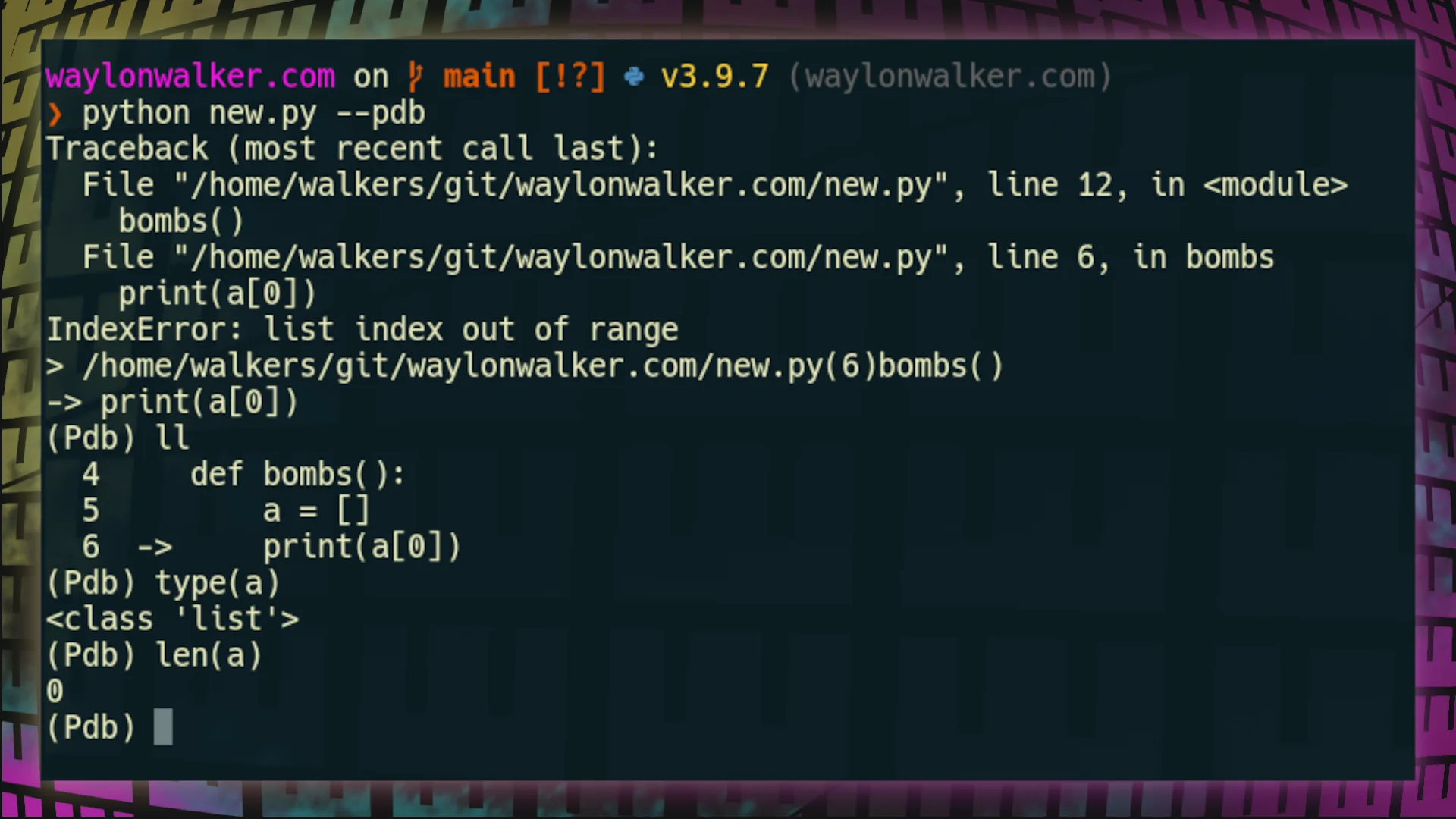
Adding a --pdb flag to your applications can make them much easier for
those using it to debug your application, especially if your applicatoin
is a cli application where the user has much fewer options to start this
for themselves. To add a pdb flag --pdb to your applications you will
need to wrap your function call in a try/except, and start a post_mortem
debugger. I give credit to
this stack overflow post [1]
for helping me figure this out.
import pdb, traceback, sys
def bombs():
a = []
print(a[0])
if __name__ == "__main__":
if "--pdb" in sys.argv:
try:
bombs()
except:
extype, value, tb = sys.exc_info()
traceback.print_exc()
pdb.post_mortem(tb)
else:
bombs()
Using –pdb # [2]
python yourfile.py --pdb
[3]
References:
[1]: https://stackoverflow.com/questions/242485/starting-python-debugger-automatically-on-error
[2]: #using---pdb
[3]: https://images.waylonwalker.com/using-pdb-flag-from-cli.png
Python comes with an enum module for creating enums. You can make your
own enum by inheriting importing and inheriting from Enum.
from enum import Enum
class LifeCycle(Enum):
configure = 1
glob = 2
pre_render = 3
render = 4
post_render = 5
save = 6
auto incrementing # [1]
Enum values can be auto incremented by importing auto, and calling
auto() as their value.
from enum import Enum, auto
class LifeCycle(Enum):
configure = auto()
glob = auto()
pre_render = auto()
render = auto()
post_render = auto()
save = auto()
using the enum # [2]
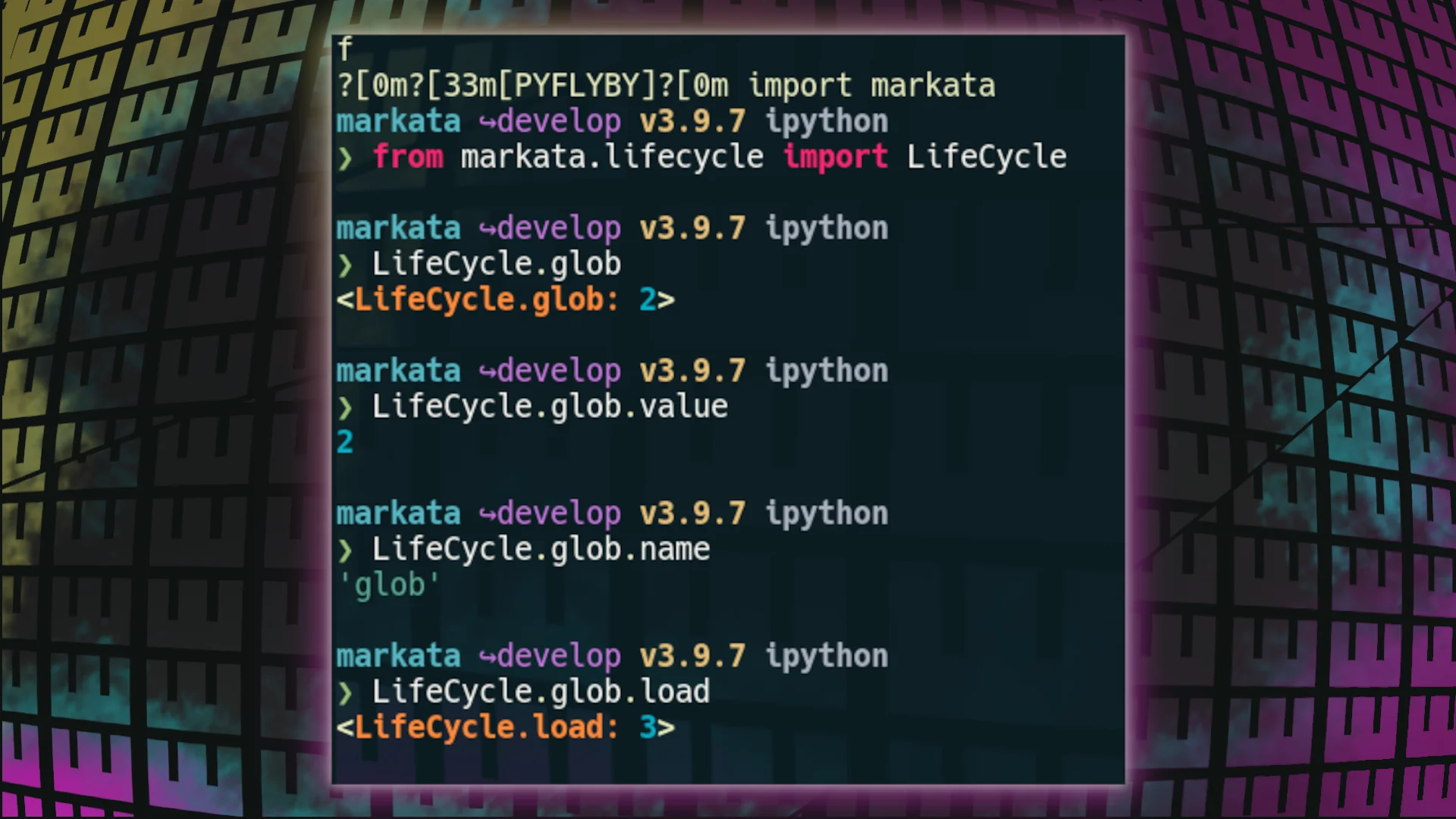
Enum’s are accessed directy under the class itself, and have primarily
two methods underneath each thing you make, .name and .value.
Lifecycle.glob
Lifecycle.glob.value
Lifecycle.glob.name
[3]
References:
[1]: #auto-incrementing
[2]: #using-the-enum
[3]: https://images.waylonwalker.com/using-lifecycle-enum.png